Вовед
This manual provides detailed instructions for the setup, operation, and maintenance of your LIGE BW0223 Smart Watch. Please read this guide thoroughly to ensure proper use and to maximize the features of your device. The LIGE BW0223 Smart Watch is designed to assist with fitness tracking, health monitoring, and smart notifications, compatible with both iOS and Android devices.
1. Поставување
1.1 Полнење на уредот
Before initial use, fully charge your LIGE BW0223 Smart Watch. Connect the magnetic charging cable to the charging contacts on the back of the watch and plug the USB end into a standard USB power adapter (5V/1A recommended). The watch display will indicate charging status. A full charge typically takes approximately 2 hours.

The back of the LIGE Smart Watch features a magnetic charging interface and advanced optical sensors for continuous monitoring of heart rate, blood pressure, and blood oxygen levels.
1.2 Инсталација и спарување на апликацијата
- Преземете ја апликацијата Companion: Scan the QR code provided in the watch packaging or search for the designated companion app (e.g., 'FitPro' or 'LIGE Smart') in your smartphone's app store (App Store for iOS, Google Play Store for Android).
- Овозможи Bluetooth: Проверете дали Bluetooth е овозможен на вашиот паметен телефон.
- Отворете ја апликацијата: Стартувајте ја инсталираната апликација и следете ги упатствата на екранот за да креирате сметка или да се најавите.
- Спарете го часовникот: Within the app, navigate to the device management section (often labeled 'Device', 'My Device', or 'Add Device'). The app will search for available Bluetooth devices. Select 'BW0223' or 'LIGE Smart Watch' from the list to initiate pairing. Confirm the pairing request on both your phone and the watch if prompted.
1.3 Почетни поставки
After successful pairing, complete your personal profile within the app, including gender, age, height, and weight. This information helps improve the accuracy of fitness and health data. You can also set preferences for units of measurement (metric/imperial) and time format (12/24-hour).
2. Упатства за работа
2.1 Приказ и навигација
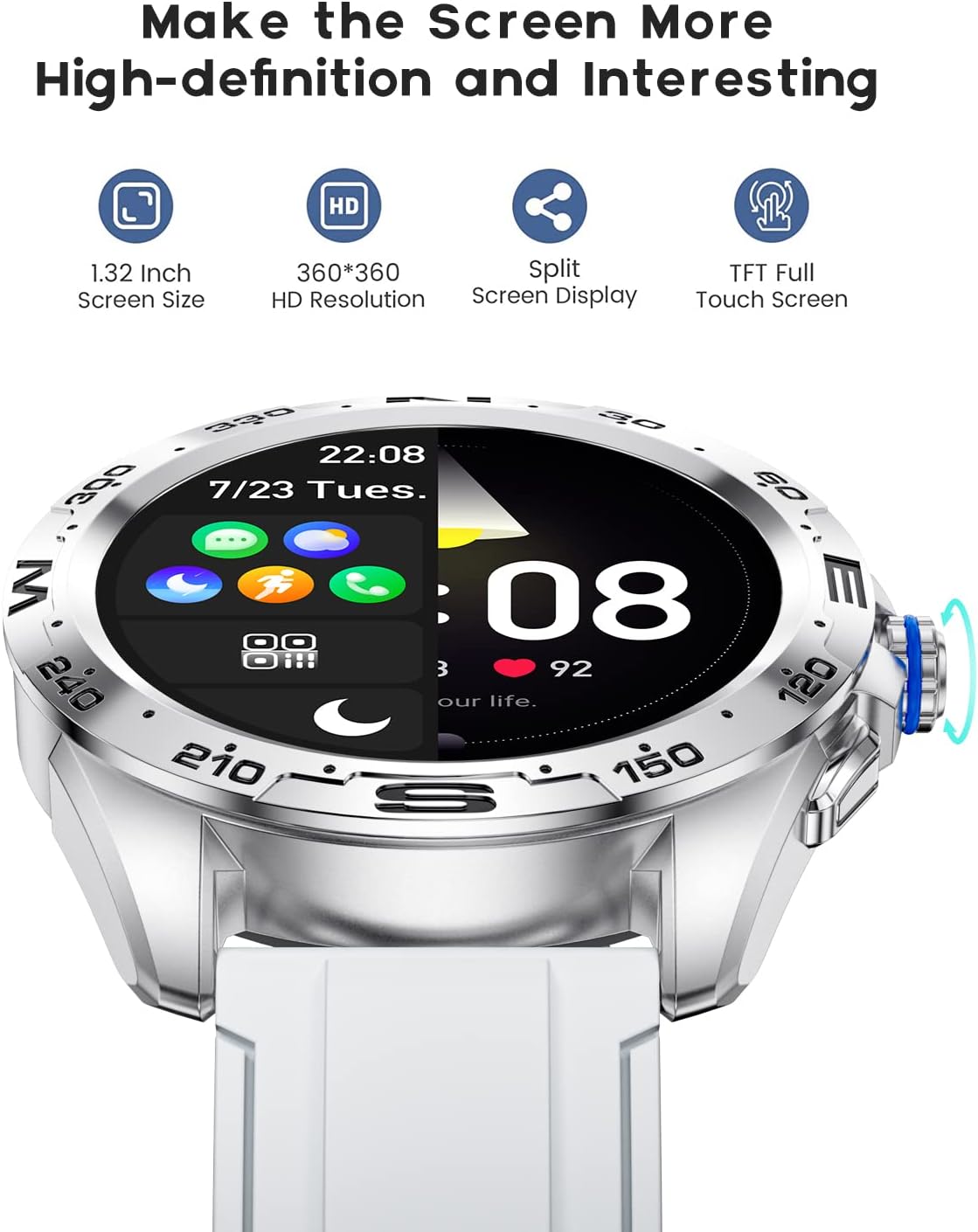
The LIGE BW0223 Smart Watch features a 1.28-inch full touch screen with 360x360 HD resolution. Navigate the watch interface using touch gestures:
- Повлечете нагоре/надолу: Скролувајте низ менијата или известувањата.
- Повлечете лево/десно: Пристап до брзи функции или различни екрани со податоци.
- Допрете: Изберете ставка или потврдете дејство.
- Притиснете го страничното копче: Return to the home screen or power on/off the device.

The LIGE Smart Watch features a 1.28-inch full touch screen with 360x360 HD resolution, offering clear visuals and responsive interaction. It supports a split-screen display for quick access to functions.
2.2 спортски режими
The watch supports 7 sports modes, including walking, running, cycling, and climbing. To access:
- Swipe on the watch face to find the 'Sports' or 'Workout' icon.
- Tap to select your desired activity.
- Tap 'Start' to begin tracking. The watch will record duration, steps, calories burned, and distance.
- To end a workout, swipe right or press the side button, then select 'End' or 'Pause'.
2.3 Мониторинг на здравјето
The LIGE BW0223 Smart Watch provides 24/7 heart rate tracking, blood pressure, and blood oxygen monitoring. These measurements are for reference only and should not be used for medical diagnosis.
- Отчукувањата на срцето: Swipe to the heart rate interface to view your current heart rate. The watch continuously monitors your heart rate throughout the day.
- Blood Pressure/Blood Oxygen: Swipe to the respective interfaces and tap to initiate a measurement. Ensure the watch is snug on your wrist for accurate readings.
- Следење на сонот: Wear the watch to bed, and it will automatically track your sleep patterns, including deep sleep, light sleep, and wake-up times. View детални податоци за спиењето во придружната апликација.
2.4 Bluetooth повици
After pairing your watch with the app and enabling the Bluetooth call function (usually a separate Bluetooth connection in your phone's settings, e.g., 'BW0223_CALL'), you can make and receive calls directly from your watch.
- Остварување повици: Access the 'Dialer' or 'Contacts' function on your watch to dial a number or select a contact.
- Примање повици: Кога ќе пристигне повик, часовникот ќе го прикаже идентификациониот број на повикувачот. Допрете ја зелената икона за да одговорите или црвената икона за да одбиете.
- Часовникот има вграден микрофон и звучник за комуникација без користење на рацете.

With the LIGE Smart Watch, you can make and receive Bluetooth calls directly from your wrist. It includes a built-in microphone and speaker for convenient communication.
2.5 Известувања за пораки
Enable message notifications through the companion app to receive alerts for SMS, calls, and various social media applications (e.g., Facebook, Twitter, WhatsApp, LinkedIn, InstagRAM) директно на вашиот часовник.
- Ensure the app has necessary permissions to access notifications on your smartphone.
- Configure which apps send notifications to your watch within the companion app settings.
- Повлечете надолу на екранот на часовникот за да view неодамнешни известувања.

The LIGE Smart Watch provides call and message reminders, displaying notifications from SMS, Facebook, Twitter, WhatsApp, LinkedIn, and Instagовен директно на вашиот зглоб.
2.6 Прилагодување
Personalize your watch by changing watch faces. Many options are available directly on the watch or through the companion app.
- На гледање: Long-press the watch face, then swipe left or right to browse available faces. Tap to select.
- Преку апликација: Open the companion app, navigate to 'Dial Market' or 'Watch Faces' to explore and download additional designs.
Personalize your LIGE Smart Watch with a variety of customizable watch faces and a rich user interface. Choose from different styles to match your preference and occasion.
3. Одржување
3.1 Чистење на часовникот
Редовно чистете го вашиот часовник за да обезбедите оптимални перформанси и хигиена. Користете мека крпа без влакненца за да го избришете екранот и телото на часовникот. За тврдокорна нечистотија, малку освежете гоampen the cloth with water. Avoid using harsh chemicals, abrasive materials, or strong detergents.
3.2 Водоотпорност (IP68)
The LIGE BW0223 Smart Watch is IP68 waterproof, meaning it is resistant to dust and can withstand immersion in water up to 1.5 meters for 30 minutes. It is suitable for daily use, such as hand washing, rain, and splashes.
Важни ограничувања:
- Do not wear the watch in hot showers, saunas, or steam rooms, as steam and hot water can compromise the seals.
- Avoid diving or high-pressure water activities.
- Do not operate buttons or the touchscreen underwater.
- Доколку часовникот се навлажни, темелно исушете го пред да го полните или да го користите.
3.3 Грижа за батерии
За да го продолжите животниот век на батеријата:
- Избегнувајте екстремни температури.
- Полнете го часовникот редовно, но избегнувајте да го оставате целосно празен подолг период.
- Reduce screen brightness and disable unnecessary notifications or features if battery life is a concern.
4 Смена на проблеми
4.1 Часовникот не се вклучува или не се полни
- Осигурајте се дека кабелот за полнење е безбедно поврзан и со часовникот и со изворот на енергија.
- Verify the power adapter and USB port are functional.
- Исчистете ги контактите за полнење на часовникот и кабелот за да отстраните прашина или остатоци.
- Allow the watch to charge for at least 30 minutes before attempting to power it on.
4.2 Проблеми со Bluetooth поврзувањето
- Проверете дали Bluetooth е овозможен на вашиот паметен телефон и часовник.
- Keep the watch within the Bluetooth range of your smartphone (typically 10 meters).
- Рестартирајте ги и паметниот телефон и часовникот.
- Unpair the watch from your phone's Bluetooth settings and re-pair it through the companion app.
- Уверете се дека придружната апликација работи во позадина и ги има потребните дозволи.
4.3 Notifications Not Working
- Verify the watch is successfully paired with the companion app.
- Проверете ги поставките за известувања во придружната апликација за да се осигурате дека посакуваните апликации се овозможени.
- Ensure your smartphone's notification access is granted to the companion app (check phone settings: Apps & notifications > Special app access > Notification access).
- Оневозможете го режимот „Не вознемирувај“ и на телефонот и на часовникот.
4.4 Неточни здравствени мерења
- Уверете се дека часовникот е цврсто носен на вашиот зглоб, на растојание од околу еден прст од коската на зглобот.
- Keep the sensor clean and free from sweat or dirt.
- Останете мирни за време на мерењата за најдобра точност.
- Remember that health data from smartwatches is for reference and not intended for medical use.
5. Спецификации
| Број на модел | BW0223 |
| Бренд | ЛИГЕ |
| Големина на екранот | 1.28 инчи |
| Влез со човечки интерфејс | Екран на допир |
| Технологија за поврзување | Bluetooth |
| Оценка за отпорност на вода | IP68 |
| Тип на батерија | Литиум полимер |
| Облик | Тркалезна |
| Тежина на ставката | 7 унци |
6. Информации за гаранцијата
The LIGE BW0223 Smart Watch comes with a standard limited warranty against manufacturing defects. The warranty period typically covers 12 months from the date of purchase. This warranty does not cover damage caused by misuse, accidents, unauthorized modifications, or failure to follow the instructions in this manual. Please retain your proof of purchase for warranty claims.
7. Поддршка за корисници
If you encounter any issues or have questions not covered in this manual, please contact LIGE customer support. Refer to the contact information provided with your product packaging or visit the official LIGE webсајт за помош.


