Вовед
Thank you for choosing the Tracer Roadster 4 in 1 Steering Wheel. This manual provides detailed instructions for setting up, operating, maintaining, and troubleshooting your new racing wheel. Please read this manual thoroughly before use to ensure optimal performance and longevity of your device.
The Tracer Roadster 4 in 1 Steering Wheel is designed for an immersive gaming experience, compatible with various platforms including PlayStation 4 and Windows PC. It features a responsive steering wheel, integrated shifter, and a pedal set for realistic control.
Содржина на пакетот
- Tracer Roadster 4 in 1 Steering Wheel
- Сет за педали
- Упатство за употреба (овој документ)
Водич за поставување
Connecting to PlayStation 4 (PS4)
- Connect the steering wheel's USB cable to an available USB port on your PS4 console.
- Power on your PS4 console. The red LED on the steering wheel will illuminate, indicating power.
- Connect the steering wheel to your PS4 controller using a microUSB cable (not included). This step is crucial for authentication.
- Притиснете го ДОМА button on the steering wheel. The green LED will illuminate, indicating successful connection and readiness for use.
Connecting to PC (Windows)
- Connect the steering wheel's USB cable to an available USB port on your Windows PC.
- The system should automatically detect and install the necessary drivers. If not, please refer to the manufacturer's webстраница за преземање драјвери.
- Once drivers are installed, the steering wheel will be ready for use with compatible PC racing games.

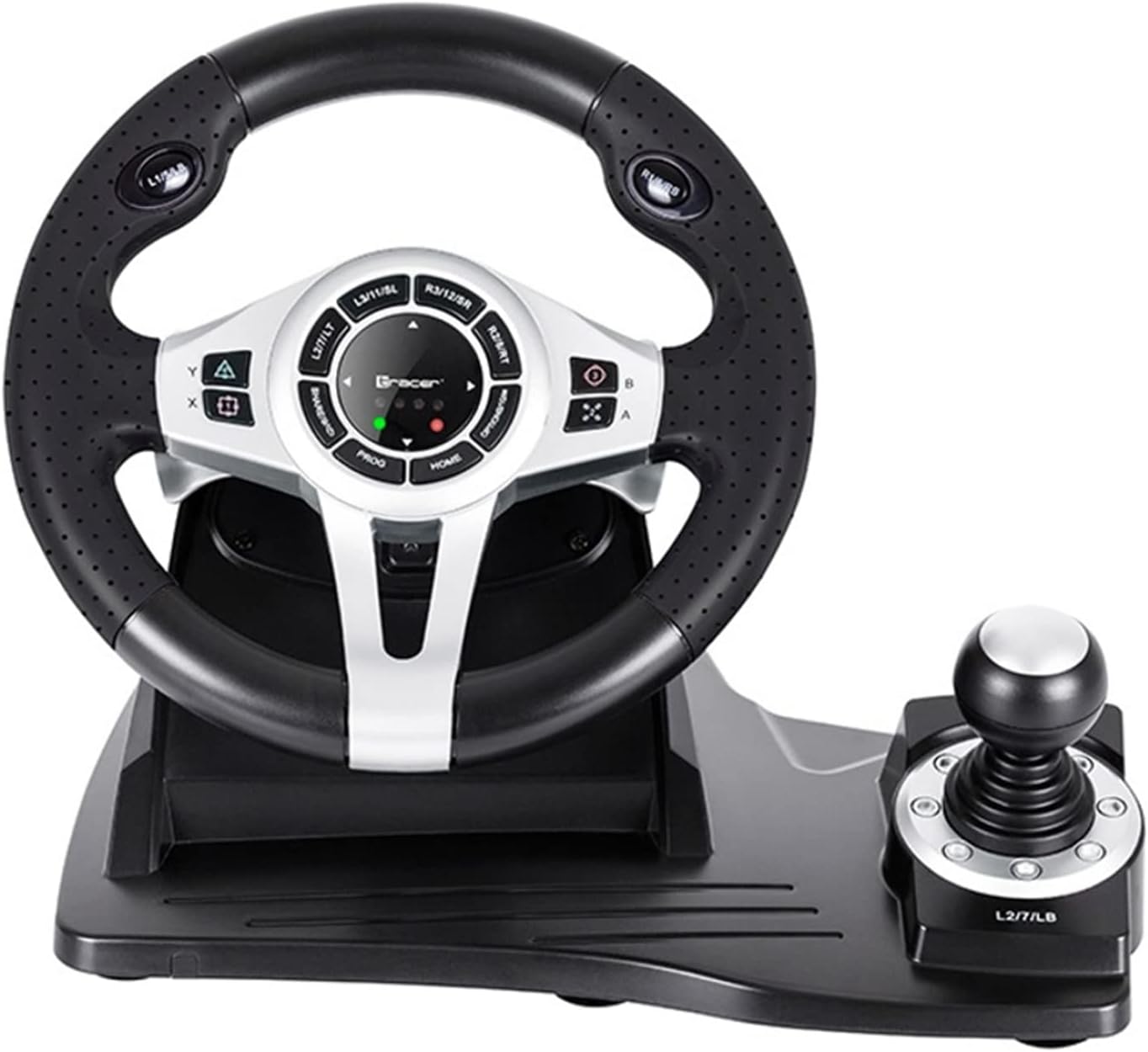
Figure 1: The Tracer Roadster 4 in 1 Steering Wheel, including the main wheel unit, integrated shifter, and separate pedal set. This image shows the complete setup ready for connection.
Упатства за работа
Контроли на воланот
The steering wheel features a full range of motion for precise control in racing games. It includes various buttons and a D-pad for in-game navigation and actions, mimicking a standard game controller layout.
- Насочна табла (D-табла): For menu navigation and specific in-game controls.
- Action Buttons (X, Circle, Square, Triangle / A, B, X, Y): Standard gaming action buttons.
- L1/R1, L2/R2 Buttons: Shoulder buttons, often used for shifting gears or other actions.
- Копче HOME: PS4 system menu access.
- Копче PROG: For programming specific functions (refer to game-specific instructions).
- Подлога за допир: Integrated touchpad for additional control options, especially on PS4.
Слика 2: Детален view of the central control panel on the steering wheel, showing the various buttons, D-pad, and indicator lights. The integrated shifter is visible to the right.
Сет за педали
The separate pedal set includes an accelerator and brake pedal for realistic driving simulation. Ensure the pedal set is placed on a stable surface to prevent slipping during intense gameplay.

Figure 3: The standalone pedal unit, featuring both accelerator and brake pedals. The textured base provides grip to prevent movement during use.
Одржување и нега
- Чистење: Use a soft, dry cloth to clean the surface of the steering wheel and pedals. For stubborn dirt, a slightly damp Може да се користи крпа, но осигурајте се дека влагата не навлегува во внатрешните компоненти.
- Складирање: Кога не го користите, чувајте го уредот на ладно и суво место подалеку од директна сончева светлина и екстремни температури.
- Избегнувајте течности: Не го изложувајте уредот на вода или други течности.
- Ракувајте со внимание: Избегнувајте паѓање или изложување на уредот на силни удари.
Решавање проблеми
| Проблем | Можна причина | Решение |
|---|---|---|
| Steering wheel not recognized by PS4. | Incorrect connection or authentication issue. | Ensure the steering wheel's USB cable is securely connected to the PS4. Verify the microUSB cable connection between the steering wheel and the PS4 controller. Press the ДОМА копче на воланот. |
| No response from steering wheel on PC. | Drivers not installed or USB port issue. | Try a different USB port. Check Device Manager for driver status. Reinstall drivers if necessary from the manufacturer's webсајт. |
| LED индикаторите не светат. | No power or connection issue. | Ensure the USB cable is firmly connected to the console/PC. Check if the console/PC is powered on. |
| Pedals not responding. | Loose connection to the steering wheel. | Verify that the pedal unit's cable is securely plugged into the steering wheel base. |
Спецификации
| Карактеристика | Детал |
|---|---|
| Бренд | Трасер |
| Име на моделот | Roadster 4 in 1 |
| Број на модел | TRAJOY46524 |
| Технологија за поврзување | USB |
| Компатибилни уреди | PlayStation 4, Windows PC |
| Тип на контролер | Волан |
| Боја | Црното |
| Специјална карактеристика | Подлога за допир |
| Број на копчиња | 8 (excluding D-pad and shifter controls) |
| Тежина на ставката | 2 килограми |
| Димензии на производот (Д x Ш x В) | 2.8 x 24.6 x 16.5 cm |
Гаранција и поддршка
For warranty information and technical support, please refer to the official Tracer webлокација или контактирајте го вашиот продавач. Зачувајте го доказот за купување за какви било гаранциски побарувања.
За дополнителна помош, можете да ја посетите страница на производот на Amazon.com.be.


