Вовед
The Perel EDIN305N is a 230V 16A 3600W DIN-rail mount digital weekly timer designed for indoor use. This device allows for precise, programmable control of electrical circuits, enabling automatic switching ON and OFF of connected appliances or lighting systems over a weekly cycle. It features a clear digital display and multiple programming options to suit various scheduling needs.
Безбедносни мерки на претпазливост
ПРЕДУПРЕДУВАЊЕ: Electrical installation should only be performed by a qualified electrician. Incorrect wiring can lead to electric shock, fire, or damage to the device and connected equipment. Always disconnect power at the main circuit breaker before installation or maintenance.
- Ensure the power supply matches the device's specifications (230V~50Hz).
- Не го надминувајте максималниот капацитет на оптоварување од 16A / 3600W.
- This device is designed for indoor use only. Avoid exposure to moisture, dust, or extreme temperatures.
- Не обидувајте се сами да го отворите или поправите уредот. За сите сервиси обратете се на квалификуван персонал.
- Да се чува подалеку од дофат на деца.
Производот завршиview
The Perel EDIN305N digital timer consists of a main body with a digital display, control buttons, and terminal blocks for electrical connections. A transparent cover protects the display and buttons.
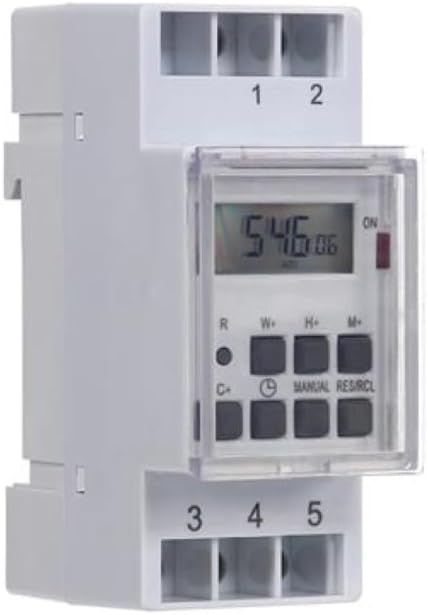
Слика 1: Предна страна view of the Perel EDIN305N Digital Weekly Timer. The image displays the LCD screen, control buttons (R, W+, H+, M+, C+, Clock, Manual, RES/RCL), and numbered terminal blocks (1, 2 at the top, 3, 4, 5 at the bottom).
Контролни копчиња:
- R: Reset button (recessed).
- W+: Weekday setting.
- H+: Поставување час.
- М+: Minute setting.
- C+: Clear program.
- Икона за часовник: Used to set current time and day, and to exit programming mode.
- ПРИРАЧНИК: Рачно префрлување за режимите ВКЛУЧЕНО/АВТОМАТСКО/ИСКЛУЧЕНО.
- RES/RCL: Reset/Recall program.
Терминални блокови:
- 1, 2 година: Power supply input (N, L).
- 3, 4, 5: Output terminals for controlled circuit (Common, Normally Open, Normally Closed).
Технички спецификации
| Параметар | Вредност |
|---|---|
| Број на модел | EDIN305N |
| Voltage | 230V~50Hz |
| Макс. Актуелно | 16 А |
| Макс. Моќ | 3600 W |
| Број на поставки | 7 (ON/OFF programs) |
| Тип на монтирање | ДИН-шина |
| Димензии (Д x Ш x В) | 2.36 x 3.54 x 1.57 инчи (60 x 90 x 40 мм) |
| Тежина | 0.12 кг (4.2 унци) |
| Материјал | Пластика |
| Боја | Бело |
| Потребни се батерии | No (internal battery for memory backup) |
Инсталација
1. Монтирање
The Perel EDIN305N is designed for DIN-rail mounting. Securely attach the timer to a standard 35mm DIN-rail within an electrical enclosure. Ensure sufficient space for wiring and ventilation.
2. Wици
ВАЖНО: Ensure power is disconnected at the main circuit breaker before proceeding with wiring. Follow local electrical codes and regulations.
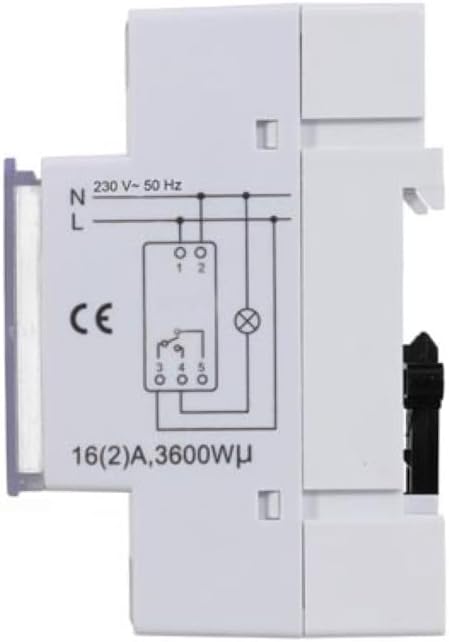
Слика 2: Страна view of the Perel EDIN305N Digital Weekly Timer showing the electrical wiring diagram. It illustrates connections for Neutral (N), Live (L), and the output contacts (1, 2, 3, 4, 5) for controlling a load.
Refer to the wiring diagram (Figure 2) and the terminal block labels on the device:
- Connect the Neutral (N) wire of your 230V AC supply to terminal 1.
- Connect the Live (L) wire of your 230V AC supply to terminal 2.
- For the controlled circuit:
- Terminal 3: Common contact for the relay output.
- Terminal 4: Normally Open (NO) contact. The circuit connected here will be ON when the timer is active.
- Terminal 5: Normally Closed (NC) contact. The circuit connected here will be OFF when the timer is active.
- Connect the load (e.g., light, appliance) between the Live (L) supply and either terminal 4 (for NO operation) or terminal 5 (for NC operation), with terminal 3 connected to the Live (L) supply. Alternatively, connect the load between terminal 4 or 5 and the Neutral (N) supply, with terminal 3 connected to the Live (L) supply. Consult a qualified electrician for specific load wiring configurations.
Почетно поставување и работа
1. Вклучување и ресетирање
After wiring and restoring power, the display will illuminate. If the display is blank or shows erratic characters, press the recessed R (Reset) button using a pointed non-metallic object (e.g., a pen tip). This will clear all settings and restore default values.
2. Поставување на тековното време и ден
- Притиснете и задржете го Икона за часовник копче.
- Додека го држите Икона за часовник копче, притиснете W+ to set the current day of the week (1=Monday, 7=Sunday).
- Додека го држите Икона за часовник копче, притиснете H+ за да го поставите тековниот час (0-23).
- Додека го држите Икона за часовник копче, притиснете M+ за да ја поставите тековната минута (0-59).
- Ослободете го Икона за часовник button. The time and day are now set.
3. Програмирање циклуси на вклучување/исклучување
The timer supports up to 7 ON/OFF programs. Each program consists of an ON time and an OFF time.
- Притиснете го Икона за часовник копчето еднаш за да влезете во режим на програмирање. На екранот ќе се прикаже „1 ВКЛУЧЕНО“.
- Притиснете W+ to select the day(s) for this program. You can choose a single day, a block of days (e.g., Mon-Fri), or all days.
- Притиснете H+ to set the ON hour for program 1.
- Притиснете M+ to set the ON minute for program 1.
- Притиснете го Икона за часовник копчето повторно. На екранот ќе се прикаже „1 OFF“.
- Repeat steps 2-4 to set the OFF day(s), hour, and minute for program 1.
- To set additional programs (2-7), press the Икона за часовник button to cycle through "2 ON", "2 OFF", etc., and repeat the setting process.
- Откако ќе ги поставите сите посакувани програми, притиснете го копчето ПРИРАЧНИК копче за да излезете од режимот на програмирање и да се вратите на приказот на тековното време.
4. Рачно отфрлање
Притиснете го ПРИРАЧНИК копчето повеќе пати за да се движите низ режимите на работа:
- НА: The output is continuously ON, overriding all programs.
- АВТОМАТ: The timer operates according to the programmed ON/OFF cycles.
- ИСКЛУЧЕНО: The output is continuously OFF, overriding all programs.
Осигурајте се дека тајмерот е поставен на АВТОМАТСКИ за програмирана работа.
5. Clearing Programs
To clear a specific program:
- Enter programming mode by pressing the Икона за часовник button until the desired program number (e.g., "3 ON") is displayed.
- Притиснете го C+ button. This will clear both the ON and OFF times for that specific program.
- Повторете за други програми по потреба.
- Притиснете ПРИРАЧНИК за да излезете од режимот на програмирање.
To clear all programs and reset the device, use the recessed R (Ресетирај) копче.
Одржување
- Чистете го уредот со мека, сува крпа. Не користете абразивни средства за чистење или растворувачи.
- Ensure the transparent cover is closed to protect the display and buttons from dust and splashes.
- Regularly check electrical connections for tightness, especially in high-vibration environments.
Решавање проблеми
| Проблем | Можна причина | Решение |
|---|---|---|
| Екранот е празен. | Нема напојување; внатрешната батерија е празна. | Check power connections (terminals 1 & 2). Ensure main power is ON. If power is present, press the R (Reset) button. The internal battery recharges when connected to power. |
| Timer not switching ON/OFF as programmed. | Incorrect program settings; timer in manual ON/OFF mode. | Verify program settings (time, day, ON/OFF). Ensure the timer is in АВТОМАТСКИ режим со притискање на ПРИРАЧНИК копче. |
| Connected appliance not receiving power. | Incorrect wiring; appliance fault; timer fault. | Check wiring according to Figure 2. Test the appliance directly. If wiring and appliance are fine, the timer may be faulty. |
| Buttons unresponsive or display erratic. | Software glitch; low internal battery. | Притиснете го вдлабнатиот R (Reset) button. Ensure the timer has been connected to power for at least 24 hours to fully charge the internal battery. |
Отстранување
Do not dispose of this product with general household waste. This electronic device contains materials that can be recycled. Please dispose of it at a designated collection point for electrical and electronic equipment waste, in accordance with local regulations.
Гаранција и поддршка
Perel products are manufactured to high quality standards. For warranty information, technical support, or service inquiries, please refer to the documentation provided with your purchase or contact your local Perel distributor or retailer. Please have your model number (EDIN305N) and purchase details ready when contacting support.


