Вовед
Ви благодарам за купувањетоasing the Caliber Alarm Clock with QI Charging Station. This device combines a digital alarm clock with a convenient wireless charging pad and a USB charging port, designed to simplify your bedside setup. It also features an adjustable night light and a large LED display for clear visibility.
This manual provides detailed instructions on how to set up, operate, maintain, and troubleshoot your new alarm clock. Please read it thoroughly before use to ensure optimal performance and longevity of the product.
Поставување
Отпакување: Carefully remove the alarm clock from its packaging. Ensure all components are present: the alarm clock unit and the power adapter.
Поврзување за напојување: Connect the provided power adapter to the DC input port on the back of the alarm clock. Plug the other end of the adapter into a standard wall outlet. The display will illuminate.
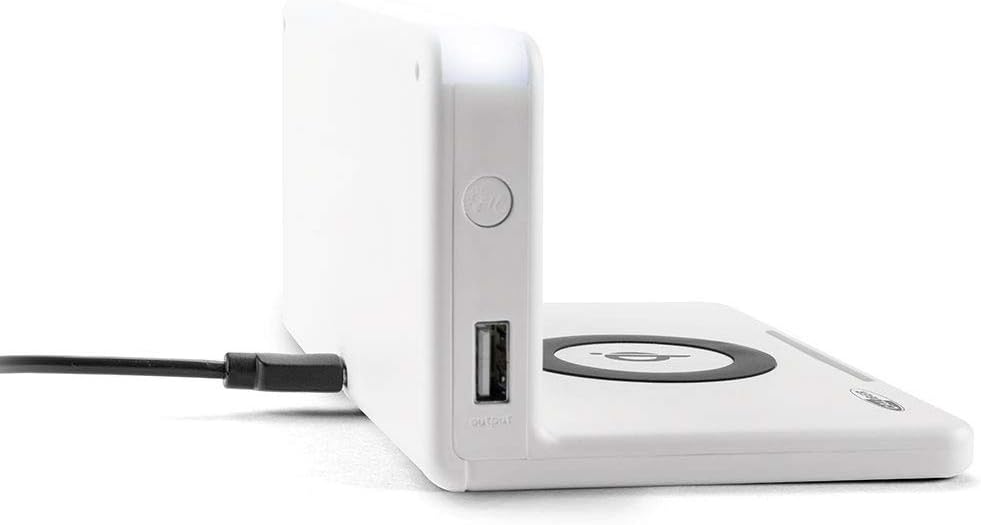
Слика: Страна view of the alarm clock, illustrating the power input port (left) and the USB output port (right).
Battery Installation (Backup): The unit includes 1 Lithium Ion battery for backup. This battery maintains time settings during power outages. No user installation is typically required for this pre-installed battery.
Почетно поставување на времето: Upon first power-up, the clock may display a default time or require manual setting. Refer to the "Operating" section for detailed instructions on setting the time.
Упатства за работа
Поставување време и датум
- Притиснете и задржете го ВРЕМЕ СЕТ button (location may vary, typically on the back or top) until the hour digits flash.
- Користете го + or - копчиња за прилагодување на часот.
- Притиснете ВРЕМЕ СЕТ повторно за да се префрлите на минути, потоа прилагодете со + or -.
- Repeat for year, month, and day if applicable.
- Притиснете ВРЕМЕ СЕТ one last time to confirm and exit.
Поставување аларми
- Притиснете и задржете го СЕТ ЗА АЛАРМ button (or similar) until the alarm hour digits flash.
- Прилагодете го часот и минутите на алармот користејќи го + or - копчиња.
- Притиснете СЕТ ЗА АЛАРМ да се потврди.
- За да го активирате/деактивирате алармот, притиснете го копчето Вклучено / исклучено аларм копче. На екранот ќе се појави/исчезне икона за аларм.
- Кога ќе се огласи алармот, притиснете на СНОЗА button for a temporary pause, or any other button to turn it off for the day.
Using the QI Wireless Charging Station
The alarm clock features a built-in QI wireless charging pad for compatible devices.
- Ensure the alarm clock is powered on.
- Place your QI-compatible smartphone or device directly onto the charging pad, centering it over the Лого на QI.
- A charging indicator (e.g., an LED light or on-screen icon) will illuminate to confirm charging has begun. If charging does not start, reposition your device.

Image: A smartphone placed on the QI charging pad of the alarm clock, showing the charging interface on the phone screen.

Image: The alarm clock with a phone positioned on its wireless charging surface, indicating active charging.
Користење на USB-портата за полнење
A USB output port is available on the side of the unit for charging non-QI compatible devices or for faster wired charging.
- Поврзете го USB кабелот за полнење на вашиот уред со USB излезниот порт на будилникот.
- Поврзете го другиот крај од кабелот со вашиот уред. Полнењето ќе започне автоматски.
Adjusting Display Brightness and Night Light
- The alarm clock features adjustable display brightness. Look for a ПОТРАГО or Осветленост button, typically on the back or top. Press it repeatedly to cycle through brightness levels.
- To activate or adjust the night light, locate the dedicated НОЌНА СВЕТЛИНА button. Press it to turn the light on/off or cycle through different brightness settings if available.
Одржување
- Чистење: Disconnect the power adapter before cleaning. Use a soft, dry cloth to wipe the surface of the alarm clock. Do not use abrasive cleaners, waxes, or solvents as they may damage the finish.
- Складирање: Доколку го складирате уредот подолг временски период, исклучете го од струја и складирајте го на ладно и суво место.
- Ракување: Avoid dropping the unit or subjecting it to strong impacts. Keep it away from water and high humidity.
Решавање проблеми
| Проблем | Можна причина | Решение |
|---|---|---|
| Приказот на часовникот е празен. | Нема поврзување со струја. | Осигурајте се дека адаптерот за напојување е безбедно вклучен во уредот и во функционален ѕиден штекер. |
| QI charging not working. | Device not QI-compatible; device not properly aligned; foreign objects on pad; phone case too thick. | Verify device compatibility. Reposition device on the center of the pad. Remove any foreign objects. Remove thick phone cases. |
| Алармот не се огласува. | Алармот не е активиран; јачината на звукот е прениска; времето на алармот е неточно. | Ensure the alarm icon is displayed. Check alarm volume settings. Verify the alarm time is set correctly. |
| Времето е неточно. | Time not set correctly; power interruption. | Reset the time manually. If power was interrupted, the backup battery should maintain time, but a manual check is recommended. |
Спецификации
| Карактеристика | Детал |
|---|---|
| Бренд | Калибар |
| Број на модел | HCG018QI/W |
| Боја | Бело |
| Тип на дисплеј | Дигитален |
| Специјална карактеристика | Night light, QI charging station, USB charging port |
| Извор на енергија | Електричен со кабел |
| Димензии на производот | 7.09 x 4.25 x 3.86 инчи |
| Тежина на ставката | 7.9 унци (225 грама) |
| Батерии | 1 Lithium Ion battery (included, for backup) |
| GTIN | 08714505047157 |
Гаранција и поддршка
This Caliber product is designed for reliability and performance. For information regarding warranty coverage, please refer to the warranty card included with your purchase or visit the official Caliber webсајт.
Should you encounter any issues not covered in the troubleshooting section, or require further assistance, please contact Caliber customer support. Contact details can typically be found on the product packaging or the manufacturer's official webсајт.


