1. Вовед
This manual provides essential information for the setup, operation, and maintenance of your Xtrfy K4 RGB Mechanical Gaming Keyboard. Please read these instructions carefully to ensure optimal performance and longevity of your device. The Xtrfy K4 RGB is designed for high-performance gaming and typing, featuring durable mechanical switches and customizable RGB illumination.
2. Содржина на пакетот
Проверете дали сите артикли се присутни во вашиот пакет:
- Xtrfy K4 RGB Mechanical Gaming Keyboard
- USB кабел (прикачен)
- Упатство за употреба (овој документ)
3. Поставување
Follow these steps to set up your Xtrfy K4 RGB keyboard:
- Отпакувајте ја тастатурата: Внимателно извадете ја тастатурата од пакувањето.
- Поврзете се со компјутер: Plug the attached USB-A cable from the keyboard into an available USB port on your computer. The keyboard is plug-and-play and does not require additional drivers for basic functionality.
- Поставување: Position the keyboard comfortably on your desk. Ensure stable placement for optimal use.
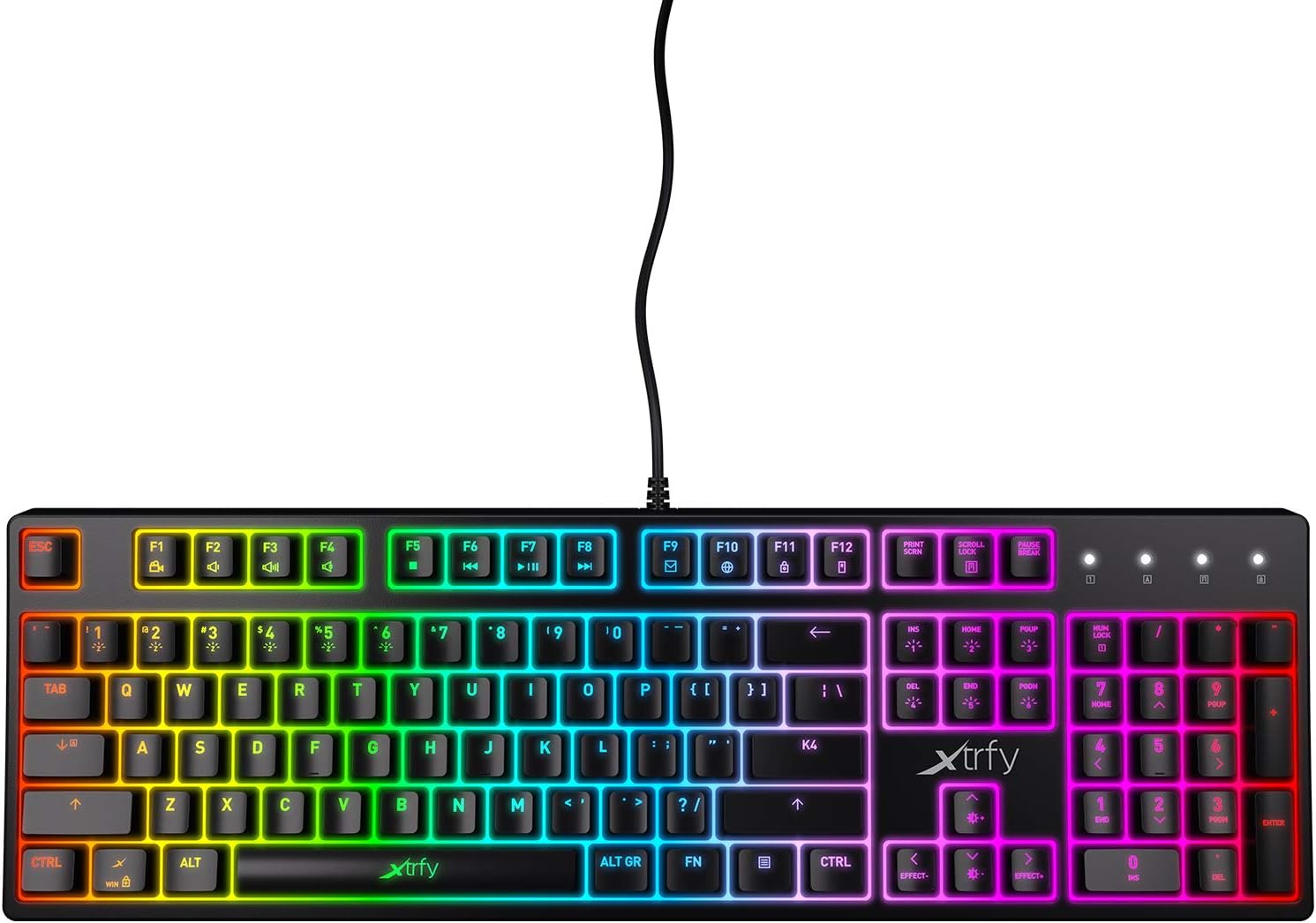
Слика 3.1: Од горе надолу view of the Xtrfy K4 RGB keyboard, showing key layout and attached USB cable.
4. Упатства за работа
4.1 Основни функции на тастатурата
The Xtrfy K4 RGB functions as a standard mechanical keyboard. All keys are pre-programmed for their respective characters and functions. It features full N-key rollover and a 1000 Hz polling rate for precise and responsive input.
4.2 RGB Illumination Control
The keyboard features customizable RGB illumination. Use the Function (FN) key in combination with specific keys to adjust lighting effects, brightness, and colors. Refer to the keycap legends for specific lighting controls.
- FN + F1-F12: These keys often control media functions or system shortcuts. Specific functions are indicated by icons on the keycaps.
- FN + стрелки: Typically used to adjust brightness or change lighting directions/patterns.
- FN + Insert/Home/Page Up/Delete/End/Page Down: These keys are commonly used to cycle through different RGB lighting modes and effects.

Figure 4.1: The Xtrfy K4 RGB keyboard showcasing неговото прилагодливо RGB осветлување.
5. Одржување
Правилното одржување гарантира долготрајност и перформанси на вашата тастатура:
- Чистење: Use a soft, dry cloth to wipe the surface of the keyboard. For deeper cleaning, use compressed air to remove dust and debris from between the keycaps. Avoid using harsh chemicals or abrasive materials.
- Отстранување на копчиња (Напредно): If necessary, keycaps can be carefully removed using a keycap puller for thorough cleaning. Exercise caution to avoid damaging the switches.
- Складирање: Кога не ја користите, чувајте ја тастатурата на чиста и сува средина, подалеку од директна сончева светлина и екстремни температури.
6 Смена на проблеми
If you encounter issues with your Xtrfy K4 RGB keyboard, refer to the following common solutions:
- Тастатурата не реагира:
- Проверете дали USB кабелот е безбедно приклучен и во тастатурата и во компјутерот.
- Обидете се да ја поврзете тастатурата во друг USB порт.
- Рестартирајте го компјутерот.
- RGB осветлувањето не работи/неправилно:
- Check if the lighting is turned off or set to a very low brightness using the FN key combinations.
- Ensure no software conflicts are present if you are using third-party lighting control applications.
- Клучевите не се регистрираат:
- Clean the affected key area to remove any debris that might be obstructing the switch.
- If the issue persists, contact Xtrfy support.
7. Спецификации
| Карактеристика | Детал |
|---|---|
| Бренд | Xtrfy |
| Број на модел | XG-K4-RGB-R-US |
| Серии | K4RGB |
| Опис на тастатурата | Механички |
| Клучни прекинувачи | Mechanical key switches (e.g., Kailh Red, depending on variant) |
| Осветлување | Customizable RGB |
| Стапка на анкети | 1000 Hz |
| Превртување на клучот N | Целосно превртување со N-копче |
| Поврзување | USB-A (Corded Electric) |
| Компатибилни уреди | PC/Mac |
| Тежина на ставката | 2.2 фунти (приближно 1 кг) |
| Димензии на производот (ДxШxВ) | 17.44" x 17.44" x 1.54" (приближно 44.3 x 44.3 x 3.9 см) |
| Боја | Црното |
8. Гаранција и поддршка
Xtrfy products are manufactured to high standards and come with a limited warranty. For specific warranty terms and conditions, please refer to the official Xtrfy webсајт или контактирајте со нивната поддршка за корисници.
For technical assistance, troubleshooting beyond this manual, or warranty claims, please visit the official Xtrfy support page or contact their customer service directly. Keep your purchase receipt as proof of purchase.
Поддршка преку Интернет: www.xtrfy.com/support


