1. Вовед
This manual provides detailed instructions for the installation, operation, and maintenance of your BINIZE Android 13 Car Stereo. This 9-inch touchscreen head unit is designed for Toyota Camry models from 2006 to 2011, offering advanced features such as Wireless CarPlay, Android Auto, GPS navigation, WiFi connectivity, and support for a backup camera.
Ве молиме внимателно прочитајте го ова упатство пред да го користите производот за да се осигурате за правилна функционалност и безбедност.
2. Поставување и инсталација
Правилната инсталација е клучна за оптимални перформанси. Доколку не сте сигурни за некои чекори, се препорачува да побарате стручна помош.
2.1 Содржина на пакетот
Проверете дали сите компоненти се присутни во пакувањето:
- BINIZE Android 13 Car Stereo Head Unit (9-inch)
- Кабел за напојување
- RCA влезни/излезни кабли
- 2 USB кабли
- GPS антена
- Упатство за употреба (овој документ)
- Влезен кабел за камера
- Резервна камера

Figure 2.1: Included components of the BINIZE Android 13 Car Stereo.
2.2 Компатибилност со возила
This head unit is specifically designed for Toyota Camry models manufactured between 2006 and 2011.

Figure 2.2: BINIZE Car Stereo installed in a compatible Toyota Camry dashboard.

Слика 2.3: Пред и по инсталацијата view of the BINIZE Car Stereo in a Toyota Camry.
2.3 Жици и врски
Connect the power harness, RCA cables, USB cables, GPS antenna, and backup camera input as per the wiring diagram provided with your unit. Ensure all connections are secure to prevent malfunctions.
Забелешка: If the provided wiring harness is incompatible with your vehicle, contact customer service for an appropriate replacement.
2.4 Почетно вклучување
After installation, turn on your vehicle's ignition. The head unit should power on automatically. Follow any on-screen prompts for initial setup.
3. Упатства за работа
3.1 Почетен екран и навигација
The home screen provides access to all main functions and applications. Swipe left or right to navigate through app pages. Tap on an icon to launch the corresponding application.

Figure 3.1: Main interface of the BINIZE Android 13 Car Stereo.
3.2 Безжичен CarPlay и Android Auto
The unit supports both Wireless CarPlay and Wireless Android Auto for seamless smartphone integration. Connect your phone via Bluetooth and Wi-Fi to access navigation, music, calls, and messaging apps directly on the car stereo.

Слика 3.2: Функционалност на безжичниот CarPlay и Android Auto.
3.3 Функција за поврзување со огледала
For apps not supported by CarPlay or Android Auto, use the Mirror Link function to display your smartphone screen (both iOS and Android) on the car stereo. This allows for viewing videos and other content.

Figure 3.3: Mirror Link feature in action.
Video 3.1: Demonstration of the Binize car stereo's features, including screen mirroring.
3.4 GPS навигација
The unit features a built-in GPS receiver and antenna. You can use pre-installed navigation apps or download others from the Play Store. Both online and offline maps are supported.

Слика 3.4: Интерфејс за GPS навигација.
3.5 FM радио
Access FM radio stations with a tuning range of 87.5-108 MHz. Save your favorite stations for quick access.
Слика 3.5: Интерфејс за FM радио.
3.6 Music and Video Playback
Enjoy lossless music playback and high-definition video. The unit supports various audio and video formats. You can download media apps from the Play Store.
Figure 3.6: Music and Video playback interfaces.
3.7 Digital Signal Processor (DSP) and Equalizer
Customize your audio experience with the built-in DSP. Adjust multi-band EQ settings, equal loudness, and sound field to achieve true stereo surround sound through the 6-speaker output.

Figure 3.7: DSP and Equalizer settings.
Видео 3.2: Надview of the Binize 10 Inch Double Din Touchscreen Android Car Stereo features.
3.8 Функционалност на камерата за заднина
The unit supports AHD HD reversing cameras. When the vehicle is in reverse, the screen automatically displays the camera feed with reversing guidelines for safer parking.
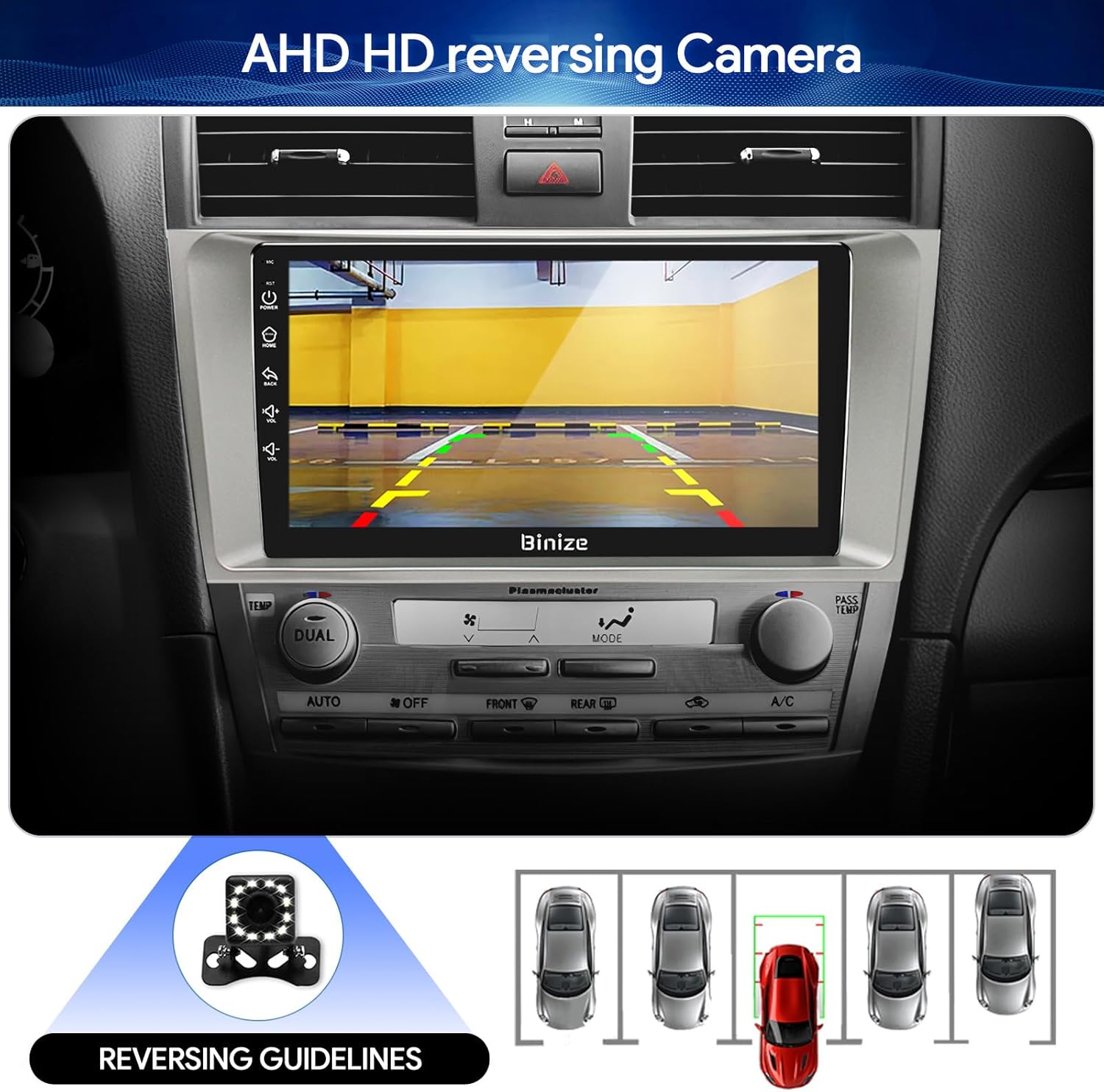
Figure 3.8: Backup camera display with reversing guidelines.
3.9 Bluetooth 5.0 for Hands-Free Calling
Connect your phone via Bluetooth 5.0 for faster network transmission and hands-free calling. Dial, answer, or receive calls directly from the head unit.
Слика 3.9: Bluetooth интерфејс за повици без раце.
4. Одржување
4.1 Чистење на екранот
Користете мека крпа без влакненца за нежно да го избришете екранот на допир. Избегнувајте абразивни средства за чистење или груби хемикалии што би можеле да го оштетат екранот.
4.2 Ажурирања на софтверот
Periodically check for software updates to ensure optimal performance and access to new features. Updates can typically be performed via Wi-Fi or USB.
5 Смена на проблеми
- Без моќност: Check all power connections and vehicle's fuse box. Ensure the ignition is on.
- Нема звук: Проверете ги поврзувањата на звучниците, нивоата на јачина на звук и поставките за еквилајзер. Проверете дали уредот е исклучен.
- Проблеми со GPS сигналот: Осигурајте се дека GPS антената е правилно инсталирана и има чиста view на небото.
- Проблеми со Bluetooth конекцијата: Ensure Bluetooth is enabled on both the head unit and your phone. Try unpairing and re-pairing the devices.
- Контролите на воланот не работат: Refer to the "SW Learning" or "Steering Wheel Setting" in the unit's settings menu to configure the controls.
- Screen Lag/Unresponsiveness: Restart the unit. If issues persist, consider a factory reset (note: this will erase personal data).
- Wiring Harness Incompatibility: If the provided wiring harness does not fit your vehicle, contact BINIZE customer service for assistance.
6. Спецификации
| Карактеристика | Спецификација |
|---|---|
| Тежина на ставката | 2.84 фунти |
| Димензии на пакетот | 11.2 x 7.2 x 3.7 инчи |
| Големина на приказ | 10.1 инчи |
| Гласовна команда | Копчиња, микрофон, екран на допир |
| Бренд | BINIZE |
| Тип на услуга на возило | Автомобил |
| Специјална карактеристика | Bluetooth, екран на допир |
| Технологија за поврзување | Bluetooth, USB, Wi-Fi |
| Тип на карта | Online and Offline |
| Режим за излез на звук | Звучник, стерео |
| Тип на монтирање | Монтажа на контролната табла |
| Резолуција | 1024 x 600 |
| Оперативен систем | Андроид |
7. Гаранција и поддршка
BINIZE offers top-notch customer service. If you encounter any problems before or after sale, please contact the BINIZE customer service team via Amazon email. They are committed to assisting you with any issues and can provide support for online updates and warranty information.
For further assistance, please refer to the contact information provided with your purchase or visit the official BINIZE store on Amazon.


