Вовед
This manual provides essential instructions for the proper use, setup, and maintenance of your BYTECH Lightning Cable (Model: CLMFCBLASST). This cable is designed for charging and data transfer with compatible Apple iOS devices, including iPhones, iPads, and iPods, as well as connecting to laptops and personal computers.
Производот завршиview
The BYTECH Lightning Cable is a durable accessory for your Apple devices. It features a Lightning connector on one end and a USB-A connector on the other, facilitating both power delivery for charging and data exchange. The cable supports fast charging capabilities for compatible devices.
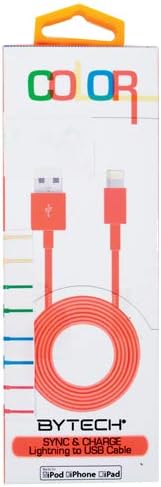
This image displays the retail packaging for the BYTECH Lightning to USB Cable. The packaging is white with 'COLOR' printed at the top in multi-colored letters. An orange Lightning to USB cable is visible through a clear window, coiled neatly. The bottom of the package indicates 'BYTECH SYNC & CHARGE Lightning to USB Cable' and compatibility with iPod, iPhone, and iPad.
Компоненти:
- Lightning конектор: Connects to your Apple iOS device (iPhone, iPad, iPod).
- USB-A конектор: Connects to a USB power adapter, computer USB port, or other USB charging source.
- Кабел: The flexible cord connecting the two connectors, designed for durability and efficient power/data transfer.
Поставување
To begin using your BYTECH Lightning Cable, follow these steps:
- Идентификувајте ги конекторите: Locate the Lightning connector (smaller, 8-pin) and the USB-A connector (larger, rectangular).
- Поврзете се со извор на енергија или компјутер:
- For charging, insert the USB-A connector into a compatible USB wall adapter or car charger.
- For charging and data transfer, insert the USB-A connector into an available USB port on your laptop or personal computer.
- Поврзување со iOS уред: Insert the Lightning connector into the charging port of your iPhone, iPad, or iPod. Ensure it is fully seated.
- Потврдете ја врската: Your device should indicate that it is charging or connected to a computer.
Упатства за работа
Полнете го вашиот уред:
Once connected as described in the "Setup" section, your iOS device will begin charging automatically. The cable supports fast charging when paired with a compatible power adapter and device.
Пренос на податоци:
When connected to a computer, the cable enables data transfer between your iOS device and the computer. This allows for syncing media, documents, and other files using iTunes or Finder (macOS Catalina and later).
- Connect your iOS device to your computer using the BYTECH Lightning Cable.
- Unlock your iOS device and respond to any "Trust This Computer?" prompts by tapping "Trust" and entering your passcode if required.
- Open iTunes (Windows/older macOS) or Finder (macOS Catalina and later) on your computer.
- Select your device within the application to manage and transfer data.
Одржување
Proper care extends the life of your cable:
- Складирање: Кога не го користите, намотајте го кабелот лабаво. Избегнувајте цврсто намотување или остри свиткувања, особено во близина на конекторите, бидејќи тоа може да ги оштети внатрешните жици.
- Чистење: Користете мека, сува крпа за нежно да ги избришете кабелот и конекторите. Не користете течни средства за чистење или абразивни материјали.
- Ракување: Always grasp the connector head when plugging or unplugging the cable. Avoid pulling directly on the cable itself.
- Животна средина: Држете го кабелот подалеку од екстремни температури, директна сончева светлина и влага.
Решавање проблеми
If you encounter issues with your BYTECH Lightning Cable, consider the following:
- Уредот не се полни:
- Проверете дали двата краја на кабелот се безбедно поврзани.
- Try a different USB power adapter or computer USB port.
- Check the charging port on your iOS device for debris or lint.
- Test the cable with a different compatible iOS device, if available.
- Проблеми со пренос на податоци:
- Ensure your iOS device is unlocked and you have tapped "Trust This Computer" when prompted.
- Restart both your iOS device and your computer.
- Update iTunes or Finder to the latest version.
- Обидете се со друга USB порта на вашиот компјутер.
- Оштетување на кабелот: Inspect the cable for any visible signs of damage, such as fraying, cuts, or bent connectors. Discontinue use if damage is found.
Спецификации
| Атрибут | Детал |
|---|---|
| Бренд | Bytech |
| Број на модел | CLMFCBLASST |
| UPC | 805112016938 |
| Тип на конектор | Lightning (Male) to USB-A (Male) |
| Тип на кабел | Молња |
| Компатибилни уреди | iPhone, iPad, iPod, Laptop, Personal Computer |
| Специјална карактеристика | Брзо полнење |
| Препорачана употреба | Charging, data transfer for iOS devices |
| Број на иглички | 8 (Lightning) |
| Тежина на ставката | 1.76 унци |
| Димензии на производот | 1 x 1 x 1 инчи (пакување) |
Гаранција и поддршка
For warranty information or technical support regarding your BYTECH Lightning Cable, please refer to the official Bytech webлокација или директно контактирајте ја нивната служба за корисници. Зачувајте ја сметката за купување за гаранциски барања.
За општи прашања, можете да ја посетите Bytech brand page on Amazon.