1. Вовед и повеќеview
The OSD Audio MX1680 GEN2 is a high-performance, multi-channel amplifier designed for distributed audio systems. This Class D amplifier provides 16 channels across 8 independent zones, delivering 80 Watts per channel into 4 Ohms or 50 Watts per channel into 8 Ohms. It is suitable for both residential and commercial audio installations, serving as a main amplifier for multi-room audio or integrating into home theater systems.
Key features include front-panel on/off buttons for each zone, efficient Class D amplification for low distortion, and built-in protection circuitry against thermal overload and short circuits. Its slim, 2U rack-mountable design (hardware included) allows for flexible installation.

Слика 1.1: Преден и заден дел view of the OSD Audio MX1680 GEN2 Multi-Zone Digital Ampживописен.
2. Информации за безбедност
Ве молиме прочитајте ги и разберете ги сите безбедносни упатства пред да го користите овој уред. Зачувајте го ова упатство за во иднина.
- Извор на енергија: Поврзете го amplifier only to the type of power source indicated on the unit. Ensure the voltage е точно за вашиот регион.
- Вентилација: Не ги блокирајте отворите за вентилација. Инсталирајте во согласност со упатствата на производителот. Одржувајте доволно простор околу уредот за правилен проток на воздух.
- Вода и влага: Не го изложувајте овој апарат на дожд или влага. Не ставајте предмети полни со течности, како што се вазни, врз апаратот.
- Топлина: Не инсталирајте во близина на извори на топлина како што се радијатори, топлински регистри, шпорети или други апарати (вклучувајќи ampлајфикатори) кои произведуваат топлина.
- Заземјување: This appliance must be grounded. Ensure the power cord is connected to a properly grounded outlet.
- Сервисирање: Не обидувајте се сами да го сервисирате овој производ. Пренесете ги сите сервиси на квалификуван сервисен персонал.
- Чистење: Исклучете го уредот од штекерот пред чистење. Користете сува крпа за чистење.
3. Поставување и инсталација
3.1 Отпакување
Внимателно отстранете го amplifier from its packaging. Verify that all components listed in the 'What's in the Box' section are present. This includes the MX1680 GEN2 amplifier and the Quick Start Guide.
3.2 Поставување
The MX1680 GEN2 is designed for rack mounting (2U height) or placement on a flat, stable surface. Ensure adequate ventilation around the unit to prevent overheating. Avoid placing it near other heat-generating equipment.
3.3 Врски
Refer to the rear panel diagram for all input and output connections.
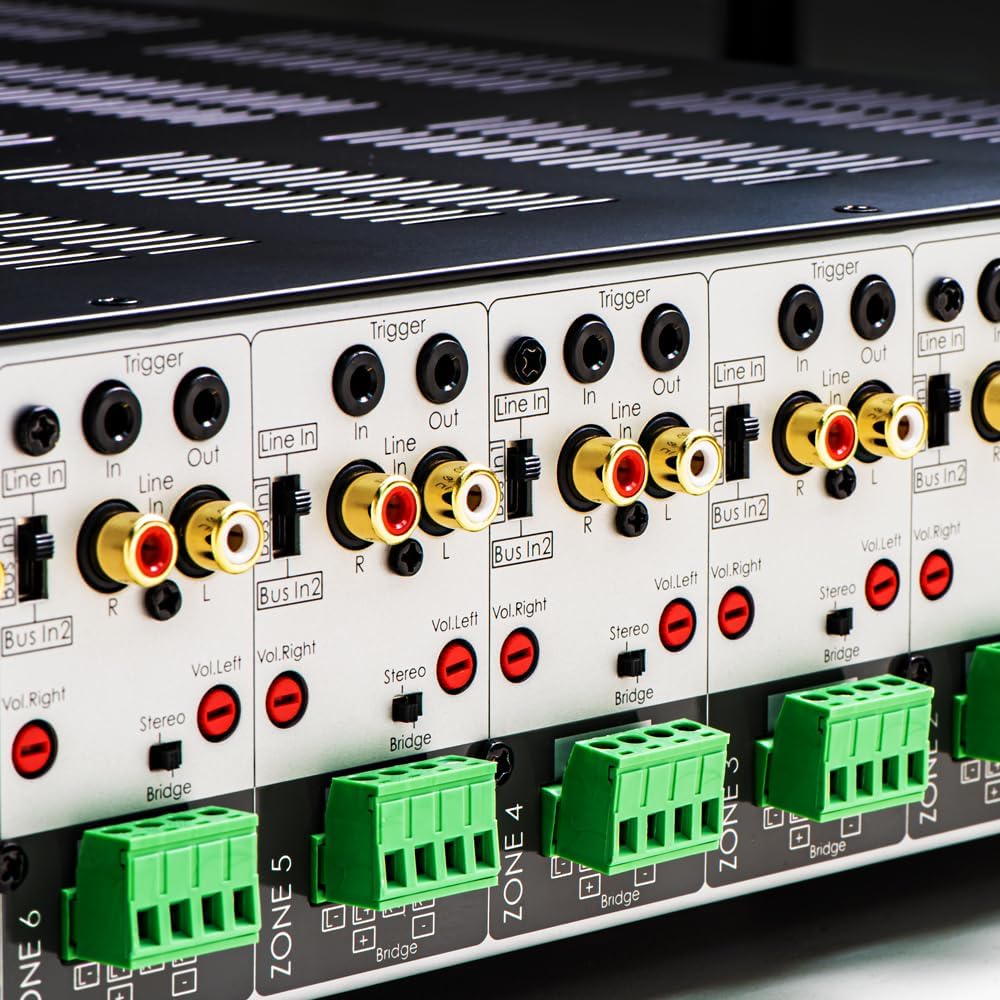
Слика 3.1: Детално view of the rear panel input and output connections.
- Излези на звучници: Connect your speakers to the corresponding zone terminals. Ensure correct polarity (+ to + and - to -). The amplifier supports both 4-ohm and 8-ohm speakers. For bridged mode operation, refer to section 4.3.
- Линиски влезови (RCA): Each zone has a dedicated stereo RCA Line In. Connect your audio sources (e.g., pre-amplifier, media player) to these inputs.
- Bus Inputs (RCA): На amplifier features two stereo Bus Inputs (Bus In 1, Bus In 2). These allow a single audio source to be distributed to multiple zones.
- Линиски излези (RCA): Each zone also has a stereo RCA Line Out, allowing the audio signal from that zone to be passed to another ampзајакнувач или аудио уред.
- Активирање Влез/Излез: The 12V Trigger In allows the amplifier to be turned on/off by an external device. The 12V Trigger Out can be used to control other devices.
- Влез за напојување со наизменична струја: Connect the supplied power cord to the AC IN receptacle and then to a suitable wall outlet.

Слика 3.2: Детално view of Bus inputs and Trigger connections on the rear panel.
4. Упатства за работа
4.1 Вклучување/исклучување
Притиснете го главното копче за вклучување на предниот панел за да го вклучите amplifier on or off. A red LED indicator will illuminate when the unit is powered on.

Image 4.1: Front panel power button.
4.2 Контрола на зони
Each of the 8 zones has a dedicated button on the front panel. Pressing a zone button will activate or deactivate that specific audio zone. The corresponding LED will indicate the zone's status.

Image 4.2: Front panel zone selection buttons.
4.3 Input Selection and Volume Adjustment
On the rear panel, each zone features switches for input selection and rotary controls for volume adjustment:
- Избор на влез: A slide switch allows you to select the audio input for each zone: Линија во (dedicated input for that zone), Bus In 1, или Bus In 2.
- Контроли на јачина на звук: Separate rotary controls for Left and Right channels (Vol. Left, Vol. Right) allow for precise volume balancing within each zone.
- Stereo/Bridge Switch: A switch allows you to configure the zone for stereo operation or bridged mono operation. In bridged mode, two amplifier channels combine to deliver higher power to a single speaker. Ensure the speaker impedance is appropriate for bridged mode (typically 8 ohms minimum).
4.4 Audio Sensing
На amplifier incorporates an audio sense feature that automatically activates a zone when an input signal is detected and turns it off after a period of no signal. This helps conserve power and prolong the unit's lifespan.

Слика 4.3: На пр.ample of multi-zone audio distribution with the ampживописен.
5. Одржување
The OSD Audio MX1680 GEN2 amplifier requires minimal maintenance. Follow these guidelines to ensure optimal performance and longevity:
- Чистење: Periodically wipe the exterior surfaces with a soft, dry cloth. Do not use liquid cleaners or aerosol sprays, as they may damage the finish or internal components.
- Вентилација: Ensure that the ventilation openings on the top and sides of the unit remain clear of dust and obstructions. Dust accumulation can impede airflow and lead to overheating.
- Врски: Occasionally check all cable connections to ensure they are secure and free from corrosion. Loose connections can lead to signal loss or degradation.
- Складирање: Доколку се складира на amplifier for an extended period, disconnect it from power and store it in a cool, dry place, away from direct sunlight and extreme temperatures.
6 Смена на проблеми
If you experience issues with your MX1680 GEN2 amplifier, consult the following troubleshooting guide. For problems not resolved here, please contact OSD Audio support.
| Проблем | Можна причина | Решение |
|---|---|---|
| Нема моќ | Power cord disconnected; Power outlet faulty; Ampпрегорен осигурувач за разладување | Check power cord connection; Test outlet with another device; Contact service for fuse replacement. |
| Нема звук од зоната | Zone not activated; Incorrect input selected; Source device off/muted; Speaker wires loose/incorrectly connected; Volume too low | Press the zone button on the front panel; Verify input selector switch position; Check source device; Inspect speaker connections; Adjust zone volume controls. |
| Искривен звук | Input signal too high; Speaker impedance mismatch; Faulty speaker cable; Ampпоживо прегревање | Reduce source device output level; Ensure correct speaker impedance (4 or 8 ohms, or 8 ohms for bridged); Check speaker cables; Ensure proper ventilation. |
| Amplifier shuts off unexpectedly | Overheating; Short circuit in speaker wiring; Protection circuit activated | Ensure proper ventilation; Check all speaker wiring for shorts; Allow unit to cool down before restarting. |
7. Спецификации
| Карактеристика | Спецификација |
|---|---|
| Број на модел | MX1680-GEN2 |
| Канали | 16 Channels (8 Zones) |
| Излезна моќност (4 оми) | 80 Watts per channel (1KHz) |
| Излезна моќност (8 оми) | 50 Watts per channel (1KHz) |
| Ampпожива класа | Класа Д |
| Димензии на производот (Д x Ш x В) | 16.81 x 16.14 x 3.46 инчи |
| Тежина на ставката | 23 фунти |
| Rack-монтаж | Yes (2U, hardware included) |
| Производител | OSD аудио |
| Датум прв на располагање | 31 јануари 2020 година |
8. Информации за гаранцијата
Warranty information for the OSD Audio MX1680 GEN2 amplifier is typically provided with your purchase documentation or can be found on the official OSD Audio webстраница. Ве молиме погледнете ги овие ресурси за детали во врска со гарантното покритие, условите и одредбите.
9. Поддршка
For technical assistance, product inquiries, or service requests, please contact OSD Audio customer support. You can typically find contact information, including phone numbers and email addresses, on the official OSD Audio webсајт:
Please have your model number (MX1680-GEN2) and purchase details ready when contacting support.