Вовед
This manual provides comprehensive instructions for the VINABTY GB172WJSA replacement remote control. This remote is designed to function as a direct replacement for various Sharp AQUOS TV models, offering seamless operation without the need for programming. Please read this manual carefully to ensure proper use and longevity of your remote control.
Compatible TV Models include:
- LC-80LE661U, LC-70C6600U, LC-70EQ30U, LC-70LE661U, LC-60EQ30U, LC-60LE661U, LC-60LE660U, LC-60c6600U, LC-70LE660U
- LC-60LE550U, LC-80UQ17U, LC-70UQ17U, LC-60UQ17U, LC-70TQ15U, LC-60TQ15U, LC-70SQ17U, LC-70SQ15U, LC-70SQ10U, LC-60SQ17U, LC-60SQ15U, LC-60SQ10U, LC-70EQ10U, LC-60EQ10U, LC-80LE650U, LC-70LE650U, LC-70C6500U, LC-60LE650U, LC-60C6500U, LC-90LE657U, LC-80LE642U
Поставување и инсталација на батеријата
The VINABTY GB172WJSA remote control requires two AAA batteries (not included) for operation. No programming is needed; simply insert the batteries, and the remote is ready to use with compatible Sharp AQUOS TVs.
- Отворете го одделот за батерија: Locate the battery compartment cover on the back of the remote control. Slide the cover downwards or press the latch and lift to open.
- Вметнете батерии: Вметнете две нови AAA батерии, осигурувајќи се дека позитивните (+) и негативните (-) терминали се правилно порамнети со ознаките во преградата.
- Затворете ја преградата за батерии: Вратете го капакот на преградата за батерии со лизгање назад на своето место додека не кликне безбедно.
- Тестирајте го далечинскиот управувач: Point the remote control at your Sharp AQUOS TV and press the МОЌ button. The TV should respond.
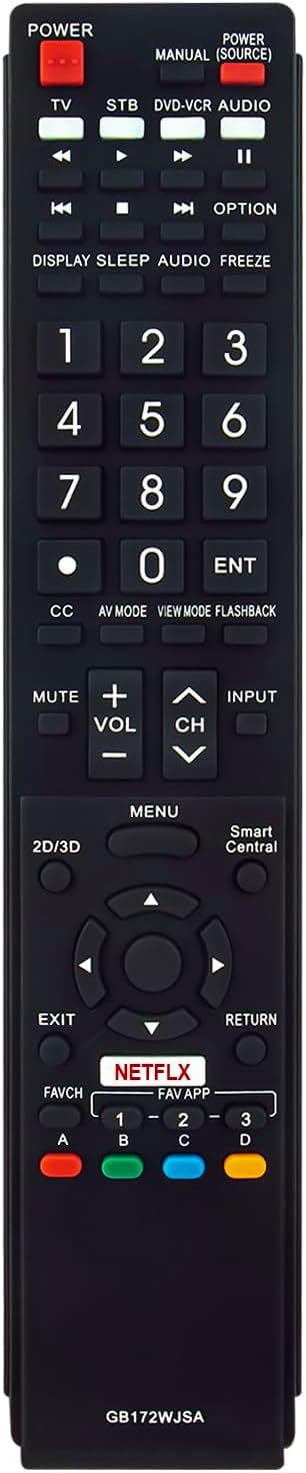
Слика: напред view of the remote control, showing button layout and overall design. This image also displays the product dimensions.
Упатства за работа
The VINABTY GB172WJSA remote control features a standard layout for easy navigation and control of your Sharp AQUOS TV. Below is a general guide to the main functions:
- МОЌНОСТ: Го вклучува или исклучува телевизорот.
- ТВ/Системски уред/ДВД-Видеорекордер/АУДИО: Selects the input source for TV, Set-Top Box, DVD/VCR, or Audio devices.
- Копчиња со броеви (0-9): Directly selects channels or inputs numerical data.
- ОРЛ: Confirms selections or enters channel numbers.
- VOL +/-: Го прилагодува нивото на јачина на звук.
- CH +/-: Ги менува каналите нагоре или надолу.
- МУТИРА: Го исклучува звукот или го вклучува звукот на телевизорот.
- ВЛЕЗ: Циклично ги прелистува достапните влезни извори.
- МЕНИ: Го отвора главното мени на телевизорот за поставки и опции.
- Копчиња за навигација (горе, долу, лево, десно, во ред): Се движи низ менијата и ги потврдува изборите.
- Излез: Излегува од тековното мени или екран.
- ВРАЌАЊЕ: Се враќа на претходниот екран или канал.
- НЕТФЛИКС: Копче за директен пристап за апликацијата Netflix.
- FAVCH / FAVAPP: Accesses favorite channels or applications.
- Копчиња во боја (A, B, C, D): Functionality varies depending on the TV model and current application.
- Контроли за репродукција (Репродукција, Пауза, Стоп, Премотување назад, Премотување напред, Прескокнување): Controls media playback on compatible devices or applications.
- DISPLAY/SLEEP/AUDIO/FREEZE: Provides various utility functions such as displaying information, setting sleep timer, changing audio tracks, or freezing the screen.

Image: A user operating the remote control while viewing a television, demonstrating typical usage.
Одржување
To ensure the optimal performance and longevity of your remote control, follow these maintenance guidelines:
- Чистење: Користете мека, сува крпа за да го избришете далечинскиот управувач. За тврдокорна нечистотија, малкуampen the cloth with water or a mild cleaning solution. Avoid using harsh chemicals or abrasive cleaners.
- Замена на батерија: Заменете ги батериите кога далечинскиот управувач ќе почне да реагира бавно или ќе престане да работи. Секогаш заменете ги обете батерии истовремено со нови од ист тип (AAA).
- Складирање: If the remote control will not be used for an extended period, remove the batteries to prevent leakage, which can damage the device. Store in a cool, dry place.
- Избегнувајте штета: Do not drop the remote control, expose it to extreme temperatures, or immerse it in liquids.
Решавање проблеми
If you encounter issues with your VINABTY GB172WJSA remote control, refer to the following common solutions:
| Проблем | Можна причина | Решение |
|---|---|---|
| Далечинското не работи. | Мртви или неправилно вметнати батерии. | Заменете ги батериите со нови AAA батерии, внимавајќи на правилниот поларитет (+/-). |
| Далечинскиот управувач има краток домет или повремен одговор. | Weak batteries; Obstruction between remote and TV; Infrared sensor on TV is blocked. | Replace batteries. Remove any objects blocking the line of sight between the remote and the TV. Ensure the TV's IR sensor is clear. |
| Specific buttons are not functioning. | Нечистотија или остатоци под копчето; Неисправност на далечинскиот управувач. | Исчистете ја површината на далечинскиот управувач. Ако проблемот продолжи, далечинскиот управувач може да е неисправен и да треба да се замени. |
| Далечинскиот управувач работи за некои функции, но не и за други. | TV model incompatibility for certain advanced functions. | Verify your TV model is listed as compatible. Some advanced features may not be universally supported across all listed models. |
Спецификации
| Карактеристика | Детал |
|---|---|
| Број на модел | GB172WJSA RRMCGB172WJSA |
| Бренд | VINABTY |
| Компатибилни уреди | Sharp AQUOS Televisions (various models) |
| Извор на енергија | 2 x AAA батерии (не се вклучени) |
| Димензии на производот | 9.5 x 1.8 x 0.65 инчи (приближно 24.13 x 4.57 x 1.65 cm) |
| Тежина на ставката | 3.16 унци (приближно 89.58 грама) |
| Специјална карактеристика | Ергономски дизајн |
| Боја | Црното |
Слика: напред view of the remote control, highlighting its dimensions (9.45 inches length, 1.77 inches width).
Гаранција и поддршка
For any questions, concerns, or technical support regarding your VINABTY GB172WJSA replacement remote control, please contact the seller or manufacturer directly through your purchase platform. Please refer to your purchase documentation for specific warranty terms and contact information.
Note: This remote is a replacement unit and does not require complex programming. Its functionality is designed to mimic the original remote for compatible Sharp AQUOS TV models.
