1. Вовед
The V7 KW550ESBT Bluetooth Keyboard is designed to enhance your productivity with versatile connectivity options. This compact, ultra-slim keyboard offers a comfortable and quiet typing experience, featuring laser-etched keys for long-lasting durability. It supports connection to multiple devices via Bluetooth or a 2.4 GHz USB dongle.
Главните карактеристики вклучуваат:
- Seamless switching between up to 2 Bluetooth devices or connection via the included 2.4 GHz USB dongle.
- Scissor-switch keys for comfortable and quiet typing.
- Laser-etched keys for enhanced durability.
- Ultra-slim and compact design.
- Includes two AAA batteries for immediate use.
2. Содржина на пакетот
Ве молиме проверете го пакувањето за следните ставки:
- V7 KW550ESBT Bluetooth Keyboard
- 2.4 GHz USB Receiver (dongle)
- 2 x AAA батерии
- Упатство за употреба (овој документ)

Image: The V7 KW550ESBT keyboard shown with its accompanying 2.4 GHz USB receiver, ready for connection.
3. Поставување
3.1. Инсталација на батерија
- Пронајдете го делот за батерии на долната страна од тастатурата.
- Отворете го капакот на преградата за батерии.
- Вметнете ги двете AAA батерии, внимавајќи на правилниот поларитет (+/-).
- Добро затворете го капакот на преградата за батерии.
3.2. Connecting via 2.4 GHz USB Dongle
- Remove the 2.4 GHz USB receiver from its storage slot (usually within the battery compartment or a dedicated slot).
- Вклучете го USB приемникот во слободен USB порт на вашиот компјутер или уред.
- The keyboard should automatically connect. If not, ensure the keyboard is powered on and the connection indicator light (if present) is active.
3.3. Поврзување преку Bluetooth
The V7 KW550ESBT keyboard supports connecting to up to two Bluetooth devices.
- Проверете дали тастатурата е вклучена.
- Press and hold the Bluetooth pairing key (refer to keyboard layout for specific key, often indicated by a Bluetooth symbol or 'BT1'/'BT2') for a few seconds until the Bluetooth indicator light starts blinking, indicating it's in pairing mode.
- На вашиот уред (компјутер, таблет, паметен телефон), одете во поставките за Bluetooth.
- Пребарај за available devices and select "V7 KW550ESBT" (or similar name) from the list.
- Следете ги сите упатства на екранот за да го завршите процесот на спарување. Можеби ќе бидете замолени да внесете код прикажан на екранот користејќи ја тастатурата.
- Repeat for a second Bluetooth device if desired, using the other Bluetooth pairing key.
3.4. Префрлување помеѓу поврзани уреди
To switch between connected devices (Bluetooth 1, Bluetooth 2, or 2.4 GHz USB), press the corresponding function key (e.g., Fn + BT1, Fn + BT2, or Fn + 2.4G if available). Refer to your keyboard's specific layout for these keys.
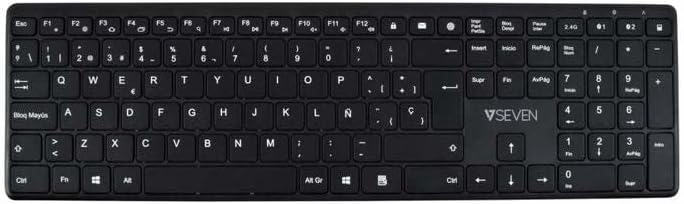
Слика: Од горе надолу view of the V7 KW550ESBT keyboard, showing the full QWERTY layout and function keys.
4. Ракување со тастатурата
4.1. Standard Key Functions
The keyboard features a standard QWERTY layout with all essential alphanumeric keys, punctuation, and modifier keys (Shift, Ctrl, Alt, Windows/Command).
4.2. Мултимедијални и функционални копчиња
The top row of keys (F1-F12) often doubles as multimedia or special function keys. These functions are typically accessed by pressing the Fn key simultaneously with the desired F-key. Common functions include:
- Контрола на јачината на звукот (исклучување на звук, намалување, зголемување)
- Репродукција на медиуми (репродукција/пауза, претходно, следно)
- Прилагодување на осветленоста на екранот
- Функција за пребарување
- Заклучен екран
Refer to the icons printed on your specific keyboard's F-keys for exact functionality.
4.3. Искуство со тивко пишување
The scissor-switch key design minimizes typing noise, making it suitable for quiet environments.

Слика: Страничен професионалецfile of the V7 KW550ESBT keyboard, highlighting its ultra-slim design.
5. Одржување
5.1. Чистење
За чистење на тастатурата:
- Turn off the keyboard and disconnect it from your device.
- Користете мека крпа без влакненца малку гampнаполнето со вода или благ раствор за чистење.
- Нежно избришете ги капачињата на копчињата и површината. Избегнувајте прекумерна влага.
- За прашина и остатоци помеѓу копчињата, користете компримиран воздух.
5.2. Замена на батеријата
When the keyboard's performance degrades or the battery indicator (if present) signals low power, replace the AAA batteries as described in Section 3.1.
6 Смена на проблеми
If you encounter issues with your V7 KW550ESBT keyboard, try the following solutions:
| Проблем | Можно решение |
|---|---|
| Тастатурата не реагира |
|
| Копчињата се лепливи или не реагираат |
|
| Спарувањето со Bluetooth не успеа |
|
7. Спецификации
| Карактеристика | Детал |
|---|---|
| Бренд | V7 |
| Број на модел | KW550ESBT |
| Технологија за поврзување | Bluetooth, 2.4 GHz Wireless (USB Dongle) |
| Опис на тастатурата | Мултимедија |
| Препорачана употреба | Канцеларија |
| Специјална карактеристика | Bluetooth |
| Боја | Црното |
| Стил | Класичен |
| Димензии на производот | 16.1L x 4.7W x 0.8H сантиметри |
| Материјал | Пластика |
| Извор на енергија | 2 x AAA батерии (вклучени) |
8. Гаранција и поддршка
For warranty information and technical support, please refer to the documentation provided with your purchase or visit the official V7 webстраница. Зачувајте го доказот за купување за гаранциски побарувања.