Вовед
The Geemarc CL7400 Opti is an amplified TV headset designed to provide clear and powerful sound for individuals with hearing loss. This headset allows users to enjoy television programs without disturbing others, by amplifying audio directly to the headphones. It comes with a charging base and multiple connection cables (optical, RCA, Jack) to ensure compatibility with various audio sources. The headset is lightweight, foldable, and offers convenient controls directly on the earpieces for volume, balance, and tone adjustments. It also features an automatic power-off function to conserve battery life.
Поставување
Before using your Geemarc CL7400 headset, ensure the charging base is properly connected to your audio source (e.g., television, radio, DVD player) and the headset is fully charged.
1. Полнење на слушалките
Place the headset onto the charging base. The charging indicator light on the headset will illuminate. A full charge takes approximately 6 hours and provides up to 8 hours of listening time. The headset can also be charged via a power bank or directly from a computer using a compatible cable (not amplified when used this way).

Image: The Geemarc CL7400 headset resting on its dedicated charging base, ready for use or charging. The base is sleek and designed to hold the headset securely.
2. Connecting the Charging Base to Your Audio Source
The CL7400 base supports multiple connection types to ensure compatibility with most televisions and audio devices. Choose the appropriate cable based on your device's available audio output ports.
Optical Connection (Recommended for Digital Audio)
Use the supplied optical cable to connect the "OPTIC OUT" port on your television or audio device to the optical input on the CL7400 charging base. This connection provides high-quality digital audio.

Image: A diagram illustrating how to connect the optical cable. A hand is shown inserting the optical cable into a port labeled "OPTIC OUT" on an audio device.
RCA Connection (Analog Audio)
If your device has RCA audio outputs (red and white ports), use the supplied RCA cable to connect them to the corresponding RCA inputs on the CL7400 charging base. Ensure red connects to red (right channel) and white connects to white (left channel).

Image: A diagram demonstrating the connection of an RCA cable. A hand is shown plugging the red RCA connector into a port labeled "RCA OUT" on an audio device.
3.5mm Jack Connection (Analog Audio)
For devices with a 3.5mm headphone jack output, use the supplied 3.5mm audio cable to connect it to the corresponding input on the CL7400 charging base. This is common for older TVs, radios, or portable players.

Image: A diagram illustrating the connection of a 3.5mm jack cable. A hand is shown inserting the jack into a port labeled with a headphone icon and "Ø 3.5mm".
Упатства за работа
1. Вклучување/исклучување
Once the base is connected and the headset is charged, simply put on the headset. It should automatically connect to the base and receive audio. To turn off, place the headset back on the charging base or it will automatically power off after 4 minutes of no signal.
2. Прилагодување на поставките за аудио
The CL7400 headset features intuitive controls located directly on the earpieces, allowing for personalized audio adjustments without needing to access the base or the audio source.
- Контрола на јачината на звукот: Use the volume buttons (usually marked '+' and '-') on the headset to increase or decrease the overall listening volume. The headset can amplify sound up to 125dB SPL.
- Контрола на рамнотежа: Adjust the left/right audio balance to suit your hearing needs. This is particularly useful if you have different levels of hearing loss in each ear.
- Контрола на тон: Modify the audio tone (treble/bass) to enhance clarity for speech or music. This helps in making sounds sharper or richer based on preference.

Слика: Детална view of the Geemarc CL7400 headset's earpiece, highlighting the accessible control buttons for volume, balance, and tone adjustment.
3. Using with Smartphones and Other Devices (Direct Connection)
The CL7400 headset can be connected directly to devices with a 3.5mm audio jack, such as smartphones, MP3 players, or computers. When connected directly, the headset functions as a standard wired headphone and не обезбедува ampзаживување. Amplification only occurs when the headset is receiving audio wirelessly from its charging base.
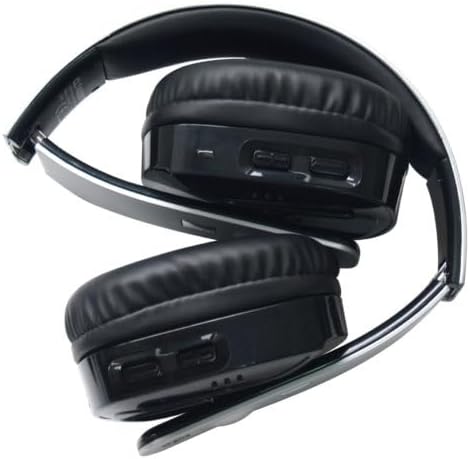
Image: The Geemarc CL7400 headset shown in its folded position, demonstrating its compact design for easy storage and portability.
Одржување
Proper maintenance ensures the longevity and optimal performance of your Geemarc CL7400 headset.
- Чистење: Use a soft, dry cloth to clean the headset and charging base. Do not use abrasive cleaners, solvents, or immerse the device in water.
- Складирање: When not in use, store the headset on its charging base or in a cool, dry place away from direct sunlight and extreme temperatures. The foldable design allows for compact storage.
- Нега на батеријата: To maintain battery health, avoid completely draining the battery frequently. Recharge the headset regularly.
Решавање проблеми
If you encounter issues with your CL7400 headset, refer to the following common problems and solutions:
| Проблем | Можна причина | Решение |
|---|---|---|
| Нема звук или низок волумен |
|
|
| Distorted or crackling sound |
|
|
| Слушалките не се полнат |
|
|
| Headset automatically turns off |
|
|
Спецификации
| Број на модел | CL7400_OP_SIL_VDE |
| Бренд | Geemarc |
| AmpНиво на лификација | Up to 125dB SPL |
| Фреквентен одговор | 40 Hz - 20,000 Hz |
| Тежина на слушалките | 260 грама |
| Вкупна тежина на предметот | 680 грама |
| Траење на батеријата | До 8 часа |
| Време на полнење | Приближно 6 часа |
| Поврзување | Wireless (from base), 3.5mm Jack (direct), Optical, RCA |
| Вклучени компоненти | Headset, Charging Base, Power Adapter, Optical Cable, RCA Cable, 3.5mm Jack Cable, User Manual |
| Материјал | Пластика |
| Посебни карактеристики | Noise Isolation, Automatic Power Off |
Гаранција и поддршка
The Geemarc CL7400 headset comes with a manufacturer's warranty and support for spare parts.
- Гаранција од производителот: This product is covered by a 2-year manufacturer's warranty from the date of purchase. Please retain your proof of purchase for warranty claims.
- Достапност на резервни делови: Spare parts for the CL7400 are available for 1 year.
- Поддршка за корисници: For technical assistance, troubleshooting beyond this manual, or warranty claims, please contact Geemarc customer support. Refer to the contact information provided in the packaging or on the official Geemarc webсајт.


