1. Вовед
Thank you for choosing the HBN Digital Programmable Timer Socket. This device is designed to automate the switching of electrical appliances, helping you save energy and enhance convenience. It features an LCD display, 8 configurable ON/OFF programs, and a random function for security. Please read this manual carefully before use to ensure proper operation and safety.
2. Инструкции за безбедност
- This timer socket is designed for indoor use only. Do not expose it to moisture, water, or extreme temperatures.
- Ensure the connected appliance's power consumption does not exceed the timer's maximum load capacity (16A / 3680W). Overloading can cause damage or fire.
- Не расклопувајте го и не обидувајте се да го поправите уредот. За сите сервиси обратете се на квалификуван персонал.
- Да се чува подалеку од дофат на деца.
- Always insert the plug fully into the socket.
- Unplug the timer from the wall socket before cleaning. Clean only with a dry, soft cloth.
3. Производот завршиview
Familiarize yourself with the components of your HBN Digital Programmable Timer Socket.

Слика 3.1: Предна страна view of the timer socket, showing the LCD display, control buttons, and power outlet.

Слика 3.2: Назад view of the timer socket, displaying the model number BND-50/SG3-VC and electrical ratings.
Контролни копчиња:

Слика 3.3: Детално view of the control buttons and LCD display.
- ЧАСОВНИК: Се користи за поставување на тековното време и излегување од режимот на програмирање.
- ПРОГ: Enters and cycles through the 8 ON/OFF programming settings.
- R (Random): Activates or deactivates the random switching function.
- РЕСЕТ: Clears all settings and resets the timer to factory defaults.
- НЕДЕЛА: Selects the day(s) of the week for time and program settings.
- ЧАС: Adjusts the hour for time and program settings.
- МИН: Adjusts the minute for time and program settings.
- ВКЛУЧЕНО/АВТОМАТСКО/ИСКЛУЧЕНО: Manually switches the timer to ON, AUTO (programmed mode), or OFF.
LCD дисплеј:
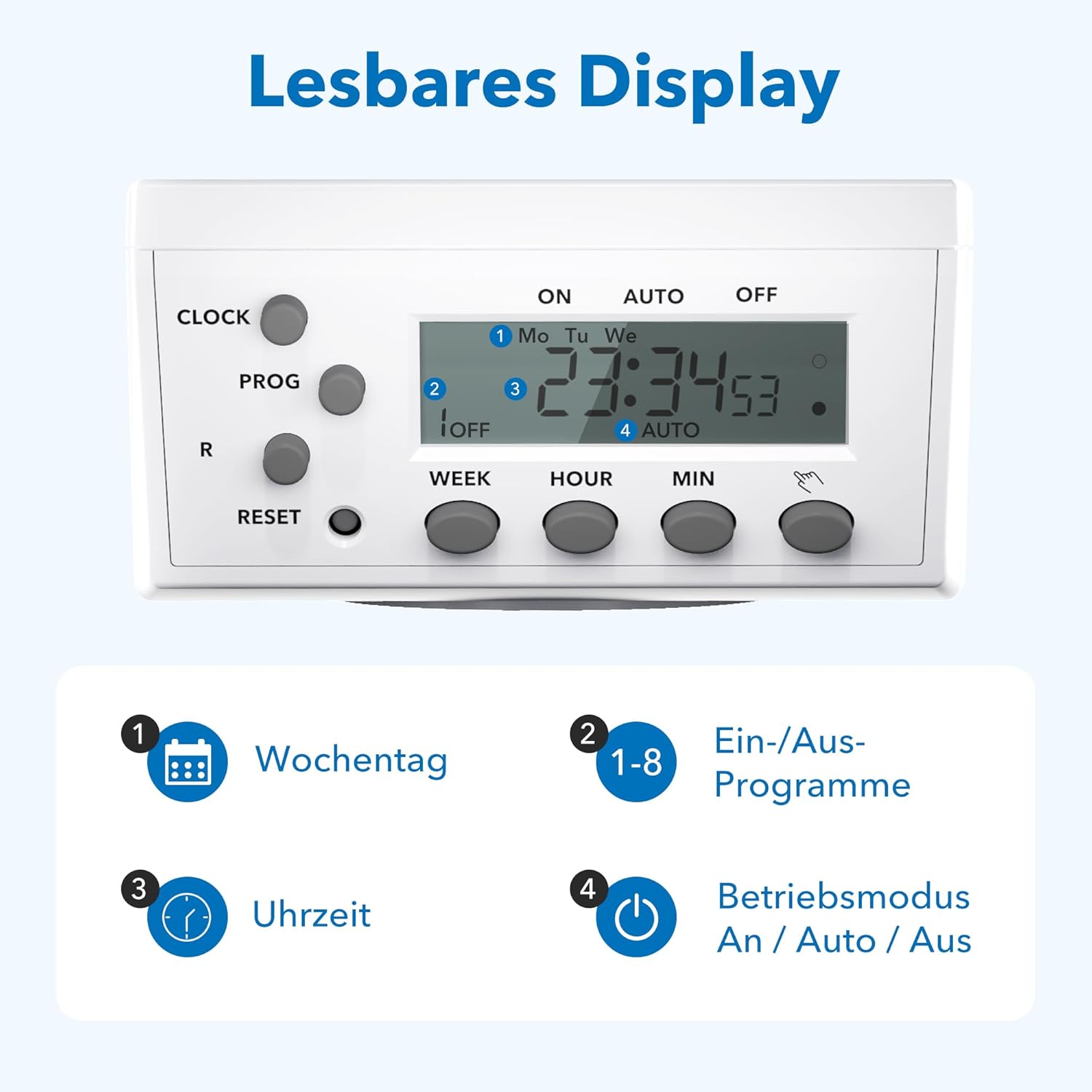
Figure 3.4: The LCD display shows current time, day, program status, and operating mode.
The LCD display provides clear information on the current time, day of the week, active program number, and the current operating mode (ON, AUTO, OFF).
4. Поставување
4.1 Initial Charging and Reset
- Plug the timer socket into a live wall outlet for at least 15-30 minutes to charge its internal battery. This battery retains settings during power outagес.
- After charging, use a pointed object (like a pen tip) to press the РЕСЕТИРАЈ button. This clears all previous settings and ensures a fresh start. The display will show '0:00'.
4.2 Поставување на тековното време
- Притиснете и задржете го ЧАСОВНИК копче.
- Додека се држи ЧАСОВНИК, притиснете го НЕДЕЛА button repeatedly to select the current day of the week (Mo, Tu, We, Th, Fr, Sa, Su).
- Додека се држи ЧАСОВНИК, притиснете го ЧАС button repeatedly to set the current hour.
- Додека се држи ЧАСОВНИК, притиснете го МИН копчето повеќе пати за да ја поставите тековната минута.
- Ослободете го ЧАСОВНИК button. The current time is now set.
5. Упатства за работа
5.1 Програмирање на времиња на вклучување/исклучување
The timer allows for up to 8 distinct ON/OFF programs. Each program consists of an ON time and an OFF time.
- Притиснете го ПРОГ button once. The display will show '1 ON'.
- Притиснете НЕДЕЛА за да ги изберете посакуваните денови за оваа програма. Опциите вклучуваат поединечни денови, работни денови, викенди или сите денови.
- Притиснете ЧАС за да го поставите посакуваниот час на вклучување.
- Притиснете МИН за да ја поставите саканата минута за вклучување.
- Притиснете ПРОГ again. The display will show '1 OFF'.
- Repeat steps 2-4 to set the desired OFF time for program 1.
- Притиснете ПРОГ again to move to '2 ON' and repeat the process for subsequent programs (up to 8).
- Откако ќе ги поставите сите посакувани програми, притиснете го копчето ЧАСОВНИК копче за да излезете од режимот на програмирање и да се вратите на приказот на тековното време.
5.2 Рачно префрлување (ВКЛУЧЕНО/АВТОМАТСКО/ИСКЛУЧЕНО)
Притиснете го ВКЛУЧЕНО/АВТОМАТСКО/ИСКЛУЧЕНО копче за циркулирање низ режимите на работа:
- НА: The connected appliance is continuously ON, overriding all programs.
- АВТОМАТ: The timer operates according to the programmed ON/OFF times. This is the standard operating mode for automated control.
- ИСКЛУЧЕНО: The connected appliance is continuously OFF, overriding all programs.
5.3 Случајна функција
The random function provides a security feature by switching the connected appliance ON and OFF at irregular intervals (2 to 30 minutes delay) around the programmed times. This can simulate presence when you are away.
- За да активирате, притиснете го R button. An 'R' indicator will appear on the display.
- За деактивирање, притиснете го R button again. The 'R' indicator will disappear.

Слика 5.1: Прamples of versatile applications for the timer socket.
6. Одржување
- Ensure the timer is unplugged from the power outlet before cleaning.
- Избришете ја надворешноста со мека, сува крпа. Не користете течни средства за чистење или абразивни материјали.
- Чувајте го тајмерот на ладно и суво место кога не го користите.
7 Смена на проблеми
- Екранот е празен: Ensure the timer is plugged into a live outlet. If it has been unplugged for an extended period, the internal battery may be depleted. Plug it in for 15-30 minutes to recharge.
- Апаратот не се вклучува/исклучува како што е програмирано:
- Проверете дали тајмерот е вклучен АВТОМАТСКИ mode. If it's in ON or OFF mode, programs are overridden.
- Verify that the programmed ON/OFF times and days are correct.
- Осигурајте се дека тековното време е точно поставено.
- Confirm the appliance itself is working and properly connected to the timer.
- Programs are lost after a power outage: The internal battery may not be fully charged or is at the end of its life. Ensure the timer is regularly plugged in to maintain battery charge.
- Timer is unresponsive: Притиснете го РЕСЕТИРАЈ button with a pointed object to clear all settings and restart the device. Then, reprogram the time and desired schedules.
8. Спецификации

Figure 8.1: Technical data and dimensions of the timer socket.
| Спецификација | Вредност |
|---|---|
| Број на модел | BND-50/SG3-VC |
| Оценето волtage | 230 В |
| Оценета струја | 16 А |
| Максимално оптоварување | 3680 W |
| Минимално време на префрлување | 1 минута |
| Број на програми | 8 ON/OFF програми |
| Димензии на производот | 7.5 x 7.5 x 8 cm |
| Тежина на ставката | 150 грама |
| Материјал | Кунстстоф (пластика) |
| Боја | Бело |
| Производител | Ergo I&E CO.,LTD |
9. Гаранција и поддршка
HBN products are manufactured to high-quality standards. For warranty information or technical support, please refer to the documentation provided with your purchase or contact your retailer. Keep your proof of purchase for warranty claims.


