1. Вовед
This manual provides detailed instructions for the memzuoix 2.4G Portable Wireless Mouse, Model WM-697. Please read this manual carefully before using the product to ensure proper operation and to maximize its lifespan.
Содржина на пакетот
- 1 x memzuoix 2.4G Portable Wireless Mouse (Model WM-697)
- 1 x USB нано ресивер
- 1 x Упатство за употреба (овој документ)

Image 1.1: The memzuoix wireless mouse and its USB nano receiver.
2. Спецификации
| Карактеристика | Детал |
|---|---|
| Модел | СМ-697 |
| Поврзување | 2.4 GHz безжичен (USB приемник) |
| DPI | 1400 DPI |
| Копчиња | 5 (Left, Right, Scroll Wheel, Forward, Backward) |
| Детекција на движење | Оптички |
| Оперативен опсег | До 43 стапки (13 метри) |
| Извор на енергија | 2 x AAA батерии (не се вклучени) |
| Режим на спиење | Автоматски по 7 минути неактивност |
| Димензии (Д x Ш x В) | 4.19 x 2.63 x 1.50 инчи |
| Тежина | 2.22 унци |
| Компатибилност | Windows 7/8/10/XP, Vista 7/8, Mac OS, Linux |

Image 2.1: Physical dimensions of the mouse.
3. Водич за поставување
3.1 Инсталација на батерија
- Пронајдете го капакот на преградата за батерии на долната страна од глувчето.
- Нежно лизгајте го капакот отворен.
- Insert two AAA batteries (not included) into the compartment, ensuring correct polarity (+/-).
- Затворете го капакот на преградата за батерии додека не кликне безбедно на своето место.
3.2 USB Receiver Connection
- Locate the USB nano receiver, which is typically stored in a slot within the battery compartment for safekeeping during transport.
- Извадете го USB приемникот од неговиот слот за складирање.
- Plug the USB nano receiver into an available USB port on your computer (laptop, PC, desktop, MacBook, etc.).
- Вклучете го глувчето користејќи го прекинувачот ВКЛУЧЕНО/ИСКЛУЧЕНО што се наоѓа на долната страна.
- Your computer should automatically detect and install the necessary drivers. No manual driver installation is required.

Image 3.1: Underside of the mouse, illustrating battery compartment, USB receiver slot, and power switch.

Image 3.2: Wireless connection setup with a laptop.
4. Упатства за работа
4.1 Основни функции
- Лев клик: Примарна селекција и активирање.
- Десен клик: Пристапува до контекстуални менија.
- Тркало за лизгање: Scrolls content vertically. Can also be clicked for middle-click functionality (application dependent).
4.2 Advanced Functions (5-Button Mouse)
- Копче за напред: Навигира напред во web прелистувачи или file explorers. (Located on the side of the mouse)
- Копче за назад: Навигира назад во web прелистувачи или file explorers. (Located on the side of the mouse)
Забелешка: The side buttons (Forward/Backward) are not available for Mac OS. Other functions operate normally.
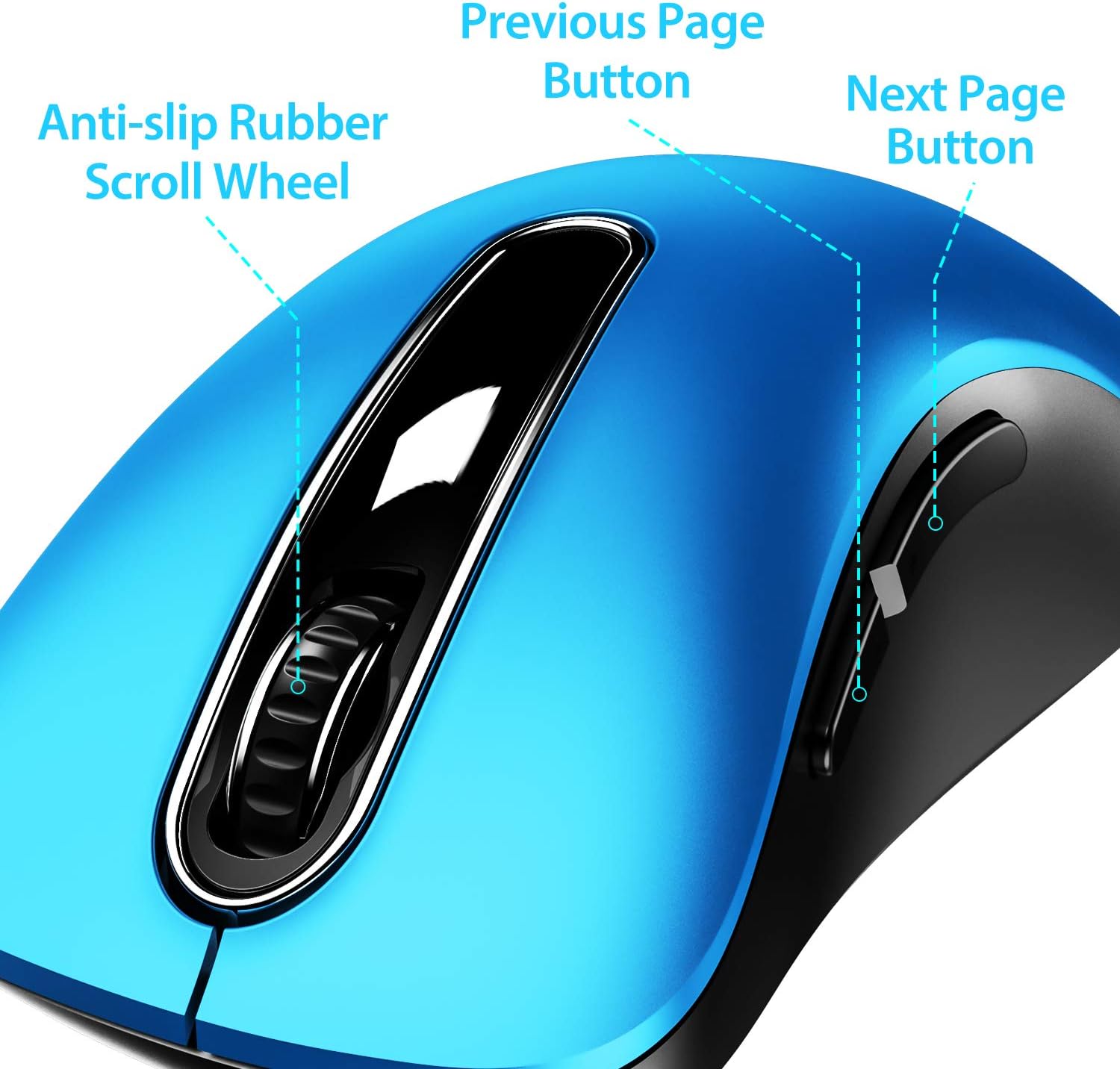
Слика 4.1: Готовоview of mouse buttons, including the scroll wheel and side navigation buttons.
4.3 Режим на заштеда на енергија
The mouse features an automatic power-saving sleep mode. If inactive for 7 minutes, the mouse will enter sleep mode to conserve battery life. To reactivate the mouse, simply click any button.
5. Одржување и грижа
- Чистење: Користете мека, сува крпа за чистење на глувчето. За тврдокорна нечистотија, малкуamp Може да се користи крпа, но осигурајте се дека влагата не навлегува во внатрешните компоненти.
- Замена на батерија: Replace batteries when the mouse performance degrades or stops responding. Always use fresh AAA batteries.
- Складирање: When not in use for extended periods, turn off the mouse using the ON/OFF switch and store the USB receiver in its dedicated slot on the mouse's underside to prevent loss.
- Избегнувајте екстремни услови: Не го изложувајте глувчето на екстремни температури, директна сончева светлина или прекумерна влага.
6 Смена на проблеми
| Проблем | Можно решение |
|---|---|
| Глувчето не реагира |
|
| Движењето на курсорот е неправилно или бавно |
|
| Side buttons not working on Mac OS | This is a known compatibility limitation. The side buttons are not supported on Mac OS. Other mouse functions should work normally. |
| Глувчето премногу брзо влегува во режим на мирување | The mouse is designed to enter sleep mode after 7 minutes of inactivity to conserve power. This is normal operation. Click any button to wake it up. |
7. Гаранција и поддршка
The memzuoix 2.4G Portable Wireless Mouse (Model WM-697) comes with a 365-day worry-free warranty from the date of purchase. This warranty covers manufacturing defects and malfunctions under normal use.
For warranty claims, technical support, or any inquiries, please contact memzuoix customer service through the retailer where the product was purchased or visit the official memzuoix webсајт за информации за контакт.
Ве молиме зачувајте го доказот за купување за потврда на гаранцијата.


