Вовед
Ви благодарам за купувањетоasing the Altec Lansing AL-5003 Multimedia DJ Trolly Speaker. This speaker is designed to deliver powerful audio for various applications, including parties and surround sound systems. Featuring wireless connectivity, a built-in trolley for portability, and multiple input options, the AL-5003 offers a versatile audio experience. Please read this manual carefully to ensure proper setup, operation, and maintenance of your speaker.
Важни безбедносни инструкции
- Read these instructions thoroughly before operating the speaker.
- Чувајте го ова упатство за идна референца.
- Не го изложувајте звучникот на дожд или влага.
- Не блокирајте никакви отвори за вентилација.
- Не инсталирајте во близина на извори на топлина како што се радијатори, топлински регистри, шпорети или други апарати (вклучувајќи ampлајфикатори) кои произведуваат топлина.
- Заштитете го кабелот за напојување од одење или стискање, особено на приклучоците, приклучните приклучоци и местото каде што тие излегуваат од апаратот.
- Користете само додатоци/додатоци наведени од производителот.
- Исклучете го овој апарат од струја за време на громови или кога не го користите подолг временски период.
- Целото сервисирање упатете го на квалификуван сервисен персонал.
Содржина на пакетот
Ве молиме проверете го пакувањето за следните ставки:
- Altec Lansing AL-5003 Multimedia DJ Trolly Speaker
- Кабел за напојување
- Далечински управувач
- Упатство за употреба
- Auxiliary Cable (may vary by region)
Производот завршиview
The AL-5003 speaker features a robust design with integrated wheels and a handle for easy transport. It includes a powerful 10-inch speaker and a 1-inch tweeter, providing clear and dynamic sound. The control panel is located on the top of the unit, offering easy access to various functions.
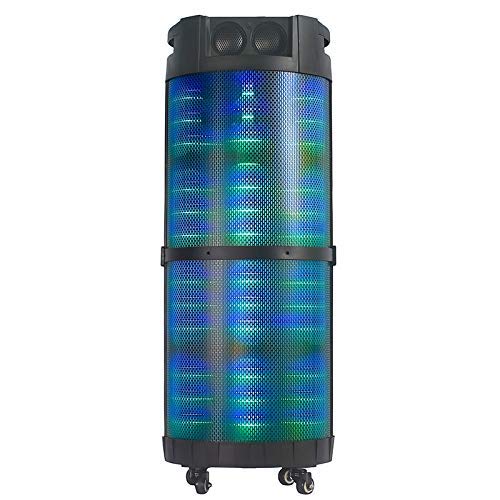
Слика 1: Предна страна view of the Altec Lansing AL-5003 speaker, showcasing its cylindrical design and illuminated grille. The speaker features a sturdy build with integrated wheels at the base for portability.
Контролен панел и врски
The top panel of the speaker houses the main controls and input/output ports.
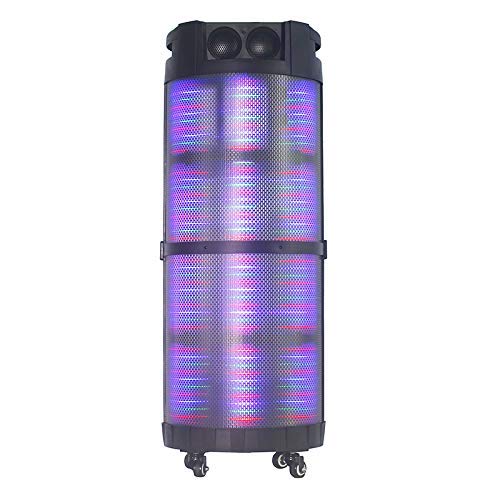
Слика 2: Горе-надолу view of the AL-5003 speaker, highlighting the control panel with various buttons and knobs, along with the top-mounted speakers. This view also shows the integrated handle for easy transport.
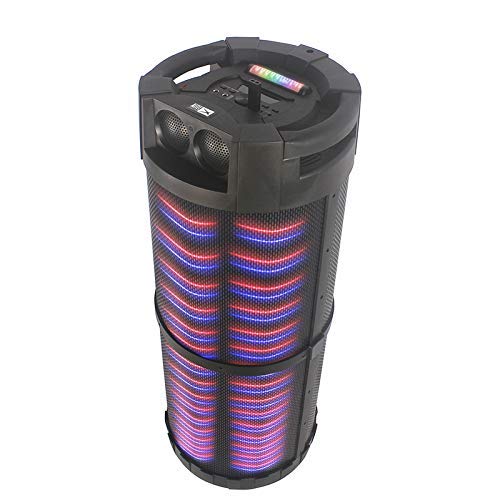
Слика 3: Аголна view of the AL-5003 speaker, providing a perspective of its overall structure, including the side grille and the top control area. The dynamic lighting effects are visible through the mesh.
Common controls include Power, Volume, Mode selection, Play/Pause, Track Skip, and inputs for USB, Auxiliary, and potentially Microphone (if available on the model).
Инструкции за поставување
- Отпакување: Carefully remove the speaker and all accessories from the packaging. Retain the packaging for future transport or storage.
- Поставување: Place the speaker on a stable, flat surface. Ensure there is adequate ventilation around the unit. For optimal sound, position the speaker in a central location within the listening area.
- Поврзување за напојување: Connect the provided power cord to the AC input on the speaker and then plug it into a standard wall outlet (AC 100-240V, 50/60Hz).
- Почетна наплата (доколку е применливо): If the speaker has an internal battery (Lead Acid battery mentioned in specs), it is recommended to fully charge it before first use. The charging indicator light will typically show charging status.
- Вклучување: Press the Power button on the control panel or remote control to turn on the speaker.
Упатства за работа
1. Режим на Bluetooth
- Активирајте Bluetooth: Turn on the speaker. Press the "Mode" button on the control panel or remote until "Bluetooth" or "BT" is displayed (or indicated by a blue LED). The speaker will enter pairing mode, indicated by a flashing light or audible prompt.
- Спарување со уред: На вашиот мобилен уред (паметен телефон, таблет, лаптоп), одете во поставките за Bluetooth и овозможете Bluetooth. Пребарај за available devices. You should see "AL-5003" or "Altec Lansing" in the list. Select it to pair.
- Потврда за поврзување: Once successfully paired, the speaker will emit a confirmation sound, and the Bluetooth indicator light will become solid.
- Репродукција: Start playing audio on your connected device. Use the speaker's volume controls or your device's volume controls to adjust the sound level. Use the Play/Pause, Next, and Previous buttons on the speaker or remote to control playback.
2. Помошен (AUX) режим
- Поврзете AUX кабел: Insert one end of a 3.5mm auxiliary cable into the AUX input port on the speaker. Connect the other end to the headphone jack or audio output of your external audio device (e.g., MP3 player, laptop).
- Изберете AUX режим: Press the "Mode" button on the speaker or remote until "AUX" is displayed or indicated.
- Репродукција: Play audio from your connected device. Adjust volume using both the speaker's controls and your device's volume.
3. Режим на репродукција преку USB
- Вметнете USB-уред: Вметнете USB флеш-уред што содржи MP3 аудио files во USB-портата на звучникот.
- Изберете USB режим: The speaker may automatically switch to USB mode. If not, press the "Mode" button until "USB" is displayed or indicated.
- Репродукција: Звучникот автоматски ќе почне да репродуцира аудио files from the USB drive. Use the Play/Pause, Next, and Previous buttons to control playback.
4. Karaoke Function (if applicable)
If your AL-5003 model includes a microphone input, you can use it for karaoke:
- Поврзете микрофон: Plug a wired microphone into the designated microphone input jack.
- Прилагодете ја јачината на звукот: Use the dedicated Microphone Volume knob (if present) to adjust the microphone's volume.
- Контрола на ехо: Some models may have an Echo knob to add an echo effect to the microphone audio.
5. Работа со далечински управувач
The included remote control provides convenient access to all major functions:
- Моќност: Вклучете/исклучете го звучникот.
- Режим: Switch between Bluetooth, AUX, USB, and other available modes.
- Волумен +/-: Прилагодете ја главната јачина на звук.
- Пушти/Пауза: Започнете или паузирајте ја репродукцијата.
- Претходно/Следно: Прескокнете на претходната или следната песна.
- EQ: Select different equalizer presets (if available).
- Исклучи звук: Исклучи или вклучи го звукот на аудио.
Одржување
- Чистење: Користете мека, сува крпа за чистење на надворешноста на звучникот. Не користете течни средства за чистење или абразивни материјали.
- Складирање: Кога не го користите подолго време, чувајте го звучникот на ладно и суво место, подалеку од директна сончева светлина и екстремни температури.
- Нега на батеријата: If the speaker has a built-in rechargeable battery, avoid fully discharging it frequently. For long-term storage, charge the battery to approximately 50-70% every few months to prolong its lifespan.
- Вентилација: Погрижете се отворите за вентилација да не се блокирани за да се спречи прегревање.
Решавање проблеми
| Проблем | Можна причина | Решение |
|---|---|---|
| Нема моќ | Power cord not connected; Power outlet not working; Speaker is off; Battery drained. | Ensure power cord is securely connected. Try a different outlet. Press the Power button. Charge the battery. |
| Нема звук | Volume too low; Incorrect mode selected; Device not connected properly; Mute function active. | Increase volume on speaker and source device. Select the correct input mode (Bluetooth, AUX, USB). Reconnect device. Check if mute is active on remote. |
| Неуспех во спарувањето со Bluetooth | Speaker not in pairing mode; Device Bluetooth off; Speaker too far from device; Interference. | Ensure speaker is in Bluetooth pairing mode. Turn on Bluetooth on your device. Move device closer to speaker. Turn off other Bluetooth devices nearby. |
| Репродукцијата преку USB не работи | USB-уредот не е правилно вметнат; Некомпатибилен file формат; USB-уредот е оштетен. | Reinsert USB drive. Ensure fileсе во MP3 формат. Обидете се со друг USB-уред. |
| Далечинскиот управувач не работи | Batteries drained; Obstruction between remote and speaker; Remote not pointed at sensor. | Replace remote control batteries. Remove any obstructions. Point remote directly at the speaker's IR sensor. |
Спецификации
| Карактеристика | Детал |
|---|---|
| Име на моделот | Altec Lansing AL-5003 Multimedia DJ Trolly Speaker |
| Тип на звучник | Сараунд звук |
| Специјална карактеристика | Безжичен |
| Препорачана употреба | For Surround Sound Systems, Party |
| Компатибилни уреди | Gaming Console, Karaoke Machine, Laptop, MP3 Player, Smartphone, Tablet |
| Конфигурација на каналот за опкружувачки звук | 1.0 |
| Контролен метод | Далечински |
| Технологија на безжична комуникација | Bluetooth |
| Големина на звучникот | 10 инчи |
| Извор на енергија | Електричен со кабел |
| Дијаметар на високотонецот | 1 инчи |
| Компатибилен со аудио влез | Помошен, USB |
| Поврзување со звучници | Wired (for power), Wireless (Bluetooth) |
| Аудио Ватtage | 100 вати |
| Состав на батериски ќелии | Оловна киселина |
| Тип на монтирање | Подолу |
Гаранција и поддршка
Altec Lansing products are manufactured to the highest quality standards. For information regarding warranty coverage, technical support, or service inquiries, please refer to the warranty card included with your product or visit the official Altec Lansing website. Please have your model number (AL-5003) and purchase details ready when contacting support.
Webсајт: www.alteclansing.com (This is a generic link, actual link might vary by region)


