Вовед
Thank you for choosing the Caliber CAM030 Wired Rear View Camera. This manual provides essential information for the proper installation, operation, and maintenance of your new camera. Please read this manual thoroughly before using the product to ensure safe and optimal performance.
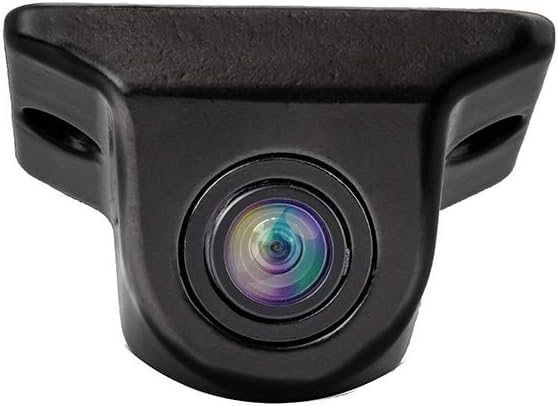
Figure 1: Caliber CAM030 Rear View Камера
Информации за безбедност
Секогаш почитувајте ги следниве безбедносни мерки за да спречите повреда или оштетување на уредот:
- Ensure the vehicle's power is off before beginning installation.
- Консултирајте се со професионалец ако не сте сигурни во врска со некои чекори за инсталација.
- Do not expose the camera to extreme temperatures or direct water immersion.
- Користете ги само испорачаните кабли и додатоци.
- Да се чува подалеку од дофат на деца.
Содржина на пакетот
Проверете дали сите артикли се присутни во пакетот:
- Caliber CAM030 Rear View Камера
- RCA видео кабел
- Кабел за напојување
- Mounting Hardware (screws, bracket)
- Упатство за употреба (овој документ)
Поставување и инсталација
The Caliber CAM030 is designed for aftermarket installation and connects to a compatible monitor via an RCA connector. Follow these steps for proper installation:
- Изберете локација за монтирање: Select a suitable location at the rear of your vehicle, typically near the license plate or bumper, that provides a clear view. The camera is designed for a wide-angle view од 170 степени.
- Монтирајте ја камерата: Secure the camera using the provided mounting bracket and screws. Ensure it is firmly attached and angled correctly for optimal visibility.
- Поврзете напојување: Connect the camera's power cable to the vehicle's reverse light circuit. This allows the camera to automatically power on when the vehicle is put into reverse gear. Ensure proper polarity.
- Поврзете видео кабел: Route the RCA video cable from the camera to your in-car monitor. Connect the RCA plug from the camera to the corresponding RCA input on your monitor.
- Тестирајте ја инсталацијата: Once all connections are made, turn on your vehicle and shift into reverse gear to test the camera's functionality. Adjust the camera's angle if necessary.

Figure 2: Typical mounting location near the license plate.
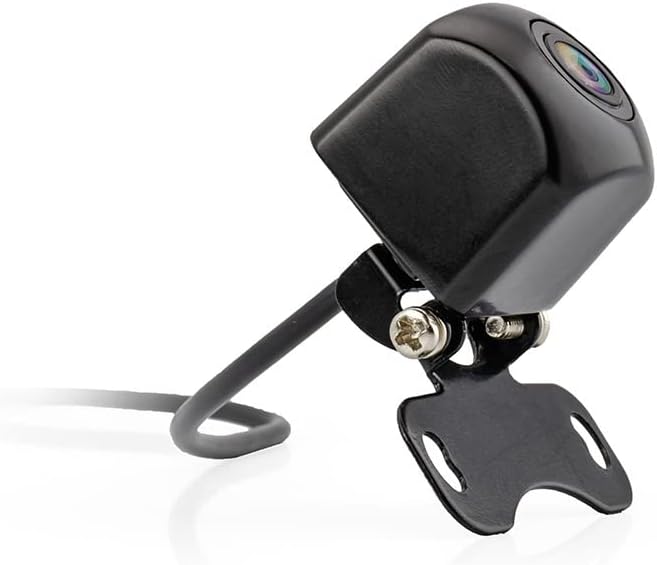
Figure 3: Camera with mounting bracket.

Figure 4: Compact size of the CAM030 camera.
Упатства за работа
The Caliber CAM030 is designed for simple, automatic operation:
- Автоматско активирање: When properly installed and connected to the reverse light circuit, the camera will automatically activate and display the rear view on your connected monitor as soon as you shift your vehicle into reverse gear.
- Широк агол View: The camera features a 170-degree wide-angle lens, providing a broad field of vision to assist with parking and maneuvering.
- Квалитет на слика: The camera captures video in 1080p resolution using CMOS sensor technology for clear images.
Одржување
За да се обезбеди долготрајност и оптимални перформанси на вашиот фотоапарат:
- Чистење: Периодично чистете го објективот на камерата со мека, дamp крпа за отстранување на нечистотија, прашина или дамки од вода што може да го попречат viewНе користете груби хемикалии.
- Инспекција на кабел: Regularly check the cables for any signs of wear, fraying, or damage. Ensure all connections remain secure.
- Заштита на животната средина: While the camera is designed for outdoor use, avoid exposing it to extreme pressure washing or prolonged submersion in water.
Решавање проблеми
| Проблем | Можна причина | Решение |
|---|---|---|
| Нема слика на мониторот |
|
|
| Треперење или искривена слика |
|
|
| Сликата е заматена или нејасна |
|
|
Спецификации
| Карактеристика | Детал |
|---|---|
| Бренд | Калибар |
| Број на модел | КАМ030 |
| Компатибилни уреди | Монитор |
| Тип на конектор | RCA |
| Тип на инсталација | Афтермаркет |
| Резолуција за снимање видео | 1080 стр |
| Технологија на оптички сензор | CMOS |
| Тип на објектив | Широк агол |
| Вистински агол на View | 170 степени |
| Поле на View | 170 степени |
| Димензии на производот | 26Д x 26Ш x 87В милиметри |
| Батерија на полнење | бр |
| Достапност на резервни делови | Информациите не се достапни |
| Гарантирани ажурирања на софтверот до | Информациите не се достапни |
| Прво достапен датум | 5 април 2022 година |
Гаранција и поддршка
For warranty information and technical support, please refer to the documentation provided at the time of purchase or visit the official Caliber webстраница. Зачувајте го доказот за купување за какви било гаранциски побарувања.
Забелешка: Информациите за достапност на резервни делови и ажурирања на софтверот во моментов не се достапни.


