Вовед
This manual provides comprehensive instructions for setting up, operating, maintaining, and troubleshooting your Mercusys MR50G AC1900 Dual-Band Wi-Fi 5 Router. The MR50G is designed to deliver high-speed wireless connectivity with AC1900 speeds, Gigabit Ethernet ports, and advanced features like MU-MIMO and Beamforming.

Слика: напред view of the Mercusys MR50G router, illustrating its dual-band capabilities with 5GHz (1300 Mbps) and 2.4GHz (600 Mbps) speeds.
Водич за поставување
1. Содржина на пакетот
Потврдете дека вашиот пакет ги содржи следниве ставки:
- Mercusys MR50G AC1900 Dual-Band Wi-Fi 5 Router
- Адаптер за напојување
- Етернет кабел
- Quick Installation Guide (User Guide)
2. Физичка врска
Следете ги овие чекори за да го поврзете вашиот рутер:
- Исклучено: Исклучете го напојувањето од модемот и рутерот (доколку е применливо).
- Поврзете го модемот со рутерот: Connect one end of the provided Ethernet cable to the WAN port (usually blue) on your MR50G router and the other end to your modem's Ethernet port.
- Поврзување уреди (опционално): For wired connections, connect your computer or other devices to the LAN ports (yellow) on the MR50G router using Ethernet cables.
- Вклучување: Connect the power adapter to the router's power port and plug it into a power outlet. Power on your modem, then power on the MR50G router.
- Почекајте индикатори: Wait for the router's LED indicators to stabilize. The Power LED should be solid green.
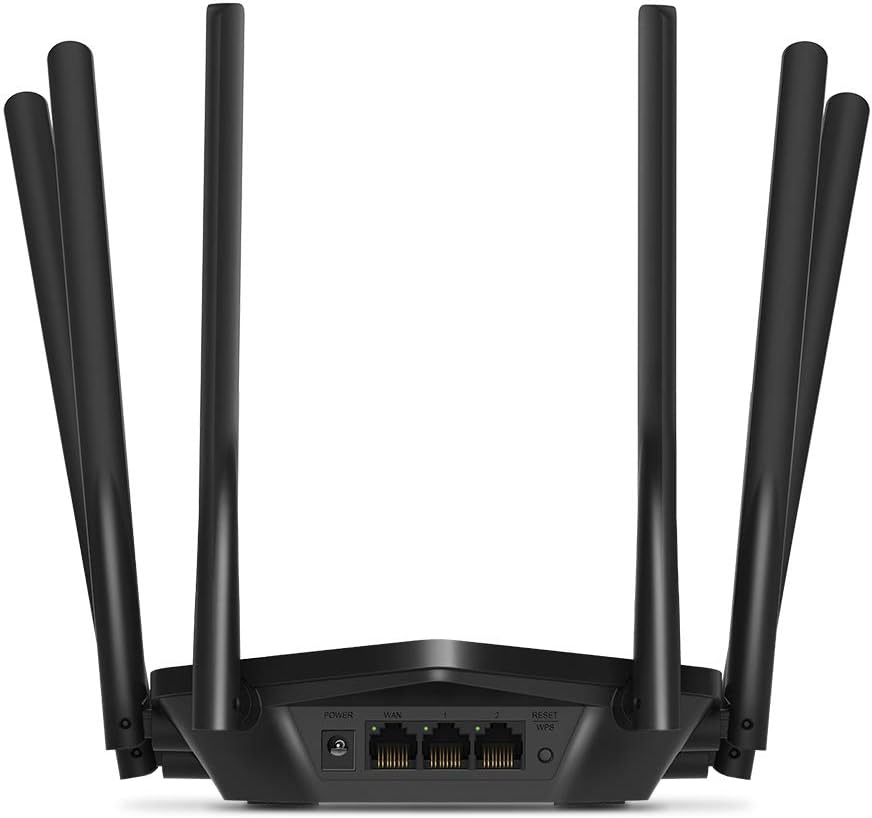
Слика: Заден дел view of the Mercusys MR50G router, illustrating the power input, WAN port (blue), and three LAN ports (yellow) for wired connections, along with the Reset/WPS button.
3. Почетна конфигурација
За да го конфигурирате вашиот рутер за прв пат:
- Поврзете се на Wi-Fi: Connect your computer or mobile device to the router's default Wi-Fi network (SSID and password are typically printed on a label on the bottom of the router).
- Пристап Web Интерфејс: Отвори a web прелистувач и напишете
mwlogin.netor192.168.1.1во лентата за адреси. - Креирај лозинка за најавување: Follow the on-screen instructions to create a login password for the router's management page.
- Follow Quick Setup: The Quick Setup wizard will guide you through basic internet and wireless settings.
Упатства за работа
1. Основни поставки за Wi-Fi
Откако ќе се најавите во web интерфејс:
- Име на мрежата (SSID): Navigate to the Wireless settings to change your Wi-Fi network names (SSIDs) for both 2.4 GHz and 5 GHz bands.
- Лозинка: Set a strong, unique password for your Wi-Fi networks. The MR50G supports WPA3 for enhanced security.
- Тип на безбедност: It is recommended to use WPA2-PSK/WPA3-Personal for optimal security.
2. Работа со двоен опсег
The MR50G operates on two frequency bands:
- 2.4 GHz: Овозможува поширока покриеност и подобра пенетрација низ ѕидови, погодна за општа употреба на интернет и постари уреди.
- 5 GHz: Offers faster speeds and less interference, ideal for bandwidth-intensive activities like 4K streaming and online gaming, but with a shorter range.
You can configure separate SSIDs for each band or use Smart Connect to combine them into a single SSID, allowing the router to automatically assign devices to the optimal band.
3. Access Point Mode
To use the MR50G as an Access Point (AP) to extend an existing wired network:
- Поврзете се: Connect an Ethernet cable from your existing router's LAN port to one of the MR50G's LAN ports (not the WAN port).
- Конфигурирај: Log into the MR50G's web interface, navigate to the Operation Mode settings, and select "Access Point Mode". Follow the prompts to complete the setup.
4. Напредни карактеристики
- MU-MIMO: Технологијата за повеќе корисници, повеќе влезови и повеќе излези му овозможува на рутерот да комуницира со повеќе уреди истовремено, подобрувајќи ја ефикасноста на мрежата.
- Формирање на зрак: Ги фокусира Wi-Fi сигналите кон поврзаните уреди, зголемувајќи ја јачината и опсегот на сигналот.
- Поддршка за VPN: The router supports VPN functionality, allowing for secure remote access or connection to VPN services. Refer to the router's web interface for specific VPN client/server configurations.
- Родителска контрола: Управувајте и ограничете го пристапот до интернет за одредени уреди или корисници.
- Мрежа за гости: Создадете посебна Wi-Fi мрежа за гостите, со што вашата главна мрежа ќе биде безбедна.
Одржување
1. Ажурирања на фирмверот
Regularly check for and install firmware updates to ensure optimal performance, security, and access to new features. Firmware updates can typically be found in the router's web interface under System Tools or Advanced settings.
2. Ресетирање на рутерот
If you encounter persistent issues or forget your login password, you may need to reset the router to its factory default settings:
- With the router powered on, press and hold the Reset/WPS button on the back panel for approximately 5-10 seconds until the LED indicators flash.
- Release the button and wait for the router to restart. All settings will be restored to factory defaults.
3. Оптимално поставување
For the best Wi-Fi coverage and performance:
- Place the router in a central location in your home or office.
- Избегнувајте да го поставувате во близина на пречки како што се дебели ѕидови, метални предмети или големи апарати (микробранови печки, фрижидери) што можат да пречат на Wi-Fi сигналите.
- Подигнете го рутерот доколку е можно, бидејќи Wi-Fi сигналите имаат тенденција да се шират надолу.

Image: Mercusys MR50G router positioned on a table, demonstrating a typical placement for optimal signal distribution within a living space.
Решавање проблеми
1. Нема пристап до интернет
- Проверете ги врските: Проверете дали сите Ethernet кабли се безбедно поврзани со точните порти (WAN кон модем, LAN кон уреди).
- Рестартирајте ги уредите: Вклучете го модемот, потоа рутерот, а потоа и поврзаните уреди.
- Check WAN LED: Verify that the WAN LED on the router is lit, indicating a connection to the modem.
- Статус на интернет-провајдер: Контактирајте го вашиот давател на интернет услуги (ISP) за да потврдите дека нема услуга надворtagе во вашата област.
2. Бавни брзини на Wi-Fi
- Поставување на рутерот: Ensure the router is placed optimally (refer to "Optimal Placement" section).
- Пречки: Move the router away from other electronic devices that may cause interference.
- Избор на бенд: For speed-critical applications, ensure your device is connected to the 5 GHz band.
- Оптимизација на канали: Во рутерот web interface, try changing the Wi-Fi channel for both 2.4 GHz and 5 GHz bands to a less congested one.
- Фирмвер: Осигурајте се дека фирмверот на вашиот рутер е ажуриран.
3. Cannot Access Router Management Page
- IP адреса: Ensure you are using the correct address (
mwlogin.netor192.168.1.1). - Жична врска: Try accessing the page from a computer connected directly to the router via an Ethernet cable.
- Исчисти ја кеш меморијата на прелистувачот: Исчистете ја вашата web кешот и колачињата на прелистувачот или обидете се со друг прелистувач.
- Заштитен ѕид/Антивирус: Привремено оневозможете го секој заштитен ѕид или антивирусен софтвер на вашиот компјутер што може да го блокира пристапот.
- Ресетирај го рутерот: If all else fails, perform a factory reset (refer to "Resetting the Router" section).
Спецификации
| Модел | MR50G (EU) |
| Безжични стандарди | IEEE 802.11a/b/g/n/ac |
| Фреквенција | 2.4 GHz и 5 GHz (двоен опсег) |
| Стапка на податоци | AC1900 (600 Mbps на 2.4 GHz, 1300 Mbps на 5 GHz) |
| Етернет порти | 1x гигабитен WAN порт, 3x гигабитен LAN порти |
| Антени | 6x фиксни омни-дирекционални антени |
| Безбедност | WPA-PSK / WPA2-PSK / WPA3-Personal |
| Димензии (Ш x Д x В) | 15.72 x 17.56 x 4.5 cm |
| Тежина | 450 гр |
| Посебни карактеристики | MU-MIMO, Beamforming, Access Point Mode, VPN Support, Parental Controls, Guest Network |
| Влез на енергија | 100-240V ~ 50/60Hz |
Гаранција и поддршка
Mercusys products come with a limited warranty. For detailed warranty information, please refer to the warranty card included with your product or visit the official Mercusys webсајт.
For technical support, firmware updates, and additional resources, please visit the Mercusys support webстраница. Обично таму можете да најдете информации за контакт и често поставувани прашања.
Official Mercusys Webсајт: www.mercusys.com