Вовед
This manual provides comprehensive instructions for the SHARP EL501TBGR Scientific Calculator. Designed for high school students, this calculator features a 1-line display capable of showing up to 10 digits and includes 146 mathematical, statistical, and trigonometric functions. Please read this manual thoroughly to understand the calculator's functions and ensure proper use.
Поставување
Инсталација на батерија
The SHARP EL501TBGR calculator is powered by a conventional battery (1 LR44 battery, included). To install or replace the battery:
- Осигурајте се дека калкулаторот е исклучен.
- Пронајдете го капакот на преградата за батерии на задната страна од калкулаторот.
- Внимателно отстранете го капакот.
- Вметнете ја батеријата LR44, внимавајќи на точниот поларитет (+/-) како што е наведено во внатрешноста на преградата.
- Добро заменете го капакот на преградата за батерии.
Почетно вклучување
Притиснете го ON/C button to turn on the calculator. The display should show "0" or a similar initial state. If the display does not appear, recheck the battery installation.
Упатства за работа
The SHARP EL501TBGR features a clear 1-line, 10-digit display. It offers 146 functions covering various mathematical, statistical, and trigonometric calculations.
Основни аритметички операции
Извршете стандардни пресметки користејќи ги нумеричките копчиња и операциските копчиња (+, -, ×, ÷). Притиснете = за да се прикаже резултатот.
- Додаток: Внесете го првиот број, притиснете +, внесете го вториот број, притиснете =.
- Одземање: Внесете го првиот број, притиснете -, внесете го вториот број, притиснете =.
- Множење: Внесете го првиот број, притиснете ×, внесете го вториот број, притиснете =.
- Поделба: Внесете го првиот број, притиснете ÷, внесете го вториот број, притиснете =.
Accessing Secondary Functions
Многу копчиња имаат секундарни функции испечатени над нив. За да пристапите до нив, притиснете го 2-ри Ф key (second function key) first, then the desired function key.
За прample, to calculate the inverse sine (sin-1), притиснете 2-ри Ф, тогаш гревот.
Key Layout Overview
Refer to the image below for a visual representation of the calculator's key layout and display.

Слика 1: Предна страна view of the SHARP EL501TBGR Scientific Calculator, showing the display and all keys. This image illustrates the arrangement of numerical, operational, and function keys, including the 2nd F key for secondary functions.
Specific Functions (Exampлес)
- Тригонометриски функции: гревот, cos, тен and their inverses (arc hyp, гревот-1, cos-1, тен-1 accessed via 2-ри Ф).
- Логаритамски функции: дневник (заеднички логаритам) и ln (природен логаритам).
- Функции на моќност и корен: x2, √ (square root), xy (моќ)
- Функции на меморија: КНИ (продавница), RCL (потсети), M+ (memory plus).
- Статистички функции: Access statistical modes via СТАТ key. Refer to the calculator's on-screen indicators for specific statistical operations.
- Единици за агол: Switch between Degrees (ДЕГ), Radians (ДСГ), and Gradians (ДСГ with 2nd F) using the ДСГ клуч.
For a complete list and detailed usage of all 146 functions, please refer to the comprehensive function guide typically provided with the product packaging or available on the manufacturer's webсајт.
Одржување
Чистење
За чистење на калкулаторот, користете мека, сува крпа. За тврдокорна нечистотија, малку премачкајтеampen the cloth with water or a mild, non-abrasive cleaner. Avoid using strong solvents, alcohol, or abrasive materials, as these can damage the plastic casing и дисплеј.
Замена на батеријата
When the display becomes dim or the calculator functions erratically, it may be time to replace the LR44 battery. Follow the battery installation steps outlined in the "Setup" section. Dispose of old batteries according to local regulations.
Складирање
Store the calculator in a cool, dry place away from direct sunlight, extreme temperatures, and high humidity. If storing for an extended period, it is recommended to remove the battery to prevent leakage.
Решавање проблеми
- Калкулаторот не се вклучува:
- Check if the battery is correctly installed with the proper polarity.
- Заменете ја батеријата со нова LR44 батерија.
- Екранот е затемнет или празен:
- Батеријата може да е празна. Заменете ја батеријата.
- Ensure the calculator is not exposed to extreme cold, which can affect LCD performance.
- Неточни резултати од пресметката:
- Verify that the correct mode (e.g., DEG/RAD/GRAD) is selected for trigonometric calculations.
- Осигурајте се дека сите претходни пресметки се избришани со притискање на ON/C or CE.
- If the issue persists, try resetting the calculator by pressing the РЕСЕТИРАЈ button (usually a small recessed button requiring a thin object like a paperclip). Note that resetting may clear memory and settings.
- Копчињата не реагираат:
- Исчистете ја околината околу копчињата што не реагираат за да ги отстраните сите остатоци.
- If the calculator has been dropped or subjected to impact, internal damage may have occurred.
If troubleshooting steps do not resolve the issue, please contact SHARP customer support for further assistance.
Спецификации
| Модел | EL501TBGR |
| Бренд | ОСТР |
| Тип на дисплеј | 1-line LCD, 10 digits |
| Број на функции | 146 (Mathematical, Statistical, Trigonometric) |
| Извор на енергија | Battery Powered (1 x LR44, included) |
| Тип на материјал | Пластика |
| Димензии на производот | 12.7 x 7.25 x 1.3 cm |
| Тежина | 140 гр |
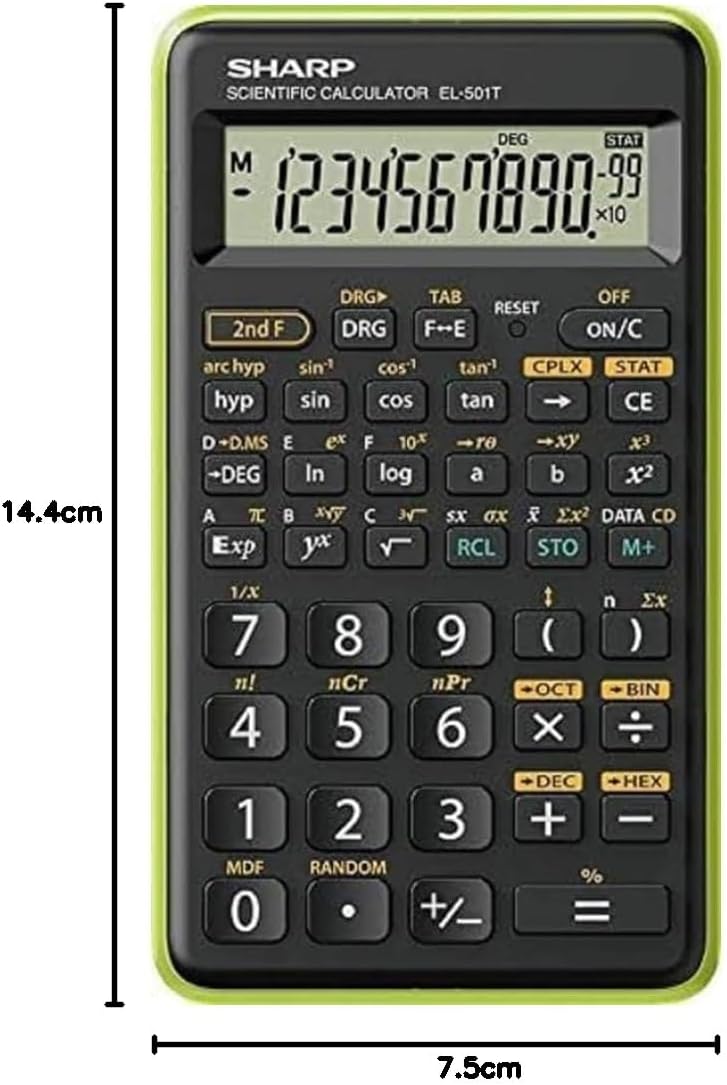
Слика 2: Страна view of the SHARP EL501TBGR Scientific Calculator, illustrating its physical dimensions: approximately 14.4 cm in height and 7.5 cm in width.
Гаранција и поддршка
For warranty information, please refer to the documentation included with your purchase or visit the official SHARP website. For technical support, product inquiries, or service, please contact SHARP customer service directly. Contact details can typically be found on the SHARP official webна локацијата или на пакувањето на производот.


