Вовед
The Meross Smart Dimmer Switch (MSS560) is designed to provide intelligent control over your lighting. This single-pole dimmer switch allows you to remotely control, dim, and schedule your lights using the Meross app, Apple HomeKit, Amazon Alexa, or Google Assistant. It requires a neutral wire for installation and operates on a 2.4GHz Wi-Fi network.
Информации за безбедност
- Потребна е неутрална жица: Ensure your electrical box has a neutral wire (typically white) before installation. If unsure, consult a qualified electrician.
- Исклучување пред инсталацијата: Always turn off power at the circuit breaker before installing or servicing the switch to prevent electrical shock.
- Single Pole Setup Only: This switch is designed for single pole configurations only. It is not compatible with 3-way or multi-way switch setups.
- Компатибилност со светилки: Works with non-smart dimming bulbs. Maximum wattage: 400W for incandescent (INC), 150W for CFL & LED bulbs. Do not use with smart bulbs.
- Потребни Wi-Fi конекции: Supports 2.4GHz Wi-Fi networks only. 5GHz Wi-Fi is not supported. No hub is required.
- Огноотпорен материјал: The switch housing is made of PC+ABS fire-retardant material for safety.
- Заштита од преоптоварување: Certified by FCC/ETL, the device includes protection against electrical overload.
Што има во кутијата
- Meross Smart Dimmer Switch (MSS560)
- Водич за брза инсталација
- Wireични навртки
- Завртки за монтирање
- Faceplate (standard size)
Поставување
Список за проверка пред инсталацијата
- Verify your electrical box has a neutral wire (white).
- Ensure you have a 2.4GHz Wi-Fi network.
- Confirm your setup is single pole (not 3-way).
- Check bulb compatibility (non-smart dimmable LED/CFL/INC).

Image: Diagram illustrating the necessity of a neutral wire and compatible bulb types (LED, CFL, INC) with wattage limits, and incompatibility with smart bulbs.

Image: Important notes on switch compatibility, including single pole setup, 2.4GHz Wi-Fi, neutral wire, and non-smart dimming bulb support.
Инсталација на хардвер
- Исклучете го напојувањето: Locate your circuit breaker and turn off the power to the switch you are replacing. Verify power is off using a voltagд тестер.
- Отстранете го стариот прекинувач: Carefully remove the faceplate and unscrew the existing switch from the electrical box. Pull the switch outward without touching any wires.
- Идентификувајте ги жиците: Identify the Live (black/red), Load (brown/black), Neutral (white), and Ground (green/bare copper) wires. Label them if necessary.
- Поврзете нов прекинувач: Use the provided wire nuts to connect the corresponding wires of the Meross Smart Dimmer Switch to your home's electrical wires. Ensure all connections are secure.
- Безбеден прекинувач: Carefully push the wires and the new switch into the electrical box. Screw the switch to the box and attach the faceplate.
- Вратете ја моќноста: Turn on the power at your circuit breaker.
Video: Official Meross guide on how to install the HomeKit smart dimmer switch, demonstrating the wiring process and safety precautions.
Поставување и спарување на апликации
- Преземете ја апликацијата Meross: Download the Meross app from the App Store or Google Play.
- Додај уред: Open the Meross app, tap the '+' icon to add a new device, and select the Smart Dimmer Switch. Follow the in-app instructions.
- Поврзете се на Wi-Fi: Connect the switch to your 2.4GHz Wi-Fi network.
- HomeKit Setup (Optional): If using Apple HomeKit, scan the HomeKit setup code located on the device or its packaging. You may need to manually enter the 8-digit code.
- Calibrate Dimming Range: Use the app to set the maximum and minimum light levels for optimal dimming performance with your specific bulbs.
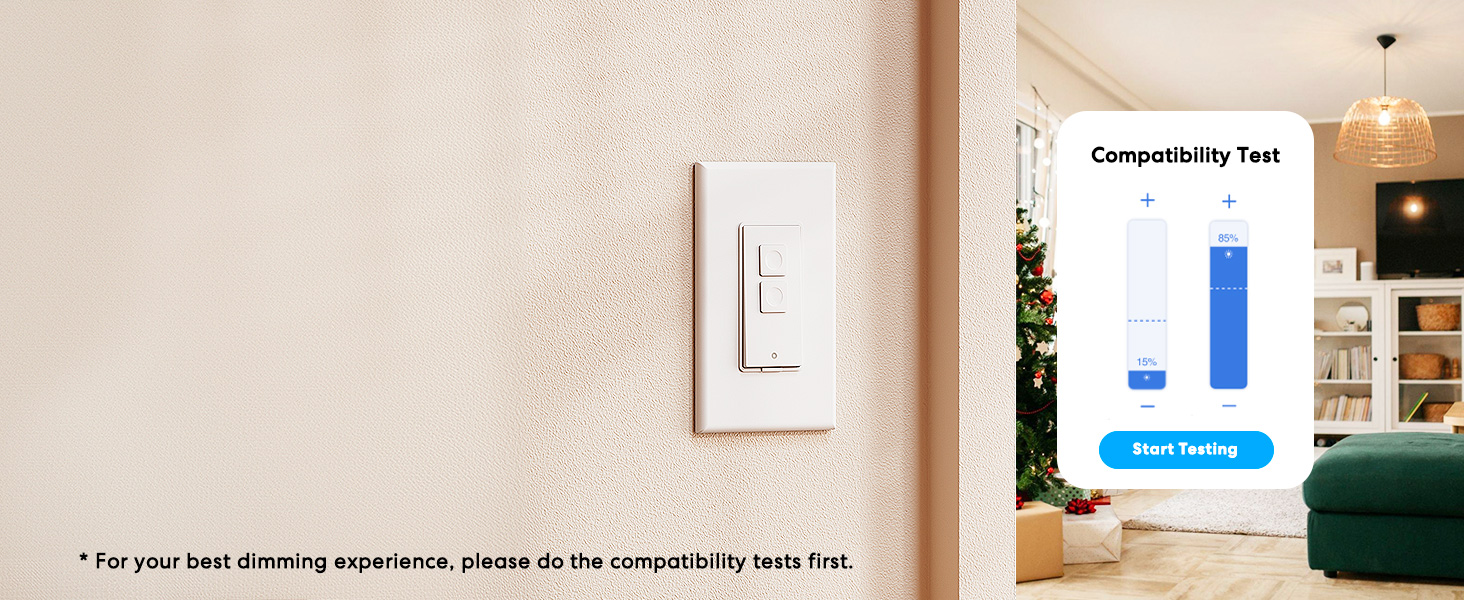
Image: Meross app interface demonstrating the dimming compatibility test to optimize light levels.
Упатства за работа
Рачна контрола
The Meross Smart Dimmer Switch features physical buttons for direct control:
- Копче за вклучување/исклучување: Press the main button to turn lights on or off.
- Копчиња за затемнување: Use the smaller up/down buttons to adjust brightness levels.
Контрола на апликацијата
Control your lights from anywhere with internet access using the Meross app:
- Далечинско вклучување/исклучување: Tap the switch icon in the app to toggle lights.
- Спалување: Use the slider in the app to precisely adjust brightness from 0% to 100%.

Image: A user controlling lights remotely via the Meross app on a smartphone.
Гласовна контрола
The Meross Smart Dimmer Switch is compatible with leading voice assistants:
- Apple HomeKit/Siri: Say "Hey Siri, turn on the light" or "Hey Siri, dim the light to 50%".
- Амазон Алекса: Say "Alexa, turn on the light" or "Alexa, dim the light to 20%".
- Google Assistant: Say "Hey Google, turn on the light" or "Hey Google, dim the light to 90%".

Image: Visual representation of voice commands for Siri, Alexa, and Google Assistant to control light brightness.
Scheduling & Scenes
Automate your lighting to suit your lifestyle:
- Распореди: Set specific times for lights to turn on/off or dim automatically. Supports sunrise and sunset settings.
- Сцени: Create custom scenes for different moods or activities (e.g., "Movie Night" with dimmed lights).

Image: Meross app interface displaying options for setting scenes, timers, and schedules for automated lighting control.
Одржување
- Чистење: Wipe the switch and faceplate with a soft, dry cloth. Do not use liquid cleaners or aerosols.
- Ажурирања на фирмверот: Редовно проверувајте ја апликацијата Meross за ажурирања на фирмверот за да обезбедите оптимални перформанси и безбедност.
Решавање проблеми
- Прекинувачот не реагира: If the switch is unresponsive or the indicator light is red, try pressing the small power reset button located at the bottom of the switch.
- Проблеми со поврзувањето со Wi-Fi: Ensure your smartphone is connected to a 2.4GHz Wi-Fi network during setup. If the switch loses connection, verify your router is functioning correctly and the switch is within range.
- Проблеми со затемнување: If lights flicker or do not dim correctly, re-calibrate the dimming range in the Meross app. Ensure you are using compatible non-smart dimmable bulbs.
- HomeKit Remote Control: For remote control via HomeKit, an additional networked Apple device (HomePod, Apple TV 4K/HD, or iPad) must be set up as a HomeKit bridge and remain online.
Спецификации
| Карактеристика | Спецификација |
|---|---|
| Режим на работа | ВКЛУЧЕНО ИСКЛУЧЕНО |
| Тековен рејтинг | 4 Amps |
| Оперативен волtage | 120 волти |
| Тип на контакт | Нормално отворено |
| Тип на конектор | Clamp |
| Терминал | Сечилото |
| Димензии на ставката (Д x Ш x В) | 4.7 x 2.8 x 1.5 инчи |
| Тип на коло | Еднонасочно (Еден пол) |
| Тип на активатор | Притиснете го копчето |
| Материјал за контакт | Бакар |
| Оценка за меѓународна заштита | IP00 |
| Број на позиции | 1 |
| Оценка за горната температура | 40 степени Целзиусови |
| Тип на контролер | Amazon Alexa, Apple HomeKit, Google Assistant |
| Контролен метод | Глас, апликација |
| Протокол за поврзување | Wi-Fi (само 2.4 GHz) |
| Боја | Бело |
| Ватtage | 400 watts (INC), 150 watts (CFL & LED) |
| Материјал | Plastic (PC+ABS fire-retardant) |
Гаранција и поддршка
Гаранција
The Meross Smart Dimmer Switch typically comes with a 1-year warranty. Please refer to your product packaging or the Meross webстраница за специфични услови за гаранција.
Поддршка
If you have any questions regarding your switch type, installation, or Wi-Fi connections, please contact Meross customer support. You can usually find contact information within the Meross app or on the official Meross webсајт.
Дополнителни информации
Видео: Оверview of Meross smart home products, showcasing various features and benefits of integrating smart devices into your home.


