1. Вовед
Welcome to the user manual for your Behringer RHYTHM DESIGNER RD-6 Analog Drum Machine. This device is designed to provide authentic analog drum sounds with modern connectivity and sequencing capabilities. The RD-6 features true analog circuitry, 8 distinct drum voices, a 16-step sequencer, and a built-in distortion effect. Please read this manual thoroughly to ensure proper setup, operation, and maintenance, allowing you to fully explore its creative potential.
2. Важни безбедносни инструкции
- Прочитајте ги овие упатства.
- Чувајте ги овие упатства.
- Внимавајте на сите предупредувања.
- Следете ги сите инструкции.
- Не користете го овој апарат во близина на вода.
- Чистете само со сува крпа.
- Не блокирајте ги отворите за вентилација. Инсталирајте во согласност со упатствата на производителот.
- Не инсталирајте во близина на извори на топлина како што се радијатори, топлински регистри, шпорети или други апарати (вклучувајќи ampлајфикатори) кои произведуваат топлина.
- Не ја нарушувајте безбедносната намена на поларизираниот или заземјувачкиот приклучок. Поларизираниот приклучок има две сечила со едно пошироко од другото. Приклучокот од типот на заземјување има две сечила и трет заземјувач. Широкото сечило или третиот жлеб се обезбедени за ваша безбедност. Ако дадениот приклучок не се вклопува во вашиот штекер, консултирајте се со електричар за замена на застарениот штекер.
- Заштитете го кабелот за напојување од газење или стискање, особено на приклучоците, приклучните приклучоци и местото каде што тие излегуваат од апаратот.
- Користете само додатоци/додатоци наведени од производителот.
- Користете го само со количка, држач, статив, држач или маса назначена од производителот или се продава со апаратот. Кога се користи количка, внимавајте кога ја преместувате комбинацијата количка/апарат за да избегнете повреда од превртување.
- Исклучете го овој апарат од струја за време на громови или кога не го користите подолг временски период.
- Целото сервисирање упатете го на квалификуван сервисен персонал. Сервисирањето е потребно кога апаратот е оштетен на кој било начин, како што е оштетен кабелот за напојување или приклучокот, течноста е истурена или предмети паднале во апаратот, апаратот бил изложен на дожд или влага, не работи нормално , или е исфрлен.
3. Што има во кутијата
- Behringer RHYTHM DESIGNER RD-6 Analog Drum Machine
- Адаптер за напојување
- USB кабел
- Водич за брз почеток
4. Controls and Connectors Overview
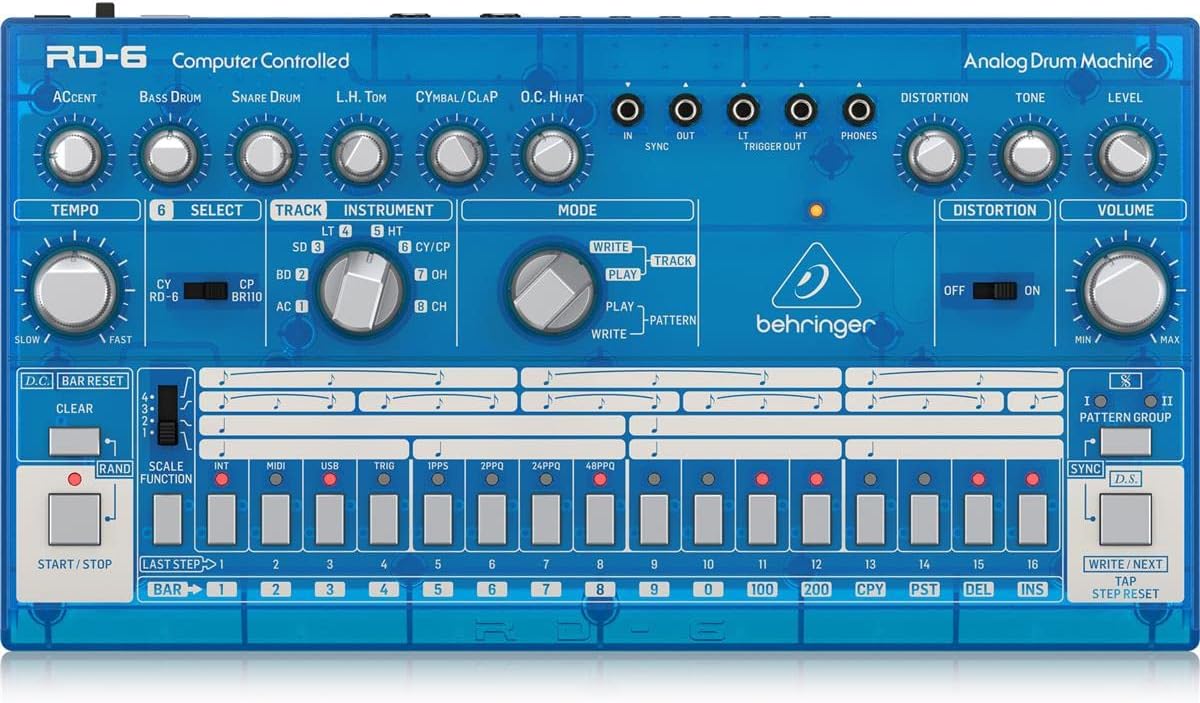
The Behringer RD-6 features an intuitive layout for easy access to all its functions, designed for both performance and studio integration.
4.1 Контроли на предниот панел

Слика: Од горе надолу view of the Behringer RD-6 front panel, showing various knobs, buttons, and the 16-step sequencer.
- ТЕМПО: Adjusts the playback speed of patterns.
- АКЦЕНТ: Controls the intensity of accented steps.
- BASS DRUM, SNARE DRUM, L.H. TOM, CYMBAL/CLAP, O.C. HI HAT: Individual controls for tone, decay, and level of each drum voice.
- ДИСТОРЗИЈА: Activates the built-in distortion effect.
- TONE/LEVEL (Distortion): Adjusts the character and intensity of the distortion.
- ВОЛУМЕН: Главна контрола на јачината на звукот на излезот.
- ИЗБЕРИ: Used to select various functions or parameters.
- TRACK/INSTRUMENT: Selects the current track or instrument for editing.
- РЕЖИМ (ПИШУВАЊЕ/РЕПУШТАЊЕ/ШЕМА): Switches between pattern writing, playback, and pattern selection modes.
- 16 STEP BUTTONS: Used to program steps in a pattern or select patterns.
- СТАРТ / СТОП: Initiates or halts pattern playback.
- ЈАСНИ: Erases patterns or steps.
- SCALE FUNCTION: Adjusts the timing scale for patterns.
- СИНИНЦИРАЈ: Selects the synchronization source (Internal, MIDI, USB, Clock).
- ПИШУВАЈ/СЛЕДНО: Saves patterns or advances to the next step/pattern.
- TAP/STEP RESET: Used for tap tempo or resetting the step sequencer.
4.2 Конектори за задниот панел
Слика: Заден дел view of the Behringer RD-6, highlighting the various audio outputs, MIDI ports, USB port, and power input.
- VOICE OUT (OH/CH, CP, CY, LT/HT, SD, BD): Individual 3.5 mm TS outputs for each drum voice, allowing for external processing.
- МЕШЕТЕ СЕ: 6.35 mm TS output for the main stereo mix.
- СТАРТ / СТОП: 3.5 mm TS input for external start/stop control.
- MIDI ВЛЕЗ/ИЗЛЕЗ/НИЗ: 5-pin DIN connectors for MIDI communication with other devices.
- USB: USB-B port for MIDI over USB and firmware updates.
- POWER DC INPUT: Поврзување за вклучениот адаптер за напојување од 9V DC.
5. Почетно поставување
5.1 Поврзување за напојување
Поврзете го вклучениот адаптер за напојување од 9V DC со DC ВЛЕЗ on the rear panel. Plug the adapter into a suitable power outlet. Ensure the МОЌ switch is in the OFF position before connecting the power supply.
5.2 Аудио поврзување
For a combined stereo mix, connect the Измешајте (6.35 mm TS) to your mixer or audio interface. For individual drum sound processing and recording, use the dedicated VOICE OUT jacks (3.5 mm TS) for each drum voice (OH/CH, CP, CY, LT/HT, SD, BD).
5.3 USB/MIDI Connection
Поврзете го USB port to your computer for MIDI control and firmware updates. Use the MIDI IN/OUT/THRU ports for connecting to other MIDI devices such as synthesizers, sequencers, or MIDI interfaces.
6. Основно работење
6.1 Вклучување/исклучување
Превртете го МОЌ switch on the rear panel to the ON position. The unit will power up and be ready for use. To power off, flip the switch back to OFF.
6.2 Creating a Pattern
- Select a pattern bank (I or II) using the PATTERN GROUP копчиња.
- Притиснете го ПИШИ button to enter pattern write mode. The ПИШИ LED ќе светне.
- Select an instrument (e.g., Bass Drum, Snare Drum) using the ИНСТРУМЕНТ копчето за избирање.
- Користете го 16 step buttons to program your rhythm. Pressing a button will activate or deactivate a step for the selected instrument. Illuminated buttons indicate active steps.
- Adjust parameters like АКЦЕНТ, ТЕМПО, and individual drum sound controls (e.g., Tone, Decay) as desired to shape your sound.
- Притиснете ИГРАЈ to hear your pattern.
- Притиснете ПИШИ again to exit write mode and save the pattern.
6.3 Real-time Recording
Додека во ИГРАЈ режим, притиснете го ПИШИ button to enable real-time recording. The ПИШИ LED will flash. Play the drum sounds using the step buttons or an external MIDI controller. The notes will be recorded into the current pattern. Press ПИШИ again to stop real-time recording.
6.4 Using Distortion
Вклучете го ДИСТОРЦИЈА switch to activate the built-in distortion effect. Adjust the ТОН и НИВО knobs to shape the distortion character and intensity to add grit and aggression to your drum sounds.
7. MIDI и USB поврзување
7.1 MIDI Control
The RD-6 supports MIDI In, Out, and Thru via its 5-pin DIN connectors. Connect to other MIDI devices to synchronize tempo, trigger sounds, or control parameters. The MIDI THRU port allows you to daisy-chain multiple MIDI devices. Refer to the full MIDI implementation chart in the comprehensive manual for detailed CC messages and settings.
7.2 USB Audio/MIDI
The USB port provides class-compliant MIDI connectivity to your computer. This allows the RD-6 to be used as a MIDI controller or to receive MIDI data from your Digital Audio Workstation (DAW) for seamless integration into your production environment.
8. Одржување
8.1 Чистење
Keep the unit clean using a soft, dry cloth. Avoid abrasive cleaners, solvents, or waxes, as these can damage the finish and internal components.
8.2 Складирање
Protect the RD-6 from dust, moisture, and extreme temperatures. When not in use for extended periods, store it in a cool, dry place, preferably in its original packaging or a protective case.
8.3 Сервисирање
Do not attempt to service the unit yourself. Refer all servicing to qualified service personnel to prevent electric shock or damage to the device.
9 Смена на проблеми
9.1 Нема излез на звук
- Check that the power adapter is securely connected and the unit is powered ON.
- Verify all audio cables are correctly connected to the Измешајте or individual VOICE OUT ports and to your audio system.
- Ensure the master ВОЛУМЕН knob and individual instrument level knobs are turned up.
- Confirm that a pattern is playing and that the selected instrument has active steps.
9.2 MIDI Not Responding
- Verify MIDI cables are correctly connected to the MIDI ВНАТРЕШЕ ports of the RD-6 and your external device.
- Check that the MIDI channel settings on both the RD-6 and your external device match.
- Ensure the RD-6 is in the correct sync mode (e.g., MIDI Sync, USB Sync) if synchronizing with an external clock.
9.3 Неочекувано однесување
If the unit exhibits unexpected behavior, try powering it off and on again. If the issue persists, a factory reset may resolve it. Refer to the comprehensive manual for instructions on how to perform a factory reset.
10. Технички спецификации
| Карактеристика | Детал |
|---|---|
| Име на моделот | RD-6 |
| Бренд | Берингер |
| Тежина на ставката | 1.98 фунти (900 грама) |
| Димензии на производот | 17.2 x 8.95 x 3.8 инчи |
| Материјал за тело | Coal Fiber |
| Материјал | Нерѓосувачки челик |
| Боја | Сино |
| Тип на конектор | USB |
| Voltage | 230 волти |
| Број на модел на ставка | 000-EE204-00010 |
| UPC | 644216639205 |
| Производител | Музичко племе САД |
10.1 Клучни карактеристики
- True analog circuitry for authentic sound reproduction.
- 8 original drum sounds, including Bass Drum, Snare Drum, Low Tom, High Tom, Cymbal, Clap, Open Hi-Hat, and Closed Hi-Hat.
- 16-step sequencer with 256 patterns for complex rhythm creation.
- Built-in distortion effect with Tone and Level controls.
- USB/MIDI connectivity for seamless integration with modern DAWs and external MIDI devices.
- 7 independent analog outputs for flexible mixing and individual drum sound processing.
- Multiple sync options: USB, MIDI, Clock, and Internal.
11. Гаранција и поддршка
За детални информации за гаранцијата, регистрација на производот и техничка поддршка, посетете ја официјалната страница на Behringer. website or contact your local distributor. It is recommended to keep your proof of purchase for any warranty claims.


