Вовед
The SANWA Multi Device Bluetooth Keyboard with Touchpad (Model GSKBBT066) is designed for versatile use across various operating systems and devices. This compact, rechargeable keyboard features a built-in touchpad, multi-device switching capabilities, and convenient shortcut keys, enhancing productivity and entertainment experiences.
Поставување
1. Полнење на тастатурата
Before initial use, fully charge the keyboard. Connect the provided USB charging cable to the keyboard's charging port and a USB power source. A full charge typically takes approximately 2 hours and provides up to 30 hours of constant use.

Image: The SANWA Bluetooth keyboard connected via USB cable to a wall adapter for charging.
2. Спарување со уреди
The keyboard supports connection to up to three Bluetooth devices simultaneously. Use the dedicated pairing buttons to switch between connected devices.
- Осигурајте се дека тастатурата е наполнета и вклучена.
- Притиснете го Fn key and one of the device selection keys (1, 2, или 3) simultaneously to select a channel. The corresponding LED will blink.
- Притиснете го Таб key labeled 'Pairing' to enter pairing mode. The selected channel's LED will blink rapidly.
- On your device (laptop, tablet, smartphone), enable Bluetooth and search for available devices.
- Select 'SANWA GSKBBT066' from the list of found devices.
- Следете ги сите предупредувања на екранот за да го завршите процесот на спарување.
- За да се префрлате помеѓу спарени уреди, едноставно притиснете Fn + 1, Fn + 2, или Fn + 3.

Image: A close-up of the keyboard showing the 'Fn' key, 'Tab' (Pairing) key, and the device selection LEDs (1, 2, 3).
Video: An instructional video demonstrating the features and usage of the SANWA Bluetooth Rechargeable Keyboard with Touchpad.
Упатства за работа
Keyboard Layout and Typing
The keyboard features a standard QWERTY layout with comfortable pantograph scissor-structure keys, designed for sensitive response and reduced typing noise. The layout is optimized for efficient typing.

Слика: Од горе надолу view of the SANWA Bluetooth keyboard, showcasing its full layout.

Image: Close-up of the keyboard keys, illustrating the pantograph scissor-structure for comfortable typing.
Копчиња за кратенки
The keyboard includes 20 practical shortcut keys for quick access to various functions and media controls. These keys are typically activated by pressing the Fn key in combination with the corresponding function key (F1-F12) or dedicated media keys.
- F1: Осветленост надолу
- F2: Осветленост горе
- F3: Функција за пребарување
- F4: Задача View
- F5: Switch to Desktop
- F6: Префрли апликации
- F7: Исклучи звук
- F8: Волумен -
- F9: Волумен +
- F10: Претходна песна
- F11: Пушти/Пауза
- F12: Следна песна
- Dedicated keys for Virtual Keyboard, Input Language Switch, and Open Browser.
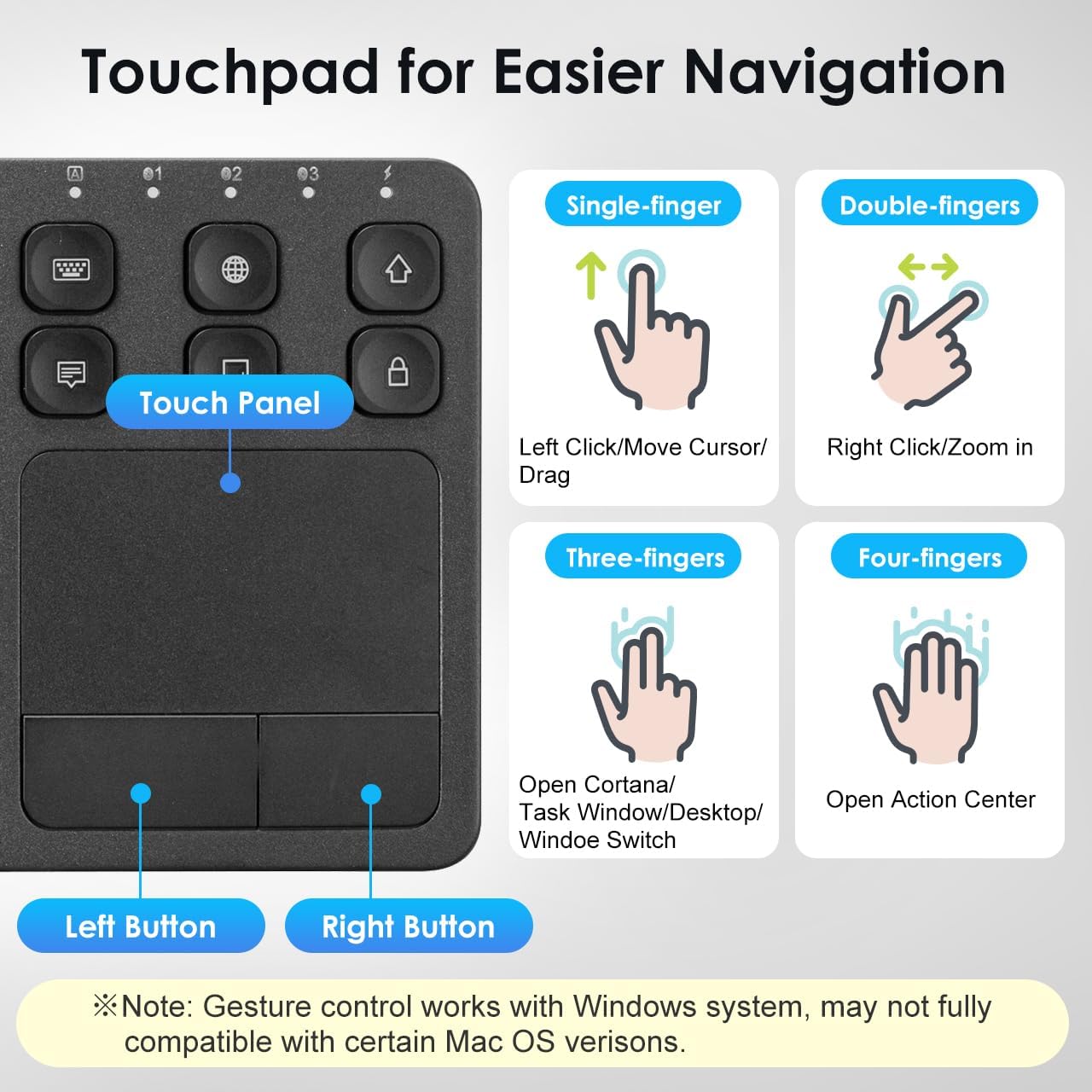
Image: The keyboard layout with icons indicating the functions of the shortcut keys.
Touchpad Functionality and Gestures (Windows System)
The integrated multi-touch touchpad provides effortless navigation. It supports various finger gestures, primarily optimized for Windows systems. Note that gesture compatibility may vary with certain macOS versions.

Слика: Детална view of the touchpad and its gesture guide.
| Гест | Функција |
|---|---|
| Single-finger tap/drag | Left Click / Move Cursor / Drag |
| Допрете со два прста | Десен клик |
| Стискање со два прста | Зумирајте / одзумирате |
| Скролувајте со два прста | Страница нагоре / Страница надолу |
| Допрете со три прста | Open Cortana / Task Window / Desktop / Window Switch |
| Допрете со четири прсти | Отворен центар за акција |
Компатибилност
The SANWA Bluetooth Keyboard with Touchpad is broadly compatible with a range of operating systems and devices, making it a versatile tool for various computing needs.
- Оперативни системи: Windows 13/11/10/8.1/8/7/XP/Vista/98/2000/Me, macOS 10.12-10.15, Android 7.0-10, iPad OS13, iOS13 and later versions.
- Компатибилни уреди: Desktop computers, laptops, cell phones, tablets, Mac, iPad, iPhone, Android TV BOX, Smart TVs, HTPC.
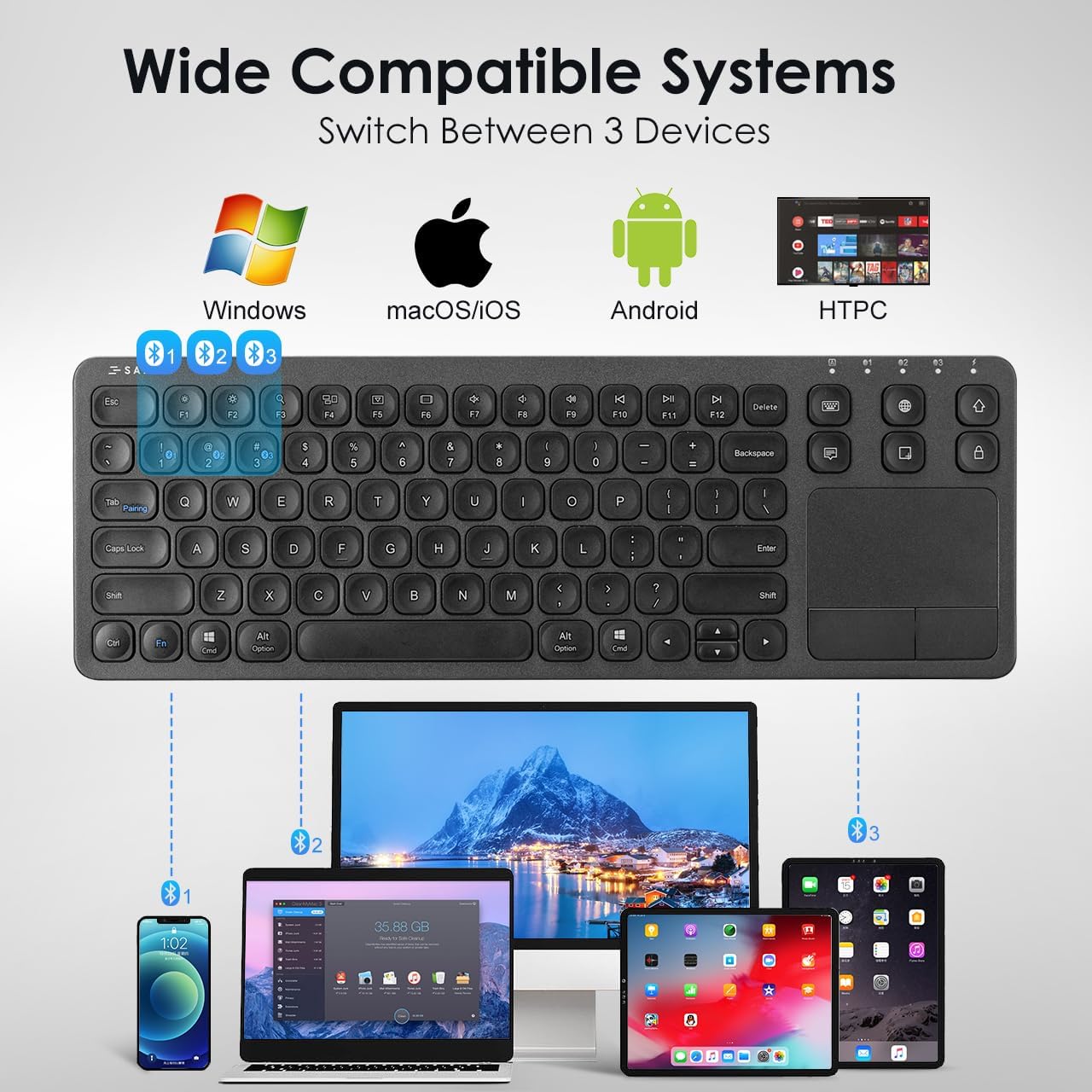
Image: The keyboard shown connected to a smartphone, laptop, and tablet, demonstrating multi-device compatibility.
Информации за полнење и батерија
The keyboard is equipped with a built-in rechargeable Lithium Polymer battery. To ensure optimal performance and longevity, adhere to the following guidelines:
- Време на полнење: Приближно 2 часа за целосно полнење.
- Работно време: Up to 30 constant hours on a full charge.
- Зачувување на енергија: The keyboard features an auto-sleep function after a period of inactivity to conserve battery. Press any key to wake it up.
- Индикатор за полнење: Refer to the keyboard's LED indicators for charging status.
Image: The SANWA Bluetooth keyboard connected via USB cable to a wall adapter for charging, with text indicating 30 hours work time and 2 hours full charge.
Нега и одржување
To maintain the performance and appearance of your SANWA keyboard, follow these simple care instructions:
- Чистење: Use a soft, dry, lint-free cloth to clean the keyboard and touchpad. For stubborn dirt, slightly dampИзбришете ја крпата со вода или благ раствор за чистење. Избегнувајте груби хемикалии или абразивни материјали.
- Складирање: Чувајте ја тастатурата на ладно и суво место, подалеку од директна сончева светлина и екстремни температури.
- Избегнувајте течности: Do not expose the keyboard to liquids. In case of accidental spills, power off the keyboard immediately and allow it to dry completely before reuse.
- Ракувајте со внимание: Избегнувајте испуштање на тастатурата или нејзино изложување на силни удари.
Решавање проблеми
If you encounter issues with your SANWA Bluetooth Keyboard, refer to the following common problems and solutions:
| Проблем | Решение |
|---|---|
| Keyboard does not connect or pair. | Ensure the keyboard is charged and powered on. Verify Bluetooth is enabled on your device. Re-enter pairing mode on the keyboard and try pairing again. Ensure no other devices are interfering with the Bluetooth signal. |
| Typing is unresponsive or delayed. | Check battery level and charge if necessary. Ensure the keyboard is within the effective Bluetooth range (up to 32.8ft). Reconnect the Bluetooth connection. |
| Touchpad is not working correctly. | Ensure your device's operating system fully supports touchpad gestures. Some macOS versions may have limited gesture compatibility. Clean the touchpad surface. Restart the keyboard and device. |
| Keyboard frequently disconnects or goes to sleep. | The keyboard has an auto-sleep function to save power. Press any key to wake it up. Ensure the keyboard is not too far from the connected device. Some users report that the sleep function cannot be disabled, which is a design characteristic. |
| Two-finger scrolling is jumpy or unpredictable. | This can be a known characteristic for some users, especially with certain iPadOS versions. Consider using the arrow keys for navigation if scrolling is inconsistent. |
Спецификации на производот
| Карактеристика | Детал |
|---|---|
| Бренд | САНВА |
| Број на модел | GSKBBT066 |
| Технологија за поврзување | Bluetooth |
| Опис на тастатурата | Мулти функционална |
| Специјална карактеристика | Touchpad, shortcuts, ultra-thin |
| Боја | Црното |
| Димензии на производот | 14.72"Д x 5.08"Ш x 0.69"В (37.39 x 12.90 x 1.75 см) |
| Тежина на ставката | 15.4 унци (436.54 грама) |
| Батерии | 1 литиум полимерна батерија (вклучена) |
| Производител | НАБАВКА САНВА |

Image: A diagram illustrating the length, width, and thickness of the ultra-slim keyboard.
Гаранција и поддршка
For warranty information, technical support, or customer service inquiries, please refer to the official SANWA webна локацијата или контактирајте го вашиот продавач. Зачувајте ја сметката за гаранциски барања.


