Вовед
The Lenovo 530 Wireless Mouse is designed for reliable and convenient navigation. Featuring 2.4 GHz wireless technology and a nano USB receiver, it offers a plug-and-play experience without the need for complex installations. Its ergonomic and contoured design ensures comfort for extended use, making it suitable for various computing tasks.
Во текот наview of the Lenovo 530 Wireless Mouse, highlighting its features and design.
Поставување
Follow these steps to set up your Lenovo 530 Wireless Mouse:
- Вметнете ја батеријата: Open the battery compartment located on the underside of the mouse. Insert one AA battery, ensuring correct polarity. The mouse comes with an included AA battery.
- Locate the Nano USB Receiver: The nano USB receiver is typically stored inside the battery compartment for safekeeping during transport. Remove it from its storage slot.
- Поврзете го ресиверот: Plug the nano USB receiver into an available USB port on your computer (PC).
- Вклучување: Turn on the mouse using the power switch, usually located on the bottom of the mouse.
- Автоматско поврзување: The mouse should automatically connect to your computer. No additional drivers are typically required for Windows 7, 8, 8.1, 10, or 11.

Image showing the battery compartment and nano USB receiver storage on the underside of the mouse.

The Lenovo 530 Wireless Mouse connected wirelessly to a laptop via its 2.4 GHz nano USB receiver.
Упатства за работа
The Lenovo 530 Wireless Mouse features a standard three-button design with a scroll wheel for intuitive control.
- Лев клик: Use the left button for selecting items, opening applications, and confirming actions.
- Десен клик: Use the right button to access context menus and additional options.
- Тркало за лизгање: Rotate the scroll wheel to navigate vertically through documents and web страници. Тркалото за скролување функционира и како средно копче кога е притиснато.
- Оптички сензор: The 1200 DPI optical sensor provides precise and responsive tracking on various surfaces.

The mouse features a 1200 DPI optical sensor for smooth navigation and is compatible with Windows operating systems.
Ергономија и удобност
The mouse is designed for ambidextrous use, accommodating both left-handed and right-handed users comfortably. Its contoured shape provides a natural grip for extended periods.

The ambidextrous design ensures comfortable use for both left and right-handed individuals.
Одржување
- Замена на батерија: When the mouse performance degrades or stops responding, replace the AA battery. Open the battery compartment on the underside, remove the old battery, and insert a new AA battery with correct polarity. The mouse offers up to 12 months of battery life, which may vary based on usage.
- Чистење: Use a soft, dry cloth to clean the exterior of the mouse. For the optical sensor, use a cotton swab lightly dampened with rubbing alcohol, ensuring no liquid enters the mouse.
- Складирање на приемникот: When not in use or during travel, store the nano USB receiver in its dedicated slot within the battery compartment to prevent loss.

The mouse is lightweight and designed for portability, offering up to 12 months of battery life.
Решавање проблеми
- Глувчето не реагира:
- Проверете дали глувчето е вклучено.
- Проверете дали батеријата е правилно вметната и дали е доволно наполнета. Заменете ја доколку е потребно.
- Verify the nano USB receiver is securely plugged into a working USB port on your computer. Try a different USB port.
- Поместете го глувчето поблиску до USB приемникот за да исклучите пречки или проблеми со дометот.
- Неправилно движење на курсорот:
- Исчистете го оптичкиот сензор на долната страна од глувчето.
- Уверете се дека го користите глувчето на соодветна површина. Високо рефлектирачки или транспарентни површини може да влијаат на следењето. Се препорачува подлога за глушец.
- Проблеми со поврзувањето:
- If the connection is lost, try unplugging and re-plugging the nano USB receiver.
- Рестартирајте го компјутерот.
Спецификации
| Карактеристика | Детал |
|---|---|
| Број на модел | GY50Z18988 |
| Поврзување | Безжична врска од 2.4 GHz (нано USB приемник) |
| Технологија на сензори | Оптички |
| DPI (точки по инч) | 1200 DPI |
| Копчиња | Left, Right, Scroll Wheel (Middle Click) |
| Животен век на копчињата | Up to 8 million clicks (Left/Right buttons) |
| Тип на батерија | 1 x AA батерија (вклучена) |
| Траење на батеријата | Up to 12 months (actual duration may vary based on usage) |
| Компатибилност на оперативниот систем | Windows 7, Windows 8, Windows 8.1, Windows 10, Windows 11 |
| Димензии (Д x Ш x В) | 4.17 x 2.48 x 1.46 инчи (10.6 x 6.3 x 3.7 см) |
| Тежина | 2.24 унци (65 g) |
| Посебни карактеристики | Lightweight, Ambidextrous Design, Nano USB Receiver Storage |
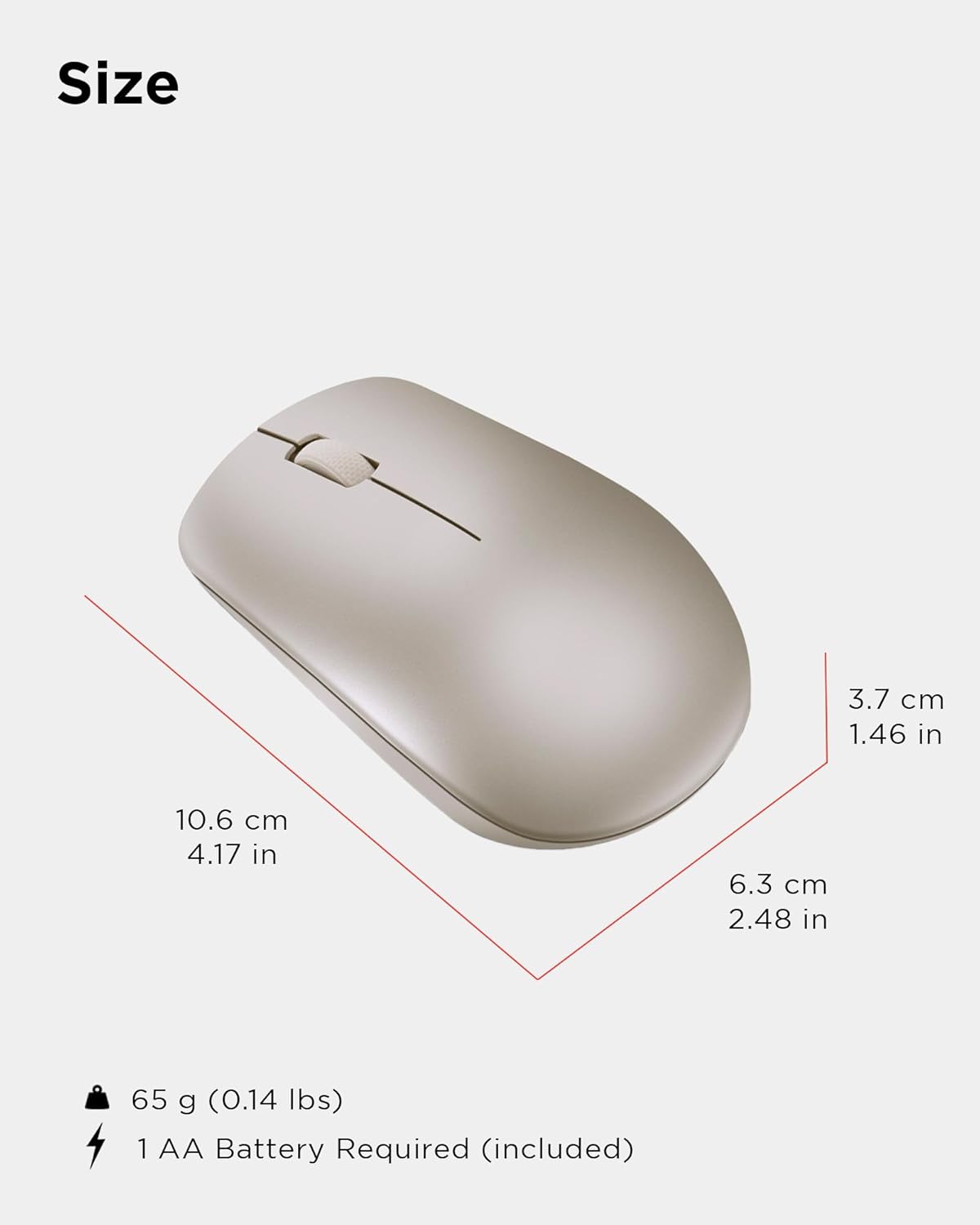
Physical dimensions and weight of the Lenovo 530 Wireless Mouse.
Гаранција и поддршка
За информации за гаранцијата и техничка поддршка, ве молиме погледнете ја документацијата вклучена во пакувањето на вашиот производ или посетете ја официјалната страница за поддршка на Lenovo. webстраница. Гарантниот период и условите може да варираат во зависност од регионот и продавачот.
Поддршка преку Интернет: Посетете поддршка.lenovo.com за драјвери, упатства и водичи за решавање проблеми.
Контактирајте со поддршката: Refer to your product's warranty card or the Lenovo support webстраница за регионални контакт броеви и опции за услуги.