1. Вовед
This manual provides comprehensive instructions for the installation, operation, and maintenance of the SINOTIMER TM919B 30A Programmable Electronic Timer Switch. This device is designed to automatically control the ON/OFF switching of various electrical appliances based on user-defined daily or weekly programs. Please read this manual carefully before installation and use to ensure proper function and safety.
2. Информации за безбедност
WARNING: Risk of electric shock. Installation should only be performed by a qualified electrician or trained personnel.
- Always disconnect power at the circuit breaker before installing or servicing the timer switch.
- Осигурајте се дека сите жичени врски се безбедни и се во согласност со локалните електрични кодови.
- Не го надминувајте максималното оптоварување од 30A.
- This device is intended for indoor use only. Avoid exposure to moisture or extreme temperatures.
- Не обидувајте се сами да го расклопите или поправите уредот. Контактирајте квалификуван сервисер.
3. Производот завршиview
The SINOTIMER TM919B is a digital timer switch featuring a large LCD display, multiple programming options, and a manual override function. It is designed for DIN rail mounting.
3.1. Компоненти и контроли
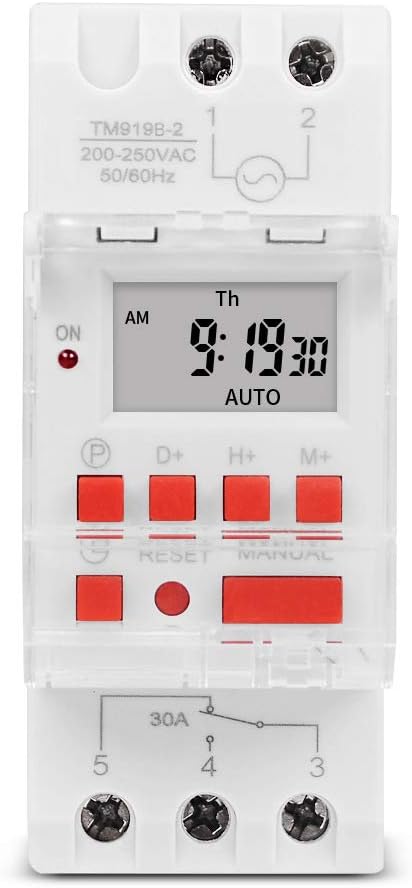
Слика 1: Предна страна view of the TM919B timer switch, showing the LCD display, control buttons, and terminal connections.

Слика 2: Аголна view of the TM919B with the transparent protective cover open, revealing the programming buttons (P, D+, H+, M+, RESET, MANUAL).
- LCD дисплеј: Ги прикажува тековното време, ден и статус на програмата.
- P (Program) Button: Enters/exits program setting mode.
- D+ (Day) Button: Adjusts day of the week in setting modes.
- H+ (Hour) Button: Adjusts hour in setting modes.
- M+ (Minute) Button: Adjusts minute in setting modes.
- Копче RESET: Clears all settings and resets the timer to factory defaults.
- MANUAL копче: Префрлува помеѓу режимите ВКЛУЧЕНО, АВТОМАТСКИ и ИСКЛУЧЕНО.
- Терминални врски: For power input and load output.
4. Спецификации
| Карактеристика | Спецификација |
|---|---|
| Модел | TM919B |
| Voltage | 220V (AC200-250V) |
| Фреквенција | 50/60 Hz |
| Максимално оптоварување | 30A (отпорно оптоварување) |
| Програми | 16 програми за вклучување/исклучување дневно/неделно |
| Минимален интервал | 1 минута |
| Резервна копија на батеријата | Built-in rechargeable battery (for memory retention) |
| Монтирање | 35мм DIN шина |
| Димензии | Видете на слика 3 |

Слика 3: Detailed dimensions of the TM919B timer switch, showing height, width, and depth measurements.
5. Поставување и инсталација
Follow these steps for safe and correct installation of your timer switch.
5.1. Монтирање
- Осигурајте се дека напојувањето е исклучено кај главниот прекинувач.
- Mount the TM919B onto a standard 35mm DIN rail. The device features a clip mechanism on the back for secure attachment.
- Press the orange clip at the bottom of the unit to release it from the DIN rail if removal is necessary.

Слика 4: Страна view of the TM919B, highlighting the orange DIN rail mounting clip.

Слика 5: Назад view of the TM919B, illustrating the DIN rail mounting mechanism.
5.2. Дијаграм за ожичување
Refer to the diagram below for correct wiring connections. Ensure all connections are tight and insulated.

Слика 6: Страна view of the TM919B showing the wiring diagram printed on the casing. Terminals 1 and 2 are for power input (L and N). Terminals 3, 4, and 5 are for load output (Common, Normally Open, Normally Closed).
- Терминали 1 и 2: Power Input (L - Live, N - Neutral). Connect your 220V AC supply here.
- Терминал 3: Common (COM) for the output relay.
- Терминал 4: Normally Open (NO) output. The load will be powered when the timer is ON.
- Терминал 5: Normally Closed (NC) output. The load will be powered when the timer is OFF.
For typical applications where the load is switched ON by the timer, connect the load between Terminal 3 (COM) and Terminal 4 (NO).
6. Упатства за работа
6.1. Првично поставување и ресетирање
- After connecting power, the display may be blank or show random characters. Press the РЕСЕТИРАЈ button with a pointed object (e.g., a pen tip) to clear all memory and reset the timer. The display will show "0:00" and "MO".
- Allow the internal battery to charge for at least 30 minutes before programming for optimal performance and memory retention during power outagес.
6.2. Поставување на тековното време и ден
- Притиснете и задржете го D+ button to set the current day of the week (MO, TU, WE, TH, FR, SA, SU).
- Притиснете и задржете го H+ button to set the current hour (0-23).
- Притиснете и задржете го M+ button to set the current minute (0-59).
- Release the buttons when the correct time and day are displayed. The timer will automatically save the settings.
6.3. Програмирање циклуси на вклучување/исклучување
The TM919B supports up to 16 ON/OFF programs. Each program consists of an ON time and an OFF time.
- Притиснете го P button once. The display will show "1 ON". This is for the first ON program.
- Користете D+ to select the day(s) for this program. Options include:
- MO TU WE TH FR SA SU (Every day)
- MO (Monday only)
- TU (Tuesday only)
- ...
- MO TU WE TH FR (Weekdays)
- SA SU (Weekends)
- MO TU WE (Mon-Wed)
- TH FR SA (Thu-Sat)
- MO WE FR (Mon, Wed, Fri)
- TU TH SA (Tue, Thu, Sat)
- MO TU WE TH FR SA (Mon-Sat)
- Користете H+ и M+ to set the desired ON hour and minute.
- Притиснете го P button again. The display will show "1 OFF". This is for the first OFF program.
- Користете D+, H+, и M+ to set the desired OFF day, hour, and minute. Ensure the OFF time is after the ON time for the same program.
- Repeat steps 1-5 for additional ON/OFF programs (up to 16). If you don't need all 16 programs, simply press P to cycle through unused programs until you return to the current time display.
- To exit programming mode and save settings, press the clock button (usually labeled with a clock icon, or simply wait for 30 seconds without input).
6.4. Рачно отфрлање
Притиснете го ПРИРАЧНИК копче за циркулирање низ режимите на работа:
- НА: The timer output is continuously ON, ignoring all programs.
- АВТОМАТ: Тајмерот работи според програмираните циклуси на ВКЛУЧУВАЊЕ/ИСКЛУЧУВАЊЕ. Ова е стандарден режим на работа.
- ИСКЛУЧЕНО: The timer output is continuously OFF, ignoring all programs.
Осигурајте се дека тајмерот е поставен на АВТОМАТСКИ за програмирана работа.
7. Одржување
- The TM919B is designed for maintenance-free operation.
- Чистете ја надворешноста со мека, сува крпа. Не користете абразивни средства за чистење или растворувачи.
- Ensure the internal battery is charged by keeping the unit powered for at least 24 hours initially, and periodically thereafter, to maintain time and program memory during power outagес.
8 Смена на проблеми
| Проблем | Можна причина | Решение |
|---|---|---|
| Екранот е празен. | No power supply; internal battery discharged. | Check power connections. Allow unit to charge for 30 minutes. |
| Timer not switching load. | Incorrect wiring; timer in MANUAL ON/OFF mode; incorrect program settings. | Verify wiring (refer to Figure 6). Ensure timer is in AUTO mode. Check program times and days. |
| Programs are lost after power outage. | Internal battery not fully charged or faulty. | Ensure unit is powered for at least 24 hours to fully charge the battery. If problem persists, contact support. |
| Копчињата не реагираат. | Unit frozen; temporary glitch. | Притиснете го РЕСЕТИРАЈ копче. |
9. Гаранција и поддршка
SINOTIMER products are manufactured to high-quality standards. For warranty information or technical support, please refer to the documentation provided with your purchase or visit the official SINOTIMER webстраница. Чувајте ја сметката за купување како доказ за купување.
For further assistance, you may contact SINOTIMER customer service through their official channels.