Вовед
This manual provides comprehensive instructions for the assembly, operation, and maintenance of your FLEXISPOT EN2 Electric Height Adjustable Standing Desk. Please read this manual thoroughly before use to ensure proper function and longevity of your product.
The FLEXISPOT EN2 features a whole-piece bamboo desktop, a removable power outlet with USB ports, a 6-button digital controller with 4 memory presets, and a durable steel frame designed for a stable and productive workspace.
Информации за безбедност
- Максимален капацитет на тежина: 176 фунти (80 кг). Не го надминувајте ова ограничување.
- Assembly requires an electric drill (not included). Exercise caution during assembly.
- Проверете дали сите врски се безбедни пред да ракувате со бирото.
- Држете ги децата и домашните миленици подалеку од работната маса за време на работата.
- Avoid contact with water or abrasive materials during cleaning.
Поставување и склопување
Your FLEXISPOT EN2 desk will arrive in two separate packages, which may be shipped separately. Assembly is required and is recommended for two people to facilitate handling of components. An electric drill is necessary for proper setup, but is not included.
Компонентите завршијаview

Слика 1: Готовоview of FLEXISPOT EN2 desk components. This image displays the various parts included for assembly, such as the desktop, leg frames, and hardware.
Управување со кабли
The desk includes a cable management device to help organize cords, contributing to a tidy workspace. Fasteners and Velcro straps are provided to secure cables neatly under the desktop.

Figure 2: Illustration of effective cable management. The "Before" section shows disorganized cables, while the "After" section demonstrates how the integrated cable management system tidies them.
Видео собрание
Video 1: Flexispot Standing Desk - Embrace a Healthier Lifestyle. This official video demonstrates the desk's features and includes brief segments on assembly and operation.
Упатства за работа
Мултифункционален контролер
The desk is equipped with a 6-button digital controller for easy height adjustment and memory preset functions. The controller features an LED display showing the current height.

Слика 3: Детално view of the multifunctional controller. It shows the LED display, up/down arrows, and four programmable height setting buttons.
Прилагодување на висината
- Користете го Горе (^) и Долу (v) стрелки за рачно прилагодување на висината на бирото.
- The motorized system adjusts smoothly from 28.1 inches (71.4 cm) to 45.7 inches (116.1 cm).
- The motor operates quietly at less than 50 dB.
Поставки за меморија
The controller allows you to save up to 4 preferred height settings for quick transitions between sitting and standing positions.
- Прилагодете ја масата на саканата висина користејќи ги стрелките нагоре/надолу.
- Притиснете го „М“ копче. LED екранот ќе трепка.
- Притиснете едно од нумерираните претходно поставени копчиња (1, 2, 3 или 4) while the display is flashing to save the current height to that preset.
- За да повикате зачувана висина, едноставно притиснете го соодветното нумерирано копче за претходно подесување.
Removable Desktop Power Outlet
The desktop includes a removable power outlet with 3 AC outlets and 2 USB charging ports (5V/2A). This can be clipped to the back or side of your desk for convenient access.

Figure 4: The removable desktop power outlet, featuring 3 AC outlets (125V/12A) and 2 USB ports (5V/2A) for charging devices.
Систем против судир
The desk is equipped with a smart anti-collision system. If the desk encounters an obstruction during height adjustment, it will stop and reverse slightly to prevent damage.
Одржување
- Dust regularly with a dry cloth to keep the desktop clean.
- Avoid contact with water or abrasive cleaning materials to prevent damage to the bamboo surface.
- Периодично проверувајте ги сите завртки и врски за да се осигурате дека се цврсто и безбедно прицврстени.
Решавање проблеми
If you encounter any issues with your FLEXISPOT EN2 desk, please refer to the following general advice:
- Бирото не се движи: Check all power connections and ensure the power outlet is functioning. Verify that the control panel is properly connected.
- Нерамномерно движење: Ensure the desk is placed on a level surface. Check that all leg components are securely fastened.
- Кодови за грешка на екранот: Consult the full troubleshooting guide available on the FLEXISPOT website or contact customer support for specific error code interpretations.
For further assistance, please contact FLEXISPOT customer support.
Спецификации
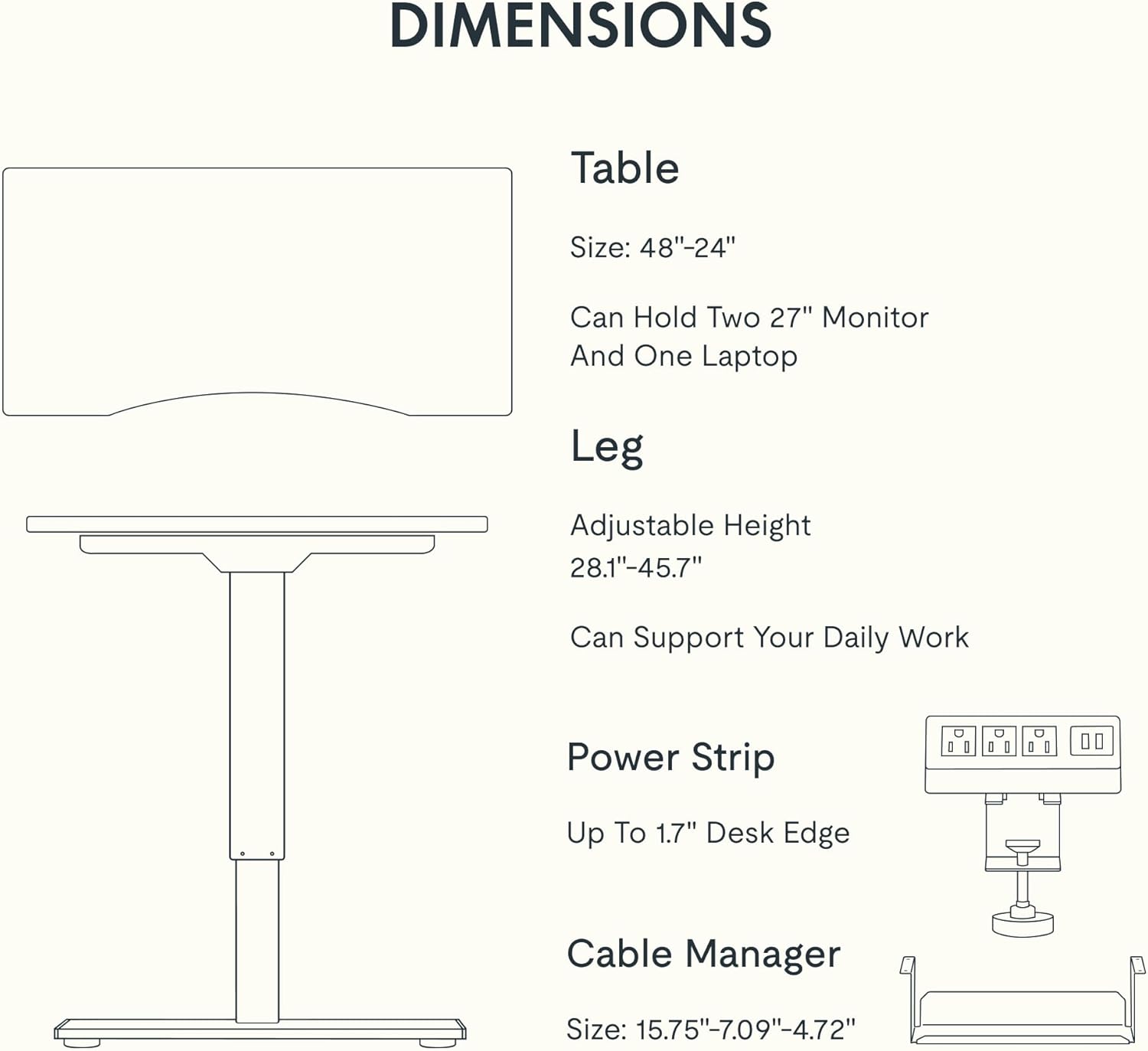
Figure 5: Dimensional specifications of the FLEXISPOT EN2 desk. This diagram illustrates the table size, adjustable height range, and dimensions of the power strip and cable manager.
| Карактеристика | Детал |
|---|---|
| Бренд | ФЛЕКСИСПОТ |
| Број на модел | EN2 |
| Материјал за работна површина | Whole-Piece Bamboo |
| Материјал за рамка | Легуриран челик |
| Димензии на производот (Д x Ш x В) | 24"Д x 48"Ш x 28"В (61см Д x 122см Ш x 71см В) |
| Прилагодлив опсег на висина | 28.1" - 45.7" (71.4 см - 116.1 см) |
| Максимална тежина капацитет | 176 фунти (80 кг) |
| Ниво на бучава на моторот | Помалку од 50 dB |
| Штекер | 3 AC Outlets (125V/12A), 2 USB Charging Ports (5V/2A) |
| Потребно е собрание | Yes (Recommended 2 people, electric drill not included) |
Гаранција и поддршка
FLEXISPOT provides the following warranty for your EN2 standing desk:
- 5-годишна гаранција: Covers frames, motors, and other mechanical devices.
- 2-годишна гаранција: Covers controllers, switches, and electronics.
For customer support, warranty claims, or additional product information, please visit the official FLEXISPOT webстраницата или контактирајте го нивниот оддел за услуги на клиентите. Можете исто така да ја посетите FLEXISPOT Store on Amazon.


