1. Вовед
This manual provides detailed instructions for the KOSPET Max S Android Smart Watch. Please read this manual thoroughly before using the device to ensure proper operation and to maximize its features. Keep this manual for future reference.
2. Информации за безбедност
- Не обидувајте се да го расклопите, поправите или модифицирате уредот. Неовластените модификации може да ја поништат гаранцијата и да предизвикаат штета.
- Држете го уредот подалеку од екстремни температури, директна сончева светлина и корозивни супстанции.
- Use only the provided charging cable and adapter. Using incompatible accessories may cause damage or fire.
- The device is IP67 waterproof. Avoid prolonged immersion in water or exposure to high-pressure water jets. Ensure the SIM card tray is properly sealed to maintain water resistance.
- Consult a medical professional before using the device if you have a pacemaker or other medical implants.
3. Содржина на пакетот
Проверете дали сите артикли се присутни во пакувањето на вашиот производ:
- KOSPET Max S Smart Watch
- Кабел за полнење/Док
- Watch Band/Strap
- Упатство за употреба (овој документ)
- SIM Card Tray Ejector Tool (or small screwdriver)
4. Производот завршиview
Familiarize yourself with the components of your KOSPET Max S Smart Watch.

Figure 4.1: KOSPET Max S Smart Watch front view showing the display with time, date, network, battery status, and app icons.

Figure 4.2: Close-up of the KOSPET Max S 2.4-inch Super Retina Display, showcasing неговата јасност и живописни бои.
Слика 4.3: Страна view of the KOSPET Max S Smart Watch, highlighting the integrated side camera and physical buttons.
Клучни компоненти:
- Прикажи: 2.4-инчен екран на допир со висока резолуција.
- Страна камера: 8-megapixel camera for photos and video.
- Предна камера: 2-megapixel camera for video calls and face unlock.
- Слот за SIM картичка: Supports Nano SIM for 4G LTE connectivity.
- Микрофон и звучник: За повици и гласовни команди.
- Сензор за отчукувањата на срцето: Located on the back for fitness tracking.
5. Поставување
5.1. Полнење на уредот
Before initial use, fully charge your KOSPET Max S Smart Watch. Connect the charging cable to the watch's charging port and plug the other end into a USB power adapter (not included) or a computer's USB port. The screen will indicate charging status.

Figure 5.1: Diagram illustrating the KOSPET Max S battery life under typical usage (40 hours) and light usage (60 hours) with its 2000mAh battery.
5.2. Инсталација на SIM картичка
The KOSPET Max S supports 4G LTE connectivity via a Nano SIM card. To install:
- Power off the watch.
- Пронајдете го лежиштето за SIM-картичка на страната од часовникот.
- Use the provided ejector tool (or a small screwdriver) to open the SIM card tray.
- Carefully place the Nano SIM card into the tray with the gold contacts facing down.
- Insert the tray back into the watch until it clicks into place. Ensure it is flush with the watch body to maintain water resistance.
Note: Some users have reported difficulty with the provided screwdriver. If necessary, use a suitable alternative tool for SIM tray access.
5.3. Првично вклучување
Press and hold the power button (usually on the side) until the KOSPET logo appears. Follow the on-screen prompts to complete the initial setup, including language selection, time zone, and Wi-Fi connection.
5.4. Спарување со паметен телефон
To fully utilize all features, pair your KOSPET Max S with a compatible smartphone. The recommended application is WiiWatch 2. Download it from the Google Play Store or Apple App Store.
- Enable Bluetooth on your smartphone and the KOSPET Max S.
- Open the WiiWatch 2 app on your smartphone and follow the instructions to search for and connect to your watch.
Note: Some users have experienced unstable Bluetooth connections with WiiWatch 2. Alternatives like "Watch Droid Phone" (for smartphone) and "Watch Droid Assistant" (for watch) may offer a more stable connection.
6. Упатства за работа
6.1. Основна навигација
- Екран на допир: Повлечете лево/десно, горе/долу за да се движите низ менијата и екраните. Допрете за да изберете.
- Копче за вклучување: Притиснете за да го разбудите/исклучите екранот. Притиснете и задржете за да го вклучите/исклучите или рестартирате.
- Копче за назад: (If present) Returns to the previous screen.
6.2. 4G LTE Network and Calls
With a Nano SIM card installed, your KOSPET Max S can function as a standalone phone. It supports 5 network modes and global 4G/3G/2G bands.
- Остварување повици: Use the dialer app on the watch to make calls directly.
- Примање повици: Answer or decline incoming calls directly from the watch.
- Пораки: Испраќајте и примајте СМС-пораки.
6.3. Applications and Google Play Store
Running on Android 10.1, the KOSPET Max S allows you to download and install applications from the Google Play Store. This includes social media, navigation, and productivity apps.
6.4. Функционалност на камерата
The watch features dual cameras:

Слика 6.1: Експлодирано view illustrating the KOSPET Max S dual camera setup, featuring an 8MP side camera and a 2MP front camera for versatile photography and video calls.
- Side Camera (8MP): Ideal for capturing photos and videos in a traditional camera orientation.
- Предна камера (2MP): Primarily used for video calls and the Face Unlock feature.
Access the camera app from the main menu to take pictures or record videos.
6.5. GPS навигација
The KOSPET Max S integrates multi-satellite positioning, supporting GPS, GLONASS, and A-GPS signals for accurate location tracking and navigation.
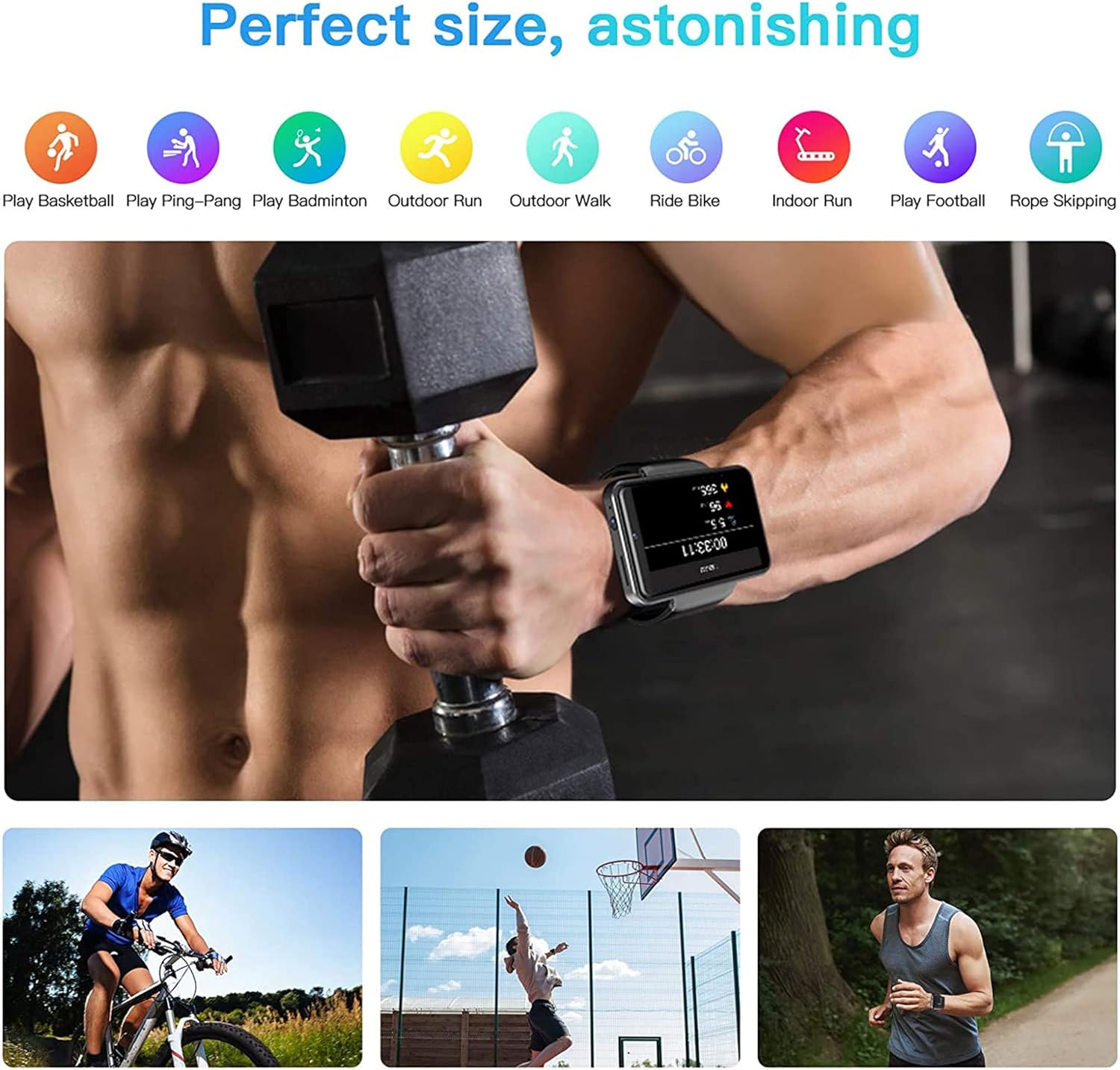
Figure 6.2: KOSPET Max S Smart Watch displaying a map with GPS navigation, indicating multi-satellite positioning support (GPS, A-GPS, GLONASS) for precise location tracking.
Use pre-installed map applications or download your preferred navigation app from the Google Play Store.
6.6. Face Unlock and Security
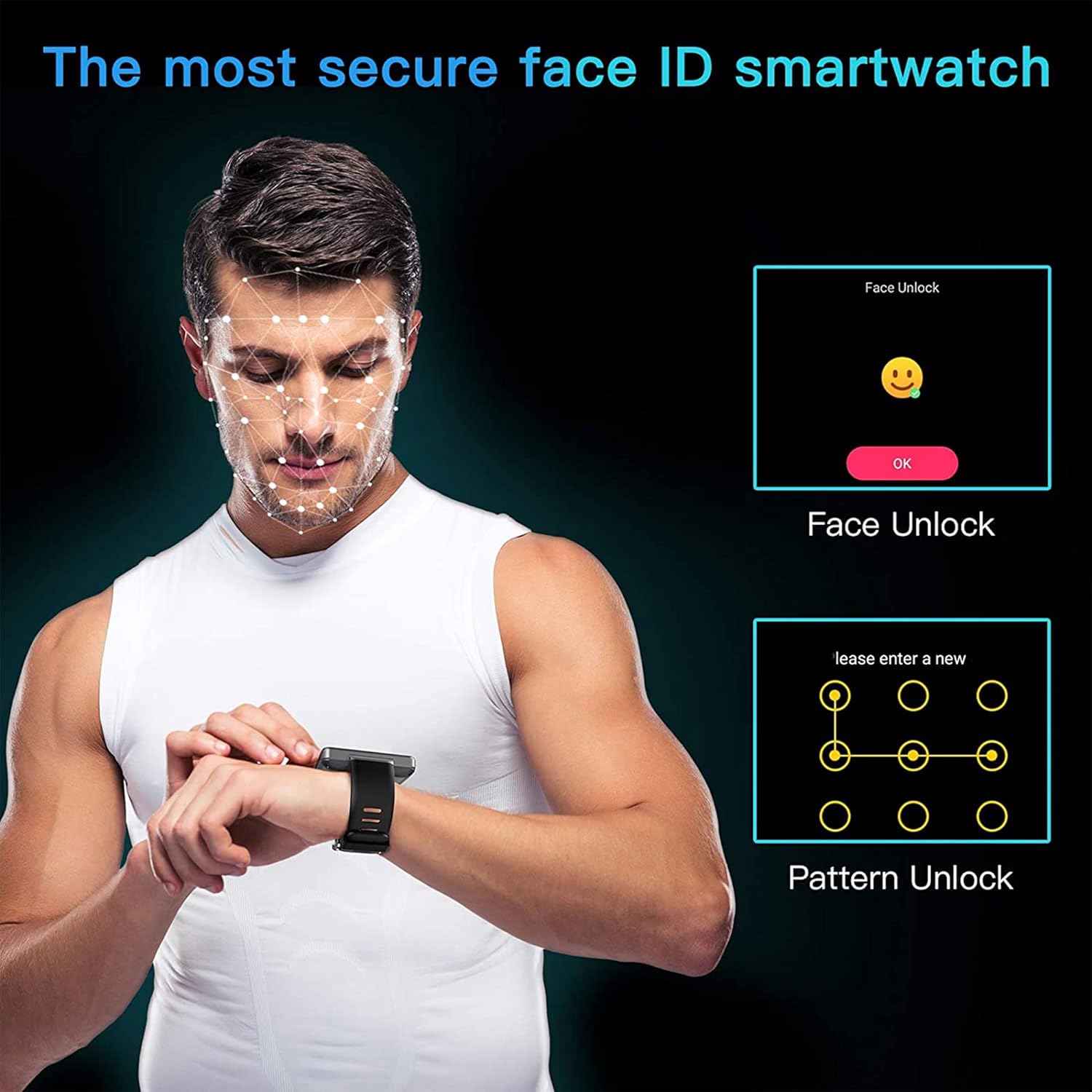
Enhance the security of your watch with Face Unlock. This feature uses the front camera to recognize your face for quick and secure access.

Figure 6.3: Illustration of the KOSPET Max S Face Unlock feature, showing facial recognition in action, alongside the option for pattern unlock.
To set up Face Unlock, navigate to the security settings in your watch and follow the on-screen instructions to register your face. You can also set up a pattern or PIN as a backup.
6.7. Следење на фитнесот
The KOSPET Max S includes features for tracking your physical activity.

Figure 6.4: KOSPET Max S Smart Watch displaying various fitness tracking modes, including basketball, ping-pong, badminton, outdoor run, outdoor walk, ride bike, indoor run, play football, and rope skipping.
- Бројач на чекори: Automatically tracks your daily steps.
- Монитор за отчукувањата на срцето: Го мери вашиот пулс во текот на денот.
- Спортски режими: Select from various sports modes (e.g., running, cycling) for more accurate tracking of specific activities.
Access fitness data through the dedicated fitness app on your watch.
7. Одржување
7.1. Чистење
Редовно бришете го часовникот и ременот со мека, дamp cloth. Avoid using harsh chemicals or abrasive materials, which can damage the finish.
7.2. Водоотпорност (IP67)
The KOSPET Max S is rated IP67 waterproof, meaning it is resistant to dust and can withstand immersion in water up to 1 meter for 30 minutes. However, it is not suitable for swimming, diving, or exposure to high-pressure water. Always ensure the SIM card tray is securely closed to maintain water resistance.
8 Смена на проблеми
- Watch does not power on: Проверете дали часовникот е целосно наполнет. Ако проблемот продолжи, обидете се со ресетирање со држење на копчето за вклучување подолго време (на пр., 15-20 секунди).
- SIM card not detected or no network:
- Verify the SIM card is correctly inserted and the tray is fully closed.
- Проверете дали вашата SIM-картичка е активна и има важечки план за податоци.
- Check network settings on the watch to ensure mobile data is enabled.
- Confirm compatibility with your network provider's bands.
- Bluetooth конекцијата е нестабилна:
- Рестартирајте ги и часовникот и паметниот телефон.
- Ensure both devices are within Bluetooth range.
- Consider using alternative pairing applications like "Watch Droid Phone" and "Watch Droid Assistant" if WiiWatch 2 is problematic.
- Apps are slow or unresponsive:
- Close background applications to free up memory.
- Clear the cache of the problematic app.
- Осигурајте се дека софтверот на часовникот е ажуриран.
- GPS не прима сигнал:
- Осигурајте се дека сте на отворено место со чист простор view на небото.
- Check that location services are enabled in the watch settings.
9. Спецификации
| Карактеристика | Спецификација |
|---|---|
| Бренд | КОСПЕТ |
| Модел | Макс С |
| Оперативен систем | Андроид 10.1 |
| Приказ | 2.4 инчен LCD екран, резолуција од 400 x 400 |
| Процесор | MediaTek MT6739 (1.25GHz max clock speed, 570MHz graphics processor) |
| Капацитет за складирање на меморија | 3 GB RAM (implied from 3GB+32GB feature bullet) |
| Внатрешно складирање | 32 GB (implied from 3GB+32GB feature bullet) |
| Поврзување | 4G LTE (Cellular), GPS (Built-in GPS, GLONASS, A-GPS), 802.11ac Wireless |
| Камери | 8MP Side Camera, 2MP Front Camera |
| Капацитет на батеријата | 2000 mAh |
| Отпорност на вода | IP67 |
| Тежина на ставката | 259 гр |
| Облик на ставка | Плоштад |
10. Гаранција и поддршка
Warranty information for the KOSPET Max S Smart Watch is typically provided with your purchase documentation or can be found on the official KOSPET webстраница. Ве молиме погледнете ги овие ресурси за детали во врска со гарантното покритие, условите и одредбите.
For technical support, troubleshooting assistance beyond this manual, or warranty claims, please contact KOSPET customer service through their official webстраницата или информациите за контакт дадени со вашиот производ.


