Вовед
This manual provides detailed instructions for the safe and efficient operation of your KORAD KWR103 Programmable DC Power Supply. Please read this manual thoroughly before using the device to ensure proper functionality and to prevent damage or injury. The KWR103 is a versatile programmable DC power supply offering a wide range of voltage and current outputs, including 60V/15A/300W, designed for various testing and application needs.
Важни безбедносни информации
Секогаш почитувајте ги следниве безбедносни мерки за да спречите електричен удар, повреда или оштетување на уредот:
- Ensure the power supply is connected to a grounded AC outlet with the correct voltage.
- Не ракувајте со уредот на влажно или damp услови.
- Не го отворајте casing; внатре нема делови што може да ги сервисира корисникот. Обратете се за сервисирање кај квалификуван персонал.
- Проверете го точниот поларитет и јачината на звукотtage/current settings before connecting to any load.
- Избегнувајте краток спој на излезните терминали.
- Исклучете го напојувањето пред да правите или менувате приклучоци.
- Обезбедете соодветна вентилација околу уредот за да спречите прегревање.
Производот завршиview
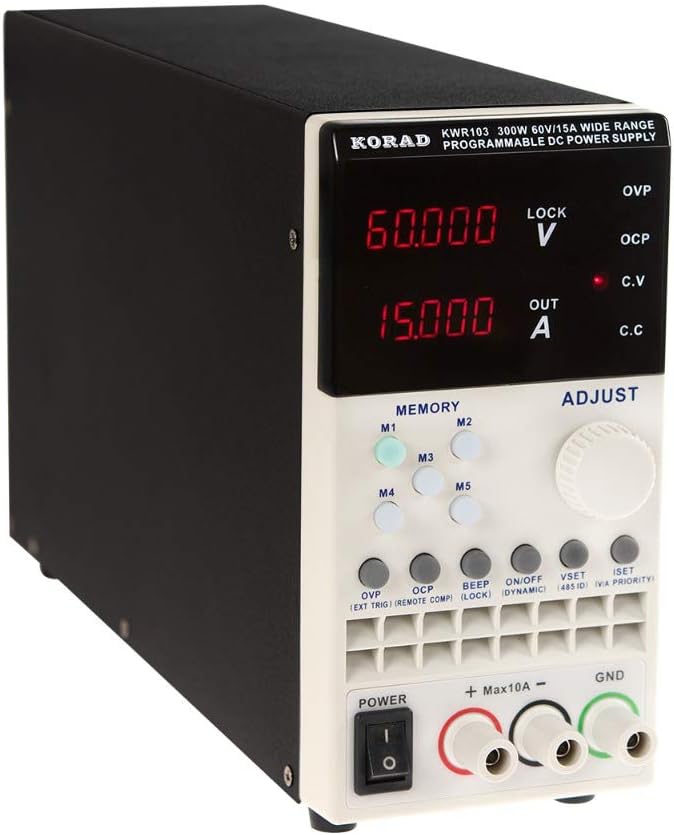
The KORAD KWR103 is a high-precision programmable DC power supply. Familiarize yourself with its components:
Преден панел

Слика 1: Front panel of the KORAD KWR103, showing the display, control buttons, adjustment knob, and output terminals.
- Прикажи: Digital readouts for voltage (V) и струја (A).
- Memory Buttons (M1-M5): For saving and recalling preset voltagд и тековните вредности.
- Прилагодете го копчето: Rotary encoder for precise adjustment of voltage и струја.
- Функциски копчиња: OVP, OCP, BEEP, ON/OFF, VSET, ISET, V/A PRIORITY for various settings and controls.
- Излезни терминали: Positive (+), Negative (-), and Ground (GND) connections. Max 10A output directly from front terminals.
- Прекинувач: Главно управување со напојувањето за уредот.
Заден панел

Слика 2: Rear panel of the KORAD KWR103, featuring power input, communication ports, and sense terminals.
- Влез за напојување со наизменична струја: За поврзување на главниот кабел за напојување.
- Држач за осигурувачи: Содржи заштитниот осигурувач.
- Sense Terminals (SENSE TRIG IN+): For remote sensing to compensate for voltagпад преку жиците за оптоварување.
- RS485 Terminals: За RS485 комуникација.
- USB порта: For computer control and communication.
- Порта RS232: For serial communication.
- LAN порта: For network communication and control.
Вклучени додатоци
Слика 3: The KORAD KWR103 power supply shown with its standard accessories, including power cord, output cables, USB cable, RS232 cable, and software CD.
Your KWR103 package typically includes:
- KORAD KWR103 Programmable DC Power Supply Unit
- Кабел за напојување со наизменична струја
- Output Test Leads (Red/Black)
- USB комуникациски кабел
- RS232 комуникациски кабел
- Software CD (for PC control)
- Упатство за употреба (овој документ)
Поставување
- Отпакување: Внимателно извадете го напојувањето и сите додатоци од пакувањето. Проверете дали има знаци на оштетување.
- Поставување: Place the unit on a stable, level surface with adequate ventilation. Ensure no vents are obstructed.
- Поврзување за напојување:
- Осигурајте се дека прекинувачот за напојување на предната плоча е во положба OFF (ИСКЛУЧЕНО).
- Connect the supplied AC power cord to the AC power input on the rear panel.
- Вклучете го другиот крај од кабелот за наизменична струја во заземјен електричен штекер.
- Вчитај врска:
- Connect the red output test lead to the positive (+) terminal and the black output test lead to the negative (-) terminal on the front panel.
- Connect the other ends of the test leads to your load, ensuring correct polarity. For currents exceeding 10A, use the rear output terminals (if available on your specific model) or thicker gauge wires directly to the internal terminals, following safety guidelines.
- За прецизен волуменtage regulation at the load, especially with long cables or high currents, connect the remote sense wires (SENSE TRIG IN+) from the rear panel directly across your load.
- Communication Interface Connection (Optional):
- USB: Connect the USB cable from the rear panel to your computer.
- RS232: Connect the RS232 cable from the rear panel to your computer's serial port or a USB-to-serial adapter.
- LAN: Connect an Ethernet cable from the rear panel to your network router or switch.
- Install the provided software drivers and control application from the included CD or manufacturer's webсајт.
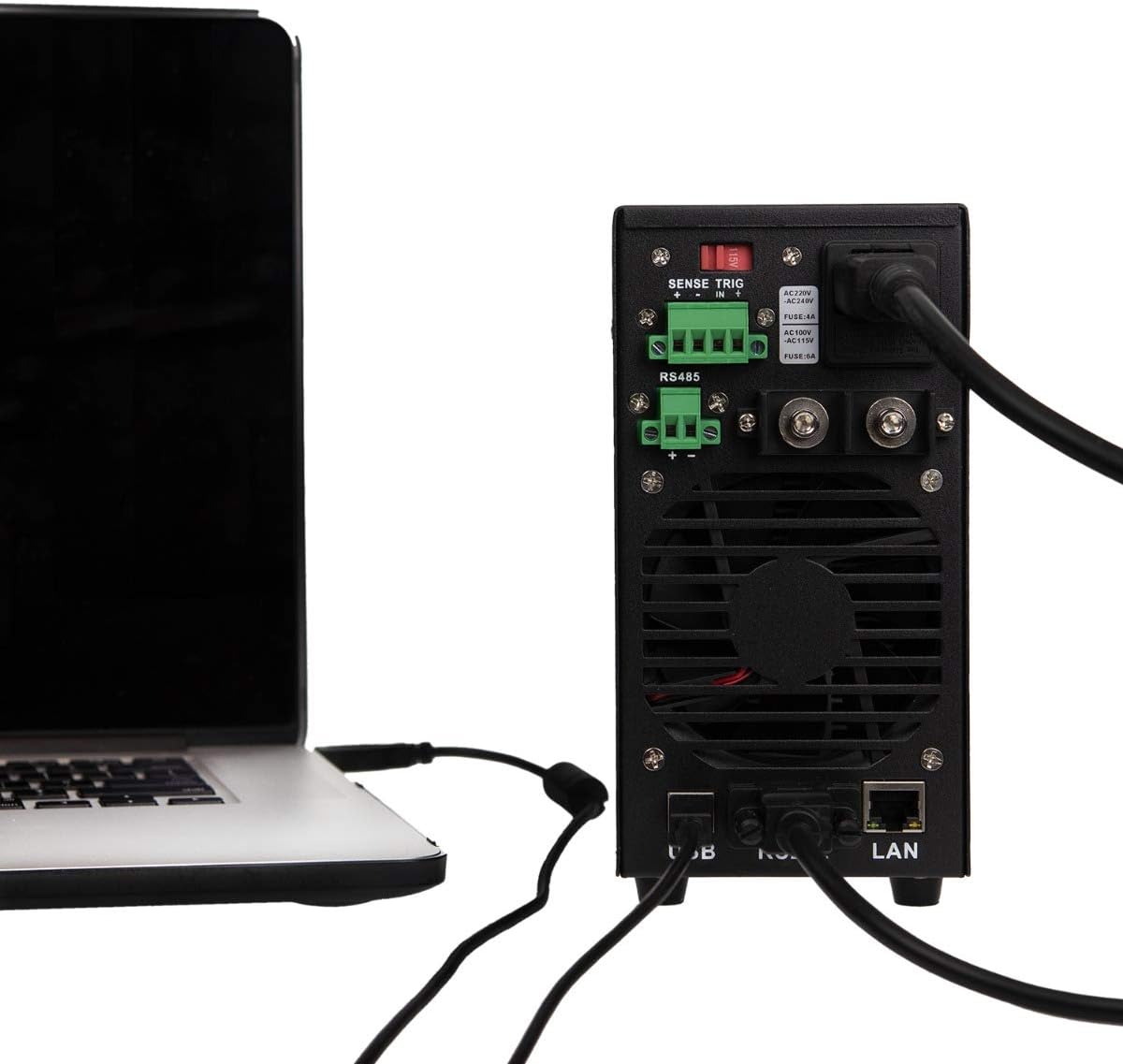
Слика 4: Example of the KORAD KWR103 rear panel connected to a laptop, illustrating USB and LAN connections for remote control.
Упатства за работа
- Вклучување: Flip the power switch on the front panel to the ON position. The display will illuminate.
- Поставување Voltage и Тековна:
- Притиснете го VSET копче за внесување voltagрежим на поставување. Јачината на звукtage display will flash.
- Завртете го Прилагодете го копчето за да ја поставите саканата јачина на звукtage. Press the knob to move between digits for fine adjustment.
- Притиснете го ISET button to enter current setting mode. The current display will flash.
- Завртете го Прилагодете го копчето to set the desired current limit. Press the knob to move between digits.
- Притиснете VSET or ISET again to exit setting mode, or wait a few seconds for it to exit automatically.
- Контрола на излезот:
- По поставувањето на јачината на звукотtage и струја, притиснете го ВКЛУЧЕНО/ИСКЛУЧЕНО button to enable the output. The "OUT" indicator will light up.
- Притиснете ВКЛУЧЕНО/ИСКЛУЧЕНО again to disable the output.
- Memory Functions (M1-M5):
- Зачувување на поставките: Поставете го саканиот волуменtage и струја. Притиснете и држете едно од М1-М5 buttons until a beep sounds, indicating the settings are saved.
- Повикување на поставки: Накратко притиснете едно од М1-М5 buttons to recall the saved settings.
- Над Voltage Protection (OVP) and Over Current Protection (OCP):
- Притиснете го ОВП button to set the over-voltage protection limit. Use the Прилагодете го копчето.
- Притиснете го OCP button to set the over-current protection limit. Use the Прилагодете го копчето.
- These functions automatically shut down the output if the set limits are exceeded, protecting the load and the power supply.
- Далечински управувач:
- Once the communication drivers and software are installed, you can control the power supply via USB, RS232, or LAN.
- Refer to the software manual for detailed instructions on using the PC control application.
Одржување
- Чистење: Disconnect the power supply from the AC outlet before cleaning. Use a soft, dry cloth to wipe the exterior. Do not use abrasive cleaners or solvents.
- Вентилација: Ensure the ventilation openings are clear of dust and debris. Periodically clean the fan intake/exhaust areas.
- Замена на осигурувачи: If the unit does not power on, the fuse may need replacement.
- Исклучете го кабелот за напојување со наизменична струја.
- Locate the fuse holder on the rear panel.
- Carefully remove the fuse holder and replace the fuse with one of the same type and rating (e.g., FUSE: 4A for AC220V, FUSE: 6A for AC110V).
- Reinsert the fuse holder and reconnect the AC power.
Решавање проблеми
| Проблем | Можна причина | Решение |
|---|---|---|
| Уредот не се вклучува. | No AC power; Blown fuse; Power switch off. | Check AC power connection; Replace fuse (see Maintenance); Ensure power switch is ON. |
| Нема излез волtagе/струја. | Output disabled; OVP/OCP triggered; Incorrect settings; Loose connections. | Press ON/OFF button; Check OVP/OCP settings; Verify voltage/current settings; Secure output connections. |
| Voltage/Current unstable. | Poor load connection; Remote sense not used or incorrectly connected; Overheating. | Check load connections; Use remote sense for critical applications; Ensure adequate ventilation. |
| Далечинскиот управувач не работи. | Incorrect cable; Driver not installed; Software configuration error. | Verify correct USB/RS232/LAN cable; Install drivers; Check software settings and communication parameters. |
Спецификации
| Параметар | Вредност |
|---|---|
| Модел | KWR103 |
| Излез Voltage | 0-60 V |
| Излезна струја | 0-15А |
| Излезна моќност | 300 W |
| Voltagд Резолуција | 1mV |
| Тековна резолуција | 1 mA |
| Интерфејси | LAN, USB, RS232, RS485 |
| Заштитни функции | OVP (Над томtage Protection), OCP (Over Current Protection), OTP (Over Temperature Protection) |
| Тежина на ставката | 11.29 фунти (приближно 5.12 кг) |
| Димензии на пакетот | 16.14 x 11.22 x 7.68 инчи (приближно 41 x 28.5 x 19.5 см) |
| Метод на ладење | Воздух |
Гаранција и поддршка
For warranty information and technical support, please refer to the documentation included with your purchase or contact KORAD customer service. Keep your purchase receipt as proof of purchase for warranty claims.
For the latest drivers, software, and additional support resources, please visit the official KORAD webсајт.


