Производот завршиview
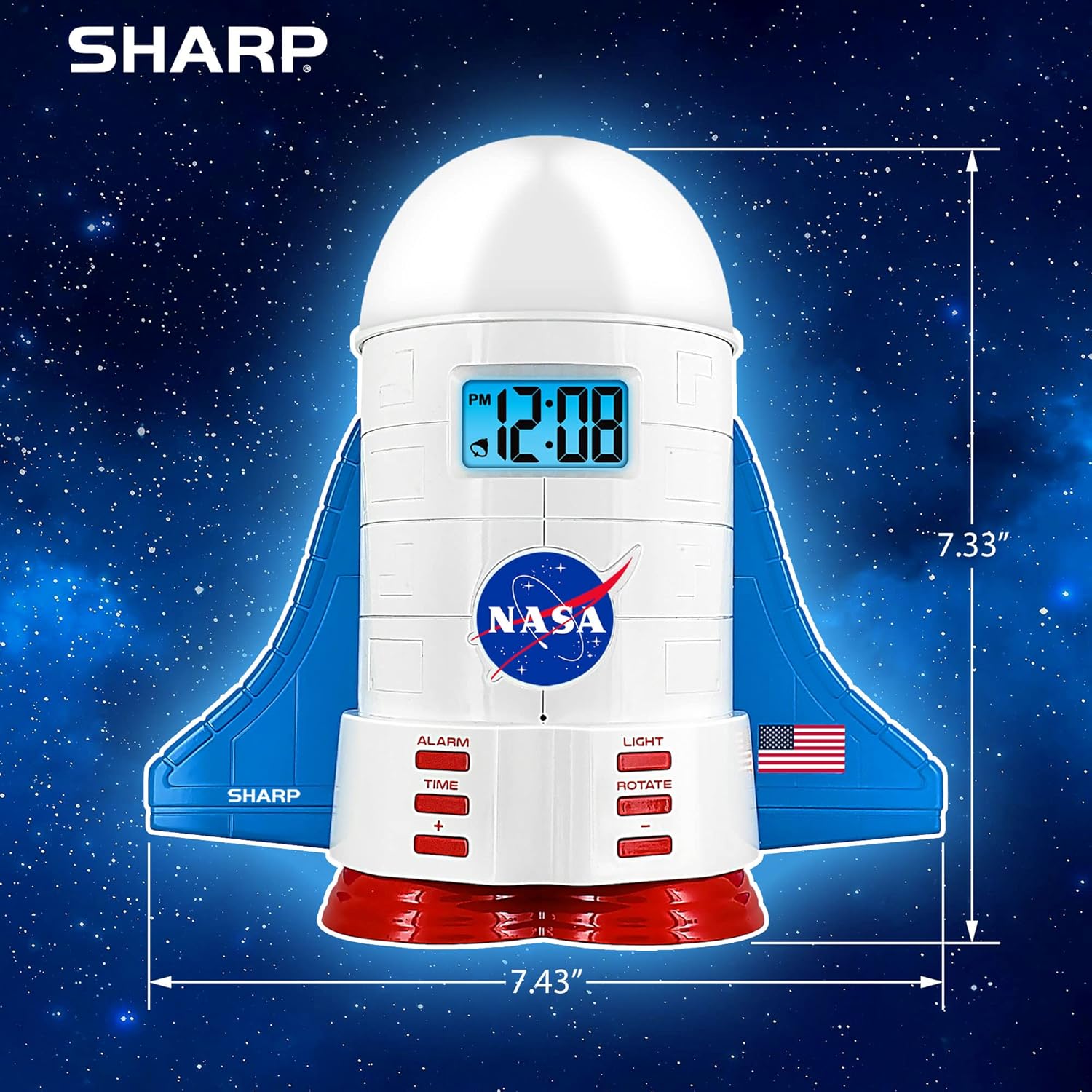
This manual provides instructions for the Sharp NASA Space Shuttle Night Light Alarm Clock. This device combines an alarm clock with a space-themed nightlight and projection feature, designed to enhance a child's bedroom environment.

Поставување
Отпакување
- Внимателно отстранете ги сите компоненти од пакувањето.
- Проверете дали се присутни сите предмети наведени во делот „Што има во кутијата“.
Поврзување за напојување
The alarm clock can be powered via the included electric adapter. For continuous operation of all features, including the nightlight and projection, direct power is recommended.
For battery backup, insert appropriate batteries (not included) into the battery compartment located at the base of the unit. This ensures timekeeping and alarm function during power outagес.

Упатства за работа
Поставување на времето
- Притиснете го ВРЕМЕ копче.
- Користете го + и - копчиња за прилагодување на часот и минутите.
- Притиснете ВРЕМЕ повторно да се потврди.
Поставување на алармот
- Притиснете го АЛАРМ копче.
- Користете го + и - копчиња за да го поставите посакуваното време на алармот.
- Притиснете АЛАРМ повторно за да го активирате алармот. На екранот ќе се појави икона за аларм.
Функција за одложување
To temporarily silence the alarm, tap the top of the unit. The alarm will sound again after a short interval.
Nightlight and Projection Features
The unit features light-up wings and a rocket booster base, along with a rotating projection cap.

Светла за активирање
Притиснете го СВЕТЛИНА button to cycle through the 4 color options for the wings and booster lights.
Projection Caps
The device includes two interchangeable space-themed projection caps and a frosted nightlight cap. Twist counter-clockwise to attach or remove caps.

Ротирачка проекција
Притиснете го РОТИРАЈ button to activate or deactivate the rotation of the projected images.
Одржување
- Clean the unit with a soft, dry cloth. Avoid abrasive cleaners or solvents.
- Ensure the projection caps are free from dust or smudges for clear image projection.
- Replace batteries in the backup compartment as needed to maintain time settings during power interruptions.
Решавање проблеми
| Проблем | Можна причина | Решение |
|---|---|---|
| Clock not displaying time | Нема моќ | Ensure the electric adapter is securely plugged in. Check battery backup. |
| Алармот не се огласува | Alarm not set or deactivated | Verify alarm time is set and activated (alarm icon visible). |
| Projection unclear or dim | Dust on cap or insufficient darkness | Clean the projection cap. Ensure the room is sufficiently dark for optimal projection. |
| Проекцијата не се ротира | Rotate function off | Притиснете го РОТИРАЈ button to activate the rotation feature. |
Спецификации
- Бренд: Остро
- Број на модел: Sharp NASA e Shuttle Alarm Clock
- Извор на енергија: Electric Adapter (Battery backup for timekeeping)
- Тип на извор на светлина: LED
- Nightlight Colors: 4 опции
- Projection Themes: 2 interchangeable space scenes
- Прикажи: LCD екран со сино позадинско осветлување
- Димензии: 7.43 x 1.5 x 7.43 инчи
- Тежина: 1.33 фунти
- Материјал: Пластика
- Посебни карактеристики: Color Changing, Snooze Function, Rotating Projection
Гаранција и поддршка
За информации за гаранцијата или техничка поддршка, ве молиме обратете се до официјалниот контакт на производителот. webсајт или контактирајте со нивната служба за корисници.
Производител: Остро
UPC: 049353005447
ASIN: B08PL6K2C5


