1. Вовед
This manual provides essential information for the safe and efficient operation of the FBT SIMPHOENIX E550-2S0055L Variable Frequency Drive (VFD). This VFD is designed for precise motor control in applications such as CNC routers, terminal machines, wire-cutting machines, and dividing/cutting machines. It offers advanced features including Sensorless Vector Control (SVC), V/F control, and high adaptability to grid voltage fluctuations (enduring ±20% fluctuation).
2. Информации за безбедност
ПРЕДУПРЕДУВАЊЕ: Failure to follow these safety instructions may result in serious injury or equipment damage.
- Refer to the instruction manual thoroughly before installation and operation.
- Do not connect AC power to the output terminals (UVW). This is for motor connection only.
- Do not remove any cover while applying power. Wait at least 10 minutes after disconnecting power before accessing internal components to allow capacitors to discharge.
- Securely ground (earth) the equipment to prevent electrical shock.
3. Производот завршиview
The FBT SIMPHOENIX E550-2S0055L VFD features a user-friendly control panel for easy configuration and monitoring.
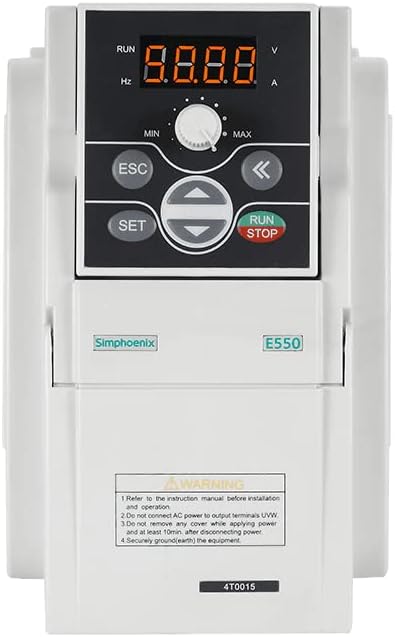
Слика 3.1: Предна страна view of the FBT SIMPHOENIX E550-2S0055L VFD, showing the digital display, control buttons, and potentiometer.
3.1 Карактеристики на контролната табла
- Дигитален екран: A 4-digit LED display shows operational parameters such as frequency (Hz), voltage (V), and current (A). Indicators for RUN status are also present.
- Потенциометар: A rotary knob labeled MIN/MAX for adjusting frequency or other parameters.
- Копче ESC: Се користи за излез од менијата или откажување на операциите.
- Копче SET: Used to enter menus or confirm settings.
- Копчиња за насока (горе/долу/лево/десно): Used for navigation within menus and adjusting parameter values.
- Копче RUN/STOP: Ја започнува или ја запира работата на моторот.
4. Поставување и инсталација
4.1 Електрични врски
- Влез на енергија: Connect the 220V AC power supply to the designated input terminals. Ensure the power source matches the VFD's voltagбарања.
- Излез на мотор: Connect the motor to the UVW output terminals. Do not connect AC power to these terminals.
- Заземјување: Ensure the VFD is securely grounded (earthed) to a proper ground point.
- Контролно жици: Utilize the multifunctional input terminals for external control signals. The VFD supports 29 kinds of terminal function definitions and 16 kinds of programmable status outputs for flexible control.
4.2 Комуникациски интерфејс
The VFD includes a standard RS485 communication interface. It supports the MODBUS protocol and Simphoenix self-defined protocols, allowing for easy integration with PLCs or other industrial control equipment.
5. Упатства за работа
5.1 Основно работење
- Вклучување: Apply power to the VFD. The digital display will illuminate.
- Прилагодување на параметарот: Use the SET button to enter the parameter menu. Navigate with the directional buttons and adjust values using the potentiometer or directional buttons. Press SET to confirm and ESC to exit.
- Стартување на моторот: Притиснете го ТРЧЕТЕ button to start the motor. The RUN indicator will light up.
- Прилагодете ја фреквенцијата: While the motor is running, the potentiometer can be used to adjust the output frequency, thereby controlling motor speed.
- Сопирање на моторот: Притиснете го СТОП button to halt the motor.
5.2 Напредни функции
- Следење во реално време: The VFD provides vivid real-time monitoring of input and output current, voltage, and other operational parameters directly on the display.
- Self-Adaptive Control: Features special self-adaptive control technology for automatic current-limiting, voltage-limiting, and under-voltage suppression during operation.
- Built-in Counter: A built-in counter function allows for simple counting operations when matched with multifunctional terminals.
- PID Controller: An integrated and optimized PID controller facilitates closed-loop control over variables like temperature, simplifying control system structures and reducing costs.
6. Одржување
Редовното одржување обезбедува долготрајност и сигурно работење на вашиот VFD.
- Чистење: Одржувајте го VFD чист и без прашина и остатоци. Користете мека, сува крпа за чистење. Не користете течни средства за чистење.
- Инспекција: Периодично проверувајте ги сите електрични врски за затегнатост и знаци на абење или оштетување.
- Ладење: Ensure adequate ventilation around the VFD to prevent overheating. Keep cooling fins clear.
- Исклучување на струја: Always disconnect power and wait at least 10 minutes before performing any maintenance or inspection that requires opening the VFD cover.
7 Смена на проблеми
Овој дел дава општи упатства за вообичаени проблеми. За сложени проблеми, контактирајте ја техничката поддршка.
- VFD Not Powering On:
- Check the main power supply connection.
- Потврдете го влезниот волуменtagд (220V)
- Inspect fuses or circuit breakers.
- Моторот не работи:
- Ensure the RUN button has been pressed.
- Check motor wiring to UVW terminals.
- Verify motor parameters are correctly set in the VFD.
- Check for any error codes on the display and consult the full manual for their meaning.
- Абнормален шум или вибрации:
- Check motor mounting and alignment.
- Verify motor parameters and VFD settings.
- Ensure the motor is suitable for VFD operation.
8. Спецификации
| Карактеристика | Спецификација |
|---|---|
| Модел | E550-2S0055L |
| Бренд | FBT / SIMPHOENIX |
| Влез волуменtage | 220V |
| Излезна моќност | 5.5KW (5500 Watts) |
| Контролни режими | SVC, V/F Control |
| Комуникациски интерфејс | Standard RS485 (MODBUS, Simphoenix protocol) |
| Материјал | Бакар (внатрешни компоненти) |
| Производител | FBT |
9. Гаранција и поддршка
За информации за гаранцијата, техничка поддршка или барања за услуги, ве молиме контактирајте го директно вашиот добавувач или производител. Зачувајте ја сметката за гаранциски барања.
You can visit the FBT Store for more products and information: FBT Store on Amazon


