1. Вовед
The Tycon TPSC2440NMPPT is an advanced Maximum Power Point Tracking (MPPT) solar charge controller designed for efficient battery charging from solar panels. It automatically adjusts to 12V or 24V battery systems and supports various battery types including Flooded, AGM, GEL, and Lithium, with a customizable USER setting. This controller features an integral LCD display for monitoring key system parameters.
2. Инструкции за безбедност
Please read and understand all instructions before installation and operation. Failure to follow these instructions may result in electric shock, fire, or severe injury.
- Осигурајте се дека сите кабли се правилно поларизирани и безбедно поврзани.
- Do not disassemble or attempt to repair the controller. Refer to qualified service personnel.
- Инсталирајте го контролерот во добро проветрено место, подалеку од запаливи материјали и корозивни гасови.
- Always disconnect the battery and solar panel before installing or moving the controller.
- Носете соодветна лична заштитна опрема (ЛЗО) за време на инсталацијата.
- The controller is designed for indoor use or protected outdoor environments (IP32 rating). Avoid direct exposure to water.
3. Производот завршиview
The TPSC2440NMPPT controller is equipped with several features to optimize solar charging and battery management:
- MPPT технологија: Го максимизира собирањето на енергија од соларни панели.
- Auto-Ranging Voltage: Compatible with 12V or 24V battery arrays.
- Multimode Load Operation: Offers 5 selectable modes for load control.
- Soft Start Load Output: Powers high capacitive loads safely.
- Automatic Battery Equalization: Performs 30-day equalization for optimal battery health.
- Conformal Coated Electronics: Provides environmental protection.
- TVS Lightning Protection: Enhances durability against electrical surges.
- Integral LCD Display: Покажува Battery Voltage, Capacity, Charging Capacity, Temperature, Load Current, and Solar Current.
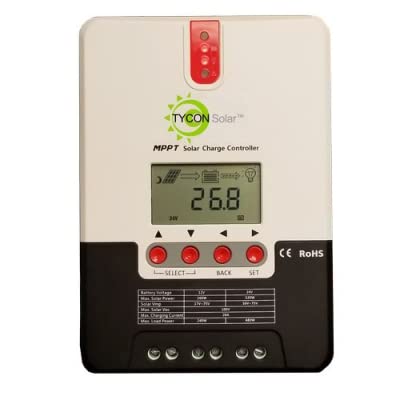
Слика 1: Предна страна view of the Tycon TPSC2440NMPPT Solar MPPT Battery Charging Controller, showing the LCD display and connection terminals.
4. Поставување и инсталација
Следете ги овие чекори за правилна инсталација:
- Монтирање: Choose a suitable location for mounting the controller. Ensure good ventilation and protection from direct sunlight and moisture.
- Поврзување со батерија: Connect the battery to the controller's battery terminals first. Ensure correct polarity (+ to + and - to -). The controller will automatically detect the battery voltage (12V или 24V).
- Поврзување на соларни панели: Connect the solar panel array to the controller's solar input terminals. Observe correct polarity. Ensure the open-circuit voltage of the solar array does not exceed the controller's maximum input voltage (110V at 25°C).
- Врска за оптоварување (опционално): If using the load output, connect your DC loads to the controller's load terminals. Do not exceed the rated load current (20A Max).
- Сензор за температура: Connect the included battery temperature probe cable to the designated port on the controller. Place the sensor near the battery for accurate temperature compensation.
- Вклучување: Once all connections are secure, the controller will power on and begin operation.
5. Упатства за работа
The integral LCD display provides real-time information about your solar charging system. Use the buttons (if present, assuming standard UP/DOWN/SET) to navigate through the display menus and adjust settings.
5.1 Информации за LCD екранот
- Батерија Voltage: Тековен волtagд на поврзаната батерија.
- Капацитет на батеријата: Estimated state of charge.
- Капацитет за полнење: Current power being delivered to the battery.
- Температура на батеријата: Temperature measured by the external probe.
- Струја на оптоварување: Current being drawn by connected DC loads.
- Solar Current: Current being generated by the solar panels.
5.2 Battery Type Settings
The controller supports Flooded, AGM, GEL, and Lithium battery types. A USER setting allows for custom charge parameters. Refer to the on-screen menu for selecting and configuring the battery type.
5.3 Load Operation Modes
The controller offers 5 selectable load operation modes. Consult the device's menu for details on each mode and how to select them, typically involving timed operation or dusk-to-dawn control.
6. Одржување
Редовното одржување обезбедува оптимални перформанси и долготрајност на вашиот соларен контролер за полнење.
- Проверете ги врските: Периодично проверувајте ги сите жичени врски за затегнатост и корозија.
- Чист контролер: Keep the controller clean and free of dust. Use a dry cloth for cleaning. Do not use liquids.
- Здравје на батеријата: Монитор батерија voltage and capacity on the LCD. Ensure batteries are properly maintained according to their manufacturer's guidelines.
- Вентилација: Осигурајте се дека просторијата за инсталација е добро проветрена за да се спречи прегревање.
7 Смена на проблеми
| Проблем | Можна причина | Решение |
|---|---|---|
| Нема екран/Нема напојување | Loose battery connection; Battery voltage too low; Blown fuse (external, if applicable). | Check battery connections and polarity. Charge battery if voltage is below operating threshold. Check and replace any external fuses. |
| Без соларно полнење | Solar panel not connected; Incorrect polarity; Insufficient sunlight; Damaged solar panel/wiring. | Verify solar panel connections and polarity. Ensure panels are receiving adequate sunlight. Inspect panels and wiring for damage. |
| Товарот не работи | Load disconnected; Overload; Short circuit; Battery voltagе премногу ниско. | Check load connections. Reduce load if exceeding 20A. Check for short circuits. Ensure battery is sufficiently charged. |
| Неточни читања | Loose connections; Faulty sensor. | Check all wiring connections. Ensure temperature sensor is properly connected and placed. |
8. Спецификации
- Модел: TPSC2440NMPPT
- Auto Voltage: 12V/24V (System)
- Ampсега: 40 А
- Номинална струја на оптоварување: 20А Макс
- Максимално капацитивно оптоварување: 10,000 uF
- Max Solar Input Voltage: 110V (25°C), 90V (25°C)
- Max Power Point Range: 2VDC to 75VDC (Battery Volts)
- Ефикасност на конверзија: 96% Тип.
- MPPT Tracking Efficiency: 99%
- Само-потрошувачка: 1W
- Температурна компензација: -3.0mV/°C/Ќелија
- Максимална големина на жица: 8 AWG
- Voltage and Current Accuracy: +/-2%
- Заземјување: Негативна основа
- Заштита на животната средина: IP32
- Димензии на производот: 12 x 9 x 6 инчи
- Тежина на ставката: 5.16 фунти
- Тип на приказ: LCD екран


