1. Вовед
Ви благодарам за купувањетоasing the JOYTRIP Auto Tracking Phone Holder, Model T2. This device is designed to enhance your video recording experience by automatically tracking your face or body, providing stable and dynamic footage without the need for manual adjustment or additional applications. It is ideal for video calls, live streaming, vlogging, and other hands-free video activities. Please read this manual thoroughly before use to ensure proper operation and maintenance.
2. Производот завршиview
2.1 Клучни карактеристики
- Автоматско следење: Recognizes and tracks faces or bodies with 360° rotation.
- No App Required: Features a built-in camera system for intelligent tracking, eliminating the need for external applications.
- Versatile Rotation: Offers 360° horizontal rotation and adjustable clip for various angles.
- Батерија на полнење: Integrated 2200 mAh lithium battery provides 6-8 hours of continuous operation.
- Компатибилност со статив: Equipped with a standard 1/4" screw thread for mounting on tripods.
- Преносен дизајн: Compact and detachable for easy transport.
2.2 Содржина на пакетот
Ве молиме проверете го пакувањето за следните ставки:
- JOYTRIP Auto Tracking Phone Holder (Model T2)
- USB Charging Cable (Type-C, inferred)
- Упатство за употреба (овој документ)

Image 2.1: The JOYTRIP Auto Tracking Phone Holder with a smartphone mounted, showing a family video call. The device is black with a silver band.

Image 2.2: An illustration detailing the key functions of the phone holder, such as 360° rotation, face/body tracking, and tripod compatibility.
3. Поставување
3.1 Полнење на уредот
- Locate the charging port on the device (usually at the back or side).
- Поврзете го испорачаниот USB кабел за полнење со уредот и соодветен USB адаптер за напојување (не е вклучен).
- The charging indicator light will illuminate (e.g., red) during charging and turn off or change color (e.g., green) when fully charged.
- A full charge typically takes approximately 3-4 hours and provides 6-8 hours of usage.
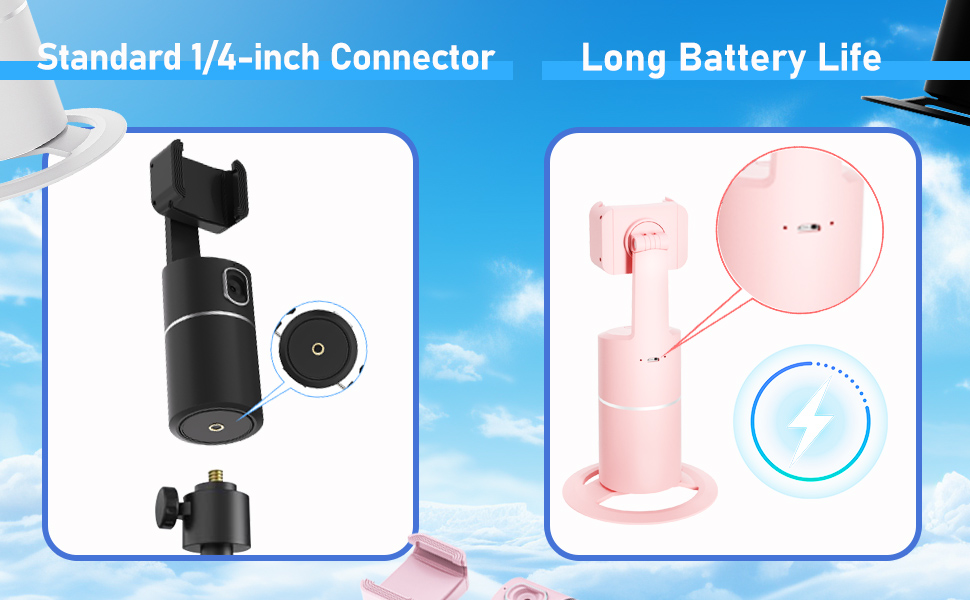
Image 3.1: Detail of the charging port and battery life indicator on the device.
3.2 Монтирање на вашиот паметен телефон
- Gently pull open the phone clip on the top of the holder.
- Place your smartphone into the clip, ensuring it is securely held. The clip supports phones between 2 to 3.2 inches in width.
- Adjust the phone's position within the clip for optimal balance and camera alignment.

Image 3.2: Dimensions of the phone holder and how to adjust the phone clip.
3.3 Вклучување/исклучување
- To power on: Press and hold the power button (usually located on the front or top of the base) for a few seconds until the indicator light illuminates.
- За исклучување: Притиснете го и држете го копчето за вклучување повторно додека индикаторската ламба не се изгасне.
4. Упатства за работа
4.1 Автоматско следење
- Ensure the device is powered on and your phone is securely mounted.
- Position yourself in front of the device's built-in camera. The device will automatically detect and begin tracking your face or body.
- The holder will rotate 360° horizontally to follow your movements.
- The device operates independently of your phone's camera or any specific app, allowing you to use any application for video calls, streaming, or recording.

Image 4.1: The phone holder automatically tracking a person during an exercise session.
4.2 Switching Between Horizontal and Vertical Modes
The phone holder allows for easy switching between horizontal (landscape) and vertical (portrait) orientations. Simply rotate your phone within the clip to the desired orientation. The device will continue to track.

Image 4.2: Demonstrates the phone holder supporting both horizontal and vertical phone orientations.
4.3 Монтирање на статив
The base of the JOYTRIP Auto Tracking Phone Holder features a standard 1/4-inch screw thread. This allows you to mount the device onto most tripods or stands for increased height and stability.
- Locate the 1/4-inch screw thread at the bottom of the device.
- Screw the device onto your tripod's mounting plate until secure.
- Ensure the device is stable before mounting your phone.

Image 4.3: Detail of the 1/4-inch screw thread for tripod compatibility.
5. Одржување
5.1 Чистење
- Избришете го уредот со мека, сува крпа.
- Do not use abrasive cleaners, solvents, or strong chemicals, as these may damage the surface or internal components.
- Keep the camera lens clean for optimal tracking performance.
5.2 Грижа за батерии
- За да го продолжите животниот век на батеријата, избегнувајте често целосно празнење на батеријата.
- Полнете го уредот редовно, дури и ако не се користи подолг период (на пример, еднаш на секои 3 месеци).
- Чувајте го уредот на ладно и суво место, подалеку од директна сончева светлина и екстремни температури.
6 Смена на проблеми
| Проблем | Можна причина | Решение |
|---|---|---|
| Уредот не се вклучува. | Слаба батерија. | Наполнете го уредот целосно користејќи го дадениот USB-кабел. |
| Tracking is inconsistent or stops. |
|
|
| Телефонот не е безбедно држен. | Phone width exceeds clip capacity or is too small. | Ensure your phone's width is between 2 and 3.2 inches. Adjust the phone carefully within the clip. |
| Device does not rotate. | Tracking not activated or device malfunction. | Ensure the device is powered on and a subject is clearly in view of the camera. If the issue persists, contact customer support. |
7. Спецификации
| Карактеристика | Детал |
|---|---|
| Број на модел | T2 |
| Бренд | ЏОЈТРИП |
| Димензии на производот | 3.93 x 3.93 x 7.75 инчи (10 x 10 x 19.7 см) |
| Тежина на ставката | 6.6 унци (187 грама) |
| Батерија | Литиум-јонска батерија од 2200 mAh (вклучена) |
| Траење на батеријата | 6-8 часа (континуирана употреба) |
| Агол на ротација | 360 ° хоризонтално |
| Поле на View (леќа) | 105° |
| Брзина на ротација | 42° во секунда |
| Компатибилна ширина на телефонот | 2 - 3.2 инчи (приближно 5 - 8.1 см) |
| Нишка за статив | Standard 1/4-inch screw thread |
| UPC | 797550711288 |
8. Гаранција и поддршка
For information regarding warranty coverage, please refer to the warranty card included with your purchase or contact the retailer where the product was acquired.
If you encounter any issues or have questions about your JOYTRIP Auto Tracking Phone Holder, please contact JOYTRIP customer support through their official webстраницата или информациите за контакт дадени со пакувањето на вашиот производ.