Вовед
This manual provides detailed instructions for the installation, operation, maintenance, and troubleshooting of the ADVANTECH PS8-500FATX-GB 80+ Gold Flex ATX Power Supply. This power supply unit (PSU) is designed to deliver stable and efficient power to your system, featuring 500W output with 3.3V, 5V, 12V, and -12V outputs, and RoHS compliance.
Информации за безбедност
Please read all safety instructions carefully before installing or operating the power supply. Failure to follow these instructions may result in electric shock, fire, or damage to the product and connected equipment.
- Ensure the power supply is disconnected from the AC power source before installation or maintenance.
- Не го отворајте напојувањето casing. Висок волуменtagКомпонентите внатре претставуваат ризик од електричен удар.
- Инсталирајте го напојувањето во добро проветрено место за да спречите прегревање.
- Use only the cables provided or approved by ADVANTECH for this power supply.
- Овој производ е дизајниран само за внатрешна употреба.
Содржина на пакетот
Проверете дали сите артикли се присутни во пакувањето:
- ADVANTECH PS8-500FATX-GB Power Supply Unit
- Кабел за напојување со наизменична струја
- Завртки за монтирање
- Упатство за употреба (овој документ)
Поставување и инсталација
Follow these steps to properly install the power supply into your system:
- Подгответе го вашиот систем: Ensure your computer system is powered off and disconnected from the AC outlet. Open the computer case.
- Отстранете го стариот напојувач (доколку е применливо): Disconnect all cables from the old power supply. Unscrew and remove the old PSU from the chassis.
- Инсталирајте нов напојувач: Carefully place the ADVANTECH PS8-500FATX-GB into the power supply bay of your computer case. Ensure the fan is facing the correct direction for optimal airflow (usually facing down or out of the case). Secure the PSU with the provided mounting screws.
- Поврзете ги главните кабли за напојување:
- Connect the 20+4 pin ATX main power connector to the motherboard.
- Connect the 4+4 pin EPS/ATX 12V connector to the motherboard CPU power socket.
- Поврзете ги периферните кабли: Connect SATA power connectors to hard drives, SSDs, and optical drives. Connect PCIe power connectors to graphics cards if required. Connect Molex connectors to other peripherals as needed.
- Управување со кабли: Уредно поставете ги каблите за да го подобрите протокот на воздух и естетиката.
- Затворете го куќиштето и поврзете го наизменичниот напон: Close your computer case. Connect the AC power cord to the power supply and then to a wall outlet or surge protector.
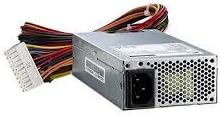
Слика 1: The ADVANTECH PS8-500FATX-GB 500W Flex ATX Power Supply, showing its compact form factor and various power connectors. This image illustrates the physical appearance of the unit and its attached cabling.
Упатства за работа
Once installed, operating the power supply is straightforward:
- Вклучување: After connecting all necessary cables and the AC power cord, press the power button on your computer case. The power supply will automatically provide power to your system.
- Исклучено: Shut down your computer through the operating system. The power supply will enter a low-power state. For complete power disconnection, switch off the power supply's main switch (if present) or unplug the AC power cord.
- Следење: Modern motherboards and operating systems often provide tools to monitor power supply voltages. Refer to your motherboard manual for details.
Одржување
Правилното одржување обезбедува долготрајност и оптимални перформанси на вашето напојување:
- Чистење прашина: Periodically clean the power supply fan and vents to prevent dust buildup, which can impede airflow and cause overheating. Use compressed air for this purpose, ensuring the system is powered off and unplugged.
- Инспекција на кабел: Редовно проверувајте ги сите напојувачки кабли за какви било знаци на абење, кинење или оштетување. Веднаш заменете ги оштетените кабли.
- Еколошки услови: Operate the power supply within its specified temperature and humidity ranges. Avoid extreme conditions.
Решавање проблеми
Доколку наидете на проблеми со напојувањето, погледнете ги следните вообичаени проблеми и решенија:
| Проблем | Можна причина | Решение |
|---|---|---|
| Системот не се вклучува. |
|
|
| Системот се вклучува, но веднаш се исклучува. |
|
|
| Невообичаени звуци од напојувањето. |
|
|
If the problem persists after trying these solutions, contact ADVANTECH customer support for further assistance.
Спецификации
| Карактеристика | Детал |
|---|---|
| Модел | PS8-500FATX-GB |
| Бренд | ADVANTECH |
| Форма фактор | Flex ATX |
| Излезен Ватtage | 500 вати |
| Оценка за ефикасност | 80+ Злато |
| Излез Voltages | 3.3V, 5V, 12V, -12V |
| Тип на конектор | ATX (20+4 pin, 4+4 pin EPS/ATX 12V, SATA, PCIe, Molex) |
| Усогласеност | RoHS |
| Тежина на ставката | 12.99 фунти |
| Производител | Advantech Co |
| ASIN | B08SMRH5V8 |
| UPC | 040048829683 |
Гаранција и поддршка
ADVANTECH products are designed for reliability and performance. For warranty information and technical support, please refer to the official ADVANTECH webсајт или контактирајте со нивниот оддел за услуги на клиентите.
- Службен Webсајт: www.forest.com
- Поддршка за корисници: Погледнете го делот „Контактирајте не“ на официјалната страница webстраница за детали за регионална поддршка.
Ве молиме чувајте го вашиот доказ за купување за барањата за гаранција.