1. Вовед
This manual provides essential information for the safe and efficient operation of your DOOGEE S97 Pro Rugged Smartphone. Please read it thoroughly before using your device.

Image 1.1: The DOOGEE S97 Pro Rugged Smartphone, showcasing неговиот робустен дизајн и дисплеј.
2. Уредот завршиview
The DOOGEE S97 Pro is a rugged smartphone designed for durability and performance. Key features include:
- Оперативен систем: Андроид 11
- Процесор: Helio G95 осумјадрен процесор 2.1GHz 12nm
- Меморија: 8 GB RAM + 128 GB ROM
- Батерија: 8500mAh Super Battery with 33W Fast Charging and 10W Wireless Charging
- Прикажи: 5.71-inch Corning Gorilla Glass
- Задна камера: Samsung 48MP AI Main Camera (48MP + 8MP + 2MP + 2MP)
- Предна камера: 16 MP
- Посебни карактеристики: 40m Rangefinder, IP68 Waterproof, Dustproof, Shockproof, NFC Support
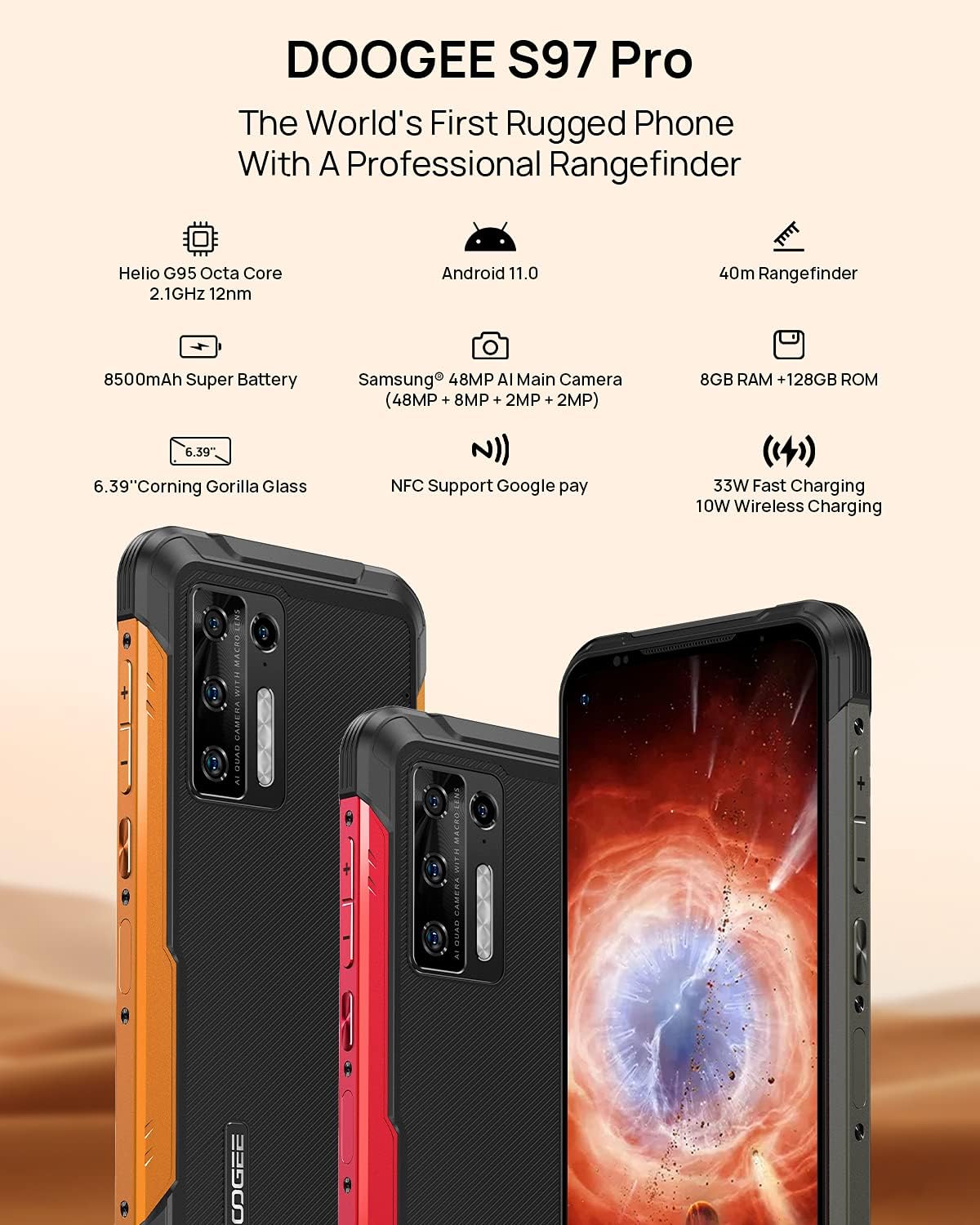
Image 2.1: Visual representation of the DOOGEE S97 Pro's main features, including processor, battery, camera, and display.
3. Поставување
3.1 Инсталација на SIM картичка
- Пронајдете го држачот за SIM-картичка од страната на вашиот уред.
- Користете ја испорачаната алатка за исфрлање на SIM картичката за да го отворите фиоката.
- Carefully place your Nano SIM card(s) into the designated slots. Ensure proper orientation.
- Gently push the SIM card tray back into the device until it is flush with the body.
Забелешка: This device supports specific frequency bands. Please verify compatibility with your network carrier before use. The DOOGEE S97 Pro does not support certain CDMA network carriers such as Verizon, Sprint, Xfinity, and TracFone.
3.2 Почетно вклучување
- Press and hold the Power button located on the side of the device until the DOOGEE logo appears.
- Следете ги упатствата на екранот за да го завршите почетното поставување, вклучувајќи го изборот на јазик, Wi-Fi конекцијата и поставувањето на Google сметката.
4. Упатства за работа
4.1 Основна навигација
- Назад функција: Повлечете од левиот или десниот раб на екранот кон центарот.
- Почетен екран: Повлечете нагоре од дното на екранот за да се вратите на почетниот екран.
- Неодамнешни апликации: Swipe up from the bottom of the screen and hold briefly to view recent applications. Swipe left or right along the very bottom of the screen to scroll through recent apps.
- Фиока за апликации: The device does not feature a traditional app drawer. All installed applications are displayed on the home screen. Additional home screens are automatically added to the right as more apps are installed.
4.2 Употреба на камерата
DOOGEE S97 Pro е опремен со разновиден систем на камери:
- Задна камера: 48MP main sensor, 8MP ultra-wide angle, 2MP portrait, and 2MP macro lens.
- Предна камера: 16MP за селфи фотографии и видео повици.
To access the camera, tap the Camera icon on your home screen. Select desired modes (Photo, Video, Portrait, Macro, etc.) from the interface.

Слика 4.1: Крупен план view of the Samsung 48MP AI Quad Rear Camera system on the DOOGEE S97 Pro.
4.3 Rangefinder Functionality
The integrated 40m laser rangefinder allows for precise distance measurements. To use:
- Locate and open the 'Rangefinder' application on your device.
- Select the desired measurement mode (Length, Area, Volume, Pythagoras).
- Follow the on-screen instructions to aim the laser and take measurements.

Image 4.2: Screenshots of the DOOGEE S97 Pro's 40m Rangefinder application interface, showing various measurement modes.
4.4 Управување со батерии
The DOOGEE S97 Pro features an 8500mAh battery. To optimize battery life and charging:
- Wично полнење: Use the provided USB Type-C cable and a compatible 33W fast charger for optimal charging speed.
- Безжично полнење: The device supports 10W wireless charging. Place the phone on a compatible wireless charging pad.
- Оптимизација на батеријата: Access battery settings to manage app power usage and enable power-saving modes.

Image 4.3: Illustration of the DOOGEE S97 Pro's 8500mAh Super Battery and charging capabilities.
4.5 Карактеристики на издржливост
The S97 Pro is built to withstand harsh environments:
- Оценка IP68: Обезбедува заштита од навлегување на прашина и потопување во вода до 1.5 метри во тек на 30 минути.
- Отпорен на удари: Designed to resist drops and impacts.
- Corning Gorilla Glass: Enhances screen durability against scratches and minor impacts.

Image 4.4: Demonstrations of the DOOGEE S97 Pro's waterproof, dustproof, and shockproof capabilities.
Video 4.5: An official video from DOOGEE showcasing the rugged features and capabilities of the S59 Pro smartphone.
4.6 Оперативен систем Android 11
The device runs on Android 11, offering enhanced privacy controls, improved notification management, and a streamlined user experience.

Image 4.6: Visual representation of the Android 11 operating system interface on the DOOGEE S97 Pro.
5. Одржување
5.1 Чистење на вашиот уред
Due to its waterproof design, the DOOGEE S97 Pro can be cleaned with water. Ensure all ports are securely closed before rinsing. Use a soft, damp cloth to wipe the screen and body. Avoid harsh chemicals or abrasive materials.
5.2 Ажурирања на софтверот
Редовно проверувајте и инсталирајте ажурирања на софтверот за да обезбедите оптимални перформанси, безбедност и пристап до нови функции. Одете до Поставки > Систем > Ажурирање на системот за да проверите за достапни ажурирања.
6 Смена на проблеми
Доколку наидете на проблеми со вашиот уред, погледнете ги следниве вообичаени решенија:
- Уредот не реагира: Притиснете го и држете го копчето за вклучување приближно 10-15 секунди за да го рестартирате.
- Проблеми со мрежната поврзаност: Verify your SIM card is correctly inserted. Check network settings (Поставки > Мрежа и интернет > Мобилна мрежа). Рестартирајте го уредот.
- Проблеми со полнење: Ensure the USB cable and charger are securely connected and undamaged. Try a different charger or cable. For wireless charging, ensure the phone is correctly positioned on the charging pad.
- Fingerprint Sensor Inaccuracy: Проверете дали прстот ви е чист и сув. Регистрирајте ги повторно отпечатоците од прсти во Поставки > Безбедност > Отпечаток од прст.
- Бавни перформанси: Close unused applications. Clear cache (Поставки > Апликации и известувања > Види ги сите апликации > [Име на апликација] > Складирање и кеш > Избриши кеш). Consider a factory reset as a last resort (Поставки > Систем > Опции за ресетирање > Избриши ги сите податоци (фабричко ресетирање)).
7. Спецификации
| Карактеристика | Детал |
|---|---|
| Димензии на производот | 6.41 x 3.19 x 0.63 инчи |
| Тежина на ставката | 12 унци (340 грама) |
| Оперативен систем | Андроид 11.0 |
| RAM меморија | 8 GB (Note: Product data shows 4GB RAM, but images and title indicate 8GB. This manual uses 8GB as per prominent product claims.) |
| Капацитет за складирање на меморија | 128 GB |
| Големина на екранот | 5.71 инчи |
| Капацитет на батеријата | 8500 милиониamp Hours (Note: Product data shows 10050 mAh, but images and title indicate 8500 mAh. This manual uses 8500 mAh as per prominent product claims.) |
| Безжични комуникациски технологии | Мобилен, Wi-Fi |
| Мобилна технологија | LTE |
| Тип на конектор | USB тип C |
| Влез со човечки интерфејс | Копчиња |
| Што има во кутијата | USB кабел |
For detailed specifications, please refer to the product packaging or the official DOOGEE webсајт.

Image 7.1: The DOOGEE S97 Pro highlighting its 8GB RAM and 128GB ROM, powered by a Helio G95 Octa Core processor.
8. Гаранција и поддршка
Your DOOGEE S97 Pro smartphone is covered by a manufacturer's warranty. Please refer to the warranty card included in your product packaging for specific terms and conditions, including warranty duration and coverage details.
For technical support, product inquiries, or service requests, please visit the official DOOGEE webвеб-страница или контактирајте го нивниот оддел за услуги на клиентите. Контакт информациите обично може да се најдат на DOOGEE webлокацијата или во пакувањето на производот.


