1. Вовед
Thank you for choosing the Ctronics 5X Optical Zoom WiFi Outdoor Security Camera. This manual provides detailed instructions for the installation, operation, and maintenance of your camera. Please read this manual thoroughly before use to ensure proper functionality and safety. This camera is designed for outdoor surveillance, offering advanced features such as 5X optical zoom, human detection, auto-tracking, color night vision, and two-way audio.

Слика 1.1: Ctronics 5X Optical Zoom WiFi Outdoor Security Camera. This image shows the main unit of the camera with its dual antennas and lens array.
2. Информации за безбедност
Ве молиме почитувајте ги следниве безбедносни мерки на претпазливост за да спречите оштетување на производот или повреда на вас самите или на другите:
- Ensure the power supply is stable and matches the camera's voltage барања (12 волти).
- Do not expose the camera to extreme temperatures or humidity beyond its operating range.
- Avoid direct exposure of the lens to strong light sources, which may damage the sensor.
- Не обидувајте се да ја расклопите или модифицирате камерата. За сите сервиси обратете се на квалификуван персонал.
- Држете го фотоапаратот и неговите додатоци подалеку од дофат на деца.
- Обезбедете правилно монтирање за да спречите паѓање на камерата.
3. Содржина на пакетот
Please check the package contents upon opening. If any items are missing or damaged, contact your retailer or Ctronics support.
- Ctronics 5X Optical Zoom WiFi Outdoor Security Camera
- Адаптер за напојување
- Монтирачки завртки и ѕидни приклучоци
- Waterproof Kit for Network Cable (if applicable)
- Водич за брз почеток
4. Поставување
4.1 Физичка инсталација
- Изберете локација: Изберете соодветна надворешна локација со јасна површина view of the area you wish to monitor. Ensure the location has access to a power outlet.
- Монтирање: Use the provided mounting template (if included) to mark drill holes on the wall or ceiling. Drill the holes, insert wall plugs, and secure the camera bracket using the screws.
- Поврзување за напојување: Поврзете го адаптерот за напојување со приклучокот за напојување на фотоапаратот и вклучете го во штекер.
4.2 мрежно поврзување
The camera supports 2.4GHz Wi-Fi networks.
- Преземете ја апликацијата: Download the "Ctronics" app from your smartphone's app store (iOS/Android). For PC users, download the HiP2P software for MAC/Windows.
- Почетно поставување: Следете ги упатствата во апликацијата за да ја додадете вашата камера. Ова обично вклучува скенирање QR-код на камерата или рачно внесување на нејзиниот ID.
- Wi-Fi конфигурација: Connect the camera to your 2.4GHz Wi-Fi network through the app.

Слика 4.1: Broad Compatibility. This image illustrates the camera's compatibility with various devices and operating systems, including iOS, Android, Windows, and Mac OS, through the Ctronics Pro app and HiP2P Client software.
4.3 Инсталација на микро SD картичка (опционално)
The camera supports a micro SD card up to 64GB for local storage of recordings.
- Locate the SD card slot on the camera (refer to the camera diagram in the quick start guide).
- Carefully insert the micro SD card into the slot until it clicks into place.
- Format the SD card via the camera's settings in the Ctronics app for optimal performance.
5. Ракување со камерата
5.1 Панорамирање, навалување и зумирање (PTZ)
The camera features motorized pan (355° horizontally) and tilt (90° vertically) functions, along with 5X optical zoom.
- Контрола: Use the Ctronics app to remotely control the camera's pan and tilt movements by swiping on the live view екран.
- Оптички зум: Штипнете за зумирање во живо view to activate the 5X optical zoom. The camera will auto-focus for clear detailed images.
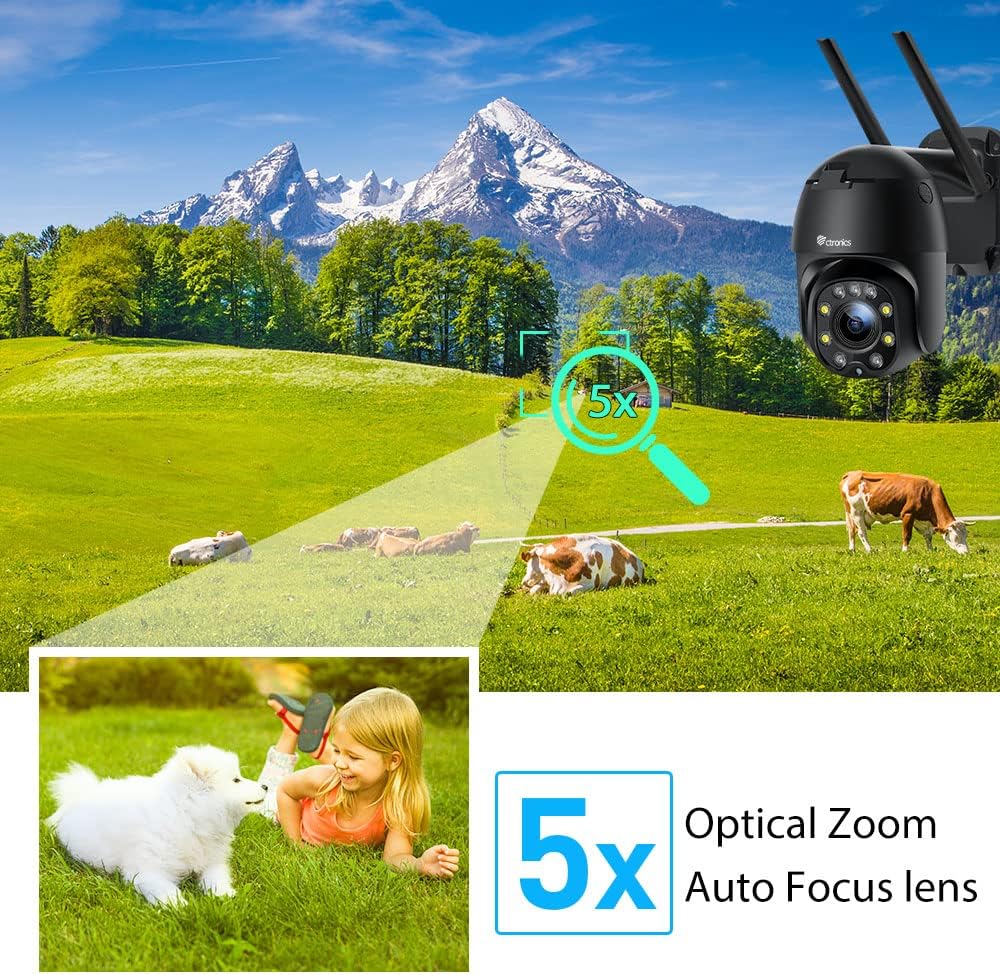
Слика 5.1: 5X Optical Zoom. This image demonstrates the camera's 5X optical zoom capability, allowing for detailed viewing of distant objects with auto-focus functionality.
5.2 Human Detection and Auto-Tracking
The camera utilizes AI algorithms to distinguish human movement from other triggers, reducing false alarms by up to 95%.
- Откривање: When a human is detected, the camera will automatically track their movement within its field of view.
- Известувања: You will receive instant notifications via the app, FTP, or email.
- Снимање: Detected events are recorded to the installed SD card.

Слика 5.2: Human Detection. This image illustrates how the camera's human detection feature accurately identifies people while ignoring non-human movements like pets, significantly reducing false alarms.

Слика 5.3: Auto Tracking. This image demonstrates the camera's auto-tracking capability, showing how it follows a detected subject's movement within its 355° horizontal and 90° vertical range.
5.3 HD 1080P & Night Vision
The camera provides 1920x1080P resolution for clear images and offers two night vision modes.
- Ноќно гледање во боја: With 4 spotlights and 5 infrared lights, the camera can display vivid color images in total darkness up to 25 meters.
- Инфрацрвено ноќно гледање: Standard black and white infrared vision is also available.

Слика 5.4: Color Night Vision. This image illustrates the camera's ability to provide full-color video surveillance even in low-light or nighttime conditions.
5.4 Двонасочно аудио
Комуницирајте со посетители или одвратете ги натрапниците користејќи го вградениот микрофон и звучник.
- Real-time Conversation: Use the Ctronics app to engage in real-time conversations.
- Намалување на бучавата: The camera features ambient noise reduction technology for clearer sound quality.

Слика 5.5: Two-Way Audio. This image depicts the camera's two-way audio functionality, allowing users to communicate with individuals near the camera via their smartphone.
5.5 Далечински пристап
View живеј фаоtage and recordings from anywhere at any time using the Ctronics app or HiP2P software.
- Ensure your camera is connected to the internet.
- Log in to your Ctronics app or HiP2P software account to access your camera feed.
6. Одржување
Редовното одржување обезбедува долготрајност и оптимални перформанси на вашиот фотоапарат.
- Чистење: Нежно избришете го објективот и телото на фотоапаратот со мека, дamp крпа. Не користете груби хемикалии или абразивни средства за чистење.
- Ажурирања на фирмверот: Check the Ctronics app periodically for available firmware updates. Keeping the firmware updated ensures you have the latest features and security enhancements.
- Циклус на напојување: If the camera experiences minor issues, try power cycling it by unplugging and replugging the power adapter.
7 Смена на проблеми
Овој дел се однесува на вообичаени проблеми со кои може да се соочите.
| Проблем | Можна причина | Решение |
|---|---|---|
| Камера офлајн | Нема струја; Wi-Fi е исклучен; Проблем со рутерот | Check power connection; Reconnect Wi-Fi in app; Restart router |
| Лош квалитет на сликата | Dirty lens; Network bandwidth; Low light | Clean lens; Check internet speed; Ensure sufficient lighting or use night vision |
| Лажни аларми | Sensitivity too high; Non-human movement | Adjust detection sensitivity in app; Ensure human detection is enabled |
| SD картичката не снима | SD card full/corrupted; Not formatted; Incorrect settings | Format SD card in app; Check recording settings; Replace SD card if faulty |
8. Спецификации
Detailed technical specifications for the Ctronics CTIPC-285C-Z4B camera:
| Карактеристика | Спецификација |
|---|---|
| Број на модел | CTIPC-285C-Z4B |
| Димензии (Д x Ш x В) | 11 x 17 x 30 cm |
| Тежина | 940 грама |
| Материјал | Акрилонитрил бутадиен стирен (ABS) |
| Тип на енергија | Електричен кабел |
| Voltage | 12 волти |
| Потрошувачка на енергија | 6 вати |
| Резолуција | 1920x1080p |
| Оптички зум | 5X |
| Пан опсег | 355° |
| Опсег на навалување | 90° |
| Растојание за ноќно гледање | Прибл. 25 метри |
| Водоотпорен рејтинг | IP66 |
| Тип на мемориска картичка | Micro SD |
| Максимален капацитет на меморијата | 64 GB |
| Компатибилни уреди | Smartphone (iOS/Android), PC (MAC/Windows) |
9. Гаранција и поддршка
Ctronics products come with a standard warranty. For specific warranty terms and conditions, please refer to the warranty card included with your product or visit the official Ctronics website. If you encounter any issues not covered in this manual or require further assistance, please contact Ctronics customer support:
- Webсајт: www.ctronics.com
- Е-пошта: Погледнете го пакувањето на вашиот производ или webстраница за е-пошта за поддршка.
- Телефон: Погледнете го пакувањето на вашиот производ или webстраница за телефонски број за поддршка.
Please have your model number (CTIPC-285C-Z4B) and purchase information ready when contacting support.


