Вовед
Ви благодарам за купувањетоasing the Bytech True Wireless Bluetooth Boost Link True Speaker. This manual provides essential information for setting up, operating, and maintaining your new speakers. Please read this manual thoroughly before use to ensure proper operation and to maximize your listening experience. These speakers feature True Wireless Stereo (TWS) functionality, Bluetooth connectivity, FM Radio, and Bass Boost for rich audio.
Информации за безбедност
- Do not expose the speakers to extreme temperatures, humidity, or direct sunlight.
- Избегнувајте испуштање или изложување на звучниците на силни удари.
- Do not disassemble, repair, or modify the speakers yourself. Refer all servicing to qualified personnel.
- Keep the speakers away from water and other liquids.
- Користете само наведениот кабел за полнење и адаптер за напојување.
- Clean the speakers with a soft, dry cloth. Do not use abrasive cleaners or solvents.
- Listen at moderate volume levels to avoid hearing damage.
Содржина на пакетот

Image: The Bytech Boost Link True Wireless Speakers shown in their retail packaging, highlighting the two speakers and the Bluetooth connectivity feature.
Проверете дали сите предмети се присутни и во добра состојба:
- 2 x Bytech Boost Link True Wireless Speakers
- 1 x кабел за полнење (USB)
- 1 x Упатство за употреба (овој документ)
Производот завршиview

Слика: Крупен план од предната страна view of the two Bytech Boost Link True Wireless Speakers, showing the speaker grilles and control buttons at the bottom.
Запознајте се со компонентите и контролите на звучникот:
- Решетка за звучник: Protects the speaker driver.
- Контролни копчиња:
- Копче за вклучување: Power On/Off, Play/Pause.
- Копче за режим: Switch between Bluetooth, FM Radio, etc.
- Претходна песна/копче за намалување на јачината на звукот: Кратко притискање за претходна песна, долго притискање за намалување на јачината на звукот.
- Следна песна/копче за зголемување на јачината на звукот: Кратко притискање за следната песна, долго притискање за зголемување на јачината на звукот.
- Порта за полнење: За поврзување на USB кабел за полнење.
- LED индикатор: Shows power status, charging status, and pairing status.
Поставување
Полнење на звучниците
Before first use, fully charge both speakers. Connect the supplied USB charging cable to the charging port on each speaker and plug the other end into a USB power adapter (not included) or a computer's USB port. The LED indicator will show charging status and turn off or change color when fully charged.
Вклучување/исклучување
- За вклучување: Press and hold the Power button on each speaker until the LED indicator lights up and you hear a power-on prompt.
- За исклучување: Press and hold the Power button on each speaker until the LED indicator turns off and you hear a power-off prompt.
Упатства за работа
Bluetooth Pairing (Single Speaker Mode)
- Уверете се дека звучникот е вклучен и во режим на спарување преку Bluetooth (LED индикаторот ќе трепка).
- На вашиот уред (паметен телефон, таблет, лаптоп), овозможете Bluetooth и пребарајте достапни уреди.
- Select "BYTECH BOOST LINK" (or similar name) from the list.
- Once paired, the LED indicator will stop flashing and remain solid, and you will hear a confirmation sound.
True Wireless Stereo (TWS) Pairing (Two Speakers)
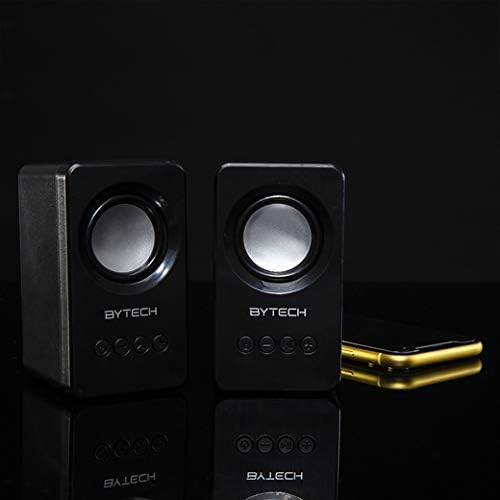
Image: The two Bytech Boost Link True Wireless Speakers positioned next to a smartphone, symbolizing their ability to connect wirelessly to each other and a device for stereo sound.
For a true stereo sound experience, you can pair both speakers together:
- Power on both Bytech Boost Link speakers. Do not connect them to your Bluetooth device yet.
- The speakers will automatically attempt to pair with each other. You will hear a confirmation sound when they are successfully linked for TWS. One speaker will become the master (left channel) and the other the slave (right channel).
- Once TWS paired, the master speaker will enter Bluetooth pairing mode (LED flashing).
- On your device, enable Bluetooth and search for "BYTECH BOOST LINK". Connect to this single entry.
- И двата звучника сега ќе репродуцираат аудио во стерео.
- Забелешка: If the speakers do not automatically pair, try double-pressing the Mode button on one of the speakers to initiate TWS pairing.
Работа на FM радио
- Power on the speaker(s).
- Притиснете го Режим копчето неколку пати додека не го слушнете известувањето од FM радиото.
- За автоматско скенирање и зачувување на станиците, притиснете и држете го Пушти/Пауза button. The speaker will scan and store available FM stations.
- Користете го Претходна песна и Следна песна копчиња за навигација помеѓу зачуваните станици.
Репродукција на аудио и контрола на јачината на звукот
- Пушти/Пауза: Кратко притиснете го копчето за вклучување.
- Следна песна: Short press the Next Track/Volume Up button.
- Претходна песна: Short press the Previous Track/Volume Down button.
- Јачина на звук нагоре: Long press the Next Track/Volume Up button.
- Намалување на јачината на звукот: Long press the Previous Track/Volume Down button.
Одржување
- Чистење: Use a soft, dry, lint-free cloth to clean the surface of the speakers. Do not use liquid cleaners, aerosols, or solvents.
- Складирање: Кога не ги користите подолг период, чувајте ги звучниците на ладно и суво место, подалеку од директна сончева светлина и екстремни температури.
- Нега на батеријата: To prolong battery life, avoid fully discharging the battery frequently. Charge the speakers regularly, even if not in use.
Решавање проблеми
| Проблем | Можна причина | Решение |
|---|---|---|
| Звучникот не се вклучува. | Слаба батерија. | Наполнете го звучникот целосно. |
| Не може да се спари преку Bluetooth. | Звучникот не е во режим на спарување; Bluetooth-от на уредот е исклучен; Премногу е далеку од уредот. | Ensure speaker LED is flashing; Turn on Bluetooth on your device; Move speaker closer to device (within 10 meters). |
| Нема звук. | Volume too low; Speaker not connected; Incorrect mode. | Increase volume on speaker and device; Re-pair Bluetooth; Ensure correct mode (Bluetooth/FM). |
| Спарувањето преку TWS не успева. | Звучниците се веќе поврзани со уред; Звучниците се премногу оддалечени еден од друг. | Disconnect speakers from any device; Power off and on both speakers, then try TWS pairing again; Ensure speakers are close to each other. |
| Слаб FM радио прием. | Слаб сигнал; Пречки. | Relocate the speaker to an area with better reception; Extend the charging cable (can act as an antenna). |
Спецификации
- Модел: BY-AU-BS-152-BK
- Бренд: Bytech
- Технологија за поврзување: Безжичен (Bluetooth)
- Режим за излез на звук: Опкружувачки
- Тип на звучник: Сараунд звук
- Посебни карактеристики: Wireless Bluetooth, Bass Boost, FM Radio, True Wireless Stereo (TWS)
- Препорачана употреба: За музички плеери
- Компатибилни уреди: Лаптоп, таблет, паметен телефон
- Тип на контролор: Копчиња на уредот
- Димензии на пакетот: 20.7 x 16 x 9 cm
- Тежина: 560 гр
Гаранција и поддршка
Bytech products are designed and manufactured to the highest quality standards. For information regarding warranty coverage, technical support, or service inquiries, please refer to the warranty card included with your purchase or visit the official Bytech webстраница. Ве молиме задржете го доказот за купување за гаранциски барања.
For further assistance, please contact Bytech customer support.


