1. Вовед
Ви благодарам за купувањетоasing the ONIKUMA K1 RGB Gaming Headset. This manual provides detailed instructions for setup, operation, maintenance, and troubleshooting to ensure optimal performance and longevity of your headset. Please read this manual carefully before use and retain it for future reference.
2. Производот завршиview
The ONIKUMA K1 is a wired gaming headset designed for multi-platform compatibility, featuring vibrant RGB lighting, 7.1 surround sound, and a noise-cancelling microphone. It is built for comfort during extended gaming sessions.
Клучни карактеристики:
- 7.1 Сараунд звук: Provides immersive audio for an enhanced gaming experience.
- Микрофон со поништување на бучава: Ensures clear communication by reducing background noise.
- RGB осветлување: Dynamic lighting effects for an aesthetic appeal.
- Компатибилност со повеќе платформи: Works with PC, PlayStation (PS3, PS4), Mobile devices, and Xbox (Xbox One requires an adapter, not included).
- Удобен дизајн: Features soft protein earpads, an adjustable headband, and cozy head cushions.
- Вградени контроли: Easy access to volume adjustment and microphone mute.
Компоненти:
The headset includes the main unit with integrated microphone and a wired connection featuring a 3.5mm audio jack and a USB connector for RGB lighting.

Figure 1: Headset with in-line volume and microphone mute control, USB connector for RGB lighting, and 3.5mm audio jack.

Figure 2: Flexible microphone with 160-degree adjustment and 360-degree voice pick-up for clear communication.

Figure 3: Soft protein earpads, adjustable headband, and cozy head cushions designed for supreme comfort.
3. Упатства за поставување
Follow these steps to connect your ONIKUMA K1 headset to your device.
Компатибилност со повеќе платформи:
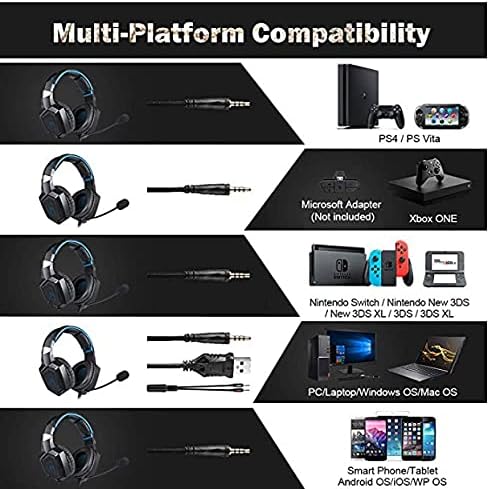
Слика 4: Компатибилност прекуview for PC, PlayStation, Xbox, Nintendo Switch, and mobile devices.
- For PC/Laptop (Windows OS/Mac OS):
Connect the 3.5mm audio jack to your computer's audio output/input port. Connect the USB cable to a USB port for RGB lighting. Ensure your sound settings are configured to use the headset. - For PlayStation (PS4/PS Vita/PS3):
Connect the 3.5mm audio jack to the controller or console's audio port. For PS4, go to Settings > Devices > Audio Devices > Output to Headphones > All Audio. Connect the USB for RGB lighting if a USB port is available. - For Xbox ONE:
An additional Microsoft Adapter (not included) is required for older Xbox One controllers. Connect the 3.5mm audio jack to the adapter, then connect the adapter to your controller. Newer Xbox One controllers have a built-in 3.5mm jack. Connect the USB for RGB lighting if a USB port is available on the console. - For Nintendo Switch/New 3DS XL/3DS/3DS XL:
Connect the 3.5mm audio jack directly to the console's audio port. - For Smart Phone/Tablet (Android OS/iOS/WP OS):
Connect the 3.5mm audio jack directly to your mobile device's headphone jack.
4. Упатства за работа
Once connected, you can begin using your headset. Here are the basic operating functions:
- Контрола на јачината на звукот: Use the in-line volume roller to adjust the audio output level. Roll up to increase volume, roll down to decrease.
- Исклучување на микрофонот: Use the in-line switch to mute or unmute the microphone. Slide the switch to the 'OFF' position to mute and 'ON' to unmute.
- Прилагодување на микрофонот: The microphone is flexible. Adjust its position closer to your mouth for optimal voice pickup or away when not in use.
- RGB осветлување: The RGB lighting is powered via the USB connection. Once the USB is plugged in, the lighting will activate automatically. There are no user-adjustable controls for the RGB lighting patterns on the headset itself.
- Поставување слушалки: Adjust the headband to ensure a comfortable and secure fit over your ears. The earpads should fully cover your ears for optimal sound isolation and comfort.
5. Одржување
Соодветната грижа ќе го продолжи животниот век на вашите слушалки.
- Чистење: Use a soft, dry cloth to clean the headset. Do not use liquid cleaners or abrasive materials.
- Складирање: Чувајте ги слушалките на ладно и суво место, подалеку од директна сончева светлина и екстремни температури.
- Грижа за кабел: Avoid sharp bends or excessive pulling on the cables to prevent damage. The cable is designed to be tangle-free.
- Избегнувајте влага: The headset is not water-resistant. Keep it away from liquids.
6 Смена на проблеми
Доколку наидете на проблеми со вашите слушалки, погледнете ги следниве вообичаени решенија:
| Проблем | Можно решение |
|---|---|
| Нема звук или низок волумен |
|
| Микрофонот не работи |
|
| RGB осветлувањето не работи |
|
| Sound quality issues (e.g., no 7.1 surround sound) |
|
7. Спецификации
| Карактеристика | Детал |
|---|---|
| Име на моделот | K1-B-Black RGB |
| Технологија за поврзување | Жичен |
| Џек за слушалки | 3.5 мм Jackек |
| Чувствителност | 104 dB |
| Фреквентен одговор | Not specified (Original data: 3045 Unknown Rate) |
| Контрола на бучава | Активно поништување на шум |
| Фактор на форма на слушалки | Над-уво |
| Поставување на увото | Над-уво |
| Боја | Црното |
| Име на брендот | ОНИКУМА |
| Димензии на производот | 22.5 x 19.5 x 10.5 cm |
| Тежина на ставката | 394 грама |
| Карактеристика на кабел | Без заплеткување |
| Тип на контрола | Контрола на јачината на звукот |
| Компатибилни уреди | Мулти-платформа |
| Препорачана употреба | Gaming, Making Calls |
| Специфични употреби на производот | Слушалки за игри |
| Материјали | Plastic, Polycarbonate Leather (PC) |
| Опис на возрасниот опсег | Возрасен |
| Ниво на отпорност на вода | Не е водоотпорен |
8. Гаранција и поддршка
For warranty information or technical support, please refer to the documentation included with your purchase or contact the seller directly. Keep your proof of purchase for any warranty claims.


