1. Вовед
This manual provides instructions for the Sharp Digital Alarm Clock, Model SPC547AJAMZ. This device features an easy-to-read LED display, a high-speed USB charging port, and essential alarm functions. Please read this manual thoroughly before use to ensure proper operation and to maximize the product's lifespan.

Figure 1: Sharp Digital Alarm Clock (Model SPC547AJAMZ) front view.
2. Карактеристики на производот
The Sharp Digital Alarm Clock offers the following key features:
- Екран што лесно се чита: Large, clear green LED digits for visibility from a distance.
- High-Speed USB Charging Port: А 2 AMP USB port for rapid charging of compatible devices such as smartphones and tablets.
- Прилагодлива јачина на аларм: Select between high and low alarm volume settings.
- Едноставна операција: Intuitive button controls for setting time and alarm.
- Резервна копија на батеријата: Ги одржува поставките за време и аларм за време на исклучување на струјатаtages (requires 2 AAA batteries, not included). The display will be blank during battery backup mode, but the internal clock will continue to run, and the alarm will sound at the set time.

Figure 2: Alarm clock with a smartphone connected to the USB charging port.
3. Содржина на пакетот
Проверете дали сите артикли се присутни во пакувањето:
- Sharp Digital Alarm Clock (Model SPC547AJAMZ)
- Адаптер за напојување со наизменична струја
- Упатство за употреба (овој документ)
Забелешка: 2 AAA батерии за резервна батерија не се вклучени и мора да се купат одделно.
4. Информации за безбедност
Ве молиме почитувајте ги следните безбедносни мерки:
- Не го изложувајте уредот на вода или прекумерна влага.
- Избегнувајте поставување на уредот во близина на извори на топлина или на директна сончева светлина.
- Користете го само испорачаниот адаптер за наизменична струја.
- Не обидувајте се да го расклопите или менувате уредот.
- Да се чува подалеку од дофат на деца.
- Обезбедете соодветна вентилација околу уредот.
5. Поставување
5.1 Поврзување за напојување
- Plug the AC power adapter into the DC IN jack located on the back of the alarm clock.
- Вклучете го другиот крај од адаптерот за наизменична струја во стандарден ѕиден штекер (120V AC, 60Hz).
- The display will illuminate, and the clock will be ready for time setting.
5.2 Инсталација на резервна батерија
To ensure time and alarm settings are retained during a power outage:
- Пронајдете го преградата за батерии на дното од уредот.
- Отворете го капакот на преградата за батерии.
- Insert two (2) new AAA batteries, observing the correct polarity (+ and -) as indicated inside the compartment.
- Добро затворете го капакот на преградата за батерии.
Note: Batteries are for backup only. The clock display will not be lit during a power outage when operating on battery backup, but the internal clock will continue to run, and the alarm will sound at the set time.
6. Упатства за работа
Familiarize yourself with the control buttons located on the top of the unit:
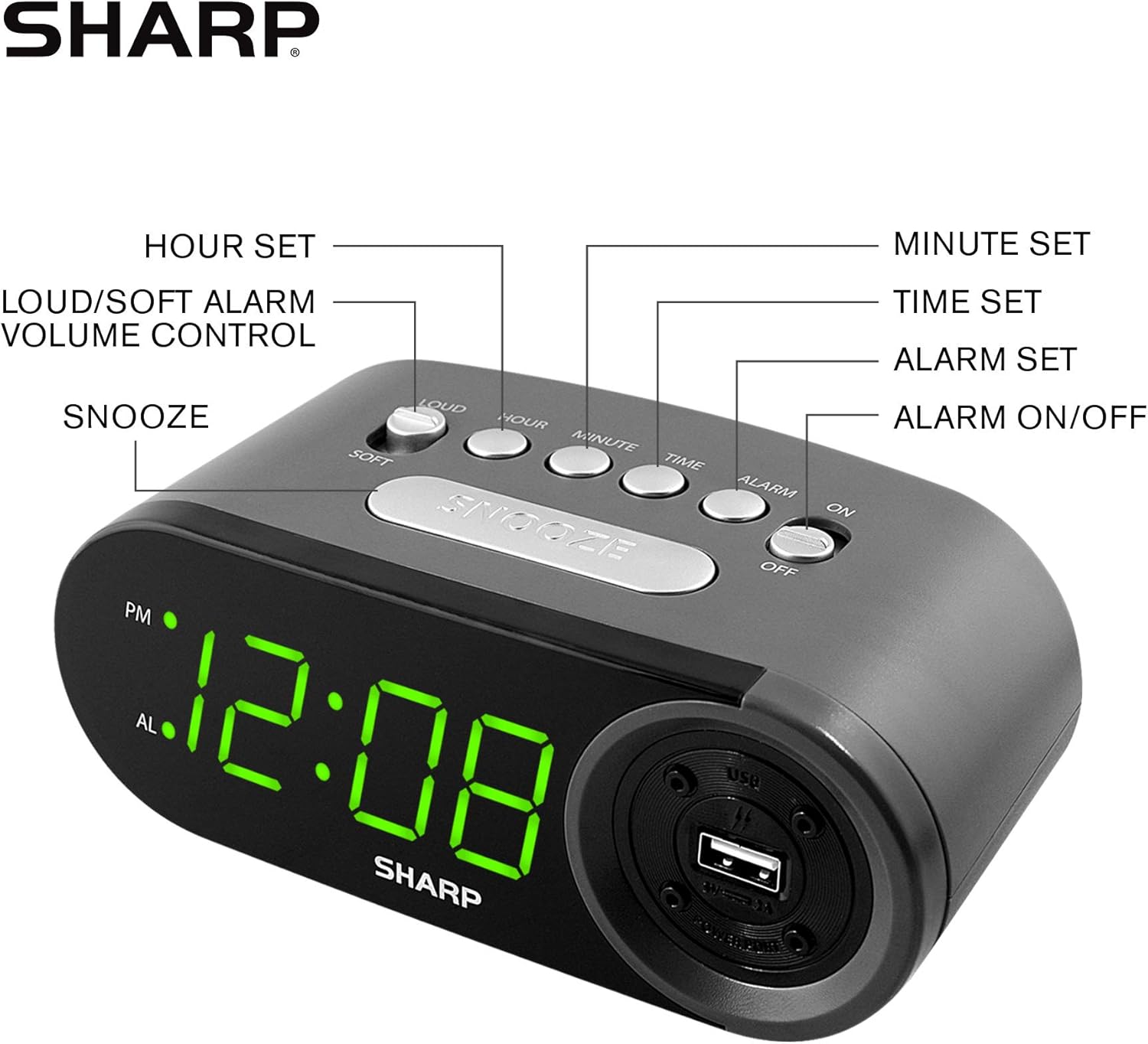
Figure 3: Top panel controls and their functions.
6.1 Поставување на тековното време
- Притиснете и задржете го ВРЕМЕ копчето додека екранот не почне да трепка.
- Притиснете го ЧАС button repeatedly to set the hour. Observe the PM indicator for afternoon hours.
- Притиснете го МИНУТА button repeatedly to set the minutes.
- Откако ќе го поставите посакуваното време, притиснете го копчето ВРЕМЕ притиснете го копчето повторно за да потврдите и да излезете од режимот за поставување време.
6.2 Поставување на времето на алармот
- Притиснете и задржете го АЛАРМ button until the alarm time display begins to flash. The "AL" indicator will also flash.
- Притиснете го ЧАС button repeatedly to set the alarm hour. Observe the PM indicator.
- Притиснете го МИНУТА button repeatedly to set the alarm minutes.
- Once the desired alarm time is set, press the АЛАРМ притиснете го копчето повторно за да потврдите и да излезете од режимот за поставување аларм.
6.3 Активирање/деактивирање на алармот
- За да го вклучите алармот ON, лизгајте го Вклучено / исклучено аларм switch to the "ON" position. The "AL" indicator will appear on the display.
- За да го вклучите алармот ИСКЛУЧЕНО, лизгајте го Вклучено / исклучено аларм switch to the "OFF" position. The "AL" indicator will disappear.
6.4 Функција за одложување
Кога ќе се огласи алармот, притиснете го големото копче СНОЗА копче. Алармот привремено ќе запре и повторно ќе се огласи по приближно 9 минути.
6.5 Запирање на алармот
To stop the alarm completely after it sounds (without using snooze), slide the Вклучено / исклучено аларм switch to the "OFF" position. The alarm will reset for the next day if the switch is moved back to "ON".
6.6 Прилагодување на јачината на звукот на алармот
Притиснете го LOUD/SOFT button to toggle between high and low alarm volume settings.
6.7 Користење на USB-портата за полнење
2-те AMP USB charging port is located on the right side of the unit.
- Connect your device's USB charging cable (not included) to the USB port on the alarm clock.
- Connect the other end of the cable to your smartphone, tablet, or other compatible USB-powered device.
- Ensure the alarm clock is connected to AC power for the USB port to function.
Note: Charging speed may vary depending on your device and cable.
7. Одржување
To keep your alarm clock in optimal condition:
- Чистење: Избришете го уредот со мека, сува крпа. Не користете абразивни средства за чистење или растворувачи.
- Замена на батерија: Replace AAA backup batteries annually or when the battery low indicator (if present) appears, to ensure reliable backup functionality.
- Складирање: If storing the unit for an extended period, remove the backup batteries to prevent leakage.
8 Смена на проблеми
| Проблем | Можна причина | Решение |
|---|---|---|
| Приказот на часовникот е празен. | No AC power; power outage; уредот е исклучен од струја. | Ensure AC adapter is securely plugged into the unit and a working wall outlet. Check for power outagес. |
| Алармот не се огласува. | Alarm is not activated; alarm time is incorrect; volume is too low. | Slide ALARM ON/OFF switch to "ON". Verify alarm time is set correctly. Adjust alarm volume using the LOUD/SOFT button. |
| USB-портата за полнење не работи. | Clock not connected to AC power; device not compatible; faulty cable. | Ensure the clock is plugged into AC power. Try a different USB cable or device to confirm compatibility. |
| Поставките за време/аларм се губат по исклучувањето на струјатаtage. | Резервните батерии се празни или не се инсталирани. | Install two fresh AAA batteries in the battery compartment, ensuring correct polarity. |
9. Спецификации
- Бренд: Остро
- Модел: SPC547AJAMZ
- Тип на приказ: Дигитална LED диода (зелена)
- Извор на енергија: Електричен кабел (AC 120V, 60Hz)
- Резервна копија на батеријата: 2 x AAA батерии (не се вклучени)
- USB порта за полнење: 2 AMP (5V)
- Димензии на производот: Приближно 6.2" Ш x 2.3" В x 3.25" Д
- Тежина на ставката: Приближно 9.6 унци
- Материјал: Пластика
- UPC: 049353006000

Слика 4: Димензии на производот.
10. Гаранција и поддршка
10.1 Информации за гаранцијата
This Sharp product is covered by a limited manufacturer's warranty. For specific warranty terms and conditions, please refer to the warranty card included with your purchase or visit the official Sharp webстраница. Чувајте ја сметката за купување како доказ за купување.
10.2 Поддршка за корисници
If you have any questions, require assistance, or need to report an issue with your Sharp Digital Alarm Clock, please contact Sharp customer support. Contact details can typically be found on the official Sharp webна локацијата или на пакувањето на производот.
За повеќе информации, посетете ја Продавница „Шарп“ на Амазон.


