1. Вовед
This user manual provides essential information for the safe and efficient operation of your Redmi Smart LED TV X55. Please read this manual thoroughly before using the product and retain it for future reference.
The Redmi Smart LED TV X55 offers a 55-inch 4K Ultra HD display, powered by Android TV, and features advanced audio and visual technologies for an immersive entertainment experience.
2. Важни безбедносни информации
Секогаш следете ги основните безбедносни мерки на претпазливост при користење на овој производ за да го намалите ризикот од пожар, електричен удар и повреда.
- Не го изложувајте телевизорот на дожд или влага.
- Не го отворајте телевизорот casing; препуштете го целото сервисирање на квалификуван персонал.
- Обезбедете соодветна вентилација околу телевизорот.
- Use only the power cord and accessories supplied by the manufacturer.
- Држете го телевизорот подалеку од директна сончева светлина, извори на топлина и силни магнетни полиња.
- Чистете го телевизорот со мека, сува крпа. Не користете течни или аеросолни средства за чистење.
3. Содржина на пакетот
По распакувањето, проверете дали сите предмети наведени подолу се присутни и во добра состојба:
- 1 x Redmi Smart LED TV X55
- 2 x Table Stand Bases
- 1 x далечински управувач
- 4 x завртки за склопување на држачот
- 1 x Упатство за употреба (овој документ)
- 1 x кабел за напојување
4. Производот завршиview
The Redmi Smart LED TV X55 is designed to deliver a premium viewing and audio experience. Below are its key features and components.
4.1. Visual Features
Experience stunning clarity and vibrant colors with the 55-inch 4K LED panel. Advanced technologies enhance your viewИНГ:
- 4K LED Panel: Delivers ultra-high-definition resolution for sharp images.
- Dolby Vision и HDR10: Provides superior contrast, brightness, and color depth.
- HLG (Hybrid Log-Gamma): Supports broadcast HDR content.
- Reality Flow & Vivid Picture Engine: Enhances motion smoothness and picture quality.
- MEMC (Проценка на движење, компензација на движење): Reduces motion blur for fast-paced scenes.

Слика 1: Предна страна view of the Redmi Smart LED TV X55.

Слика 2: Готовоview of key visual features including Dolby Vision, 4K HDR, and Vivid Picture Engine.
4.2. Аудио карактеристики
Immerse yourself in rich, powerful sound with the integrated audio system:
- 30W Output Speakers: Delivers clear and robust sound.
- Dolby Audio: Provides enhanced sound quality for movies and music.
- DTS виртуелен: X: Создава повеќедимензионално аудио искуство.
- Dolby Atmos Pass-through via eARC: Allows for advanced audio formats to be sent to compatible sound systems.
- DTS-HD: High-definition audio decoding for a cinematic sound.
4.3. Smart Features & Performance
The Redmi Smart LED TV X55 runs on Android TV 10, offering a user-friendly interface and access to a vast ecosystem of apps.
- Андроид ТВ 10: Provides a smooth and intuitive smart TV experience.
- PatchWall 4 со IMDb интеграција: A curated content platform with smart recommendations and IMDb ratings.
- Четиријадрен процесор: Ensures seamless performance and quick app loading.
- 2GB RAM + 16GB простор за складирање: Ample memory and storage for apps and system operations.
- Built-in Wi-Fi (2x2 Dual Band) & Chromecast: Easy wireless connectivity and content casting from mobile devices.
- Ok Google: Voice control for searching content, controlling smart home devices, and more.
- Автоматски режим на мала латентност (ALLM): Ги оптимизира поставките за игри, намалувајќи го доцнењето на влезниот сигнал.
- Miracast: Wireless display mirroring from compatible devices.
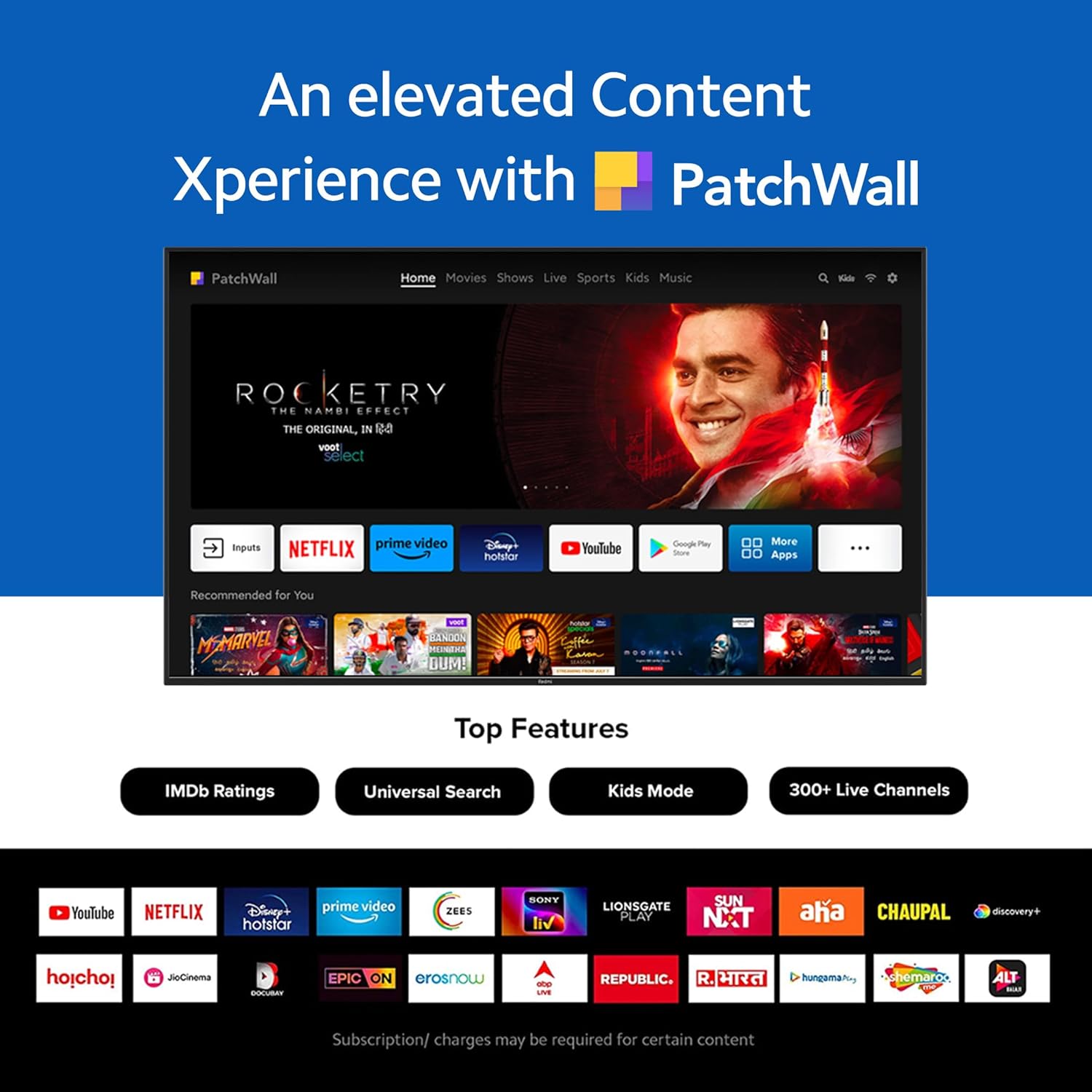
Figure 3: The PatchWall interface displaying various streaming apps and content.

Figure 4: Details on the TV's performance, including 2GB RAM, 16GB Storage, and Quad-core A55 processor.

Figure 5: Android TV 10 interface with Google Play, Ok Google, and Chromecast built-in.
4.4. Поврзување
The TV offers multiple connectivity options for various devices:
- HDMI2.1: Multiple ports for high-definition audio and video input, supporting eARC.
- USB 2.0: За поврзување на надворешни уреди за складирање.
- Етернет: Жична мрежна врска.
- Оптичка порта: Дигитален аудио излез.
- Аудио приклучок од 3.5 мм: За слушалки или надворешни звучници.
- Bluetooth 5.0 with BLE: Wireless connectivity for audio devices and accessories.

Слика 6: Заден дел view of the Redmi Smart TV X55 highlighting various input/output ports.

Figure 7: Close-up of the TV's ports, including HDMI 2.1, USB 2.0, Ethernet, Optical, and Headphone Jack.
5. Водич за поставување
5.1. Физичка инсталација
Your Redmi Smart LED TV X55 can be installed on a table stand or wall-mounted.
- Инсталација на постоље за маса: Attach the two provided table stand bases to the bottom of the TV using the included screws. Ensure the TV is placed on a stable, flat surface.
- Инсталација на ѕиден носач: For wall mounting, use a compatible VESA wall mount kit (sold separately). Follow the instructions provided with the wall mount kit and ensure professional installation for safety.

Figure 8: Dimensions of the Redmi Smart TV X55 for planning installation.
5.2. Првично вклучување и мрежно поврзување
- Поврзете го кабелот за напојување со ТВ и штекер.
- Притиснете го копчето за вклучување на далечинскиот управувач или телевизорот.
- Follow the on-screen instructions to select your language, country, and connect to your Wi-Fi network or plug in an Ethernet cable.
- Sign in with your Google account to access Android TV features and the Play Store.
5.3. Setting Up Alexa Control
You can control your Redmi TV hands-free with Alexa devices. Follow these steps to set up Alexa:
Video 1: Instructions on how to set up Alexa control for your Redmi Smart TV.
To enable advanced settings for Alexa control, refer to the following video guide:
Video 2: Guide to enabling advanced settings on Redmi TV for Alexa control.
6. Упатства за работа
6.1. Далечински управувач
The sleek remote control provides quick access to essential functions:
- Брзо будење: Вклучете го телевизорот за помалку од 5 секунди.
- Брзо исклучување: Double-tap the volume down button to mute.
- Брзи поставки: Долго притиснете го копчето PatchWall за да влезете во менито за брзи поставки.

Figure 9: The sleek remote control for the Redmi Smart TV X55, highlighting quick access features.
6.2. Navigating the Smart TV Interface
Use the remote's directional pad and OK button to navigate through the Android TV and PatchWall interfaces. Access apps, settings, and content recommendations easily.
6.3. Користење на гласовна контрола
Press the dedicated voice assistant button on your remote and speak commands to control your TV, search for content, or interact with connected smart home devices via Ok Google or Alexa.
6.4. App Usage and Casting
The TV supports popular streaming services like Prime Video, Netflix, Disney+ Hotstar, YouTube, and Apple TV. You can also cast content from your mobile devices using Chromecast built-in or Miracast.
7. Одржување
- Чистење: Gently wipe the screen and TV body with a soft, dry, lint-free cloth. Do not use abrasive cleaners or solvents.
- Ажурирања на софтверот: Ensure your TV's software is up to date for optimal performance and security. Navigate to Settings > Device Preferences > About > System update to check for updates.
- Моќен менаџмент: Исклучете го телевизорот од струја за време на грмотевици или кога нема да се користи подолг период.
8 Смена на проблеми
If you encounter issues with your Redmi Smart LED TV X55, refer to the following common problems and solutions:
| Проблем | Можно решение |
|---|---|
| Нема моќ | Проверете дали кабелот за напојување е безбедно поврзан и дали штекерот работи. Обидете се со друг штекер. |
| Нема слика, но звукот е присутен | Ensure the correct input source is selected. Check HDMI cable connections. |
| Нема звук, но сликата е присутна | Check volume levels and mute status. Verify audio output settings (e.g., internal speakers, external soundbar). |
| Далечинскиот управувач не работи | Replace batteries. Ensure no obstructions between the remote and the TV. Re-pair the remote if necessary. |
| Проблеми со мрежната врска | Restart your router and modem. Check Wi-Fi password. Try connecting via Ethernet. |
9. Спецификации
Detailed technical specifications for the Redmi Smart LED TV X55:
| Карактеристика | Спецификација |
|---|---|
| Бренд | Редми |
| Име на моделот | X55 |
| Големина на екранот | 55 инчи |
| Технологија на прикажување | LED-LCD |
| Резолуција | 3840 x 2160 пиксели (4K) |
| Стапка на освежување | 60 Hz |
| Оперативен систем | Андроид ТВ 10 |
| Процесор | Quad Core A55 |
| RAM меморија | 2 GB |
| Складирање | 16 GB |
| Аудио излез | 30 вати |
| Технологија за поврзување | HDMI, USB, Wi-Fi (2x2 Dual Band), Ethernet, Bluetooth 5.0 |
| HDMI порти | 3 (HDMI 2.1, компатибилен со eARC) |
| USB порти | 2 (USB 2.0) |
| Viewинголен агол | 178 степени |
| Сооднос на аспект | 16:9 |
| Тежина на ставката | 15 кг 300 г |
| Тип на монтирање | Wall Mount; Table Mount |
10. Гаранција и поддршка
Your Redmi Smart LED TV X55 comes with a standard brand warranty. For specific warranty terms, duration, and service procedures, please refer to the warranty card included in your package or visit the official Redmi support webсајт.

Figure 10: Information regarding Mi Extended Warranty, offering benefits like zero documentation, genuine spare parts, cashless repairs, authorized service centers, and on-site support.
For installation services, Amazon will coordinate with the brand within 48 hours of delivery. Scheduled delivery options are available in select cities. Installation charges may apply.


