Вовед
This manual provides comprehensive instructions for the setup, operation, maintenance, and troubleshooting of your Cherry MX 3.0 S Wired Mechanical Gaming Keyboard. Designed for gamers and professionals, this keyboard combines robust construction with advanced features for an optimal typing and gaming experience. Please read this manual thoroughly to ensure proper use and longevity of your device.

Слика 1: Од горе надолу view of the Cherry MX 3.0 S Wired Mechanical Gaming Keyboard, showcasing its full-size layout and RGB backlighting.
Карактеристики на производот
- CHERRY MX RED SILENT Switches: Patented damping minimizes actuation noise while maintaining the linear MX RED actuation feel. These switches are characterized by smooth operation and precise input transmission, ideal for quiet environments.
- Premium Aluminum Housing: Elegantly extruded aluminum housing integrates original CHERRY MX switches, ensuring high quality and stability. The screw-less design contributes to its timeless aesthetic.
- Full N-Key Rollover and Anti-Ghosting: Prevents unwanted inputs, double letters, or missing characters, ensuring accurate and reliable performance during intense gaming sessions or rapid typing.
- Прилагодливо RGB позадинско осветлување: Features a full RGB color display with onboard memory for 5 dynamic layouts. Textured keycaps provide vibrant illumination options with over 16 million colors.
- Издржлива конструкција: Robust quality with an abrasion-resistant keycaps (double plastic-injected or lasered) and a detachable mini-USB B cable for superior longevity. Includes four rubberized feet for enhanced stability.
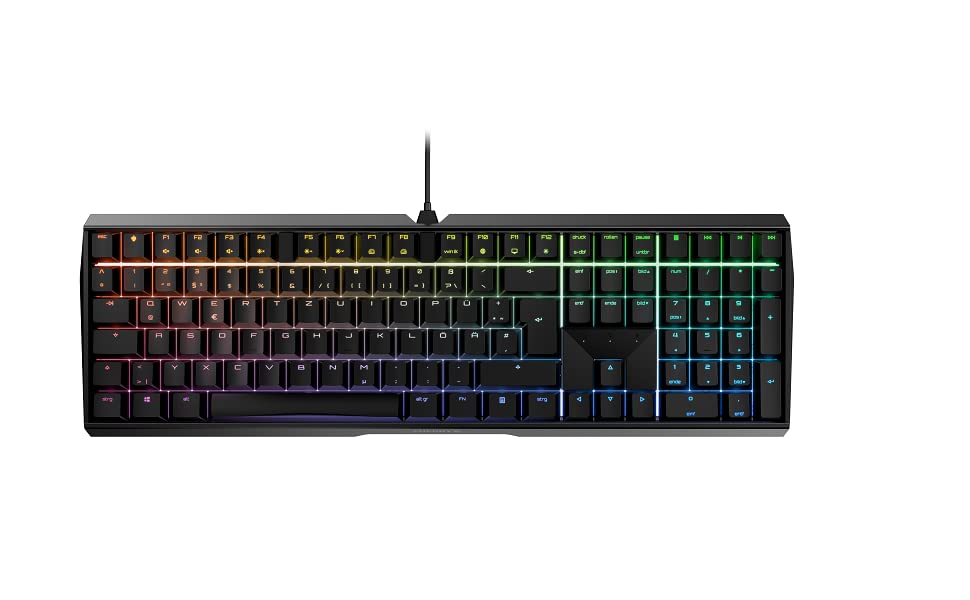
Figure 2: The Cherry MX 3.0 S keyboard displaying its customizable RGB backlighting.
Содржина на пакетот
Ве молиме проверете дали сите артикли се присутни во пакетот:
- Cherry MX 3.0 S Wired Mechanical Gaming Keyboard
- USB кабел (отстранлив)
- Упатство за употреба (овој документ)
Поставување
1. Поврзување на тастатурата
- Locate the detachable USB cable provided with your keyboard.
- Connect the mini-USB B end of the cable to the port on the back of the Cherry MX 3.0 S keyboard.
- Поврзете го USB-A крајот од кабелот со слободен USB порт на вашиот компјутер или играчка конзола.
- Тастатурата треба автоматски да биде препознаена од вашиот оперативен систем. Обично не се потребни дополнителни драјвери за основна функционалност.

Слика 3: Заден дел view of the keyboard, highlighting the detachable USB cable connection point.
2. Инсталација на софтвер (опционално)
For advanced customization of RGB lighting and other features, Cherry may provide optional software. Please visit the official Cherry website for the latest software downloads and installation instructions. This software allows for personalized RGB settings and pattern options beyond the onboard memory.
Операција
Основни функции на тастатурата
The Cherry MX 3.0 S functions as a standard full-size keyboard. All keys operate as labeled. The MX Red Silent switches provide a linear feel with minimal noise, suitable for both typing and gaming.
Приспособување на RGB осветлување
The keyboard features onboard memory for up to 5 dynamic RGB lighting layouts. Specific key combinations (often involving the 'Fn' key) can be used to cycle through pre-programmed effects or adjust brightness. Refer to the quick start guide or the official Cherry software for detailed instructions on customizing lighting profiles.
Посебни карактеристики
- N-Key Rollover (NKRO) and Anti-Ghosting: This keyboard supports full N-Key Rollover, meaning every key press is registered independently, even when multiple keys are pressed simultaneously. Anti-ghosting ensures that no unintended key presses occur.
- WIN Key Lockout: For gaming, the Windows key can be disabled to prevent accidental interruptions during gameplay. This function is typically activated via a specific key combination (e.g., Fn + Windows key). The indicator light for the Windows key may change color (e.g., red) when disabled.

Figure 4: A user's hand demonstrating typing on the keyboard, highlighting the keycap design.
Одржување
Чистење
За да ги одржите перформансите и изгледот на вашата тастатура:
- Исклучете ја тастатурата од компјутерот пред чистење.
- Користете мека крпа без влакненца малку гampened with water or a mild cleaning solution to wipe down the keycaps and housing. Avoid harsh chemicals or abrasive materials.
- За прашина и остатоци помеѓу копчињата, користете компримиран воздух или мала четка.
Општа нега
Avoid exposing the keyboard to excessive moisture, extreme temperatures, or direct sunlight. Do not attempt to disassemble the keyboard, as this may void your warranty.
Решавање проблеми
If you encounter issues with your Cherry MX 3.0 S keyboard, please refer to the following common solutions:
| Проблем | Можно решение |
|---|---|
| Тастатурата не реагира | Ensure the USB cable is securely connected to both the keyboard and the computer. Try a different USB port or a different computer to isolate the issue. |
| RGB осветлувањето не работи или е неправилно | Check the keyboard's onboard lighting controls (Fn key combinations). If using software, ensure it is installed correctly and updated. Restart the software and/or computer. |
| Клучевите не се регистрираат или се пишуваат двојно | Ensure the keyboard is clean and free of debris. If the issue persists, it may indicate a hardware problem. |
| Spacebar squeaks | This can sometimes be resolved by carefully removing the spacebar and applying a very small amount of lubricant (e.g., lightweight valve oil, not WD-40) to the stabilizers. Exercise caution to avoid damaging components. |
For further assistance, please visit the official Cherry support webсајт или контактирајте со нивната служба за корисници.
Спецификации
| Карактеристика | Детал |
|---|---|
| Димензии на производот | 16.93 x 5.51 x 1.42 инчи |
| Тежина на ставката | 2.25 фунти |
| Производител | ЦРЕША |
| Број на модел на ставка | G80-3874HWAUS-0 |
| Технологија за поврзување | USB-A |
| Опис на тастатурата | Механичка тастатура за игри |
| Препорачана употреба | Gaming, Home Office, Office, Programming |
| Посебни карактеристики | Backlit, Customizable Display Keys, Lighting, MX Red Silent Switches |
| Боја | White (as per current model) |
| Број на клучеви | 109 |
| Позадинско осветлување на тастатурата | RGB |
| Стил | Класичен |

Figure 5: The Cherry MX 3.0 S keyboard, highlighting its German engineering and design.
Гаранција и поддршка
Cherry products are manufactured to high-quality standards and come with a manufacturer's warranty. For detailed information regarding warranty terms, technical support, and service, please visit the official Cherry webстраницата или директно контактирајте ја нивната корисничка поддршка. Зачувајте ја сметката за купување како доказ за купување за гаранциски побарувања.
Official Cherry Webсајт: www.cherry.de


