1. Вовед
Ви благодарам за купувањетоasing the Blackstar ID:Core Stereo 10 Sugar Skull V2 Limited Edition amplifier. This 10-watt (2x5W) stereo combo amplifier is designed to provide a versatile and high-quality sound experience for electric guitarists. It features Blackstar's patented ISF (Infinite Shape Feature) control, a range of voices, and built-in effects, making it ideal for practice, recording, and small performances. This manual provides essential information for safe and effective use of your ampживописен.
2. Важни безбедносни инструкции
- Прочитајте ги упатствата: Прочитајте ги сите упатства за безбедност и работа пред да го користите овој производ.
- Задржете ги упатствата: Чувајте ги овие упатства за идна референца.
- Внимавајте на предупредувањата: Следете ги сите предупредувања на производот и во упатството за употреба.
- Вода и влага: Не користете го овој апарат во близина на вода.
- Чистење: Чистете само со сува крпа.
- Вентилација: Не ги блокирајте отворите за вентилација. Инсталирајте во согласност со упатствата на производителот.
- Топлина: Не инсталирајте во близина на извори на топлина како што се радијатори, топлински регистри, шпорети или други апарати (вклучувајќи ampлајфикатори) кои произведуваат топлина.
- Заштита на кабелот за напојување: Заштитете го кабелот за напојување од одење или стискање, особено на приклучоците, приклучните приклучоци и местото каде што тие излегуваат од апаратот.
- Исклучете го за време на бури: Исклучете го овој апарат од струја за време на громови или кога не го користите подолг временски период.
- Сервисирање: Целото сервисирање упатете го на квалификуван сервисен персонал. Сервисирањето е потребно кога апаратот е оштетен на кој било начин, како што е оштетен кабелот за напојување или приклучокот, течноста е истурена или предмети паднале во апаратот, апаратот бил изложен на дожд или влага, не работи нормално , или е исфрлен.
3. Содржина на пакетот
Ве молиме означете го полето за следните ставки:
- Blackstar ID:Core Stereo 10 Sugar Skull V2 Limited Edition Ampживописен
- Единица за напојување
- USB кабел
- Упатство за употреба (овој документ)
4. Контроли и функции
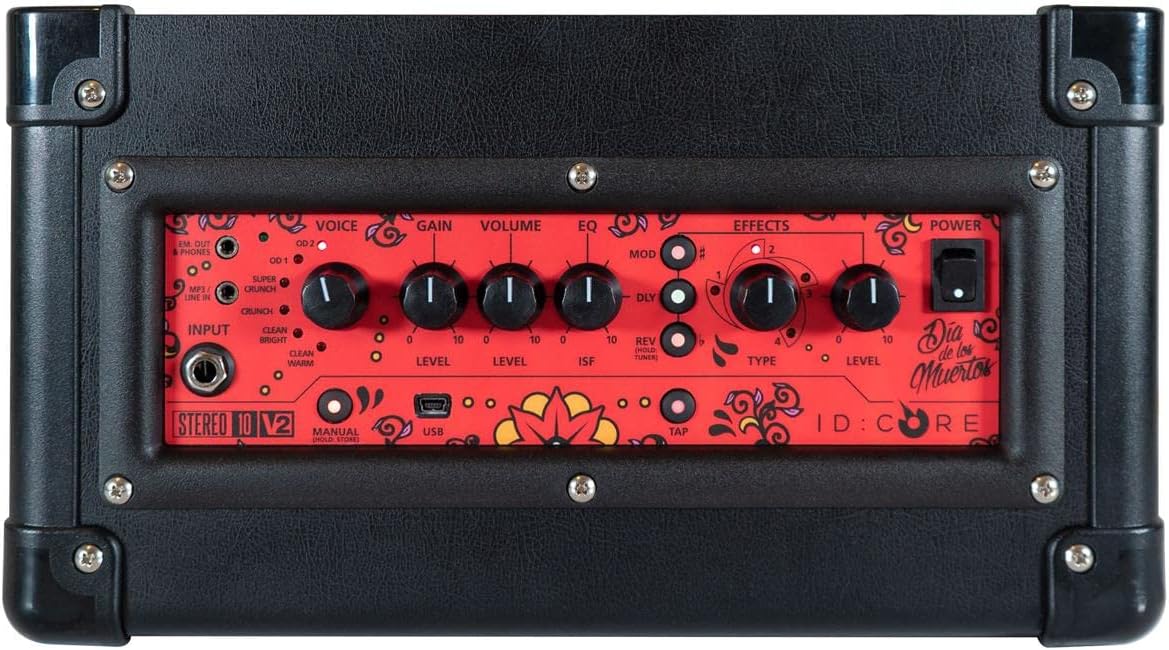
Слика: Горе view на amplifier's control panel, showing all knobs, buttons, and input/output jacks.
Контроли на предниот панел:
- Влез: 6.35mm (1/4") jack for connecting your guitar.
- Глас: Rotary switch to select one of six Blackstar voices: Clean Warm, Clean Bright, Crunch, Super Crunch, OD 1, OD 2.
- Добивка: Controls the amount of overdrive or distortion.
- Волумен: Го прилагодува вкупното ниво на излез на ampживописен.
- EQ: Контрола на тон.
- ISF (Infinite Shape Feature): Patented control that shifts the tone stack response between a USA-style (counter-clockwise) and a UK-style (clockwise) ampживописен.
- Мод (модулација): Rotary switch to select and adjust the level of modulation effects (Chorus, Flanger, Phaser, Tremolo).
- Dly (Delay): Rotary switch to select and adjust the level of delay effects (Linear, Analogue, Tape, Multi).
- Rev (Reverb): Rotary switch to select and adjust the level of reverb effects (Room, Hall, Spring, Plate).
- Тип: Selects the specific effect type within the Mod, Dly, or Rev categories.
- Ниво: Adjusts the overall level of the selected effect.
- Допрете: Button to set the tempo for time-based effects (Delay, Tremolo).
- Моќност: Прекинувач за вклучување/исклучување за ampживописен.
- USB: USB-B port for connecting to a computer for recording and using Blackstar's Architect software.
- Em. Out / Phones: 6.35mm (1/4") jack for headphones or direct recording output with speaker emulation.
- MP3 / Line In: 3.5mm (1/8") stereo jack for connecting external audio devices like MP3 players or phones.

Слика: напред view of the Blackstar ID:Core Stereo 10 ampлифирач, шоуasing the unique Sugar Skull V2 design on the speaker grille.
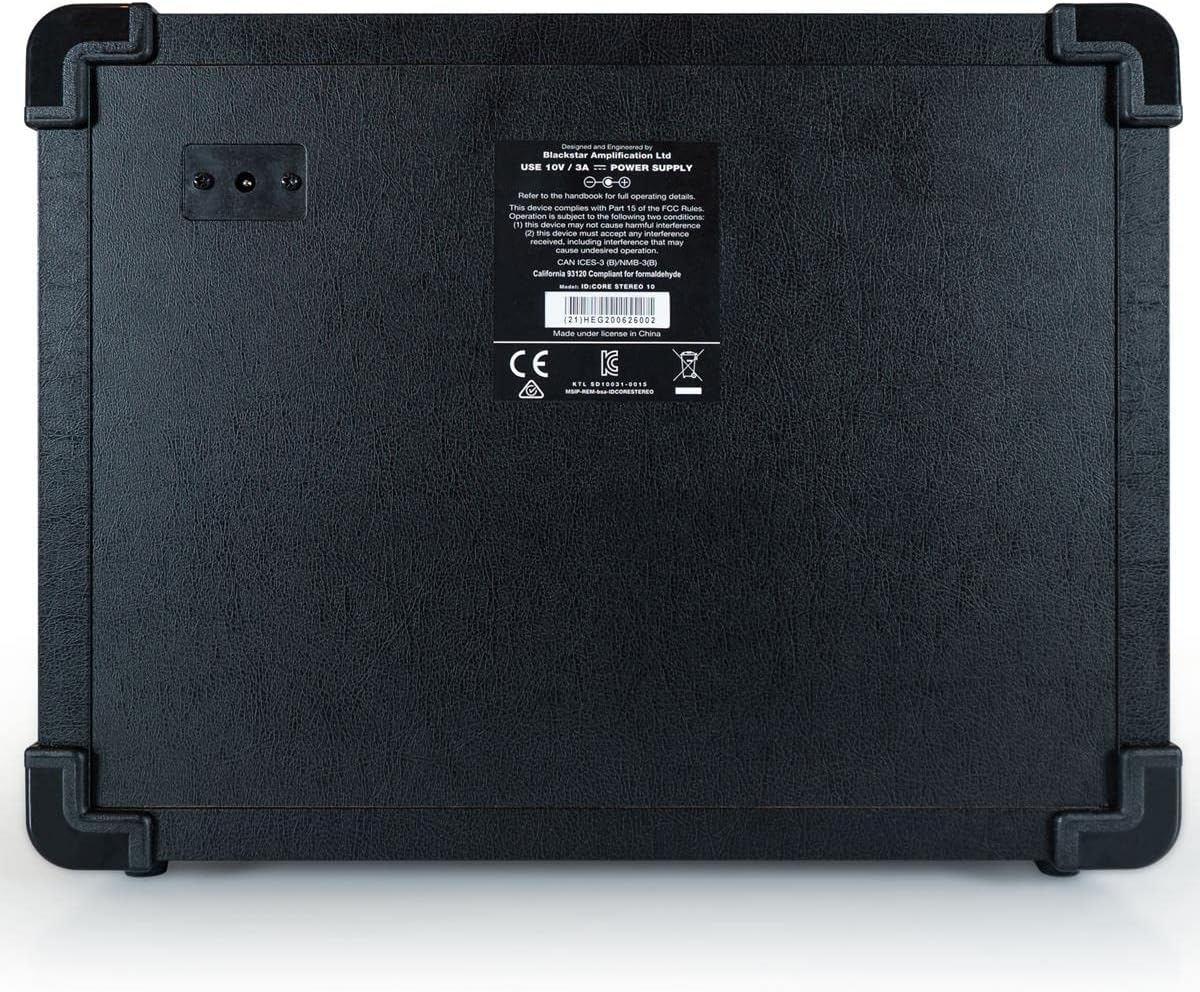
Слика: Заден дел view of the Blackstar ID:Core Stereo 10 amplifier, displaying the product information label and power input.
5. Поставување
- Отпакување: Внимателно отстранете го amplifier and all accessories from the packaging. Retain the packaging for future transport or storage.
- Поставување: Поставете го amplifier on a stable, flat surface. Ensure adequate ventilation around the unit. Avoid placing it near heat sources or in direct sunlight.
- Поврзување за напојување: Connect the supplied power supply unit to the DC input jack on the rear of the amplifier. Plug the power supply into a suitable mains outlet. Ensure the amplifier's power switch is in the OFF position before connecting.
- Врска со гитара: Поврзете ја вашата електрична гитара со Влез jack on the front panel using a standard 6.35mm (1/4") instrument cable.
- External Audio (Optional): To play along with music, connect an MP3 player, phone, or other audio source to the MP3 / Line In jack using a 3.5mm stereo cable.
- USB конекција (опционално): For recording or using the Blackstar Architect software, connect the amplifier to your computer using the supplied USB cable.
6. Упатства за работа
- Вклучување: Ensure all connections are secure, then switch the Моќ button to the ON position. The power indicator light will illuminate.
- Поставете ја јачината на звукот: Започнете со Волумен knob at a low setting to avoid sudden loud sounds.
- Изберете глас: Завртете го Глас switch to choose your desired amplifier type (e.g., Clean Warm, Crunch, OD 1).
- Прилагодете ја добивката: Користете го Добивка knob to control the amount of drive. Lower settings provide cleaner tones, while higher settings introduce more distortion.
- Shape Tone with EQ and ISF: Прилагодете го EQ knob for general tone shaping. Experiment with the ISF control to blend between American (tight low-end, aggressive mids) and British (woodier, less aggressive) ampкарактеристики на лафирачот.
- Примени ефекти:
- Select a modulation, delay, or reverb effect using the Мод, Dly, или Св rotary switches.
- Користете го Тип knob to select a specific effect within that category (e.g., Chorus, Flanger for Mod).
- Adjust the effect's intensity with the Ниво копче.
- For time-based effects (Delay, Tremolo), press the Допрете button repeatedly at your desired tempo to synchronize the effect.
- Headphone/Recording Output: Поврзете слушалки со Em. Out / Phones jack for silent practice. This output also provides a speaker-emulated signal for direct recording.
- USB аудио: When connected to a computer via USB, the amplifier acts as an audio interface, allowing you to record your guitar directly into a DAW or use the Blackstar Architect software for deeper editing and patch management.
- Исклучено: When finished, turn the Волумен down, then switch the Моќ копче во позиција OFF.
7. Одржување
- Чистење: Исчистете го ampИзбришете ја надворешноста на ладилникот со мека, сува крпа. Не користете абразивни средства за чистење, растворувачи или восоци.
- Складирање: Кога не се користи подолг период, чувајте го amplifier in a dry, cool place, away from direct sunlight and extreme temperatures.
- Вентилација: Ensure that the ventilation openings are always clear to prevent overheating.
- Грижа за кабел: Always handle power and instrument cables carefully. Avoid bending or kinking them sharply.
8 Смена на проблеми
| Проблем | Можна причина | Решение |
|---|---|---|
| Нема звук од ampживописен |
|
|
| Poor sound quality / Buzzing noise |
|
|
| Ефектите не функционираат |
|
|
9. Спецификации
- Модел: IDCORE10 V3
- Излезен Ватtage: 10 Watts (2 x 5W Stereo)
- Говорници: 2 x 3" Blackstar Speakers
- Гласови: 6 (Clean Warm, Clean Bright, Crunch, Super Crunch, OD 1, OD 2)
- Ефекти: Modulation (Chorus, Flanger, Phaser, Tremolo), Delay (Linear, Analogue, Tape, Multi), Reverb (Room, Hall, Spring, Plate)
- Контроли: Voice, Gain, Volume, EQ, ISF, Mod, Dly, Rev, Type, Level, Tap, Power
- Влезови: Guitar Input (6.35mm jack), MP3/Line In (3.5mm stereo jack), USB-B
- Излези: Emulated Out/Headphones (6.35mm jack)
- Извор на енергија: Електричен со кабел
- Компатибилни уреди: Електрична гитара
- Тежина на ставката: 10 фунти (4.54 кг)
- Димензии на производот: 16 x 18 x 14 инчи (40.6 x 45.7 x 35.6 см)
- ASIN: B08Z88WN8T
10. Гаранција и поддршка
Блекстар Amplification products are designed and manufactured to the highest standards. For detailed warranty information specific to your region and product, please refer to the warranty card included with your purchase or visit the official Blackstar Ampзаживување website. For technical support or service inquiries, please contact your authorized Blackstar dealer or Blackstar customer support directly.
Онлајн ресурси:
- Блекстар Amplification Official Webсајт: www.blackstaramps.com
- Blackstar Architect Software: www.blackstaramps.com/architect


