Вовед
This manual provides detailed instructions for the setup, operation, maintenance, and troubleshooting of your Perixx PERIDUO-606 Wireless Mini Ergonomic Keyboard and Vertical Mouse combo. Please read this manual thoroughly before use to ensure optimal performance and longevity of your devices.
Содржина на пакетот
- 1 x Perixx PERIDUO-606 Wireless Mini Ergonomic Keyboard
- 1 x Perixx Wireless Vertical Mouse
- 1 x Adjustable Palm Rest Stand
- 1 x Movable Magnet (for height adjustment)
- 1 x Nano USB Receiver (located in the keyboard's battery compartment)
- 1 x Упатство за употреба

Производот завршиview
The Perixx PERIDUO-606 is a compact wireless ergonomic keyboard and vertical mouse combination designed for comfort and efficiency. It features a split-key design and a vertical mouse to promote natural wrist and hand positions.
Карактеристики на тастатурата:
- Split-Key Design: Separates keys into two groups to reduce wrist deviation.
- Компактна големина: Measures approximately 13.82 x 8.94 x 2.56 inches, suitable for smaller workspaces.
- Adjustable Palm Rest: Integrated palm rest with an adjustable stand for varied wrist positions.
- Membrane Low Profile Клучеви: Овозможува удобно искуство со пишување.
- 4-Way Scroll Navigation: Integrated scroll wheel for enhanced navigation.


Карактеристики на глувчето:
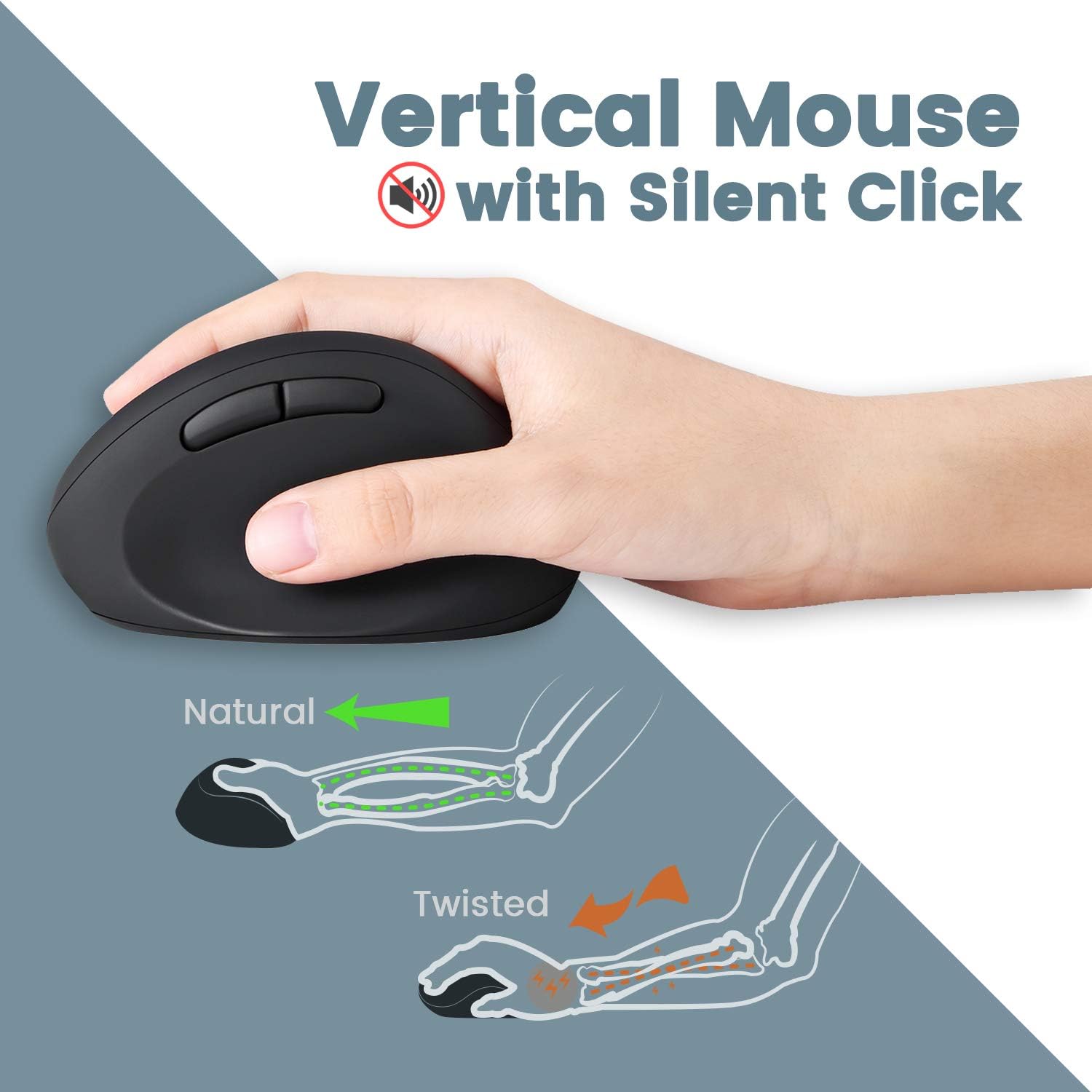
- Vertical Ergonomic Design: Positions the hand in a natural handshake posture to reduce wrist strain.
- Тивок клик: Го намалува оперативниот шум.
- Прилагодлив DPI: Offers 800 / 1200 / 1600 DPI settings for customizable cursor speed.
- Дизајн со 5 копчиња: Standard left/right click, scroll wheel, and two thumb buttons.
Безжична поврзаност:
- 2.4 GHz Wireless Technology: Provides a stable connection up to 33 feet (10 meters).
- Single Nano USB Receiver: One receiver connects both the keyboard and mouse.
Инструкции за поставување
- Инсталирајте батерии:
- For the keyboard: Open the battery compartment on the underside of the keyboard and insert two AAA batteries (not included).
- For the mouse: Open the battery compartment on the underside of the mouse and insert one AA battery (not included).
- Лоцирајте го USB приемникот: The Nano USB receiver is stored in a dedicated compartment on the backside of the keyboard. Carefully remove it.
- Поврзете го приемникот: Вклучете го Nano USB приемникот во слободен USB порт на вашиот компјутер.
- Вклучување: Ensure both the keyboard and mouse are powered on (check for an ON/OFF switch, usually on the underside). The devices should connect automatically via Plug and Play.
- Прикачете го потпирачот за дланка (опционално): The adjustable palm rest stand attaches magnetically to the front of the keyboard. Use the movable magnet for height adjustment as desired.

Упатства за работа
Користење на тастатура:
- Пишување: Position your hands naturally over the split-key layout. The design is intended to reduce wrist bending.
- Функциски копчиња: Use the F1-F12 keys for standard functions. Some keys may have secondary functions accessible via the 'Fn' key (refer to keycap legends).
- Тркало за лизгање: Utilize the central scroll wheel for vertical and horizontal scrolling in compatible applications.
Употреба на глувчето:
- Зафат: Hold the mouse in a natural handshake position.
- Прилагодување на DPI: Press the DPI button (usually located near the scroll wheel or on the top) to cycle through 800, 1200, and 1600 DPI settings. Select the sensitivity that best suits your preference.
- Тивки кликови: The main left and right click buttons are designed for quiet operation.
Одржување
- Чистење: Користете мека, сува крпа за чистење на површините на тастатурата и глувчето. За тврдокорна нечистотија, малкуamp Може да се користи крпа со благ сапун, осигурувајќи се дека течноста нема да влезе во уредите.
- Замена на батерија: Replace batteries when performance degrades or devices stop responding. Ensure correct polarity when inserting new batteries.
- Складирање: When not in use for extended periods, turn off the devices to conserve battery life. Store the USB receiver in the keyboard's compartment to prevent loss.
Решавање проблеми
| Проблем | Решение |
|---|---|
| Тастатурата/глушецот не реагираат |
|
| Keys are sticky or not registering consistently |
|
| Mouse cursor freezes or moves erratically |
|
| Безжичната врска често се прекинува |
|
Спецификации
| Карактеристика | Детал |
|---|---|
| Број на модел | 11660 |
| Поврзување | Безжична врска од 2.4 GHz (нано USB приемник) |
| Работно растојание | До 33 стапки (10 метри) |
| Димензии на тастатурата (ДxШxВ) | 13.82 x 8.94 x 2.56 инчи |
| Димензии на глувчето (ДxШxВ) | 4.5 x 2.64 x 2.28 инчи |
| Тежина на тастатура | Приближно 1.6 килограми |
| Поставки за DPI на глувчето | 800/1200/1600 |
| Батерија за тастатура | 2 x AAA (не е вклучено) |
| Батерија на глувчето | 1 x AA (не е вклучено) |
| Компатибилни оперативни системи | Windows 7, 8, 10, 11 |
Гаранција и поддршка
Your Perixx PERIDUO-606 comes with a 12-месечна ограничена гаранција од датумот на купување. Оваа гаранција ги покрива производствените дефекти и гарантира дека производот функционира како што е предвидено при нормална употреба.
For technical support, warranty claims, or further assistance, please visit the official Perixx website or contact their customer service department. Contact information can typically be found on the Perixx brand store page or included documentation.
Онлајн ресурси: Perixx Brand Store on Amazon


