Производот завршиview
The Sena Spider ST1 is a Mesh-equipped communication headset designed for motorcycle riders. It features a glove-friendly jog-dial control and operates exclusively on Sena's Mesh intercom platform. This system enhances rider-to-rider communication with robust reliability, offering both Multi-Channel Open Mesh and Group Mesh modes. It includes upgraded HD Speakers for improved audio quality and is compatible with the Sena Motorcycle App.

Слика: напред view of the Sena Spider ST1 communication system, showing the main unit with the jog dial and LED indicator.
Содржина на пакетот
The Sena Spider ST1 package typically includes the following components:
- Communication Device (Sena Spider ST1 unit)
- USB кабел за полнење
- Speaker Set (HD Speakers)
- Microphone (Boom or Wired, depending on kit)
- Mounting Hardware (Clamp Kit, Glued Surface Mounting Plate)
- Велкро влошки за звучници и микрофон
Поставување и инсталација
1. Полнење на уредот
Before first use, fully charge the Sena Spider ST1. Connect the provided USB charging cable to the device's charging port and a USB power source. The LED indicator will show charging status.
- Време на полнење: Приближно 2.5 часа за целосно полнење.
- Траење на батеријата: До 12 часа време за разговор.
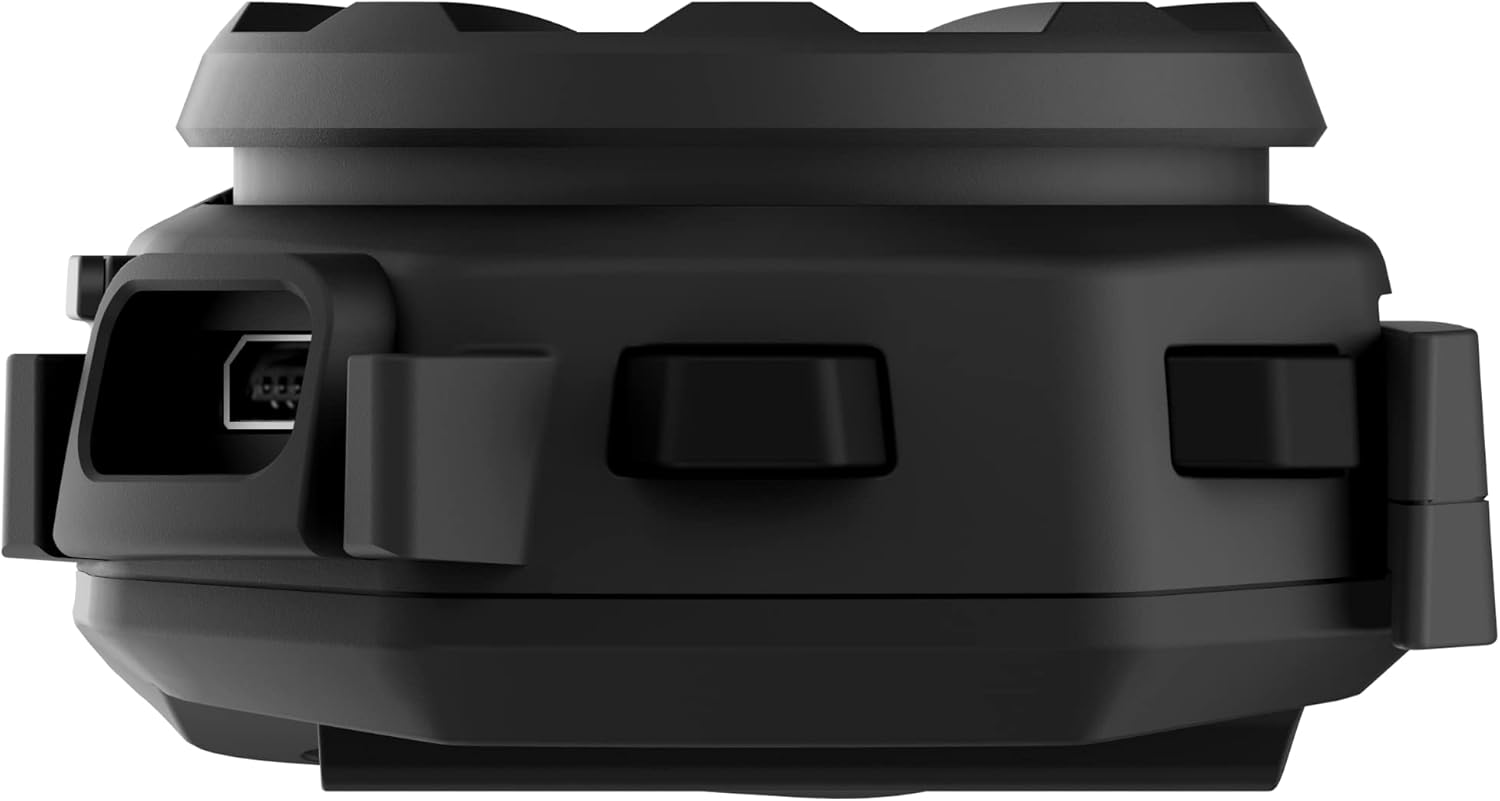
Слика: Страна view of the Sena Spider ST1 unit, highlighting the USB charging port for power connection.
2. Монтирање на кацига
The Spider ST1 can be mounted using either the clamp kit or the glued surface mounting plate. Ensure the mounting location allows for easy access to the jog dial and does not obstruct helmet functionality.
- Изберете локација: Изберете рамна површина на левата страна од вашата кацига.
- Прикачете ја монтажата: Securely attach the chosen mounting accessory (clamp or adhesive plate) to the helmet.
- Инсталирајте звучници: Place the HD Speakers inside the helmet's ear pockets using the Velcro pads. Ensure they are positioned directly over your ears for optimal audio quality.
- Инсталирајте микрофон: Attach the microphone to the helmet, positioning it close to your mouth but not directly in front of it to avoid wind noise.
- Прикачете ја главната единица: Slide the Spider ST1 main unit onto the mounted accessory until it clicks securely into place.

Image: The Sena Spider ST1 communication system securely mounted on the side of a motorcycle helmet, with its LED indicator illuminated.
Упатства за работа
Вклучување/исклучување
- Вклучување: Притиснете и задржете го Jog Dial 1 секунда.
- Исклучено: Притиснете и задржете го Jog Dial 5 секунди.
Контрола на јачината на звукот
- Зголемете ја јачината на звукот: Rotate the Jog Dial clockwise.
- Намалување на јачината на звукот: Rotate the Jog Dial counter-clockwise.
Интерфон за мрежа
The Spider ST1 utilizes Sena's Mesh Intercom technology for seamless group communication.
- Вклучување/исклучување на мрежест домофон: Press the Mesh Intercom Button (located on the side of the unit).
- Multi-Channel Open Mesh: Allows communication with a near-limitless number of riders. Switch between 9 channels using the Sena Motorcycle App.
- Групна мрежа: Supports up to 24 participants in a private group. Create and manage groups via the Sena Motorcycle App.

Image: A screenshot displaying the user interface of the Sena Motorcycle App, showing options for Mesh Grouping and Channel selection.
Smartphone Connectivity (Bluetooth 5.1)
Connect your Spider ST1 to your smartphone for music, phone calls, and GPS navigation.
- Режим на спарување: With the unit off, press and hold the Jog Dial for 5 seconds until the LED flashes red and blue.
- Поврзете се: On your smartphone, go to Bluetooth settings and select "Sena Spider ST1" from the list of available devices.
- Функции:
- Пуштање музика/пауза: Притиснете на Jog Dial.
- Следна песна: Rotate Jog Dial clockwise and hold for 1 second.
- Претходна песна: Rotate Jog Dial counter-clockwise and hold for 1 second.
- Одговори/заврши повик: Притиснете на Jog Dial.
- Гласовен асистент (Siri/Google Assistant): Притиснете го Jog Dial 3 секунди.
Одржување и нега
- Чистење: Избришете го уредот со меко, гamp крпа. Не користете груби хемикалии или абразивни средства за чистење.
- Складирање: Чувајте го уредот на ладно и суво место кога не го користите.
- Нега на батеријата: For optimal battery life, avoid storing the device in extremely hot or cold conditions. Charge the battery at least once every six months if not used regularly.
- Отпорност на вода: The device is water resistant, but not fully waterproof. Avoid submerging it in water.
Решавање проблеми
| Проблем | Можна причина | Решение |
|---|---|---|
| Уредот не се вклучува. | Слаба батерија. | Наполнете го уредот целосно. |
| Нема аудио од звучниците. | Speakers not connected properly or volume too low. | Check speaker connections. Increase volume using the Jog Dial. |
| Cannot connect to Mesh Intercom. | Mesh Intercom is off or out of range. | Ensure Mesh Intercom is enabled. Move closer to other Mesh users. |
| Проблеми со спарување преку Bluetooth. | Device not in pairing mode or smartphone Bluetooth is off. | Put the Spider ST1 in pairing mode. Ensure smartphone Bluetooth is on and visible. Try restarting both devices. |
| Лош квалитет на микрофонот. | Microphone not positioned correctly or obstructed. | Adjust microphone position closer to your mouth. Ensure it is not blocked by helmet padding. |
Спецификации
| Карактеристика | Детал |
|---|---|
| Име на моделот | ПАЈАК |
| Број на модел на ставка | SPIDER-ST1-01 |
| Материјал | Гума |
| Боја | Црното |
| Тежина на ставката | 60 грама (2.12 унци) |
| Димензии на производот | 1.8" Д x 3.8" Ш x 1" В |
| Траење на батеријата | 12 часа (време за разговор) |
| Време на полнење | 2.5 часа |
| Bluetooth верзија | 5.1 |
| Технологија на безжична комуникација | Bluetooth, Mesh Intercom |
| Maximum Mesh Range | До 5 милји (8 км) |
| Максимална излезна моќност на звучникот | 100 вати |
| Фреквентен одговор | 10000 Hz |
| Ниво на отпорност на вода | Водоотпорен |
| Вклучени компоненти | Communication Device, Cable |
Гаранција и поддршка
Информации за гаранцијата
The Sena Spider ST1 comes with a 2-годишна гаранција од датумот на купување. Оваа гаранција ги покрива дефектите во материјалите и изработката при нормална употреба. Ве молиме задржете го доказот за купување за гаранциски барања.
Поддршка за корисници
For further assistance, technical support, or warranty inquiries, please refer to the official Sena resources:
- Официјално упатство за користење (PDF): Преземете го прирачникот PDF
- Sena Official Store: Visit Sena Store on Amazon
- For the most up-to-date support information, visit the official Sena webсајт.


