1. Вовед
Thank you for choosing the LINK LKMS06 HDMI Cable Tester. This device is designed for both domestic and professional use to verify the integrity and configuration of HDMI Type A and Type C cables. It can detect open circuits, short circuits, and correctly connected conductors, ensuring optimal cable performance. This manual provides detailed instructions for setup, operation, maintenance, and troubleshooting.
2. Информации за безбедност
Please read and understand all safety instructions before using the device. Failure to follow these instructions may result in damage to the device or personal injury.
- Не го изложувајте уредот на влага или екстремни температури.
- Use only a 9V battery (not included) for power. Ensure correct polarity during installation.
- Не обидувајте се да го отворите или модифицирате уредот. За сите сервиси обратете се на квалификуван персонал.
- Чувајте го уредот подалеку од деца.
- Avoid connecting the tester to live circuits or Power over Ethernet (PoE) circuits to prevent damage.
3. Содржина на пакетот
При распакување, проверете дали се присутни сите предмети наведени подолу:
- LINK LKMS06 Main Unit (Master)
- LINK LKMS06 Remote Unit
- Торбичка за носење со патент
- Упатство за употреба (овој документ)
Note: A 9V battery is required for operation and is not included in the package.
4. Производот завршиview
The LINK LKMS06 consists of two main parts: the Master unit and the Remote unit. Both units feature HDMI Type A and Type C ports, along with LED indicators for each of the 19 pins and the shield connection.
4.1. Main Unit (Master) and Remote Unit
The Master unit and Remote unit can be connected together for storage or separated for testing longer cables. Each unit has clearly labeled HDMI ports and LED indicators.

Слика 1: The LINK LKMS06 HDMI Cable Tester showing the Master and Remote units connected. The top surface of each unit displays LED indicators for the 19 pins and shield, along with power and test mode switches. This configuration is suitable for storage or testing shorter cables.
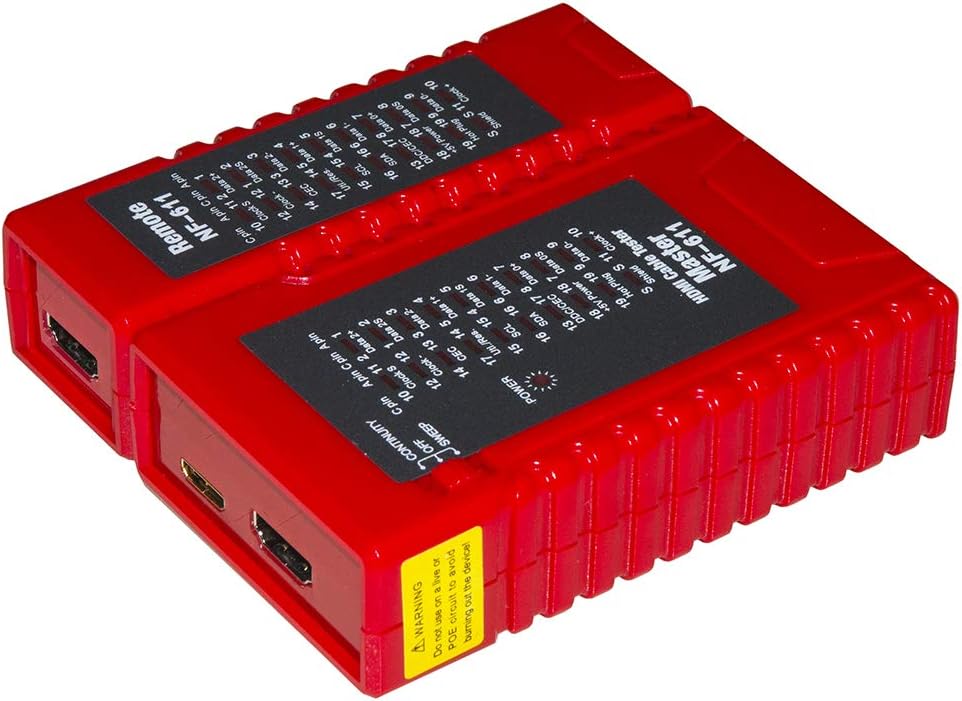
Слика 2: The LINK LKMS06 HDMI Cable Tester with the Master and Remote units separated. This view highlights the HDMI Type A and Type C ports on each unit, which are used for connecting the HDMI cable under test. The separation allows for testing of longer cables where the remote end is distant from the master unit.
4.2. Zippered Carrying Case
The device comes with a protective zippered carrying case for portability and storage.

Слика 3: The black zippered carrying case provided with the LINK LKMS06 HDMI Cable Tester. This case offers protection and convenience for transporting the tester and its components.
5. Поставување
5.1. Инсталација на батерија
The LINK LKMS06 requires one 9V battery (not included) for operation.
- Locate the battery compartment on the back of the Master unit.
- Отворете го капакот на преградата за батерии.
- Insert a new 9V battery, ensuring the correct polarity (+/-).
- Добро затворете го капакот на преградата за батерии.
Note: The Remote unit does not require a battery as it is powered by the Master unit through the cable under test.
6. Упатства за работа
6.1. Поврзување на кабелот
- Separate the Master unit and the Remote unit if they are connected.
- Connect one end of the HDMI cable (Type A or Type C) to the corresponding port on the Master unit.
- Connect the other end of the HDMI cable to the corresponding port on the Remote unit.
6.2. Selecting Test Mode
The LINK LKMS06 offers three testing modes: Auto Fast, Auto Slow, and Manual. Use the switch on the Master unit to select your desired mode.
- Автоматско брзо: The tester cycles through each pin connection quickly. This mode is suitable for quick checks of cable continuity.
- Auto Slow: The tester cycles through each pin connection at a slower pace, allowing for more detailed observation of the LED indicators.
- Прирачник: In this mode, you can manually step through each pin connection one by one. This is useful for pinpointing specific issues on individual pins.
6.3. Интерпретација на LED индикатори
Both the Master and Remote units feature 19 LEDs corresponding to the 19 pins of an HDMI cable, plus an additional LED for the shield connection. When a pin is correctly connected, its corresponding LED on both the Master and Remote units will illuminate simultaneously.
- LED On (both units): Indicates a good connection for that specific pin.
- LED On (one unit only): Indicates an open circuit (break) in the cable for that specific pin.
- Multiple LEDs On (one unit, or unexpected pattern): May indicate a short circuit or miswiring.
- No LED On: Indicates an open circuit for that specific pin.
The tester verifies continuity and correct configuration for all 19 poles and the ground connection. This allows you to determine how many conductors are connected, which is crucial for assessing the cable's standard compliance and quality.
6.4. Testing Cable Lengths
The LINK LKMS06 can test HDMI cables up to 50 meters (approximately 164 feet) in length.
7. Одржување
7.1. Чистење
To clean the device, use a soft, dry cloth. Do not use abrasive cleaners, solvents, or harsh chemicals, as these may damage the casing или внатрешни компоненти.
7.2. Складирање
When not in use, store the LINK LKMS06 in its zippered carrying case in a cool, dry place, away from direct sunlight and extreme temperatures. Remove the 9V battery if the device will not be used for an extended period to prevent battery leakage.
8 Смена на проблеми
| Проблем | Можна причина | Решение |
|---|---|---|
| No LEDs illuminate on either unit. | No battery or low battery in Master unit. | Install a fresh 9V battery in the Master unit. |
| Only Master unit LEDs illuminate, or Remote unit LEDs are dim. | Cable is too long or has high resistance. Poor connection. | Ensure cable is fully seated. Try a shorter cable to confirm tester functionality. |
| Specific pin LED(s) do not illuminate on Remote unit. | Open circuit in the cable for that pin. | Кабелот е неисправен и треба да се замени. |
| Multiple unexpected LEDs illuminate or flicker. | Short circuit or miswiring in the cable. | Кабелот е неисправен и треба да се замени. |
| Tester does not respond to mode switch. | Внатрешна грешка. | Контактирајте ја поддршката за корисници за помош. |
9. Спецификации
| Карактеристика | Детал |
|---|---|
| Модел | LKMS06 |
| Бренд | ЛИНК |
| Cable Types Supported | HDMI Type A, HDMI Type C |
| Тест режими | Auto Fast, Auto Slow, Manual |
| Индикатори | 19 LEDs for pins + 1 LED for shield (per unit) |
| Максимална должина на кабел | До 50 метри (приближно 164 стапки) |
| Извор на енергија | 1 x 9V батерија (не е вклучена) |
| Димензии (Д x Ш x В) | 14 x 11 x 3 cm (approximate, combined units) |
| Тип на мерење | Тестер за континуитет на кабел |
10. Гаранција и поддршка
For warranty information and technical support, please refer to the documentation provided at the time of purchase or visit the official LINK product support webстраница. Зачувајте го доказот за купување за гаранциски побарувања.


