Вовед
Welcome to the user manual for your AWOW Funtab 701 Kids Tablet. This guide provides essential information on setting up, operating, maintaining, and troubleshooting your device to ensure a safe and enjoyable experience for your child. Please read this manual thoroughly before using the tablet.
Содржина на пакетот
Ве молиме проверете дали сите артикли наведени подолу се вклучени во вашиот пакет:
- AWOW Funtab 701 Kids Tablet (7 inch)
- Exclusive Kid-Proof Case
- Активно пенкало
- Упатство за употреба (овој документ)
- Адаптер за напојување
Производот завршиview
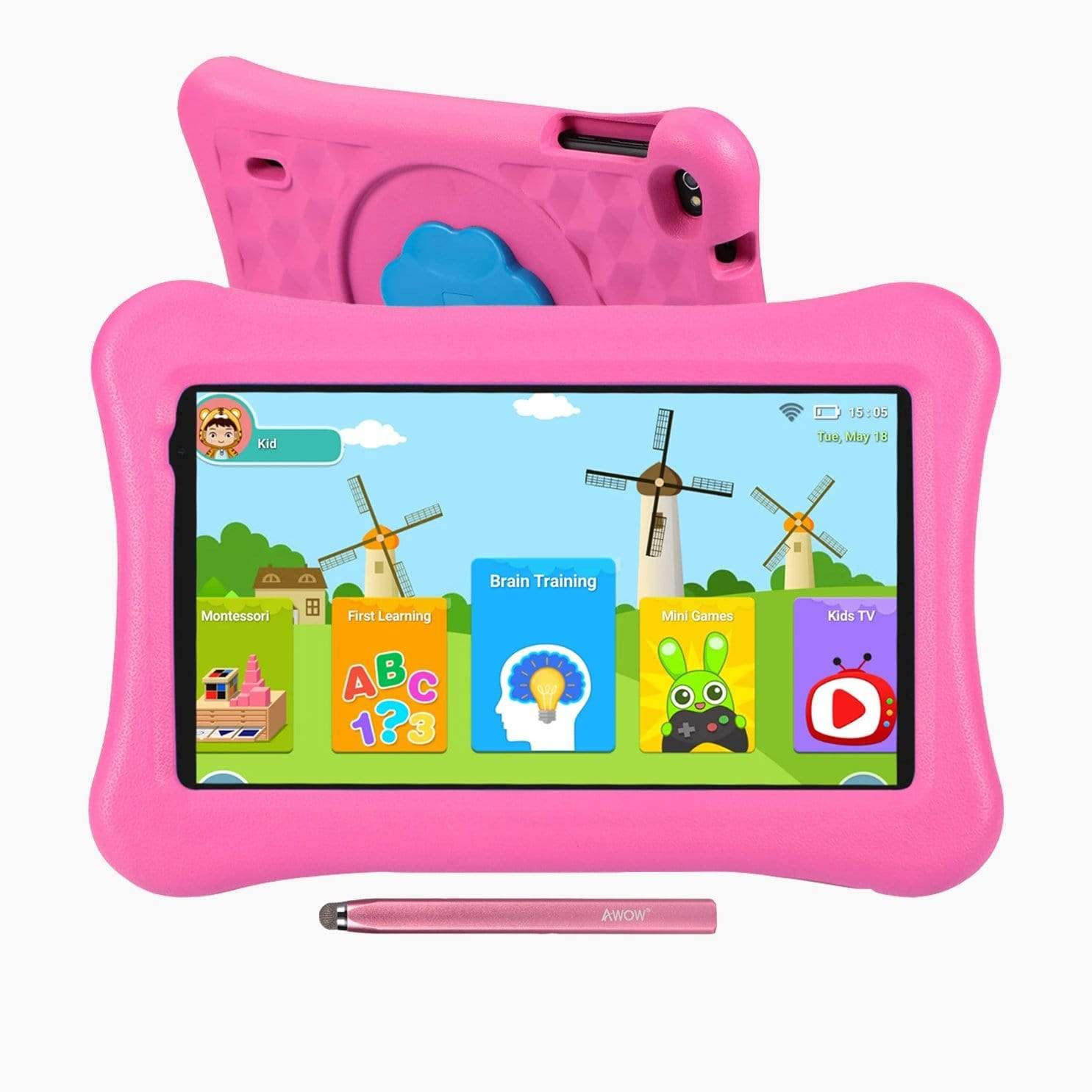
Image: The AWOW Funtab 701 Kids Tablet, shown with its protective pink kid-proof case and the accompanying active pen. The tablet features a 7-inch display.
The AWOW Funtab 701 is a 7-inch kids tablet designed for educational and entertainment purposes. It runs on Android 10 Go, powered by a 1.5GHz Quad-core processor, with 2GB RAM and 16GB ROM. It features a 1024x600 IPS HD display and supports 2.4G Wi-Fi connectivity. The tablet comes with a durable kid-proof case and an active pen for interactive learning and creativity.
Поставување
1. Полнење на таблетот
Before first use, fully charge the tablet. Connect the provided power adapter to the tablet's charging port and plug it into a wall outlet. The charging indicator will typically light up. A full charge may take several hours.
2. Вклучување/исклучување
- За вклучување: Press and hold the Power button (usually located on the side or top edge) until the screen lights up.
- За исклучување: Притиснете го и задржете го копчето за вклучување додека на екранот не се појави мени за исклучување. Изберете „Исклучи“ и потврдете.
3. Почетно поставување
При првото вклучување, таблетот ќе ве води низ процесот на почетно поставување:
- Избор на јазик: Изберете го саканиот јазик.
- Wi-Fi конекција: Select your 2.4G Wi-Fi network from the list and enter the password.
- Сметка на Google: Sign in with an existing Google account or create a new one. This is necessary for accessing the Google Play Store and other Google services.
- Датум и време: Поставете го точниот датум и време или дозволете мрежата автоматски да ги постави.
4. iWawa App and Parental Controls
The AWOW Funtab 701 comes with the iWawa app pre-installed, offering a safe environment for children and robust parental controls.
- Креирање на проfiles: Open the iWawa app to create individual profiles за секое дете.
- Управување со содржини: Within the parental control mode, you can hand-pick specific apps, games, videos, and websites that your child can access.
- Screen Time Control: Set daily time limits for tablet usage and specific play periods.
- Безбедно прелистување: Ensure children browse only safe and approved webсајтови.
- Прилагодување на поставките: Parental control settings can be adjusted as your child grows to tailor content to their age and development.
Ракување со таблетот
1. Основна навигација
The tablet uses a touchscreen interface. Common gestures include:
- Допрете: За да изберете ставка или да отворите апликација.
- Повлечете: За прелистување низ страници или менија.
- Штипење: За зумирање или одзумирање на слики и web страници.
- Долг печат: За пристап до контекстуални менија или преместување икони на апликации.
2. Using the Active Pen
The included active pen allows for more precise interaction, drawing, and writing. Simply touch the pen to the screen as you would with your finger. No pairing is typically required for basic functionality.
3. Управување со апликации
- Преземање апликации: Access the Google Play Store to download new applications. Ensure parental controls are set to manage app downloads for children.
- Деинсталирање апликации: Long-press an app icon on the home screen or in the app drawer, then drag it to the 'Uninstall' option that appears. Alternatively, go to Settings > Apps & notifications > See all apps, select the app, and tap 'Uninstall'.
4. Поврзување на Wi-Fi
To connect or reconnect to a Wi-Fi network:
- Одете на Поставки > Мрежа и интернет > Wi-Fi.
- Проверете дали Wi-Fi е вклучен On.
- Select your desired 2.4G network from the list of available networks.
- Внесете ја мрежната лозинка доколку се побара, а потоа допрете Поврзете се.
Одржување
1. Чистење
За чистење на екранот на таблетот, користете мека крпа без влакненца. За тврдокорни дамки, малку исплакнете го екранот.ampen the cloth with water or a screen-specific cleaning solution. Avoid harsh chemicals or abrasive materials. The kid-proof case can be cleaned with mild soap and water.
2. Нега на батерии
За да го продолжите животниот век на батеријата:
- Избегнувајте изложување на таблетата на екстремни температури (топли или ладни).
- Не дозволувајте батеријата целосно да се празни често.
- За полнење користете го само испорачаниот адаптер за напојување.
- Reduce screen brightness and close unused apps to conserve power.
3. Складирање
When not in use for extended periods, store the tablet in a cool, dry place away from direct sunlight. Ensure the battery has at least a 50% charge before storing.
Решавање проблеми
If you encounter issues with your AWOW Funtab 701, refer to the solutions below:
- Tablet does not turn on: Ensure the tablet is fully charged. Connect it to the power adapter and wait a few minutes before attempting to power it on again. If it still doesn't turn on, try holding the power button for 10-15 seconds.
- Проблеми со Wi-Fi конекцијата: Check if your Wi-Fi router is working correctly. Restart both the tablet and the router. Ensure you are connecting to a 2.4G network and have entered the correct password.
- Апликациите се бавни или се уриваат: Close unused applications. Clear the cache of problematic apps (Settings > Apps & notifications > App info > Storage & cache > Clear cache). If the issue persists, consider uninstalling and reinstalling the app.
- Батеријата брзо се празни: The average battery life is approximately 4 hours. To optimize, reduce screen brightness, disable Wi-Fi when not needed, and close background apps. Avoid running multiple demanding applications simultaneously.
- Екранот не реагира: Try restarting the tablet. If the issue persists, ensure the screen is clean and free of debris.
Спецификации
| Карактеристика | Детал |
|---|---|
| Бренд | АУУ |
| Име на моделот | Funtab 701 |
| Оперативен систем | Android 10 Go |
| Големина на екранот | 7 инчи |
| Резолуција на екранот | 1024 x 600 пиксели |
| Процесор | 1.5 GHz Quad-core (Qualcomm) |
| RAM меморија | 2 GB |
| Внатрешно складирање | 16 GB |
| Складирање што може да се прошири | Micro SD slot (up to 512GB) |
| Задна камера | 2.0 MP |
| Предна камера | 2.0 MP |
| Безжично поврзување | 2.4G Wi-Fi (802.11b) |
| Просечен век на траење на батеријата | 4 часа |
| Димензии на производот | 18.5 x 10.5 x 1 cm |
| Тежина на ставката | 453.59 гр |
Гаранција и поддршка
For warranty information, please refer to the documentation provided at the time of purchase. This typically includes details on coverage duration and terms. For technical assistance or further inquiries, please contact AWOW customer service through their official support channels.


