Вовед
Thank you for choosing the Opal Selfie Stick OP-Sel-BT-01. This manual provides essential information for the safe and effective use of your device. Please read it thoroughly before operation and retain it for future reference.
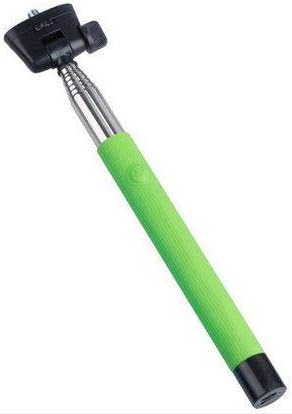
Слика 1: The Opal Selfie Stick OP-Sel-BT-01 in green, showing its extendable arm, phone holder, and comfortable grip.
Карактеристики на производот
- Боја: Зелена
- Главен материјал: Челик
- Максимален капацитет на носивост: 500 гр
- Поврзување: Безжичен (Bluetooth)
- Компатибилни системи: Андроид 3.0 и погоре, iOS 4.0 и погоре
Поставување
- Расклопете го селфи стапот: Gently pull the phone holder section upwards to extend the stick.
- Adjust Phone Holder: Отворете го телефонот clamp and securely place your smartphone within it. Ensure the phone is centered and stable. The clamp is designed to hold various phone sizes.
- Вклучување: Locate the power button (if applicable, usually on the handle) and press it to turn on the selfie stick. An indicator light may illuminate.
Упатства за работа
Bluetooth спарување
- Ensure the selfie stick is powered on and in pairing mode (indicator light may flash rapidly).
- На вашиот паметен телефон, одете на Поставки > Bluetooth.
- Вклучете Bluetooth и пребарувајте достапни уреди.
- Select "Opal OP-Sel-BT-01" or a similar name from the list of devices.
- Once paired, the indicator light on the selfie stick may turn solid or turn off, indicating a successful connection.
Снимање фотографии/видеа
- Отворете ја апликацијата за камера на вашиот паметен телефон.
- Продолжете го стапот за селфи до саканата должина.
- Position your phone for the desired shot.
- Press the shutter button on the selfie stick handle to capture a photo or start/stop video recording.
Одржување
- Чистење: Избришете го селфи стапот со мека, сува крпа. Не користете абразивни средства за чистење или растворувачи.
- Складирање: Store the device in a cool, dry place away from direct sunlight and extreme temperatures. Retract the stick fully before storage.
- Нега на батеријата: If the selfie stick has a rechargeable battery, ensure it is charged periodically even when not in use to maintain battery health.
Решавање проблеми
| Проблем | Можна причина | Решение |
|---|---|---|
| Не може да се спари со телефон | Selfie stick not in pairing mode; Bluetooth off on phone; battery low. | Ensure stick is on and in pairing mode. Turn phone's Bluetooth off/on. Charge the selfie stick. |
| Shutter button not working | Not paired; camera app settings. | Verify successful Bluetooth pairing. Check camera app settings for volume button shutter control. |
| Phone not stable in clamp | Phone not centered; clamp не е целосно обезбедено. | Re-position phone to be centered. Ensure clamp is firmly gripping the phone. |
Спецификации
- Модел: OP-Sel-BT-01
- Бренд: Опал
- Боја: Зелена
- Главен материјал: Челик
- Максимален капацитет на носивост: 500 гр
- Поврзување: Безжичен (Bluetooth)
- Поддржани оперативни системи: Android 3.0+, iOS 4.0+
- ASIN: B091DBB122
- Прв достапен датум: 30 март 2021 година
Гаранција и поддршка
For information regarding warranty coverage or technical support, please refer to the documentation included with your purchase or visit the official Opal webлокација. Специфичните гарантни услови може да се разликуваат во зависност од регионот и продавачот.
Информации за безбедност
- Do not expose the device to extreme temperatures, moisture, or direct sunlight for prolonged periods.
- Да се чува подалеку од дофат на деца.
- Не обидувајте се да го расклопите или модифицирате уредот. Ова може да ја поништи гаранцијата и да предизвика штета.
- Ensure your phone is securely fastened in the clamp before extending the stick.


