1. Производот завршиview
The ChunHee Solar Sound & Light Alarm (Model SL02-3) is an outdoor security device designed to deter intruders and animals using a loud siren and flashing lights. It is solar-powered with a USB charging backup, making it suitable for various outdoor applications.
Клучни карактеристики:
- 129dB Siren and 6 LED Flash Warning: Provides a powerful deterrent that can be heard and seen from a distance.
- Сензор за движење: Detects movement within a 5-8 meter range and a 125° sensing angle.
- Издржлив дизајн: Sturdy ABS casing with IP65 waterproof and dustproof rating for outdoor use.
- Повеќе режими на работа: Four selectable modes for different security needs.
- Двојно полнење: Supports solar charging as the primary power source and USB charging for backup during prolonged cloudy periods.

Слика 1: Предна страна view of the ChunHee Solar Sound & Light Alarm, highlighting its compact design and motion sensor.
2. Содржина на пакетот
Проверете дали сите артикли се присутни во вашиот пакет:
- ChunHee Solar Motion Sensor Alarm Light (3 units for this model)
- USB кабел за полнење (3 единици)
- Installation Kit (3 sets of screws and wall plugs)

Figure 2: Illustration of the alarm units, USB cables, and installation kit included in the package.
3. Поставување и инсталација
Follow these steps to set up and install your ChunHee Solar Sound & Light Alarm:
- Почетна наплата: Before first use, ensure the device is fully charged. Place the solar panel in direct sunlight for at least 8 hours, or use the provided USB cable for DC charging (less than 1 hour).
- Изберете локација: Изберете локација што прима ample direct sunlight for optimal solar charging. The device should be positioned to cover the desired detection area.
- Монтирање: Use the included installation kit to securely mount the alarm to a wall, fence post, or other suitable surface. The device features a stainless steel rack for easy screw-in mounting.
- Вклучување: Locate the ON/OFF button on the back of the device. Press it once to activate the alarm.

Слика 3: Детално view of the alarm's back panel, showing the solar panel, ABS casing, motion sensor, stainless steel rack, DC charging port, and ON/OFF button.

Слика 4: Прample of mounting the alarm on a fence to create a perimeter alert system.
4. Упатства за работа
The ChunHee Solar Sound & Light Alarm features four operating modes. Press the power button on the back of the device to cycle through the modes.
| Режим | Опис | Активирање |
|---|---|---|
| Режим 1: 24-hour Sound and Light Alarm | The alarm will activate with both sound and flashing lights upon motion detection, operating continuously for 24 hours. | Притиснете го копчето за вклучување еднаш. |
| Режим 2: 24-hour Flash Silent Alarm | The alarm will activate with flashing lights only upon motion detection, operating continuously for 24 hours without sound. | Press power button a second time. |
| Режим 3: Night Sound and Light Alarm | The alarm will activate with both sound and flashing lights upon motion detection, operating only during nighttime (12 hours). It charges during the day. | Press power button a third time. |
| Режим 4: Night Flash Silent Alarm | The alarm will activate with flashing lights only upon motion detection, operating only during nighttime (12 hours) without sound. It charges during the day. | Press power button a fourth time. |
| Исклучи | Го деактивира алармот. | Press power button a fifth time. |
Забелешка: To switch between modes, ensure the solar panel is exposed to light (day state) or covered (night state) as appropriate for modes 3 and 4 to register correctly.

Figure 5: Visual representation of the four working modes and how to select them.
Video 1: Demonstration of how to operate the ChunHee Solar Motion Sensor Alarm, including mode switching.
5. Полнење
The alarm supports two charging methods:
- Соларно полнење: The integrated solar panel charges the internal battery during daylight hours. Ensure the device is placed in an area with direct sunlight for optimal charging. A full solar charge takes approximately 8 hours.
- USB полнење: For faster charging or during prolonged periods of low sunlight, use the provided USB cable. Connect the cable to the DC charging port on the back of the device and a 5V USB power adapter (not included). DC charging takes less than 1 hour.
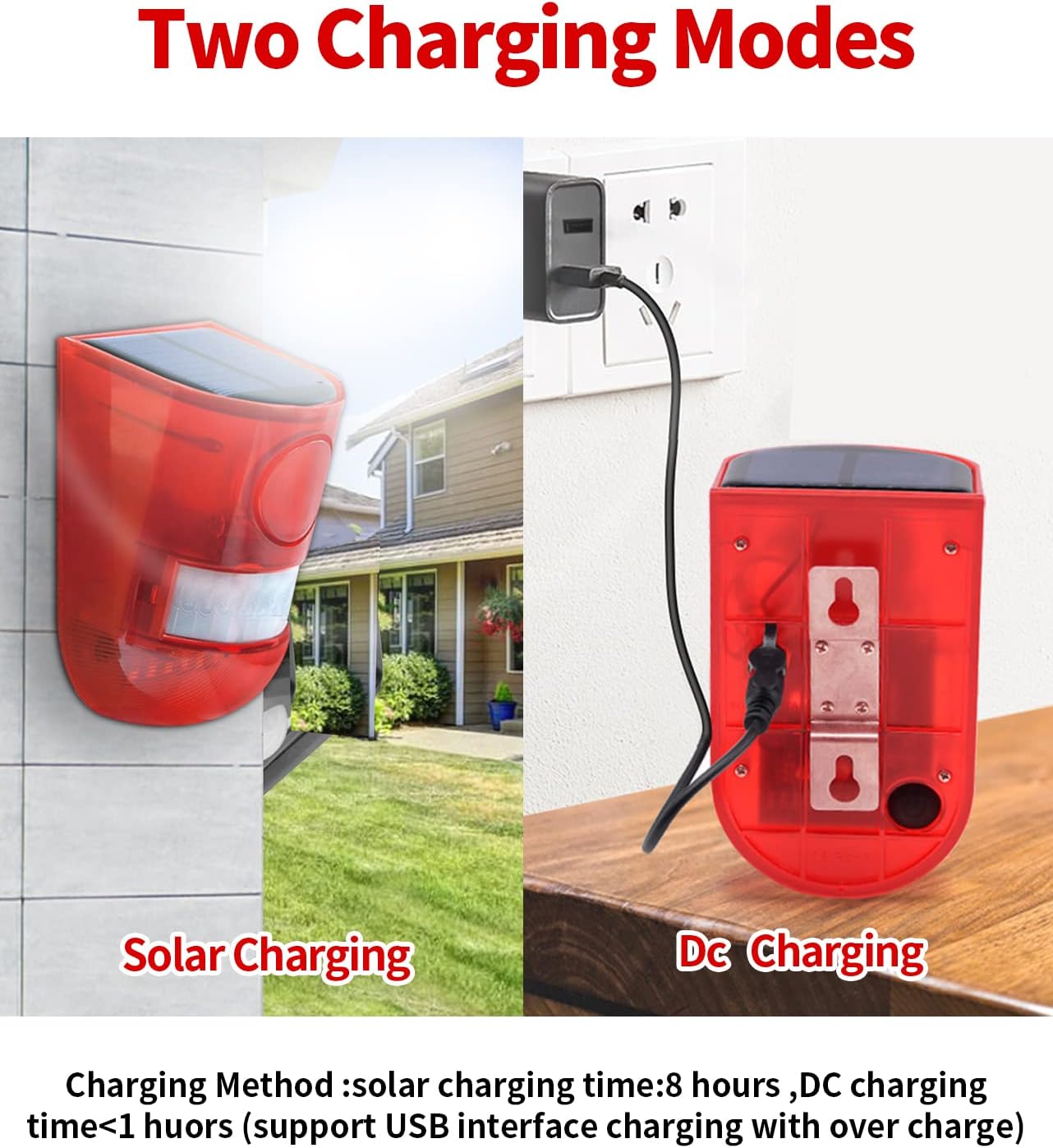
Figure 6: Illustration of the two charging methods: solar charging and DC USB charging.
6. Одржување
To ensure optimal performance and longevity of your ChunHee Solar Sound & Light Alarm, follow these maintenance guidelines:
- Чист соларен панел: Редовно бришете го соларниот панел со мека, дamp крпа за отстранување прашина, нечистотија или остатоци што може да ја попречат сончевата светлина и да ја намалат ефикасноста на полнењето.
- Проверете ја монтажата: Periodically inspect the mounting screws and bracket to ensure the device remains securely attached.
- Траење на батеријата: The device uses a Lithium-Ion battery. While designed for long-term use, battery performance may degrade over time. Ensure regular charging to maintain battery health.
- Отпорност на времето: The device is IP65 waterproof and dustproof, designed to withstand outdoor conditions. However, avoid submerging it in water or exposing it to extreme temperatures beyond its operating range.
7 Смена на проблеми
If you encounter issues with your ChunHee Solar Sound & Light Alarm, refer to the following common problems and solutions:
| Проблем | Можна причина | Решение |
|---|---|---|
| Alarm not activating. | Low battery, incorrect mode selected, motion sensor obstructed. | Charge the device fully. Ensure the correct operating mode is selected. Clear any obstructions from the motion sensor. |
| Siren is too loud/quiet (no volume control). | The device has a fixed siren volume (129dB). | Consider placement further from residential areas if noise is an issue, or use flash-only modes. |
| Лажни аларми. | Movement from trees/foliage, small animals, or strong winds. | Adjust the mounting angle or location to minimize detection of non-threats. Consider using night-only modes if daytime false alarms are frequent. |
| Device not charging via solar. | Insufficient sunlight, dirty solar panel. | Relocate the device to an area with more direct sunlight. Clean the solar panel. Use USB charging as an alternative. |
Video 2: A short video demonstrating the motion detection and alarm activation of the ChunHee Solar Alarm.
8. Спецификации
| Карактеристика | Детал |
|---|---|
| Број на модел | SL02-3 |
| Бренд | ЧунХи |
| Извор на енергија | Напојува со соларна енергија |
| Тип на батерија | Lithium-Ion (3 AAA batteries required, included) |
| Voltage | 5 волти (DC) |
| Ниво на бучава | 129 децибели |
| Опсег на сензор за движење | 5-8 метри |
| Агол на чувствителност | 125 степени |
| Контролен метод | Touch (button) |
| Тип на монтирање | Screw-In (Wall-Mounted) |
| Материјал | Sturdy made & corrosion-resistant plastic (ABS) |
| Димензии на производот | 3.94 x 4.72 x 3.94 инчи (10 x 12 x 10 см) |
| Тежина на ставката | 1.15 фунти |
| Употреба | Внатрешна/Надворешна |
| Водоотпорен рејтинг | IP65 |
9. Гаранција и поддршка
The ChunHee Solar Sound & Light Alarm comes with a 1 година гаранција од датумот на купување.
For technical support, warranty claims, or any questions regarding your product, please contact ChunHee customer service through the retailer where the product was purchased or visit the official ChunHee store page on Amazon: ChunHee Store.


