1. Вовед
This manual provides essential information for the installation, operation, and maintenance of the Cisco Catalyst 9500 C9500-24Y4C-A 24-Port Network Advantage Switch. Please read this manual thoroughly before using the device to ensure proper setup and functionality. This switch is designed for enterprise-level networking environments, offering high performance and advanced features.
2. Информации за безбедност
WARNING: Failure to follow these safety instructions can result in injury or damage to the product.
- Проверете дали изворот на енергија одговара на јачината на звукотtage requirements of the switch.
- Do not operate the switch in environments with excessive moisture or extreme temperatures. The upper temperature rating is 40 degrees Celsius.
- Секогаш исклучувајте го напојувањето пред да извршите какви било процедури за одржување или инсталација.
- Правилното заземјување е од суштинско значење за безбедно работење.
- Само квалификуван персонал треба да ја инсталира и сервисира оваа опрема.
3. Содржина на пакетот
Потврдете дека вашиот пакет ги содржи следниве ставки:
- Cisco Catalyst 9500 C9500-24Y4C-A Switch
- Кабел за напојување
- Rack-mount Kit (brackets, screws)
- Кабел за конзола (RJ-45 до DB-9)
- Документација (Водич за брз почеток, Информации за безбедност)
Доколку недостасуваат или се оштетени некои предмети, веднаш контактирајте го вашиот продавач.
4. Физичко преоптоварувањеview
The Cisco Catalyst 9500 C9500-24Y4C-A is a high-performance network switch. Below is an image illustrating the front panel of the device, highlighting its various ports and indicators.
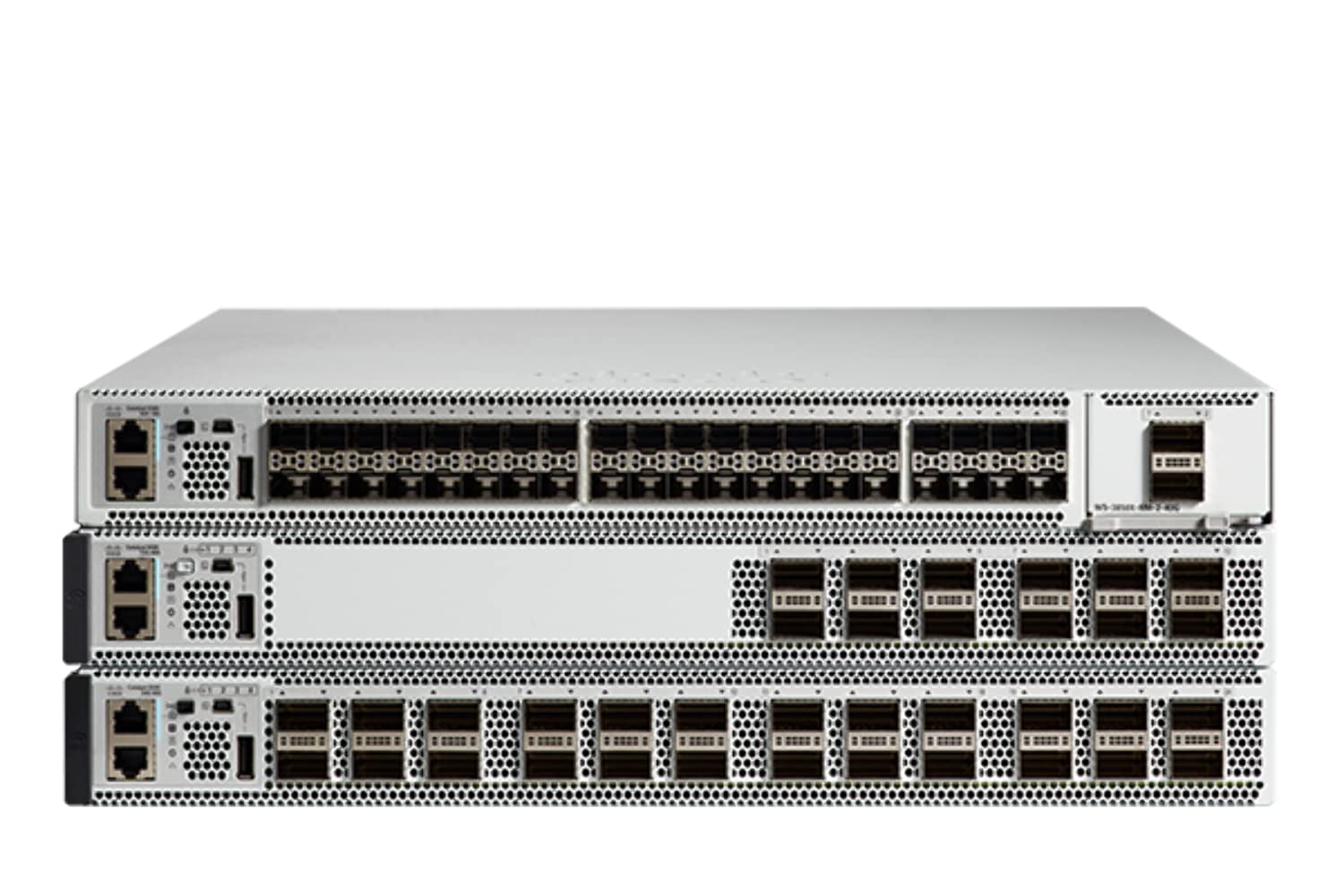
Слика 4.1: Front Panel of the Cisco Catalyst 9500 C9500-24Y4C-A Switch. This image displays the front of the switch, featuring 24 SFP/SFP+/SFP28 ports for high-speed fiber and copper connectivity, along with 4 QSFP28 ports for even higher bandwidth uplinks. Various status LEDs and management ports are also visible.
4.1 Карактеристики на предниот панел
- 24 x SFP/SFP+/SFP28 Ports: These ports support various fiber and copper transceivers for flexible network connectivity at speeds up to 25 Gbps.
- 4 x QSFP28 Ports: High-density quad small form-factor pluggable ports for 100 Gbps uplinks or stacking.
- Статусни LED диоди: Indicators for system status, port activity, and power. Refer to the LED section for detailed explanations.
- Порта на конзолата: RJ-45 port for out-of-band management via a serial connection.
- USB порта: For software upgrades or configuration backup/restore.
4.2 Карактеристики на задниот панел
- Модули за напојување: Slots for redundant power supplies.
- Модули за вентилатори: Slots for hot-swappable fan modules.
- Врв за заземјување: За поврзување на шасијата со заземјување.
5. Поставување и инсталација
5.1 Подготовка на локацијата
- Осигурајте се дека местото за инсталација е чисто, суво и добро проветрено.
- Maintain ambient temperature within the specified operating range (up to 40°C).
- Provide adequate space for airflow around the switch.
- Ensure a reliable power source with proper grounding.
5.2 Монтирање на решетка
The switch is designed for standard 19-inch rack mounting.
- Attach the provided rack-mount brackets to the sides of the switch using the supplied screws.
- Порамнете го прекинувачот со столбовите на решетката и прицврстете го со соодветни завртки за решетката.
- Ensure the switch is level and securely fastened.
5.3 Поврзување напојување
- Insert the power cord into the power supply module on the rear of the switch.
- Поврзете го другиот крај од кабелот за напојување со заземјен штекер за наизменична струја.
- Ако користите редундантни напојувања, поврзете ги обете на посебни извори на напојување за максимална сигурност.
5.4 Мрежни врски
- Insert appropriate SFP/SFP+/SFP28 transceivers into the desired front panel ports.
- Connect fiber optic or copper cables from your network devices to the installed transceivers.
- For high-speed uplinks or stacking, insert QSFP28 transceivers and connect compatible cables.
5.5 Почетен пристап до конфигурација
To perform initial configuration, connect a console cable from your management workstation to the console port on the switch's front panel. Use a terminal emulation program (e.g., PuTTY, Tera Term) with the following settings:
- Стапка на бауд: 9600
- Битови на податоци: 8
- Паритет: Нема
- Стоп битови: 1
- Контрола на проток: Нема
6. Ракување со прекинувачот
6.1 Вклучување/исклучување
- Вклучување: After connecting the power cords, the switch will automatically power on. Observe the system LEDs for boot-up status.
- Исклучено: To power off, disconnect the power cords from the power source. For graceful shutdown, it is recommended to save the configuration and issue a shutdown command via the CLI before disconnecting power.
6.2 LED индикатори
LED диодите на предниот панел даваат визуелен статус на работата на прекинувачот:
- Системски LED: Indicates overall system health (e.g., green for normal, amber for warning, red for critical).
- LED диоди за статус на порта: Indicate link status and activity for each network port (e.g., green for link, blinking for activity, off for no link).
- LED диоди за напојување: Indicate the status of installed power supply units.
6.3 Управувачки интерфејси
- Интерфејс со командна линија (CLI): Accessed via the console port or SSH/Telnet (after initial configuration). Provides full control over the switch.
- Web Кориснички интерфејс (Web UI): Accessed via a web browser (after initial IP configuration). Offers a graphical interface for common tasks.
- SNMP: For network management system integration.
7. Одржување
7.1 Ажурирања на фирмверот
Редовно проверувајте ја поддршката на Cisco website for the latest firmware updates. Keeping the firmware up-to-date ensures optimal performance, security, and access to new features. Follow the specific upgrade procedures provided by Cisco.
7.2 Чистење
- Пред чистење, проверете дали прекинувачот е исклучен и исклучен од изворот на енергија.
- Користете мека, сува крпа за да ја избришете надворешноста на прекинувачот.
- Не користете течни или аеросолни средства за чистење.
- Држете ги отворите за вентилација чисти од прашина и остатоци.
7.3 Разгледувања за животната средина
Maintain the operating environment within specified limits to prevent overheating and ensure longevity. Monitor ambient temperature and humidity. Ensure proper airflow through the rack and around the switch.
8 Смена на проблеми
Овој дел нуди решенија за вообичаени проблеми со кои може да се соочите.
8.1 Нема струја
- Verify that the power cord is securely connected to both the switch and the power outlet.
- Проверете го штекерот со друг уред за да се осигурате дека работи.
- Ensure the power supply modules are correctly seated in their slots.
8.2 Нема врска на портата
- Check the cable connection between the switch port and the connected device.
- Ensure the correct transceiver (SFP/SFP+/SFP28) is used and properly seated.
- Проверете дали поврзаниот уред е вклучен и работи правилно.
- Check the port configuration on the switch (e.g., speed, duplex, shutdown status) via CLI or Web UI.
8.3 Проблеми со поврзувањето
- Verify IP address, subnet mask, and gateway settings on the switch and connected devices.
- Check VLAN configurations to ensure devices are in the correct broadcast domain.
- Examine routing tables if devices are on different subnets.
- Use diagnostic tools like пинг и тракерут from the switch CLI.
8.4 System LED Indicates Error
If the System LED is amber or red, consult the Cisco documentation for specific error codes or patterns. This usually indicates a hardware fault or a critical system issue. Contact Cisco Technical Support if the issue persists.
9. Спецификации
Key technical specifications for the Cisco Catalyst 9500 C9500-24Y4C-A Switch:
| Карактеристика | Спецификација |
|---|---|
| Бренд | Cisco |
| Број на модел | C9500-24Y4C-A |
| Број на пристаништа | 24 x SFP/SFP+/SFP28, 4 x QSFP28 |
| Тип на интерфејс | SFP, SFP+, SFP28, QSFP28 |
| Стапка на пренос на податоци | Up to 25 Gigabits Per Second (per SFP28 port) |
| Оценка за горната температура | 40 степени Целзиусови |
| Материјал на случајот | Метал |
| Компатибилни уреди | Desktop (for management workstation) |
| Производител | CISCO SYSTEMS - ПРЕТПРИЈАТИЈА |
| UPC | 649661945130 |
10. Гаранција и поддршка
This product is a renewed item. For specific warranty information, please refer to the Amazon Renewed Guarantee details provided at the time of purchase. For technical support, documentation, and software downloads, please visit the official Cisco support website or contact your authorized Cisco reseller.
Обновена гаранција од Амазон: Renewed products are eligible for replacement or refund under the Amazon Renewed Guarantee if not satisfied with the purchase.


