Вовед
This manual provides essential instructions for setting up, operating, maintaining, and troubleshooting your Blackview Tab 10 Android Tablet. The Blackview Tab 10 features a 10.1-inch FHD+ display, an MTK8768 Octa-Core processor, 4GB RAM, 64GB internal storage, and runs on Android 11 (Doke OS_P 1.0). It supports dual SIM cards for 4G phone calls and data, Wi-Fi, and Bluetooth 5.0 connectivity.
Please read this manual thoroughly to ensure proper use and to maximize your tablet's performance and longevity.

Слика: Црнотоview Tab 10 tablet shown from the rear in three color options: gray, golden, and silvery, highlighting its sleek design.
Поставување
Содржина на пакетот
Проверете дали сите предмети се присутни во пакувањето:
- Црнотоview Tab 10 Tablet PC
- USB-кабел (тип-C)
- Адаптер за напојување (9V 2A)
- Упатство за употреба
Полнење на батеријата
Before first use, fully charge the tablet. Connect the USB Type-C cable to the tablet's Type-C port and the other end to the provided power adapter. Plug the adapter into a power outlet. The charging indicator will show the charging status. The tablet supports 18W fast charging.
Inserting SIM and TF Cards
Црнотоview Tab 10 supports dual Nano SIM cards or one Nano SIM card and one TF (microSD) card for expandable storage up to 128GB.
- Пронајдете го држачот за SIM/TF картичка на страната од таблетот.
- Користете ја испорачаната алатка за исфрлање на SIM картичката за да го отворите фиоката.
- Carefully place the Nano SIM card(s) and/or TF card into the designated slots on the tray. Ensure the cards are correctly oriented.
- Нежно туркајте ја фиоката назад во таблетот додека не кликне на своето место.
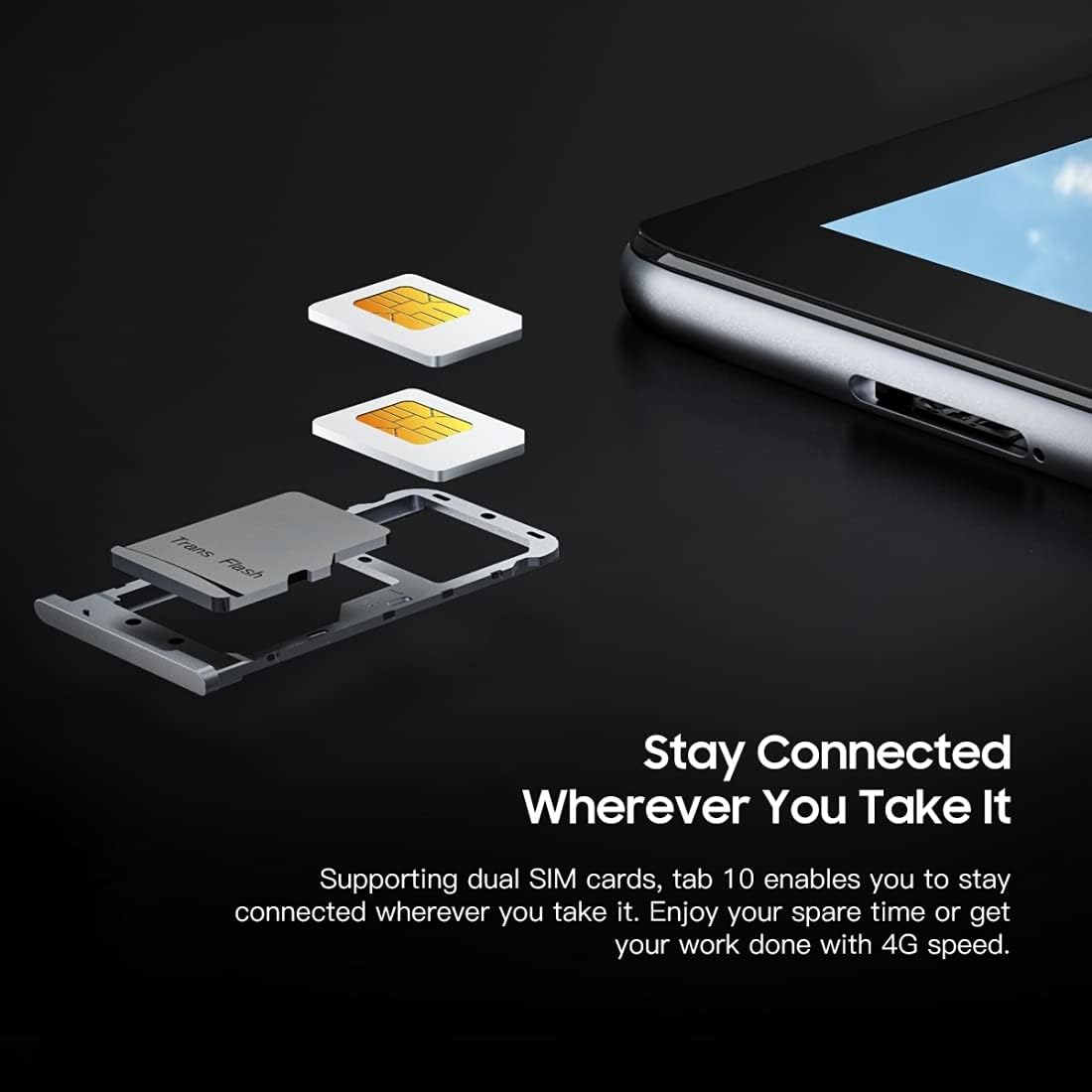
Слика: Детална view на Црнотоview Tab 10's SIM card tray, showing how two Nano SIM cards are inserted, illustrating the dual SIM support.
Вклучување/исклучување
- За вклучување: Press and hold the Power button until the Blackview се појавува логото.
- За исклучување: Притиснете го и задржете го копчето за вклучување додека не се појави менито со опции за вклучување, а потоа изберете „Исклучи“.
- За рестартирање: Притиснете го и држете го копчето за вклучување додека не се појави менито со опции за вклучување, а потоа изберете „Рестартирај“.
Почетно поставување
При првото вклучување, следете ги упатствата на екранот за да го завршите почетното поставување:
- Изберете го вашиот јазик.
- Поврзете се на Wi-Fi мрежа.
- Најавете се со вашата сметка на Google или креирајте нова.
- Поставете заклучување на екранот (PIN, шема, лозинка).
- Review и прифатете ги условите и одредбите.
Упатства за работа
Основна навигација
- Допрете: Допрете го екранот еднаш за да отворите апликација, да изберете ставка или да притиснете копче.
- Допрете и задржете: Притиснете и задржете ставка за да пристапите до повеќе опции или да ја преместите.
- Повлечете: Повлечете го прстот преку екранот за да скролувате низ страниците или содржината.
- Штипење: Користете два прста за зумирање или одзумирање на сликите и web страници.
Поврзување со мрежи
- Wi-Fi: Одете на Поставки > Мрежа и интернет > Wi-FiВклучете Wi-Fi, изберете ја саканата мрежа и внесете ја лозинката доколку е потребно.
- Bluetooth: Одете на Поставки > Поврзани уреди > Bluetooth. Turn Bluetooth on, then select a device from the list to pair.
- Мобилни податоци (4G): If a SIM card is inserted, go to Поставки > Мрежа и интернет > Мобилна мрежа to enable mobile data and configure settings.
Користење на камерата
Црнотоview Tab 10 features a 13.0MP rear camera and a 5.0MP front camera.
- Отворете го Камера апликација.
- Допрете ја иконата на камерата за да се префрлате помеѓу предните и задните камери.
- Допрете го копчето за бленда за да фотографирате или да започнете/запрете снимање видео.
- Explore various camera modes and settings within the app.

Слика: Црнотоview Tab 10 displaying its camera features, including an 8MP front camera and a 13MP rear camera, emphasizing its photographic capabilities.
Android 11 and Doke OS_P 1.0
Your tablet runs on Android 11 with Blackview's Doke OS_P 1.0 interface, offering enhanced privacy controls, improved notification management, and a more intuitive user experience. Explore the Поставки menu to customize your device, manage apps, and optimize performance.

Слика: Црнотоview Tab 10 screen showing the Doke OS_P 1.0 interface based on Android 11, with various settings and app screens visible.
Одржување
Чистење на уредот
- Користете мека крпа што не остава влакненца за чистење на екранот и телото на таблетот.
- За тврдокорни дамки, малку дampИстријте ја крпата со вода или со средство за чистење екрани наменето за електроника.
- Избегнувајте употреба на груби хемикалии, абразивни материјали или аеросолни спрејови директно на таблетата.
Нега на батерии
- Избегнувајте изложување на таблетот на екстремни температури (топли или ладни), бидејќи тоа може да влијае на животниот век на батеријата.
- Не го оставајте таблетот да се полни подолго време откако ќе биде целосно наполнет.
- Користете го само оригиналниот полнач и кабел што се испорачуваат со таблетот.
Софтверски ажурирања
Редовно проверувајте и инсталирајте ажурирања на софтверот за да се осигурате дека вашиот таблет ги има најновите функции, безбедносни закрпи и подобрувања на перформансите. Одете на Поставки > Систем > Системско ажурирање.
Решавање проблеми
Уредот не се вклучува
- Проверете дали батеријата е наполнета. Поврзете го таблетот со полначот најмалку 30 минути.
- Притиснете го и држете го копчето за вклучување 10-15 секунди за да го натерате рестартирањето.
Проблеми со поврзувањето со Wi-Fi
- Рестартирајте го вашиот Wi-Fi рутер и таблетот.
- Заборавете ја мрежата во поставките за Wi-Fi и повторно поврзете се.
- Проверете дали сте во опсегот на Wi-Fi сигналот.
Бавни перформанси
- Затворете ги неискористените апликации што работат во позадина.
- Исчисти ги податоците од кешот за апликации што често се користат.
- Обезбедете доволно простор за складирање. Избришете го непотребното. files или апликации.
- Размислете за враќање на фабричките поставки како последно средство (прво направете резервна копија на вашите податоци).
Апликацијата паѓа или замрзнува
- Force close the app: Go to Поставки > Апликации и известувања, select the app, then tap Присилно запирање.
- Clear the app's cache and data (this will reset the app).
- Деинсталирајте ја и повторно инсталирајте ја апликацијата.
Спецификации
| Модел | Картичка 10 |
| Големина на екранот | 10.1 инчи |
| Резолуција на екранот | 1920 x 1200 (FHD+) |
| Процесор | MTK8768 Octa Core Cortex-A53 2.0GHz |
| RAM меморија | 4 GB |
| Внатрешно складирање | 64 GB |
| Складирање што може да се прошири | TF картичка до 128GB (не е вклучена) |
| Оперативен систем | Android 11 (Doke OS_P 1.0) |
| Задна камера | 13.0MP with AF, LED flash |
| Предна камера | 5.0 MP |
| Капацитет на батеријата | 7480 mAh |
| Полнење | 9V 2A, 18W Fast Charging |
| Мрежна комуникација | 4G LTE, Wi-Fi (802.11a/b/g/n/ac), Bluetooth V5.0 |
| Тип на SIM | Двојна нано СИМ картичка |
| Интерфејси | 1 x 3.5mm Earphone Port, 1 x Type-C, 1 x Magnetic Port |
| Димензии (Д x Ш x В) | 243 x 162 x 8.4мм (9.57 x 6.38 x 0.33 инчи) |
| Тежина | 523 g (1.15 фунти) |

Слика: Инфографикasinг Црниотview Tab 10's main features, including its 13MP rear camera, Octa-core processor, 7480mAh battery, 10.1-inch FHD display, 8.8mm slim body, and support for dual SIM cards.
Гаранција и поддршка
Црнотоview Tab 10 comes with a standard manufacturer's warranty. Please refer to the warranty card included in your package for specific terms and conditions, including warranty period and coverage details.
For technical support, service inquiries, or additional product information, please visit the official Blackview webстраницата или контактирајте го нивниот оддел за услуги на клиентите. Чувајте ја сметката за купување и серискиот број на производот при рака кога барате поддршка.
Official Blackview Продавница: Црнотоview Продавница на Амазон