1. Вовед
This manual provides detailed instructions for the installation, operation, and maintenance of your DALY Smart BMS LiFePo4 4S 12V 200A with Programmable Bluetooth Module. This Battery Management System (BMS) is designed to protect and manage LiFePo4 battery packs, ensuring their safe and efficient operation. Please read this manual thoroughly before installation and use.
2. Информации за безбедност
Секогаш почитувајте ги следниве безбедносни мерки на претпазливост за да спречите повреда или оштетување на BMS и батерискиот пакет:
- Се препорачува професионална инсталација: Installation should be performed by qualified personnel with experience in battery systems and electronics.
- Правилен поларитет: Ensure all connections are made with correct polarity. Incorrect wiring can cause severe damage to the BMS and battery.
- Изолација: Properly insulate all exposed wires and terminals to prevent short circuits.
- Voltagд Компатибилност: Verify that the BMS voltage and cell count match your battery pack configuration (4S 12V LiFePo4).
- Избегнувајте вода и влага: Do not expose the BMS to water, moisture, or corrosive environments.
- Температура: Operate the BMS within its specified temperature range.
- Итно исклучување: Familiarize yourself with emergency shutdown procedures for your battery system.
3. Содржина на пакетот
Проверете дали сите артикли се присутни во вашиот пакет:
- DALY Smart BMS (200A FAN LiFePo4 4S 12V BT)
- Balance Wires
- Bluetooth Module (for Mobile APP IOS & Android)
- UART Cable (for PC screen connection)
- English Version Wiring Manual (this document)

Image: Contents of the DALY Smart BMS package.
4. Карактеристики на производот
The DALY Smart BMS offers comprehensive protection and monitoring for your LiFePo4 battery pack:
- Можност за висока струја: Supports up to 200A continuous discharge and 100A charge current.
- Programmable Temperature Protection: Automatically stops current flow if battery temperature limits are exceeded.
- Programmable Over-charge/Over-discharge Protection: Prevents damage by stopping charging or discharging when voltage limits are reached.
- Programmable Over-current Protection: Safeguards against excessive current during charging and discharging.
- Voltagе Балансирање: High detection precision for voltage balancing across cells.
- SOC Calculation: Precise State of Charge (SOC) calculation with automatic learning function.
- Bluetooth поврзување: Wireless monitoring and parameter setting via Android or iPhone mobile application.
- Заеднички дизајн на порт: Utilizes a single port for both charging and discharging.
- Интегриран вентилатор за ладење: Ensures optimal operating temperature for high current applications.

Слика: Надview of the 12 protection functions provided by the DALY Smart BMS.

Image: Internal component breakdown of the DALY Smart BMS.
5. Водич за инсталација
Careful wiring is critical for the correct and safe operation of the BMS. Follow these steps precisely:
5.1 Дијаграм за поврзување

Image: Wiring diagram for the DALY Smart BMS.
5.2 Step-by-Step Wiring
- Подгответе алатки: Ensure you have necessary tools such as a soldering machine (if needed, suggest using 662°F/350°C), scissors, double-sided tape, tin wire, and a multimeter.
- Поврзете ги жиците за балансирање: First, connect the balance wires to your battery pack. Ensure the balance wires are welded correctly.
- Connect BMS to Battery: Connect the main negative terminal (B-) of the battery pack to the B- terminal on the BMS. Connect the main positive terminal (B+) of the battery pack to the P+ terminal (if applicable, or ensure the charger/load positive connects directly to battery B+).
- Connect Balance Wire Harness: Plug the balance wire harness into the BMS connection port. Ensure the red balance wire is connected to the highest positive cell.
- Поврзување на товар/полнач: Connect the negative terminal of your motor/load and charger to the P- terminal on the BMS. The positive terminals of the motor/load and charger connect directly to the battery pack's positive terminal (B+).
- Install Cooling Fan: Keep the red cooling surface of the BMS uncovered to allow for proper fan operation.
- Потврдете ги жиците: Before proceeding, use a multimeter to measure the voltage between adjacent balance cables. This voltage should approximate the nominal voltage of a single cell string, confirming correct wiring.
- Активирајте го BMS: Plug in the NTC (temperature sensor) and Bluetooth module. Press the activation button on the BMS to power it on.
Важна забелешка: Disconnect balance wires and the BMS connection port before welding black and red balance wires on the battery pack.
Video: This video demonstrates the connection process for the DALY Smart BMS, including measuring cell voltages, connecting the balance wires, activating the BMS, and connecting to the mobile application.
6. Водич за работа
The DALY Smart BMS can be monitored and configured using a mobile application via Bluetooth or a PC software via UART.
6.1 Mobile App Installation and Connection
- Преземи апликација: Пребарај за "Smart BMS" in the Huawei App Gallery or Apple App Store and download the application.
- Отворете ја апликацијата и поврзете се: Open the Smart BMS app on your mobile device. Ensure Bluetooth is enabled. The app will display available BMS devices. Select the corresponding device number to connect.
- View Параметри: Откако ќе се поврзете, можете view real-time battery parameters such as total voltage, current, State of Charge (SOC), individual cell voltagи температура.
- Поставете параметри: Navigate to the "Parameter Settings" section. For initial power-on, the battery capacity must be set to the actual capacity of your battery pack. The initial password for parameter modification is 123456. You can also adjust protection thresholds for over-charge, over-discharge, over-current, and temperature.

Image: DALY Smart BMS connected to a mobile application for monitoring and control.
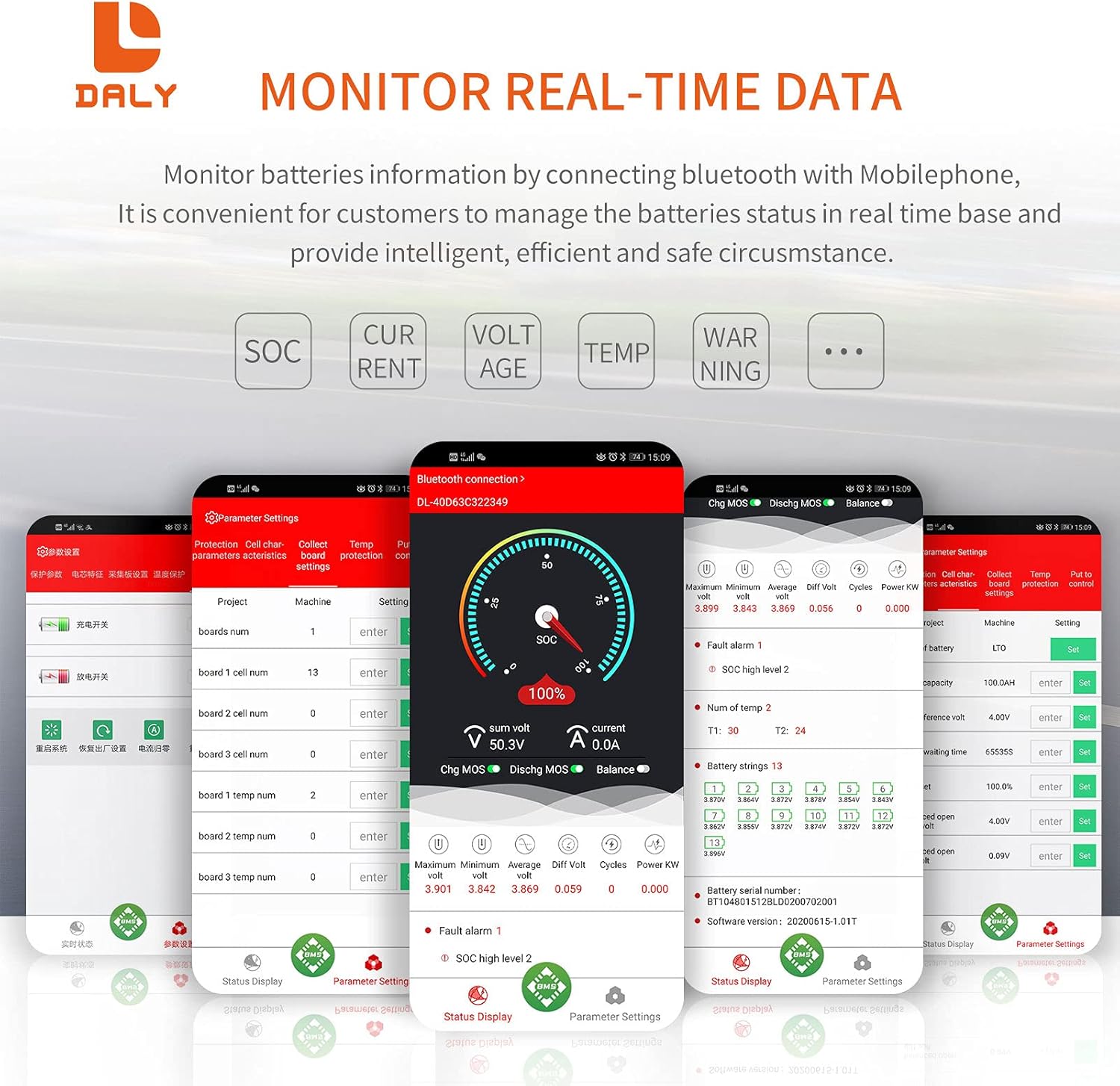
Image: Real-time data monitoring interface of the Smart BMS app.
6.2 Софтверско поврзување со компјутер
Connect the UART cable from the BMS to your computer. Open the host computer software to view detailed battery information and adjust parameters. The PC software provides a comprehensive display of battery status and settings.
7. Одржување
To ensure the longevity and optimal performance of your DALY Smart BMS and battery pack:
- Редовна инспекција: Периодично проверувајте ги сите жичени врски за затегнатост и знаци на корозија или оштетување.
- Чистота: Keep the BMS free from dust and debris, especially around the cooling fan.
- Ажурирања на софтверот: Check for available firmware updates for the BMS and app to ensure you have the latest features and bug fixes.
- Здравје на батеријата: Мониторирање на волуменот на батеријатаtages and temperatures regularly through the app to detect any anomalies early.
8 Смена на проблеми
If you encounter issues with your DALY Smart BMS, consider the following common problems and solutions:
| Проблем | Можна причина | Решение |
|---|---|---|
| BMS not activating/no power | Неправилно поврзување, низок волумен на батеријатаtage, activation button not pressed. | Verify all wiring according to the diagram. Ensure battery voltage is above the minimum threshold. Press the activation button on the BMS. |
| Проблеми со поврзувањето со Bluetooth | Bluetooth module not plugged in, module faulty, app issues, out of range. | Ensure Bluetooth module is securely connected. Restart the app and phone's Bluetooth. Move closer to the BMS. |
| Over-charge/Over-discharge protection triggered | Волумен на батеријаtage exceeded/fell below set limits. | Check charger output voltage or load. Allow battery to return to safe voltagд. Одгview and adjust protection parameters in the app if necessary (with caution). |
| Over-current protection triggered | Load drawing too much current, short circuit. | Reduce load or check for short circuits. Review and adjust over-current parameters in the app if necessary (with caution). |
| Cell voltagе дисбаланс | Natural cell variation, prolonged disuse. | The BMS has an active balancing function. Ensure the battery is charged to full capacity to allow balancing to occur. If severe, manual balancing may be required by a professional. |
9. Спецификации
Key technical specifications for the DALY Smart BMS LiFePo4 4S 12V 200A:
| Карактеристика | Спецификација |
|---|---|
| Тип на производ | Smart BMS for LiFePo4 Battery |
| Конфигурација на ќелијата | 4S (4 Series) |
| Номинален волtage | 12V |
| Континуирана струја на празнење | 200 А |
| Континуирано полнење струја | 100 А |
| Заштита од струја од прекумерно празнење | 300A ± 30A (Configurable) |
| Overcharge Current Protection | 300A ± 30A (Configurable) |
| Преполнување Voltage (per string) | 3.75V ± 0.05V (Configurable) |
| Прекумерно празнење Voltage (per string) | 2.2V ± 0.1V (Configurable) |
| Полнење Voltage | 14.6V (Configurable) |
| Комуникација | UART (Single Communication), Bluetooth |
| Output Wire Gauge | 6AWG |
| Balance Wires Gauge/Length | 24AWG / 350mm |
| Димензии на производот | 235мм x 130мм x 52мм (приближно 9.21 x 4.72 x 2.09 инчи) |
| Тежина на ставката | ~1844g (approx. 4.07 pounds) |
| Материјал | Бакар |

Image: Fan specifications and physical dimensions of the BMS.
10. Гаранција и поддршка
For warranty information, technical support, or service inquiries, please refer to the official DALY website or contact your point of purchase. Keep your purchase receipt as proof of purchase for warranty claims.


