1. Вовед
This manual provides comprehensive instructions for the assembly, operation, and maintenance of your FLEXISPOT EN2 Electric Height Adjustable Standing Desk. Please read this manual thoroughly before assembly and use to ensure safe and efficient operation.
The FLEXISPOT EN2 desk features a spacious one-piece desktop, an electric height adjustment system with memory presets, and a removable clamp power strip for convenient device charging and cable management. It is designed to support a dynamic work environment, allowing seamless transitions between sitting and standing positions.
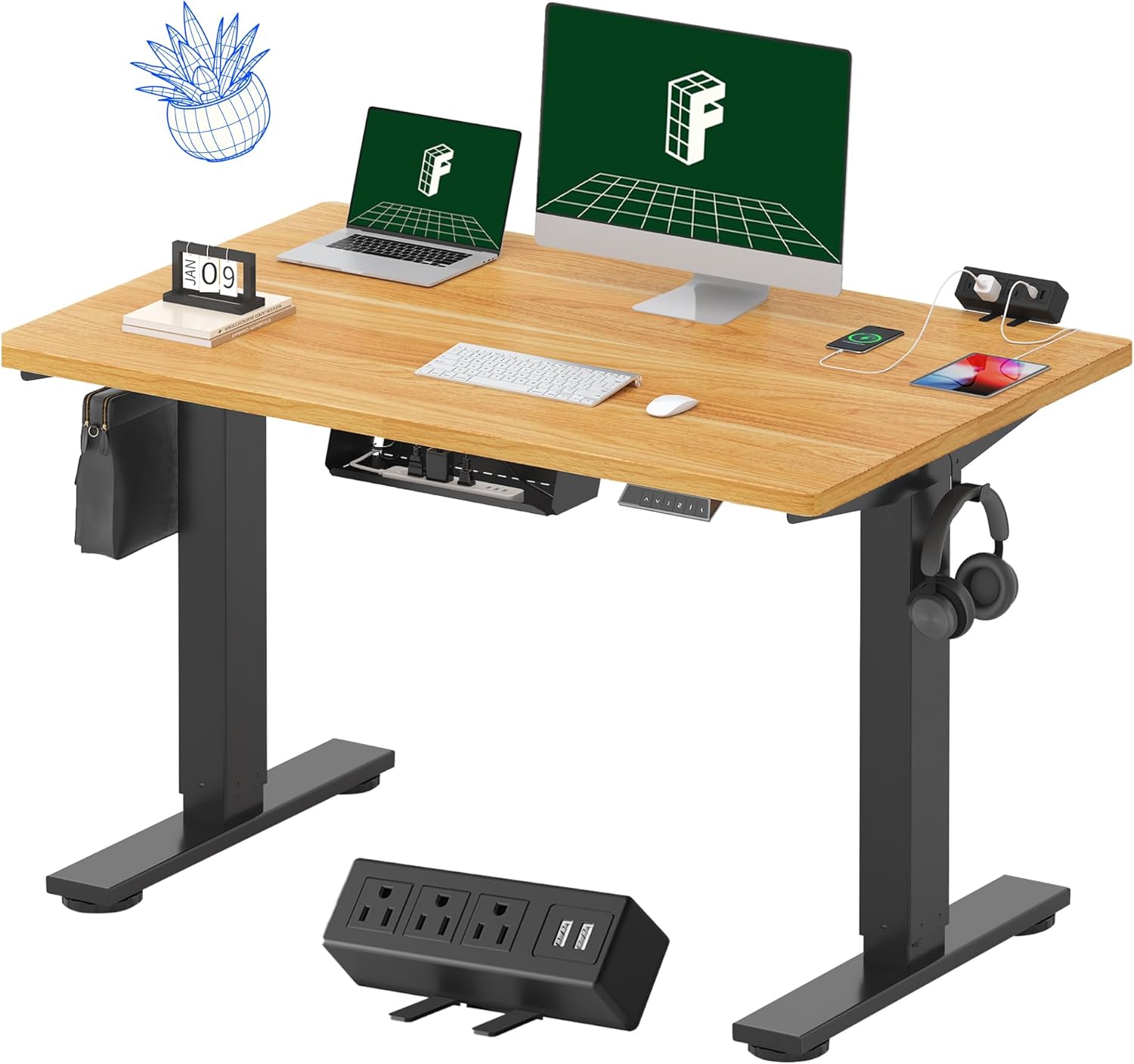
Image 1.1: FLEXISPOT EN2 Standing Desk with Maple Top and Black Frame, showcasing a typical setup with monitors, a laptop, and a clamp лента за напојување.
2. Информации за безбедност
ПРЕДУПРЕДУВАЊЕ: Непочитувањето на овие безбедносни упатства може да резултира со повреда или оштетување на производот.
- Секогаш внимателно следете ги упатствата за склопување.
- An electric drill (not included) may be required for assembly.
- Ensure the desk is properly anchored to prevent tipping.
- Не ја надминувајте препорачаната максимална тежина од 176 фунти (80 кг).
- Keep the work surface clear of items that could fall and cause injury during height adjustments.
- Always unplug the desk before performing any maintenance or making adjustments to the frame or electrical components.
- Држете ги децата и домашните миленици подалеку од работната маса за време на работата.
3. Содржина на пакетот
Your FLEXISPOT EN2 Standing Desk will arrive in two separate packages, which may be shipped separately. Please ensure you have received both packages and all components before beginning assembly.

Image 3.1: Illustration showing the desk components arriving in two separate packages: one for the desktop and one for the desk frame.
Вклучени компоненти:
- One-piece desktop (48" x 30" Maple Top)
- Electric height-adjustable frame (Black)
- 6-button digital controller with 4 memory presets
- Removable clamp power strip (3 AC outlets, 2 USB charging ports)
- Cable management device
- Assembly hardware and tools (excluding electric drill)
4. Поставување и склопување
Assembly typically requires two people and an electric drill (not included). Follow the detailed instructions provided in the separate assembly guide included with your product. The process involves attaching the legs to the desktop and connecting the control panel and motor.
Совети за склопување:
- Поставете ги сите компоненти на мека, чиста површина за да спречите гребнатини.
- Осигурајте се дека сите завртки се цврсто затегнати, но не претерувајте.
- Properly route all cables using the provided cable management solutions to avoid interference with desk movement.
Video 4.1: Official FLEXISPOT Standing Desk Frame Installation Guide. This video demonstrates the step-by-step process of assembling the desk frame and attaching it to the desktop.
5. Упатства за работа
5.1 Дигитален контролен панел
The desk is operated using a 6-button digital controller, typically mounted on the underside of the desktop. It features up/down arrows, an LED display for height, and four programmable memory presets.

Image 5.1: Digital control panel with LED display showing current height, up/down arrows, and four numbered memory preset buttons.
5.2 Прилагодување на висината
- Притиснете и задржете го Up Arrow (^) копче за кревање на бирото.
- Притиснете и задржете го Down Arrow (v) копче за спуштање на бирото.
- The desk adjusts smoothly from 28.1 inches (71.4 cm) to 45.7 inches (116.1 cm).
- The motor operates quietly at less than 50 dB.
5.3 Поставување на мемориски поставки
The controller allows you to save up to four preferred height settings for quick adjustments.
- Прилагодете ја масата на саканата висина користејќи ги стрелките нагоре/надолу.
- Притиснете го Меморија (М) копче. LED екранот ќе трепка.
- Within 3 seconds, press one of the numbered preset buttons (1, 2, 3 или 4) за да ја зачувате тековната висина на таа претходно поставена вредност.
- За да повикате зачувана висина, едноставно притиснете го соодветното нумерирано копче за претходно поставени вредности. Бирото автоматски ќе се премести на зачуваната позиција.
Video 5.2: FlexiSpot Brand Store video demonstrating the desk's height adjustment and memory preset functions.
6. Карактеристики
6.1 One-Piece Desktop
The desk features a spacious, single-piece desktop made of FSC-Certified wood. This design provides a smooth, seamless work surface, enhancing stability and aesthetics compared to multi-piece desktops.

Image 6.1: Visual comparison highlighting the smooth surface of a single-piece desktop against the visible seams of a two-piece desktop.
6.2 Removable Clamp Појас за струја
A desktop-mounted power strip is included, featuring 3 AC outlets (125V/12A) and 2 USB charging ports (5V/2A). This allows for convenient charging of electronic devices directly from your desk. The power strip can be clipped to the back or side of your desk.

Image 6.2: Close-up of the removable clamp power strip, detailing its 3 AC outlets and 2 USB-A ports, and how it attaches to the desk edge.
6.3 Управување со кабли
The desk includes a cable management device to help organize and tidy up your workspace, preventing cables from dangling and interfering with desk movement.

Image 6.3: Illustration demonstrating effective cable management with an under-desk tray, showing a tidy setup compared to unmanaged cables.
7. Одржување
- Regularly inspect all screws and connections to ensure they are tight.
- Исчистете ја површината на работната површина со мека, дamp крпа. Избегнувајте абразивни средства за чистење кои може да го оштетат финишот.
- Чувајте го моторот и електричните компоненти без прашина и влага.
- Do not place hot items directly on the desktop without protective coasters.
8 Смена на проблеми
8.1 Desk Not Moving or Displaying Error Code (e.g., "r5t")
If your desk is not responding or the LED display shows an error code like "r5t", a system reset may be required.
- Исклучете ја работната маса од штекерот.
- Wait for at least 10-15 seconds.
- Вклучете ја работната маса повторно во штекерот.
- Press and hold the "Down Arrow (v)" button until the desk reaches its lowest position and then slightly rises. This indicates a successful reset.
- Ако проблемот продолжи, контактирајте со поддршката за корисници.
8.2 Desk Wobbling at Higher Heights
While the desk is designed for stability, minor wobbling can occur at maximum heights. Ensure the adjustable feet on the leg bases are properly leveled to compensate for uneven flooring.
9. Спецификации
| Карактеристика | Спецификација |
|---|---|
| Бренд | ФЛЕКСИСПОТ |
| Модел | EN2 |
| Материјал за работна површина | FSC-Certified Maple Wood |
| Димензии на работната површина | 48" (Ш) x 30" (Д) |
| Дебелина на работната површина | 1 инчи |
| Материјал за рамка | Industrial-grade Alloy Steel (Black) |
| Опсег за прилагодување на висината | 28.1" до 45.7" (71.4 см до 116.1 см) |
| Ниво на бучава на моторот | < 50 dB |
| Тежински капацитет | 176 фунти (80 кг) |
| Контролен панел | 6-button digital controller with 4 memory presets |
| Штекер | 3 AC outlets (125V/12A), 2 USB charging ports (5V/2A) |
| Потребно е собрание | Yes (electric drill recommended) |
10. Гаранција и поддршка
10.1 Информации за гаранцијата
- 5-годишна гаранција: Covers frames, motors, and other mechanical devices.
- 2-годишна гаранција: Covers controllers, switches, and electronics.
Ве молиме зачувајте го доказот за купување за гаранциски барања. Гаранцијата ги покрива дефектите во материјалите и изработката при нормална употреба.
10.2 Поддршка за корисници
For any questions, troubleshooting assistance, or warranty claims, please contact FLEXISPOT customer support through their official webлокацијата или продавачот на мало каде што сте го купиле производот.


