1. Вовед
This user manual provides essential information for the safe and efficient operation of your Qoltec 51758 Mains & Inverter Adapter. This power adapter is designed to provide reliable power to compatible HP notebooks, featuring advanced protection mechanisms against overvoltage, overload, short circuit, and overheating. Please read this manual thoroughly before using the product to ensure proper functionality and longevity.
2. Инструкции за безбедност
To prevent injury or damage to your device, always follow these safety precautions:
- Do not expose the adapter to water, moisture, or high humidity.
- Do not disassemble, modify, or attempt to repair the adapter. Refer all servicing to qualified personnel.
- Осигурајте се дека штекерот е напонскиtage is compatible with the adapter's specifications.
- Avoid placing the adapter in direct sunlight or near heat sources.
- Do not use the adapter if the cable or connector is damaged.
- Да се чува подалеку од дофат на деца.
- Исклучете го адаптерот од штекерот кога не го користите подолг временски период.
3. Производот завршиview
The Qoltec 51758 adapter is a compact and efficient power solution. It includes the main adapter unit and various interchangeable tips to ensure compatibility with a range of HP notebooks.
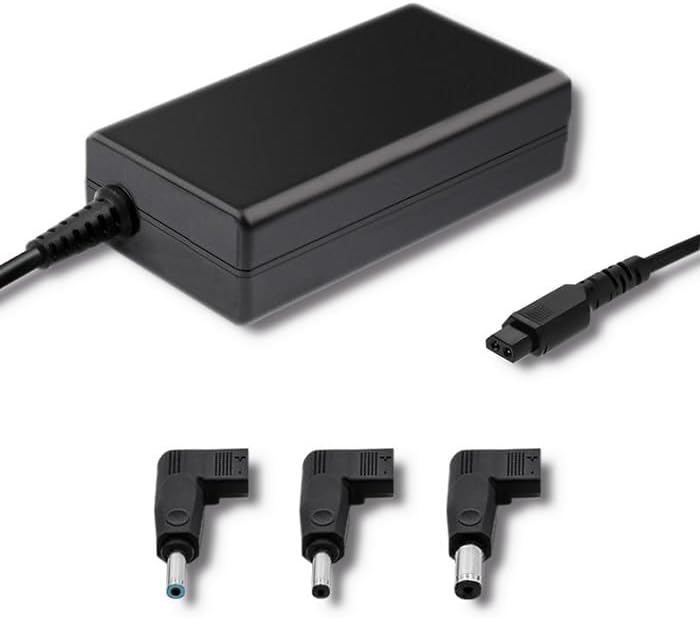
Слика 3.1: Предна страна view of the Qoltec 51758 power adapter showing the main unit and three common interchangeable tips.

Слика 3.2: Заден дел view of the Qoltec 51758 power adapter, highlighting the AC input port and the three interchangeable tips.
The adapter features a robust design with a standard AC input port and a DC output cable that connects to the interchangeable tips. These tips ensure a secure and correct fit for various HP notebook models.
4. Поставување
- Идентификувајте го точниот совет: Select the interchangeable tip that matches the power input port of your HP notebook. Ensure it fits snugly and securely.
- Connect the Tip: Attach the selected tip to the DC output cable of the Qoltec 51758 adapter.
- Поврзете се со бележник: Insert the connected tip into the power input port of your HP notebook.
- Поврзете се со штекер: Plug the AC input cable of the adapter into a standard wall power outlet.
- Потврдете ја врската: Confirm that the power indicator light (if present on your notebook or adapter) illuminates, indicating a successful power connection.
5. Работење
Once properly set up, the Qoltec 51758 adapter operates automatically to provide power to your connected HP notebook. It will charge the notebook's battery and/or power the notebook directly.
- Полнење: When connected, the adapter will charge your notebook's battery until it reaches full capacity.
- Директна моќност: The adapter can also power your notebook directly, even if the battery is fully charged or removed (if supported by the notebook).
- Карактеристики на заштита: The adapter is equipped with built-in protections against overvoltage, overload, short circuit, and overheating. In case of an anomaly, the adapter may temporarily cease operation to protect itself and the connected device. Disconnect and reconnect to reset if this occurs.
6. Одржување
Proper maintenance ensures the longevity and optimal performance of your adapter.
- Чистење: Disconnect the adapter from all power sources and devices before cleaning. Use a soft, dry cloth to wipe the surface. Do not use liquid cleaners or aerosols.
- Складирање: Кога не е во употреба, чувајте го адаптерот на ладно и суво место, подалеку од директна сончева светлина и екстремни температури. Избегнувајте цврсто намотување на каблите за да спречите оштетување.
- Грижа за кабел: Regularly inspect the power cables and connectors for any signs of wear, cuts, or damage. Replace if necessary.
7 Смена на проблеми
| Проблем | Можна причина | Решение |
|---|---|---|
| Адаптерот не снабдува со енергија. | No power from outlet; loose connection; damaged cable/adapter. | Check outlet with another device. Ensure all connections are secure. Inspect cables for damage. |
| Notebook not charging. | Incorrect tip used; notebook power port issue; adapter fault. | Verify the correct tip is used and fully inserted. Test with another compatible adapter if possible. |
| Адаптерот е жежок. | Normal operation under load; poor ventilation; overload. | Ensure adequate ventilation around the adapter. If excessively hot, disconnect and allow to cool. Reduce load if possible. |
If the problem persists after attempting these solutions, please contact Qoltec customer support.
8. Спецификации
| Карактеристика | Детал |
|---|---|
| Бренд | Колтек |
| Модел | 51758 |
| Ватtage | 65 вати |
| Димензии на производот | 2.79 x 24.64 x 16.51 cm |
| Тежина на ставката | 214 грама |
| Компатибилни уреди | HP Notebooks |
| Карактеристики на заштита | Overvoltage, Overload, Short Circuit, Overheat Protection |
| Тип на конектор | Interchangeable DC Power Tips |
| Технологија за поврзување | Wired Power Adapter |
| Датум прв на располагање | 29 април 2022 година |
Белешка: Спецификациите може да се променат без претходна најава.
9. Гаранција и поддршка
Qoltec products are manufactured to high quality standards. For information regarding warranty coverage, terms, and conditions, please refer to the warranty card included with your product or visit the official Qoltec webсајт.
For technical support, troubleshooting assistance, or inquiries about replacement parts, please contact Qoltec customer service through their official channels. Have your product model number (51758) and purchase details ready when contacting support.
Qoltec Official Webсајт: www.qoltec.com (Забелешка: Ова е резервирано место URL, please refer to actual Qoltec webсајт за поддршка.)


