1. Вовед
This manual provides instructions for the installation, operation, and troubleshooting of your ARRIS Touchstone TM804G DOCSIS 3.0 Telephone Modem. The TM804G is designed to provide high-speed data access and up to four lines of Voice over IP (VoIP) telephone service over your cable network. It features DOCSIS 3.0 technology for enhanced internet speeds and reliability.
2. Клучни карактеристики
- DOCSIS 3.0 compliant for high-speed internet.
- Four (4) dedicated VoIP telephone ports.
- Supports download speeds up to 343 Mbps.
- Two independent 96MHz RF tuners.
- Ethernet connectivity for network devices.
3. Содржина на пакетот
Потврдете дека вашиот пакет ги содржи следниве ставки:
- ARRIS Touchstone TM804G Telephone Modem
- Адаптер за напојување
- Етернет кабел
- Документација (Водич за брз почеток, Информации за безбедност)
Note: A backup battery is sold separately and is not included in the standard package.
4. Физички карактеристики
4.1 Индикатори на предниот панел
The front panel of the TM804G modem features several LED indicators that provide status information.

Слика 1: Предна страна view of the ARRIS Touchstone TM804G Telephone Modem. This image shows the modem's black casing with ventilation holes on top and a row of green LED indicator lights on the right side of the front panel.
| Индикатор | Статус | Опис |
|---|---|---|
| МОЌ | Цврсто зелено | Модемот е вклучен. |
| ДС (низводно) | Цврсто зелено | Downstream channel is connected. |
| САД (возводно) | Цврсто зелено | Upstream channel is connected. |
| ОНЛАЈН | Цврсто зелено | The modem is registered and online. |
| ЛИНК | Цврсто зелено | An Ethernet device is connected. |
| ТЕЛ1-4 | Цврсто зелено | Телефонската линија е активна. |
4.2 Порти на задниот панел
The rear panel provides all necessary connection ports for the modem.
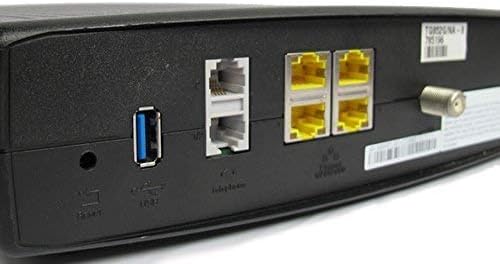
Слика 2: Заден дел view of the ARRIS Touchstone TM804G Telephone Modem. This image displays the back of the modem, featuring a coaxial cable connector, four yellow Ethernet ports, two grey telephone ports (RJ-11), a USB port, a reset button, and the power input.
- КОАКСИЈАЛНО: Connects to the cable wall outlet.
- ETHERNET (LAN): Four (4) RJ-45 ports for connecting to a computer or router.
- TEL1-4 (RJ-11): Four (4) telephone ports for connecting to telephones or a home telephone wiring system.
- USB: (Functionality may vary or be disabled by your service provider).
- РЕСЕТ: Recessed button to reset the modem to factory defaults (use with caution).
- МОЌНОСТ: Се поврзува со адаптерот за напојување.
5. Поставување и инсталација
Follow these steps to install your ARRIS Touchstone TM804G modem.
- Поврзете коаксијален кабел: Connect one end of a coaxial cable to the COAXIAL port on the modem and the other end to a cable wall outlet. Ensure the connection is finger-tight.
- Поврзете го етернет кабелот: Connect one end of the Ethernet cable to one of the ETHERNET ports on the modem and the other end to your computer's network port or your wireless router's WAN/Internet port.
- Поврзете телефонски линии: If using telephone service, connect your telephone(s) or home telephone wiring to the TEL1, TEL2, TEL3, or TEL4 ports on the modem using standard RJ-11 telephone cables.
- Поврзете адаптер за напојување: Connect the power adapter to the POWER port on the modem and then plug the adapter into an electrical outlet.
- Вклучување: The modem will automatically power on. Observe the front panel indicator lights. The POWER, DS, US, and ONLINE lights should eventually turn solid green, indicating a successful connection to the cable network and internet. The TEL lights will illuminate when telephone lines are active.
- Активирајте ја услугата: Contact your Internet Service Provider (ISP) to activate the modem. You will need to provide them with the MAC address and serial number, typically found on a label on the bottom or back of the modem.
Important: Do not connect the modem to a power outlet until all other connections are made.
6. Упатства за работа
Once the modem is successfully installed and activated, it operates automatically.
- Интернет пристап: Any device connected via Ethernet to the modem (or through a connected router) should have internet access once the ONLINE light is solid green.
- Телефонска услуга: If your service plan includes VoIP, connected telephones will have dial tone and function once the corresponding TEL lights are solid green.
- Мониторинг статус: Refer to the front panel LED indicators (Section 4.1) to monitor the modem's operational status.
7. Одржување
- Чистење: Keep the modem clean and free of dust. Use a soft, dry cloth to wipe the exterior. Do not use liquid cleaners or aerosols.
- Вентилација: Погрижете се модемот да биде поставен во добро проветрено место за да спречите прегревање. Не ги блокирајте отворите за вентилација.
- Ажурирања на фирмверот: Ажурирањата на фирмверот обично се управуваат автоматски од вашиот давател на интернет услуги. Не обидувајте се рачно да го ажурирате фирмверот освен ако не ви е наложено од вашиот давател на интернет услуги.
- Restarting the Modem: If you experience connectivity issues, try restarting the modem by unplugging the power adapter for 10-15 seconds and then plugging it back in.
- Ресетирање на фабриката: The recessed RESET button on the rear panel can be used to restore factory default settings. This should only be done if instructed by your ISP, as it will erase all custom configurations. To perform a factory reset, use a paperclip to press and hold the RESET button for at least 10 seconds.
8 Смена на проблеми
If you encounter problems with your modem, refer to the following common issues and solutions.
| Проблем | Можна причина | Решение |
|---|---|---|
| Нема моќ | Адаптерот за напојување не е поврзан или штекерот е неисправен. | Ensure power adapter is securely connected to the modem and a working electrical outlet. Check the POWER LED. |
| Нема пристап до Интернет | Coaxial cable loose, modem not activated, or ISP outage. |
|
| No Dial Tone on Phone | Telephone cable loose, TEL light off, or service issue. |
|
| Бавна брзина на Интернет | Network congestion, old router, or ISP issue. |
|
For further assistance, contact your Internet Service Provider's technical support.
9. Спецификации
| Број на модел | TM804G |
| DOCSIS стандард | DOCSIS 3.0 |
| Internet Download Speed | До 343 Mbps (зависно од интернет-провајдерот) |
| VoIP порти | 4 (RJ-11) |
| Етернет порти | 4 (RJ-45) |
| Технологија за поврзување | Етернет |
| Димензии (Д x Ш x В) | Приближно 11.81 x 9.13 x 2.56 инчи |
| Тежина | Приближно 2.16 килограми |
| Компатибилни интернет-провајдери | Optimum, Mediacom (and others, check with your provider) |
10. Гаранција и поддршка
Овој производ се нуди како обновена ставка на Amazon. Производите на Amazon Renewed се професионално проверени и тестирани за да работат и да изгледаат како нови. Тие се подобни за замена или враќање на парите според гаранцијата на Amazon Renewed доколку не сте задоволни од вашата нарачка.
For technical support, troubleshooting, or service-related inquiries, please contact your Internet Service Provider (ISP) directly. Your ISP is responsible for the activation, configuration, and ongoing support of the modem on their network.


